Question

Custom Extension Attribute Based on Site

  • June 4, 2020
  • 21 replies
  • 270 views

dennisnardi
Forum|alt.badge.img+15

I had a use case that it would have been extremely nice to be able to use an advanced search or smart group to be able to gather data about computers in specific sites. However sites aren't meant to be scope-able per Jamf, and that really made my life difficult. Specifically I was looking for unmanaged computers in the "none" or "Full Jamf Pro" site, and there is no way to make a search for this.

I did some searching and saw several posts of folks who wanted Jamf to make sites a useable criteria, but saw that Jamf specifically said it was not planned (https://www.jamf.com/jamf-nation/feature-requests/1365/smart-computer-groups-based-on-site).

I was able to create a workaround for this and thought I'd share. I first made a custom extension attribute named "Site" with a string data type and a text field for the input type.

Then I was able to make a script utilizing the API to read the current site of a computer and write that data to a XML file that gets uploaded to Jamf and sets the custom EA I created. Once this runs and is finished you will then be able to scope and search based on that custom EA. The script loops through all computers there's a device ID for, and is run locally without the need to be run on each individual computer.

Hopefully others find this useful. Below is my script:

#!/bin/sh

jssURL="https://xxxxxx.jamfcloud.com/JSSResource"
username="apiusername"
password="apipassword"

IDS=$(/usr/bin/curl -H "Accept: text/xml" --user "$username":"$password" ${jssURL}/computers | xmllint --format - | awk -F'>|<' '/<id>/{print $3}')

ea_name="Site"

for X in $IDS; do

ea_value=$(curl -H "Accept: text/xml" -skfu $username:$password ${jssURL}/computers/id/${X} -X GET | xmllint --xpath 'computer/general/site/name/text()' -)

# Create xml
    cat << EOF > /private/tmp/ea.xml
<computer>
    <extension_attributes>
        <extension_attribute>
            <name>$ea_name</name>
            <value>$ea_value</value>
        </extension_attribute>
    </extension_attributes>
</computer>
EOF

# Upload the xml file
curl -sfku "${username}":"${password}" "${jssURL}/computers/id/${X}" -T /private/tmp/ea.xml -X PUT

    done

exit 0

21 replies

stevewood
Forum|alt.badge.img+38
  • Hall of Fame
  • June 4, 2020

@dennisnardi

We solved this a different way by storing the site value locally in a plist file that gets read in by an EA. We use a policy that runs once a week to grab the site info for the computer and store it in that plist. The policy ends with an inventory update, which pushes the site information up to the server. The advantage of this is two-fold. First, the site info is stored on the device so a tech can easily determine a machine is in the correct site without needing access to Jamf, and second, the site EA is continually updated in case a machine is moved to a different site and doesn't require us to remember to update the EA value manually.

All in all, you came up with a nice way to workaround Jamf's limitations.


dennisnardi
Forum|alt.badge.img+15
  • Author
  • Jamf Heroes
  • June 4, 2020

@stevewood Yeah, that's also a good idea. In my environment I'm in the process of migrating computer records from multiple different Jamf servers into a central one, and if it's just a record and the computer hasn't itself migrated over, then the record is "unmanaged", and still checking into the old Jamf server. I'm doing this in preparation for the computer migration so the computer will retain it's user/location/dept/building info. So for my specific purpose I don't think I had a lot of other options. I can also make some kind of scheduled task to automate running the script weekly or what not.


stevewood
Forum|alt.badge.img+38
  • Hall of Fame
  • June 4, 2020

@dennisnardi

We're in the same boat. Migrating ~16,000 devices over to a different server. We have quite a bit of data in the "old" Jamf server that we'll need to migrate over to the new. We will most likely store in our list so we can ingest into the new server easily.


Forum|alt.badge.img+1
  • New Contributor
  • March 1, 2021

@dennisnardi Did you create a single EA plist and you dump all your EAs into the single file or do you create one for each EA? (nothing like bringing up a 6 month old thread, right? :) )


KyleEricson
Forum|alt.badge.img+17
  • Valued Contributor
  • August 11, 2021

@dennisnardi  Thanks this is great. I was able to create a EA based on this script.

#!/bin/sh # This will pull the site name jssURL="https://you.jamfcloud.com/JSSResource" username="your" password="your" udid=$(/usr/sbin/system_profiler SPHardwareDataType | /usr/bin/awk '/Hardware UUID:/ { print $3 }') siteName=$(curl -H "Accept: text/xml" -skfu $username:$password ${jssURL}/computers/udid/${udid} -X GET | xmllint --xpath 'computer/general/site/name/text()' -) if [[ $siteName ]]; then echo "<result>${siteName}</result>" else echo "<result>Not Available</result>" fi

dennisnardi
Forum|alt.badge.img+15
  • Author
  • Jamf Heroes
  • August 11, 2021

@dennisnardi Did you create a single EA plist and you dump all your EAs into the single file or do you create one for each EA? (nothing like bringing up a 6 month old thread, right? :) )


And nothing like replying to a post 5 months late! I didn't have the skills to do a single plist, so my script created one for each computer. So it takes a second or two per computer to go through the process if I run the script locally. Generally what I do now is set the script to run on each computer on enrollment/check in, so the EA gets set automatically and I don't need to run a script on a local computer that touches 4000+ Mac's now. 


Forum|alt.badge.img+3
  • New Contributor
  • March 27, 2023

@dennisnardi  Thanks this is great. I was able to create a EA based on this script.

#!/bin/sh # This will pull the site name jssURL="https://you.jamfcloud.com/JSSResource" username="your" password="your" udid=$(/usr/sbin/system_profiler SPHardwareDataType | /usr/bin/awk '/Hardware UUID:/ { print $3 }') siteName=$(curl -H "Accept: text/xml" -skfu $username:$password ${jssURL}/computers/udid/${udid} -X GET | xmllint --xpath 'computer/general/site/name/text()' -) if [[ $siteName ]]; then echo "<result>${siteName}</result>" else echo "<result>Not Available</result>" fi

Hi Kyle,

Thanks for the script based on this topic, I tried creating an attribute and somehow it's blank for me. Is there any OS restriction for the above script?

Thanks


KyleEricson
Forum|alt.badge.img+17
  • Valued Contributor
  • March 30, 2023

Hi Kyle,

Thanks for the script based on this topic, I tried creating an attribute and somehow it's blank for me. Is there any OS restriction for the above script?

Thanks


I don't think so just make sure that you allow for legacy API in Jamf Pro and that the username and password are correct for the script. Also make sure that a recent inventory has ran. 


stevewood
Forum|alt.badge.img+38
  • Hall of Fame
  • March 30, 2023

Hi Kyle,

Thanks for the script based on this topic, I tried creating an attribute and somehow it's blank for me. Is there any OS restriction for the above script?

Thanks


Make sure your URL variable contains /JSSResource like Kyle's script has. I missed that in testing just now and the info was coming black blank.


Forum|alt.badge.img+3
  • New Contributor
  • March 30, 2023
#!/bin/sh jssURL=https://***********.com/JSSResource username=test.api password=******** IDS=$(/usr/bin/curl -H "Accept: text/xml" --user "$username":"$password" ${jssURL}/computers | xmllint --format - | awk -F'>|<' '/<id>/{print $3}') ea_name="Site" for X in $IDS; do ea_value=$(curl -H "Accept: text/xml" -skfu $username:$password ${jssURL}/computers/id/${X} -X GET | xmllint --xpath 'computer/general/site/name/text()' -) # Create xml cat << EOF > /private/tmp/ea.xml <computer> <extension_attributes> <extension_attribute> <name>$ea_name</name> <value>$ea_value</value> </extension_attribute> </extension_attributes> </computer> EOF # Upload the xml file curl -sfku "${username}":"${password}" "${jssURL}/computers/id/${X}" -T /private/tmp/ea.xml -X PUT done exit 0

Forum|alt.badge.img+3
  • New Contributor
  • March 30, 2023

This is what I have updated and please correct me if I need to modify it.


stevewood
Forum|alt.badge.img+38
  • Hall of Fame
  • March 30, 2023

This is what I have updated and please correct me if I need to modify it.


So what you have posted would be a script that would run off from a policy and not as part of an EA. Instead what Kyle posted can be placed into an Extension Attribute and run that way. That would be more secure since the credentials would not get stored on the device, whereas if running a script from a policy the credentials could be visible in the jamf.log file.

Try creating a new Extension Attribute, set the Data Type to String and the Input Type to script and then paste in Kyle's script:

#!/bin/sh # This will pull the site name jssURL="https://you.jamfcloud.com/JSSResource" username="your" password="your" udid=$(/usr/sbin/system_profiler SPHardwareDataType | /usr/bin/awk '/Hardware UUID:/ { print $3 }') siteName=$(curl -H "Accept: text/xml" -skfu $username:$password ${jssURL}/computers/udid/${udid} -X GET | xmllint --xpath 'computer/general/site/name/text()' -) if [[ $siteName ]]; then echo "<result>${siteName}</result>" else echo "<result>Not Available</result>" fi

The next time a computer updates inventory, the site value will be placed in the EA.


Forum|alt.badge.img+3
  • New Contributor
  • March 30, 2023

Worked like a charm, Thanks Stevewood & Kyle.


MLBZ521
Forum|alt.badge.img+12
  • Valued Contributor
  • April 17, 2023

It should be mentioned that including API account credential in scripts and/or EA is considered very bad practice and really shouldn't be utilized, much less should it be recommended (at least, without a disclaimer).


If you need to do something like this, run it in a script off device.  There is absolutely no need to run this on a device.  Not to mention, these methods only support Macs, so if you have Mobile Devices as well, this doesn't support them.


I've been using my solution since 2018 and it essentially does the same thing, but again, off devices.


Here's my script: jamf_assignSiteEA.ps1; it sets the Site value on every device using the API.  Some notes:

  1. This is a PowerShell script as I run it on a Windows box that runs other automated tasks that my team has setup

    1. It runs nightly and dumps to a log file for review

    2. It checks if the current Site is the same as the Site EA; if it is, it does nothing, if it isn't, it updates the Site EA

      1. Duplicate records will cause an issue here -- the API cannot handle this

      2. Every time the API is used to change a device record, Jamf Pro acts like that is a "Inventory Update" even though it isn't -- this is a known issue with Jamf Pro that Jamf has yet to fix even though there are numerous Feature Requests asking for it


tender
Forum|alt.badge.img+7
  • Contributor
  • April 22, 2024

In the year 2024, this is still useful I just added this as an extension attribute. thanks!


MLBZ521
Forum|alt.badge.img+12
  • Valued Contributor
  • April 22, 2024

In the year 2024, this is still useful I just added this as an extension attribute. thanks!


And even with it still being useful.....  Jamf rejects any Feature Requests to add this simple criteria into the product........


Forum|alt.badge.img+6
  • Contributor
  • March 25, 2025

@MLBZ521 Do you have any plans on updating your script "jamf_assignSiteEA.ps1" to use the Jamf Pro API instead of the Jamf Pro Classic API?

I ask because I see with the latest release notes for Jamf Pro 11.15.0 mentions that the classic API for computers is marked as deprecated and at some point, will be gone as an option (they mention within a year).

https://developer.jamf.com/jamf-pro/docs/deprecation-of-classic-api-computer-inventory-endpoints?_gl=1*k801za*_gcl_au*MzU0NjcyNjY5LjE3MzcxMzgxODY.*_ga*MTIzMzIyNDU1OC4xNzI1Mzk1Mjk4*_ga_X3RD84REYK*MTc0MjkxNzUwNS45MS4xLjE3NDI5MjE3MjAuNjAuMC4w

Thanks!


Forum|alt.badge.img+5
  • Contributor
  • April 8, 2025

@dennisnardi  Thanks this is great. I was able to create a EA based on this script.

#!/bin/sh # This will pull the site name jssURL="https://you.jamfcloud.com/JSSResource" username="your" password="your" udid=$(/usr/sbin/system_profiler SPHardwareDataType | /usr/bin/awk '/Hardware UUID:/ { print $3 }') siteName=$(curl -H "Accept: text/xml" -skfu $username:$password ${jssURL}/computers/udid/${udid} -X GET | xmllint --xpath 'computer/general/site/name/text()' -) if [[ $siteName ]]; then echo "<result>${siteName}</result>" else echo "<result>Not Available</result>" fi

Hey Eric, I realise this is an old post, but do you have an updated or working version of this for the current Jamf landscape?


Forum|alt.badge.img+8
  • Contributor
  • April 8, 2025

I was thinking the same thing about using the new Pro API as the classic is looking at an upcoming sunset, so here's a version for that method I cooked up. Seems to be working ok so far as I'm having Macs reporting when they have a Site of "None" (interesting that Jamf makes that Site ID -1) so I can find them easier since you can't normally make any report or Smart Group based on that criteria. Now it sits in an extension attribute I can report on. I happen to also have a Site named "Unassigned" where devices from ASM land if a tech doesn't assign them to an MDM workflow to direct them to the correct Site. Would be great if the Site level Admins could be given rights to move devices from one Site to another without having full global admin rights.

#!/bin/sh # This will pull the site name and create/update an Extension Attribute to store it. # EDIT THE VALUES IN THIS SECTION FOR YOUR NEEDS! GO TO THE JAMF API SETTINGS TO CREATE AN API CLIENT AND API ROLE TO OBTAIN THE INFO BELOW. # Access Token Template client_id="PUT YOUR CLIENT ID HERE" client_secret="PUT YOUR CLIENT SECRET HERE" url="https://YOURJAMFINSTANCE.jamfcloud.com" ##This output has multiple values, use plutil to extract the token getAccessToken() { response=$(curl --silent --location --request POST "${url}/api/oauth/token" \\ --header "Content-Type: application/x-www-form-urlencoded" \\ --data-urlencode "client_id=${client_id}" \\ --data-urlencode "grant_type=client_credentials" \\ --data-urlencode "client_secret=${client_secret}") access_token=$(echo "$response" | plutil -extract access_token raw -) token_expires_in=$(echo "$response" | plutil -extract expires_in raw -) token_expiration_epoch=$(($current_epoch + $token_expires_in - 1)) } checkTokenExpiration() { current_epoch=$(date +%s) if [[ token_expiration_epoch -ge current_epoch ]] then echo "Token valid until the following epoch time: " "$token_expiration_epoch" else echo "No valid token available, getting new token" getAccessToken fi } checkTokenExpiration # Sanity Check #echo "$access_token" invalidateToken() { responseCode=$(curl -w "%{http_code}" -H "Authorization: Bearer ${access_token}" $url/api/v1/auth/invalidate-token -X POST -s -o /dev/null) if [[ ${responseCode} == 204 ]] then echo "Token successfully invalidated" access_token="" token_expiration_epoch="0" elif [[ ${responseCode} == 401 ]] then echo "Token already invalid" else echo "An unknown error occurred invalidating the token" fi } #~~~~~~~~~~~~~~~~~~~~~~~~~~~# ### Obtain UDID and submit to Jamf to receive the Site Name udid=$(/usr/sbin/system_profiler SPHardwareDataType | /usr/bin/awk '/Hardware UUID:/ { print $3 }') computerInventory=$(curl -s -X 'GET' "$url/api/v1/computers-inventory?section=GENERAL&page=0&page-size=100&sort=general.name%3Aasc&filter=udid%3D%3D$udid" -H 'accept: application/json' -H "Authorization: Bearer $access_token") siteName=$(echo $computerInventory | plutil -extract "results".0."general"."site"."name" raw -) if [[ $siteName ]]; then echo "<result>${siteName}</result>" else echo "<result>Not Available</result>" fi exit 0

Forum|alt.badge.img+8
  • Contributor
  • April 8, 2025

Forgot to mention in the previous comment that the API Role will need to include rights to Read Computers and Read Sites.


Forum|alt.badge.img+6
  • Contributor
  • January 30, 2026

It’s 2026 and still nothing from Jamf.

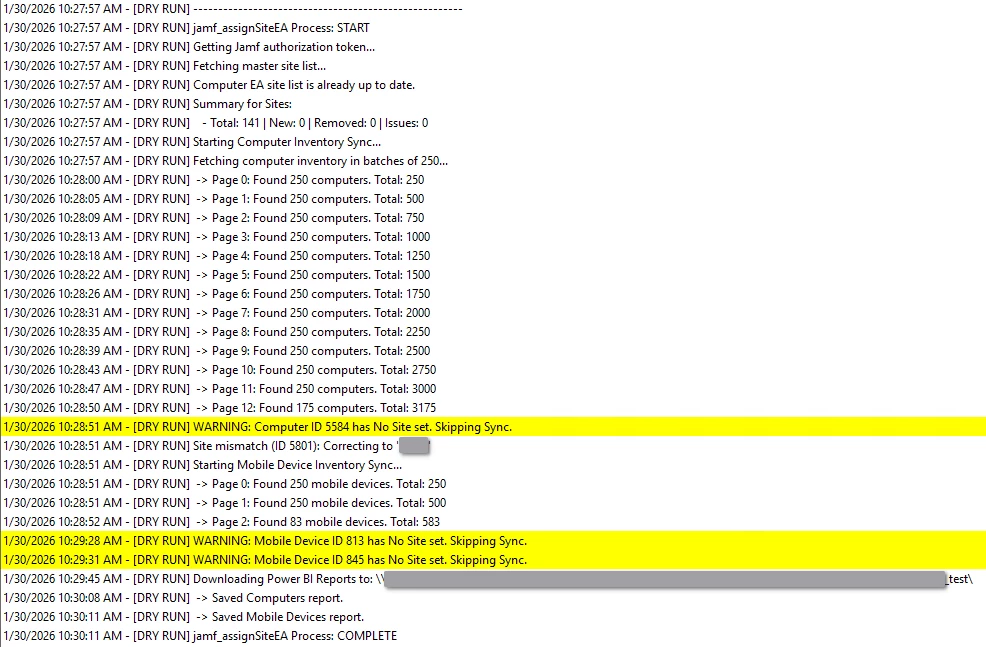
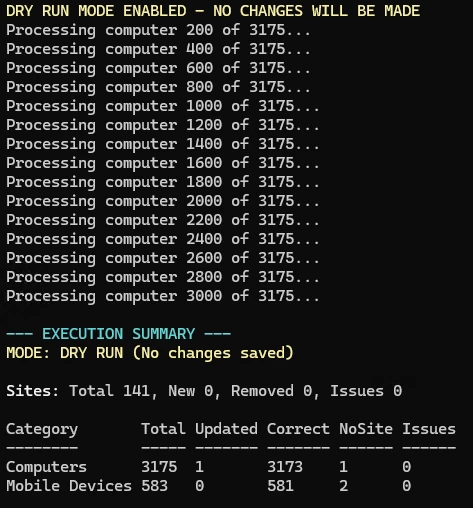
I babysat AI to build me a script based on Zach Thompon’s original script. I’m not using this to make changes yet in production. It’s running daily in ‘DryRun’ so I can see what it would do. I’m still running Zach’s original script with my own modifications for my needs after this “new” script runs. Baby steps. Unfortunately, this script still uses a hybrid of classic API and modern API as some options aren’t available in the modern API yet. :(

Sharing here for others to “beta” test and to give back. I take no responsibility for this, blame AI. ;)

PS. Jamf, if you read the forums, just do this for us please, this is way to much work for something that should be pretty simple on your end.

<#

Original script created by: Zack Thompson
https://github.com/MLBZ521/MacAdmin/blob/master/Jamf%20Pro/Extension%20Attributes/jamf_assignSiteEA.ps1

.SYNOPSIS
Jamf Site-to-EA Sync & Power BI Report Exporter
Version: 1.0.0 (January 2026)

.DESCRIPTION
Automates the synchronization of the "Site" field from Jamf Pro General inventory into
a custom Extension Attribute (EA).

EXECUTION MODES:
- Default: Running without parameters performs a "Dry Run." It logs what changes
WOULD occur but makes no API modifications.
- Live: Use the -Live switch to apply changes to Extension Attribute values and
pop-up menu choices.

This script also exports Advanced Search reports in JSON format for Power BI ingestion.

.NOTES
API STRATEGY & ARCHITECTURE:
Due to the transitional state of the Jamf Pro API as of early 2026, this script
utilizes a "Hybrid-Generation" approach to ensure data integrity:

1. Jamf Pro API (v1/v2):
- Used for Computer Inventory and Auth Tokens.
- v1 is the current standard for modern, performant computer record PATCHing.
- v2 is used for Mobile Device "List" discovery due to its superior pagination.

2. Jamf Classic API (JSSResource):
- Used for Mobile Device Detail & Updates. The Pro API (v1/v2) currently has
intermittent issues displaying or updating certain Extension Attributes
on mobile devices. The Classic API remains the "source of truth" for
consistent XML-based EA updates.
- Used for Power BI Reports. Advanced Searches (Reports) are not yet
exposed via the Pro API and must be pulled via the Classic engine.

3. Security:
- Uses Bearer Token authentication (v1/auth).
- Enforces TLS 1.2 for all session communications.

4. Logging:
- Optimized for CMTrace. Use "STATUS: Failed" or "CRITICAL" keywords to
trigger red highlights, and "Execution Status: Clean" for green.

#>

# ============================================================
# Parameters & Configuration (MUST BE AT THE TOP)
# ============================================================
param (
[switch]$Live,
# Jamf Environment Settings
[string]$jamfUrl = "jamf_url",
[string]$jamfUser = "api_user",
[string]$jamfPass = "check_under_the_keyboard",
# Extension Attribute IDs
[string]$computerEASiteID = "2",
[string]$mobileDeviceEASiteID = "4",
# Advanced Search IDs for Reports
[string]$macOSSearchID = "245",
[string]$iOSSearchID = "125",
# Output Location for Power BI JSON reports
[string]$PowerBILocation = "\\server\share\IT\powerbi"
)

# Clear the console for a clean run
Clear-Host

# ============================================================
# Computed Variables & Pre-Flight Checks
# ============================================================
$getMacOSReport = "${jamfUrl}/JSSResource/advancedcomputersearches/id/$macOSSearchID"
$getIOSReport = "${jamfUrl}/JSSResource/advancedmobiledevicesearches/id/$iOSSearchID"

# Ensure PowerBILocation is formatted correctly
if (-not $PowerBILocation.EndsWith("\")) { $PowerBILocation += "\" }

# Verify the output directory exists
if (-not (Test-Path $PowerBILocation)) {
Write-Host "ERROR: The Power BI report path does not exist: $PowerBILocation" -ForegroundColor Red
exit 1
}

# ============================================================
# Stats Tracking Object
# ============================================================
$script:Summary = [Ordered]@{
Sites = [PSCustomObject]@{ Total=0; New=0; Removed=0; Issues=0 }
Computers = [PSCustomObject]@{ Category="Computers"; Total=0; Updated=0; Correct=0; NoSite=0; Issues=0 }
Mobile = [PSCustomObject]@{ Category="Mobile Devices"; Total=0; Updated=0; Correct=0; NoSite=0; Issues=0 }
}

# ============================================================
# Log Location & Helper
# ============================================================
$Global:LogPath = "$PSScriptRoot\jamf_assignSiteEA.log"

Function Add-LogContent {
Param (
[parameter(Mandatory = $false)][switch]$Load,
[parameter(Mandatory = $true)]$Content
)
$prefix = if (-not $Live) { "[DRY RUN] " } else { "" }
$FinalContent = "$prefix$Content"
# LOG ROTATE: Rename to .log.old if > 5MB
If ((Test-Path $LogPath) -and (Get-Item $LogPath).Length -gt 5mb) {
$HistoryPath = "$LogPath.old"
Move-Item -Path $LogPath -Destination $HistoryPath -Force
}
# Simplified writing: Always append
"$(Get-Date -Format G) - $FinalContent" | Out-File -FilePath $LogPath -Append
}

Add-LogContent -Content "------------------------------------------------------"
if (-not $Live) { Write-Host "DRY RUN MODE ENABLED - NO CHANGES WILL BE MADE" -ForegroundColor Yellow }
Add-LogContent -Load -Content "jamf_assignSiteEA Process: START"

[Net.ServicePointManager]::SecurityProtocol = [Net.SecurityProtocolType]::Tls12

# ============================================================
# Functions
# ============================================================

function checkJamfAuthToken {
if (!$authTokenData -or ($(Get-Date).AddMinutes(5) -gt $authTokenExpireDate)) {
try {
if (!$authTokenData) {
Add-LogContent -Content "Getting Jamf authorization token..."
$base64AuthInfo = [Convert]::ToBase64String([Text.Encoding]::ASCII.GetBytes(("{0}:{1}" -f $jamfUser,$jamfPass)))
$script:authTokenData = Invoke-RestMethod -Uri "$jamfUrl/api/v1/auth/token" -Method Post -Headers @{Authorization=("Basic {0}" -f $base64AuthInfo)} -ErrorAction Stop
} else {
Add-LogContent -Content "Renewing Jamf authorization token..."
$script:authTokenData = Invoke-RestMethod -Uri "$jamfUrl/api/v1/auth/keep-alive" -Method Post -Headers @{Authorization="Bearer $authToken"; Accept="application/json"} -ErrorAction Stop
}
$script:authToken = $authTokenData.token
$script:authTokenExpireDate = Get-Date "$($authTokenData.expires)"
$script:jamfApiHeaders = @{ Authorization = "Bearer $authToken"; Accept = "application/json" }
}
catch {
Add-LogContent -Content "ERROR: Failed. Could not authenticate: $($_.Exception.Message)"
exit 1
}
}
}

function Get-AllSites {
checkJamfAuthToken
Add-LogContent -Content "Fetching master site list..."
$Response = Invoke-RestMethod -Uri "$jamfUrl/api/v1/sites" -Method Get -Headers $jamfApiHeaders
$names = $Response | Select-Object -ExpandProperty name
$script:Summary.Sites.Total = ($names).Count
return $names
}

function Computer-Extension-Attribute {
checkJamfAuthToken
try {
$uri = "$jamfUrl/api/v1/computer-extension-attributes/$computerEASiteID"
$objectOf_EA = Invoke-RestMethod -Uri $uri -Method Get -Headers $jamfApiHeaders
$diff = Compare-Object -ReferenceObject $objectOf_EA.popupMenuChoices -DifferenceObject $siteList
if (-not $diff) {
Add-LogContent -Content "Computer EA site list is already up to date."
return
}
$added = ($diff | Where-Object { $_.SideIndicator -eq "=>" }).InputObject
$removed = ($diff | Where-Object { $_.SideIndicator -eq "<=" }).InputObject
if ($added) {
Add-LogContent -Content " -> Sites to ADD to Computer EA: $($added -join ', ')"
$script:Summary.Sites.New += ($added).Count
}
if ($removed) {
Add-LogContent -Content " -> Sites to REMOVE from Computer EA: $($removed -join ', ')"
$script:Summary.Sites.Removed += ($removed).Count
}
if (-not $Live) {
Add-LogContent -Content "Would update Computer EA menu choices."
} else {
$objectOf_EA.popupMenuChoices = $siteList
$jsonBody = $objectOf_EA | ConvertTo-Json -Depth 10 -Compress
Invoke-RestMethod -Uri $uri -Method Put -Headers $jamfApiHeaders -Body $jsonBody -ContentType "application/json" | Out-Null
Add-LogContent -Content "Successfully updated computer EA pop-up menu choices."
}
} catch {
Add-LogContent -Content "WARNING: Issue syncing Computer EA list: $($_.Exception.Message)"
$script:Summary.Sites.Issues++
}
}

function Computer-Update-If-Required {
Add-LogContent -Content "Starting Computer Inventory Sync..."
checkJamfAuthToken
$allComputers = New-Object System.Collections.Generic.List[PSCustomObject]
$page = 0
$pageSize = 250
$keepGoing = $true
Add-LogContent -Content "Fetching computer inventory in batches of ${pageSize}..."
while ($keepGoing) {
$uri = "${jamfUrl}/api/v1/computers-inventory?section=GENERAL&section=EXTENSION_ATTRIBUTES&page=${page}&page-size=${pageSize}&sort=id%3Aasc"
try {
$response = Invoke-RestMethod -Uri $uri -Method Get -Headers $jamfApiHeaders
$batch = $response.results
if ($null -eq $batch -or $batch.Count -eq 0) {
$keepGoing = $false
} else {
foreach ($item in $batch) { $allComputers.Add($item) }
Add-LogContent -Content " -> Page ${page}: Found $($batch.Count) computers. Total: $($allComputers.Count)"
if ($batch.Count -lt $pageSize) { $keepGoing = $false } else { $page++ }
}
} catch {
Add-LogContent -Content "ERROR: Failed during fetch on page ${page}. Error: $($_.Exception.Message)"
$keepGoing = $false
}
if ($page -gt 50) { $keepGoing = $false }
}
$script:Summary.Computers.Total = $allComputers.Count
$processCount = 0
foreach ($computer in $allComputers) {
$processCount++
if ($processCount % 200 -eq 0) {
checkJamfAuthToken
Write-Host "Processing computer ${processCount} of $($allComputers.Count)..." -ForegroundColor Gray
}
$deviceID = $computer.id
$siteFromGeneral = $computer.general.site.name
if ([string]::IsNullOrWhiteSpace($siteFromGeneral) -or $siteFromGeneral -eq "None") {
Add-LogContent -Content "WARNING: Computer ID ${deviceID} has No Site set. Skipping Sync."
$script:Summary.Computers.NoSite++; continue
}
$ea = $computer.extensionAttributes | Where-Object { [string]$_.definitionId -eq [string]$computerEASiteID -or $_.name -eq "Site" }
$currentEAValue = if ($ea -and $ea.values) { $ea.values[0] } else { "" }
if ($currentEAValue -ne $siteFromGeneral) {
Add-LogContent -Content "Site mismatch (ID ${deviceID}): Correcting to '${siteFromGeneral}'"
if (-not $Live) {
$script:Summary.Computers.Updated++
} else {
$updateBody = @{ extensionAttributes = @(@{ definitionId = [string]$computerEASiteID; values = @([string]$siteFromGeneral) }) } | ConvertTo-Json -Depth 10 -Compress
try {
Invoke-RestMethod -Uri "${jamfUrl}/api/v1/computers-inventory-detail/${deviceID}" -Method Patch -Headers $jamfApiHeaders -Body $updateBody -ContentType "application/json" | Out-Null
$script:Summary.Computers.Updated++
} catch {
Add-LogContent -Content "ERROR: Update failed for ID ${deviceID}: $($_.Exception.Message)"
$script:Summary.Computers.Issues++
}
}
} else { $script:Summary.Computers.Correct++ }
}
}

function Mobile-Device-Extension-Attribute {
checkJamfAuthToken
try {
$uri = "$jamfUrl/api/v1/mobile-device-extension-attributes/$mobileDeviceEASiteID"
$objectOf_EA = Invoke-RestMethod -Uri $uri -Method Get -Headers $jamfApiHeaders
$diff = Compare-Object -ReferenceObject $objectOf_EA.popupMenuChoices -DifferenceObject $siteList
if (-not $diff) { return }
$added = ($diff | Where-Object { $_.SideIndicator -eq "=>" }).InputObject
$removed = ($diff | Where-Object { $_.SideIndicator -eq "<=" }).InputObject
if ($added) { Add-LogContent -Content " -> Sites to ADD to Mobile Device EA: $($added -join ', ')" }
if ($removed) { Add-LogContent -Content " -> Sites to REMOVE from Mobile Device EA: $($removed -join ', ')" }
if (-not $Live) {
Add-LogContent -Content "Would update Mobile Device EA choices."
} else {
$objectOf_EA.popupMenuChoices = $siteList
$jsonBody = $objectOf_EA | ConvertTo-Json -Depth 10 -Compress
Invoke-RestMethod -Uri $uri -Method Put -Headers $jamfApiHeaders -Body $jsonBody -ContentType "application/json" | Out-Null
Add-LogContent -Content "Successfully updated Mobile Device EA pop-up menu choices."
}
} catch {
Add-LogContent -Content "WARNING: Issue syncing Mobile Device EA list: $($_.Exception.Message)"
$script:Summary.Sites.Issues++
}
}

function Mobile-Device-If-Required {
Add-LogContent -Content "Starting Mobile Device Inventory Sync..."
checkJamfAuthToken
$allMobile = New-Object System.Collections.Generic.List[PSCustomObject]
$page = 0
$pageSize = 250
$keepGoing = $true
while ($keepGoing) {
$uri = "${jamfUrl}/api/v2/mobile-devices?page=${page}&page-size=${pageSize}&sort=id%3Aasc"
try {
$response = Invoke-RestMethod -Uri $uri -Method Get -Headers $jamfApiHeaders
$batch = $response.results
if ($null -eq $batch -or $batch.Count -eq 0) {
$keepGoing = $false
} else {
foreach ($item in $batch) { $allMobile.Add($item) }
Add-LogContent -Content " -> Page ${page}: Found $($batch.Count) mobile devices. Total: $($allMobile.Count)"
if ($batch.Count -lt $pageSize) { $keepGoing = $false } else { $page++ }
}
} catch { $keepGoing = $false }
}
$script:Summary.Mobile.Total = $allMobile.Count
$processCount = 0
foreach ($device in $allMobile) {
$processCount++
if ($processCount % 200 -eq 0) { checkJamfAuthToken }
$ID = $device.id
try {
$deviceDetail = Invoke-RestMethod -Uri "${jamfUrl}/JSSResource/mobiledevices/id/${ID}" -Method Get -Headers $jamfApiHeaders
$siteName = $deviceDetail.mobile_device.general.site.name
$currentEA = $deviceDetail.mobile_device.extension_attributes | Where-Object { [string]$_.id -eq [string]$mobileDeviceEASiteID }
if ([string]::IsNullOrWhiteSpace($siteName) -or $siteName -eq "None") {
Add-LogContent -Content "WARNING: Mobile Device ID ${ID} has No Site set. Skipping Sync."
$script:Summary.Mobile.NoSite++; continue
}
if ($siteName -ne $currentEA.value) {
Add-LogContent -Content "Site mismatch (Mobile ID ${ID}): Correcting to '${siteName}'"
if (-not $Live) {
$script:Summary.Mobile.Updated++
} else {
$xmlBody = "<mobile_device><extension_attributes><extension_attribute><id>$mobileDeviceEASiteID</id><value>$([System.Security.SecurityElement]::Escape($siteName))</value></extension_attribute></extension_attributes></mobile_device>"
$classicHeaders = $jamfApiHeaders.Clone(); $classicHeaders["Content-Type"] = "application/xml"
try {
Invoke-RestMethod -Uri "${jamfUrl}/JSSResource/mobiledevices/id/${ID}" -Method Put -Headers $classicHeaders -Body ([System.Text.Encoding]::UTF8.GetBytes($xmlBody)) | Out-Null
$script:Summary.Mobile.Updated++
} catch {
$script:Summary.Mobile.Issues++
}
}
} else { $script:Summary.Mobile.Correct++ }
} catch { $script:Summary.Mobile.Issues++ }
}
}

function Get-Reports-For-PowerBI {
Add-LogContent -Content "Downloading Power BI Reports to: $PowerBILocation"
checkJamfAuthToken
$reports = @(
@{ Name="Computers"; Uri=$getMacOSReport; Path="${PowerBILocation}Jamf_macOS_Report_Power_BI.json" },
@{ Name="Mobile Devices"; Uri=$getIOSReport; Path="${PowerBILocation}Jamf_iOS_Report_Power_BI.json" }
)
foreach ($report in $reports) {
if ($report.Uri) {
try {
$reportHeaders = $jamfApiHeaders.Clone(); $reportHeaders["Accept"] = "application/json"
$data = Invoke-RestMethod -Uri $report.Uri -Method Get -Headers $reportHeaders
$data | ConvertTo-Json -Depth 10 | Out-File -FilePath $report.Path -Encoding utf8
Add-LogContent -Content " -> Saved $($report.Name) report."
} catch { Add-LogContent -Content "WARNING: Issue downloading $($report.Name): $($_.Exception.Message)" }
}
}
}

# ============================================================
# Logic Flow
# ============================================================
try {
checkJamfAuthToken
$siteList = Get-AllSites
if (!$siteList) { throw "Site list empty. Aborting to protect EA data." }
# 1. Update EA Site Dropdowns
Computer-Extension-Attribute
Mobile-Device-Extension-Attribute
# Log Site Summary
Add-LogContent -Content "Summary for Sites:"
Add-LogContent -Content " - Total: $($script:Summary.Sites.Total) | New: $($script:Summary.Sites.New) | Removed: $($script:Summary.Sites.Removed) | Issues: $($script:Summary.Sites.Issues)"
# 2. Update Device Assignments
Computer-Update-If-Required
Mobile-Device-If-Required
# 3. Download Reports
Get-Reports-For-PowerBI
Add-LogContent -Content "jamf_assignSiteEA Process: COMPLETE"
# --- CONSOLE SUMMARY ---
Write-Host "`n--- EXECUTION SUMMARY ---" -ForegroundColor Cyan
$mode = if (-not $Live) { "DRY RUN (No changes saved)" } else { "LIVE (Changes applied)" }
Write-Host "MODE: $mode" -ForegroundColor Yellow
$siteIssueColor = if ($script:Summary.Sites.Issues -gt 0) { "Red" } else { "Gray" }
Write-Host "`nSites: " -NoNewline -ForegroundColor White
Write-Host "Total $($script:Summary.Sites.Total), " -NoNewline
Write-Host "New $($script:Summary.Sites.New), " -NoNewline
Write-Host "Removed $($script:Summary.Sites.Removed), " -NoNewline
Write-Host "Issues $($script:Summary.Sites.Issues)" -ForegroundColor $siteIssueColor
$DeviceStats = @($script:Summary.Computers, $script:Summary.Mobile)
$DeviceStats | Select-Object `
@{Name="Category"; Expression={$_.Category}},
@{Name="Total"; Expression={[string]$_.Total}},
@{Name="Updated"; Expression={[string]$_.Updated}},
@{Name="Correct"; Expression={[string]$_.Correct}},
@{Name="NoSite"; Expression={[string]$_.NoSite}},
@{Name="Issues"; Expression={[string]$_.Issues}} |
Format-Table -AutoSize
}
catch {
Add-LogContent -Content "ERROR: Failed. Fatal Issue: $($_.Exception.Message)"
Write-Host "FATAL ISSUE: $($_.Exception.Message)" -ForegroundColor Red
}

Console output