Solved

Custom Patch Management Workflow

  • April 13, 2018
  • 112 replies
  • 528 views

Show first post

112 replies

Forum|alt.badge.img+9
  • Valued Contributor
  • April 9, 2021

this looks pretty slick mac@ibm-notification-tool


Forum|alt.badge.img+16
  • Author
  • Valued Contributor
  • April 9, 2021

Whoa, nice. Playing with it a little and it seems like the notification appears and then hides pretty quickly where our goal would be to have the notification stay on screen. The -timeout option only applies to the Pop-Up option and not the notification banner. I'll definitely keep an eye on this project to see where it goes, thanks for the reference!


Forum|alt.badge.img+9
  • Valued Contributor
  • April 12, 2021

cool


Forum|alt.badge.img+1
  • New Contributor
  • April 20, 2021

Has anyone played around with making this script be able to close multiple apps? For example for Acrobat Reader update you need Reader and Safari to be closed I believe.


Forum|alt.badge.img+8

Funny - I am having the exact same issue. I guess the key is this one, if there can be build in more applications

Look if app is open via process name

appOpen="$(pgrep -ix "$6" | wc -l)"


Forum|alt.badge.img+11

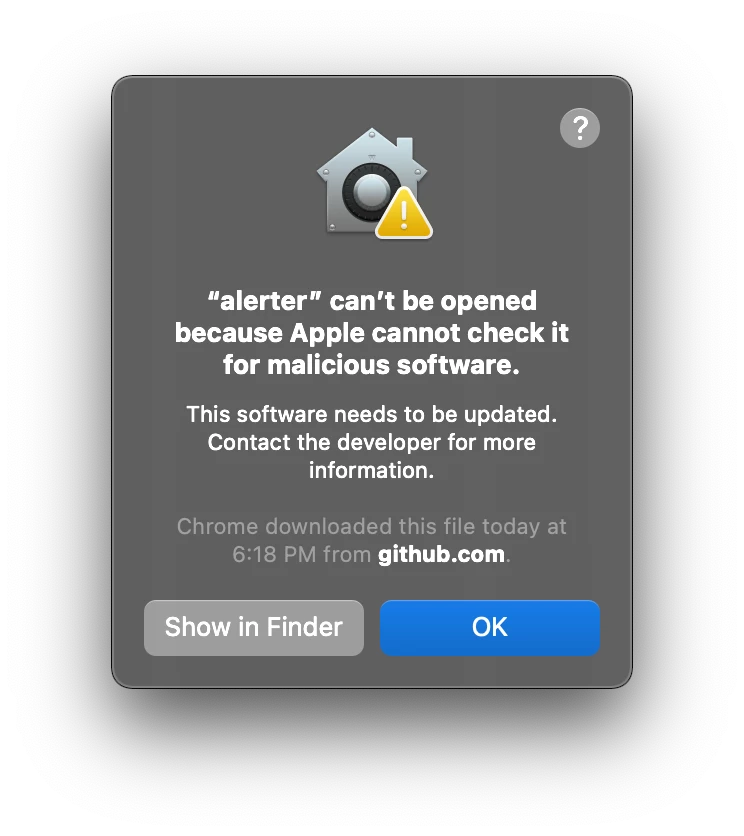
Anyone else running into this notarization issue and have a fix? I tried creating a new package for version .004 of alerter and signing the package with our Developer ID and it's still throwing this prompt on 11.4 😞 Thanks!


tender
Forum|alt.badge.img+7
  • Contributor
  • November 15, 2021

Hi @kendalljjohnson this looks very useful, going to test it out. Can you post the most recent version of the script you are using with JAMF Helper?

nice work!


Forum|alt.badge.img+16
  • Author
  • Valued Contributor
  • November 15, 2021

Hi @kendalljjohnson this looks very useful, going to test it out. Can you post the most recent version of the script you are using with JAMF Helper?

nice work!


Yeah @tender, no problem. Good opportunity to make sure my comments are up to date!

#!/bin/bash # If app is open, alert user with the option to quit the app or defer for later. If user chooses to install it will quit the app, trigger the installation, # then alert the user the policy is complete with the option to reopen the app. If the app is not open it will trigger the installation without alerting ################################DEFINE VARIABLES################################ # $4 = Title # Example: "Google Chrome" # $5 = App ID # Example: "com.google.chrome" # $6 = Process Name # Example: "Google Chrome" # $7 = App Icon Path # Example: "/Applications/Google Chrome.app/Contents/Resources/app.icns" # $8 = Jamf Policy Event # Example: "install_googleChromeUpdate" # $9 = Quit App Path # Example: "/Applications/Google Chrome.app" # $10 = Open App Path # Example: "/Applications/Google Chrome.app" #Jamf parameters can't be passed into a function, redefining the app path to be used within the funciton iconPath="$7" quitPath="$9" openPath="${10}" ################################SETUP FUNCTIONS TO CALL################################ fGetCurrenUser (){ currentUser=`/bin/ls -l /dev/console | /usr/bin/awk '{ print $3 }'` # Identify the UID of the logged-in user currentUserUID=`id -u "$currentUser"` } fCheckAppIconPath (){ #Check if iconPath is still valid, use App Store logo if not found if [ -f "$iconPath" ]; then echo "App Icon Path still valid" else echo "App Icon not found, use generic logo" iconPath="/Applications/App Store.app/Contents/Resources/AppIcon.icns" fi } fQuitApp (){ cat > /private/tmp/quit_application.sh <<EOF #!/bin/bash /bin/launchctl asuser "$currentUserUID" /usr/bin/osascript -e 'tell application "$quitPath" to quit' EOF /bin/chmod +x /private/tmp/quit_application.sh /bin/launchctl asuser "$currentUserUID" sudo -iu "$currentUser" "/private/tmp/quit_application.sh" /bin/rm -f "/private/tmp/quit_application.sh" } fOpenApp (){ cat > /private/tmp/open_application.sh <<EOF #!/bin/bash /usr/bin/open "$openPath" EOF /bin/chmod +x /private/tmp/open_application.sh /bin/launchctl asuser "$currentUserUID" sudo -iu "$currentUser" "/private/tmp/open_application.sh" /bin/rm -f "/private/tmp/open_application.sh" } ################################SETUP TIMER FILE################################ ## Set up the software update time if it does not exist already if [ ! -e /Library/Application\\ Support/JAMF/.$5.timer ]; then echo "2" > /Library/Application\\ Support/JAMF/.$5.timer fi ## Get the timer value timer=`cat /Library/Application\\ Support/JAMF/.$5.timer` ################################ALERT MESSAGE OPTIONS################################ saveQuitMSG="must be quit in order to update. Save all data before quitting." updatedMSG="has been updated. Thank you." ################################START 'UPDATE WITH JAMFHELPER' PROCESS################################ # Look if app is open via process name appOpen="$(pgrep -ix "$6" | wc -l)" # if the app is open and the defer timer is not zero if [[ $appOpen -gt 0 && $timer -gt 0 ]]; then fGetCurrenUser fCheckAppIconPath updateAnswer="$(/Library/Application\\ Support/JAMF/bin/jamfHelper.app/Contents/MacOS/jamfHelper -windowType utility -windowPosition ur -icon "$iconPath" -iconSize 50 -heading "Update Available" -description "$4 must be quit in order to update. Save all data before quitting." -button1 "Quit & Update" -button2 "Defer ($timer)" -timeout 3600)" if [[ $updateAnswer == "0" ]]; then #quit app, install the update, then prompt the user when complete and ask if they want to reopen the app. Message will time out after 60 secs. fQuitApp /usr/local/bin/jamf policy -event "$8" reopenAnswer="$(/Library/Application\\ Support/JAMF/bin/jamfHelper.app/Contents/MacOS/jamfHelper -windowType utility -windowPosition ur -icon "$iconPath" -iconSize 50 -description "$4 has been updated" -button1 "Reopen" -button2 "Ok" -timeout 60)" if [[ $reopenAnswer == "0" ]]; then fOpenApp fi #reset timer after updating echo "2" > /Library/Application\\ Support/JAMF/.$5.timer else let CurrTimer=$timer-1 echo "User chose to defer" echo "$CurrTimer" > /Library/Application\\ Support/JAMF/.$5.timer echo "Defer count is now $CurrTimer" exit 0 fi # if app is open and defer timer has run out elif [[ $appOpen -gt 0 && $timer == 0 ]]; then fGetCurrenUser fCheckAppIconPath /Library/Application\\ Support/JAMF/bin/jamfHelper.app/Contents/MacOS/jamfHelper -windowType utility -windowPosition ur -icon "$iconPath" -iconSize 50 -heading "Update Available" -description "$4 must be quit in order to update. Save all data before quitting." -button1 "Quit & Update" -button2 "No Deferrals Left" -timeout 3600 fQuitApp /usr/local/bin/jamf policy -event "$8" reopenAnswer="$(/Library/Application\\ Support/JAMF/bin/jamfHelper.app/Contents/MacOS/jamfHelper -windowType utility -windowPosition ur -icon "$iconPath" -iconSize 50 -description "$4 has been updated" -button1 "Reopen" -button2 "Ok" -timeout 60)" if [[ $reopenAnswer == "0" ]]; then fOpenApp fi #reset timer after updating echo "2" > /Library/Application\\ Support/JAMF/.$5.timer else # app is not open, reset timer and run updates echo "2" > /Library/Application\\ Support/JAMF/.$5.timer /usr/local/bin/jamf policy -event "$8" fi


tender
Forum|alt.badge.img+7
  • Contributor
  • November 16, 2021

Yeah @tender, no problem. Good opportunity to make sure my comments are up to date!

#!/bin/bash # If app is open, alert user with the option to quit the app or defer for later. If user chooses to install it will quit the app, trigger the installation, # then alert the user the policy is complete with the option to reopen the app. If the app is not open it will trigger the installation without alerting ################################DEFINE VARIABLES################################ # $4 = Title # Example: "Google Chrome" # $5 = App ID # Example: "com.google.chrome" # $6 = Process Name # Example: "Google Chrome" # $7 = App Icon Path # Example: "/Applications/Google Chrome.app/Contents/Resources/app.icns" # $8 = Jamf Policy Event # Example: "install_googleChromeUpdate" # $9 = Quit App Path # Example: "/Applications/Google Chrome.app" # $10 = Open App Path # Example: "/Applications/Google Chrome.app" #Jamf parameters can't be passed into a function, redefining the app path to be used within the funciton iconPath="$7" quitPath="$9" openPath="${10}" ################################SETUP FUNCTIONS TO CALL################################ fGetCurrenUser (){ currentUser=`/bin/ls -l /dev/console | /usr/bin/awk '{ print $3 }'` # Identify the UID of the logged-in user currentUserUID=`id -u "$currentUser"` } fCheckAppIconPath (){ #Check if iconPath is still valid, use App Store logo if not found if [ -f "$iconPath" ]; then echo "App Icon Path still valid" else echo "App Icon not found, use generic logo" iconPath="/Applications/App Store.app/Contents/Resources/AppIcon.icns" fi } fQuitApp (){ cat > /private/tmp/quit_application.sh <<EOF #!/bin/bash /bin/launchctl asuser "$currentUserUID" /usr/bin/osascript -e 'tell application "$quitPath" to quit' EOF /bin/chmod +x /private/tmp/quit_application.sh /bin/launchctl asuser "$currentUserUID" sudo -iu "$currentUser" "/private/tmp/quit_application.sh" /bin/rm -f "/private/tmp/quit_application.sh" } fOpenApp (){ cat > /private/tmp/open_application.sh <<EOF #!/bin/bash /usr/bin/open "$openPath" EOF /bin/chmod +x /private/tmp/open_application.sh /bin/launchctl asuser "$currentUserUID" sudo -iu "$currentUser" "/private/tmp/open_application.sh" /bin/rm -f "/private/tmp/open_application.sh" } ################################SETUP TIMER FILE################################ ## Set up the software update time if it does not exist already if [ ! -e /Library/Application\\ Support/JAMF/.$5.timer ]; then echo "2" > /Library/Application\\ Support/JAMF/.$5.timer fi ## Get the timer value timer=`cat /Library/Application\\ Support/JAMF/.$5.timer` ################################ALERT MESSAGE OPTIONS################################ saveQuitMSG="must be quit in order to update. Save all data before quitting." updatedMSG="has been updated. Thank you." ################################START 'UPDATE WITH JAMFHELPER' PROCESS################################ # Look if app is open via process name appOpen="$(pgrep -ix "$6" | wc -l)" # if the app is open and the defer timer is not zero if [[ $appOpen -gt 0 && $timer -gt 0 ]]; then fGetCurrenUser fCheckAppIconPath updateAnswer="$(/Library/Application\\ Support/JAMF/bin/jamfHelper.app/Contents/MacOS/jamfHelper -windowType utility -windowPosition ur -icon "$iconPath" -iconSize 50 -heading "Update Available" -description "$4 must be quit in order to update. Save all data before quitting." -button1 "Quit & Update" -button2 "Defer ($timer)" -timeout 3600)" if [[ $updateAnswer == "0" ]]; then #quit app, install the update, then prompt the user when complete and ask if they want to reopen the app. Message will time out after 60 secs. fQuitApp /usr/local/bin/jamf policy -event "$8" reopenAnswer="$(/Library/Application\\ Support/JAMF/bin/jamfHelper.app/Contents/MacOS/jamfHelper -windowType utility -windowPosition ur -icon "$iconPath" -iconSize 50 -description "$4 has been updated" -button1 "Reopen" -button2 "Ok" -timeout 60)" if [[ $reopenAnswer == "0" ]]; then fOpenApp fi #reset timer after updating echo "2" > /Library/Application\\ Support/JAMF/.$5.timer else let CurrTimer=$timer-1 echo "User chose to defer" echo "$CurrTimer" > /Library/Application\\ Support/JAMF/.$5.timer echo "Defer count is now $CurrTimer" exit 0 fi # if app is open and defer timer has run out elif [[ $appOpen -gt 0 && $timer == 0 ]]; then fGetCurrenUser fCheckAppIconPath /Library/Application\\ Support/JAMF/bin/jamfHelper.app/Contents/MacOS/jamfHelper -windowType utility -windowPosition ur -icon "$iconPath" -iconSize 50 -heading "Update Available" -description "$4 must be quit in order to update. Save all data before quitting." -button1 "Quit & Update" -button2 "No Deferrals Left" -timeout 3600 fQuitApp /usr/local/bin/jamf policy -event "$8" reopenAnswer="$(/Library/Application\\ Support/JAMF/bin/jamfHelper.app/Contents/MacOS/jamfHelper -windowType utility -windowPosition ur -icon "$iconPath" -iconSize 50 -description "$4 has been updated" -button1 "Reopen" -button2 "Ok" -timeout 60)" if [[ $reopenAnswer == "0" ]]; then fOpenApp fi #reset timer after updating echo "2" > /Library/Application\\ Support/JAMF/.$5.timer else # app is not open, reset timer and run updates echo "2" > /Library/Application\\ Support/JAMF/.$5.timer /usr/local/bin/jamf policy -event "$8" fi


Thanks @kendalljjohnson, I am working on adapting this to my needs. Great stuff you put together in your script.

-steven


gadsden_flag
Forum|alt.badge.img+6
  • Contributor
  • December 15, 2021

Hey @Kristopher,

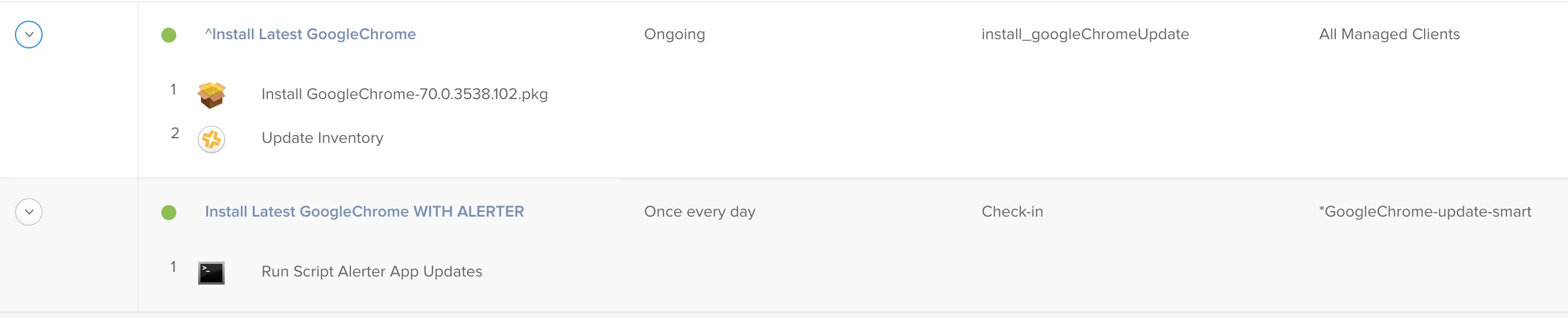
There are 2 different policies:

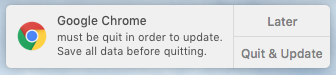
  1. The Alerter policy -This is scoped to a smart group that looks for all computers that have the software installed but not on the desired version -If the user chooses to update and not defer, it calls on the other policy that installs the update via a custom policy trigger
  2. The actual updater policy

Here are an example of the 2 policies (in reverse order).

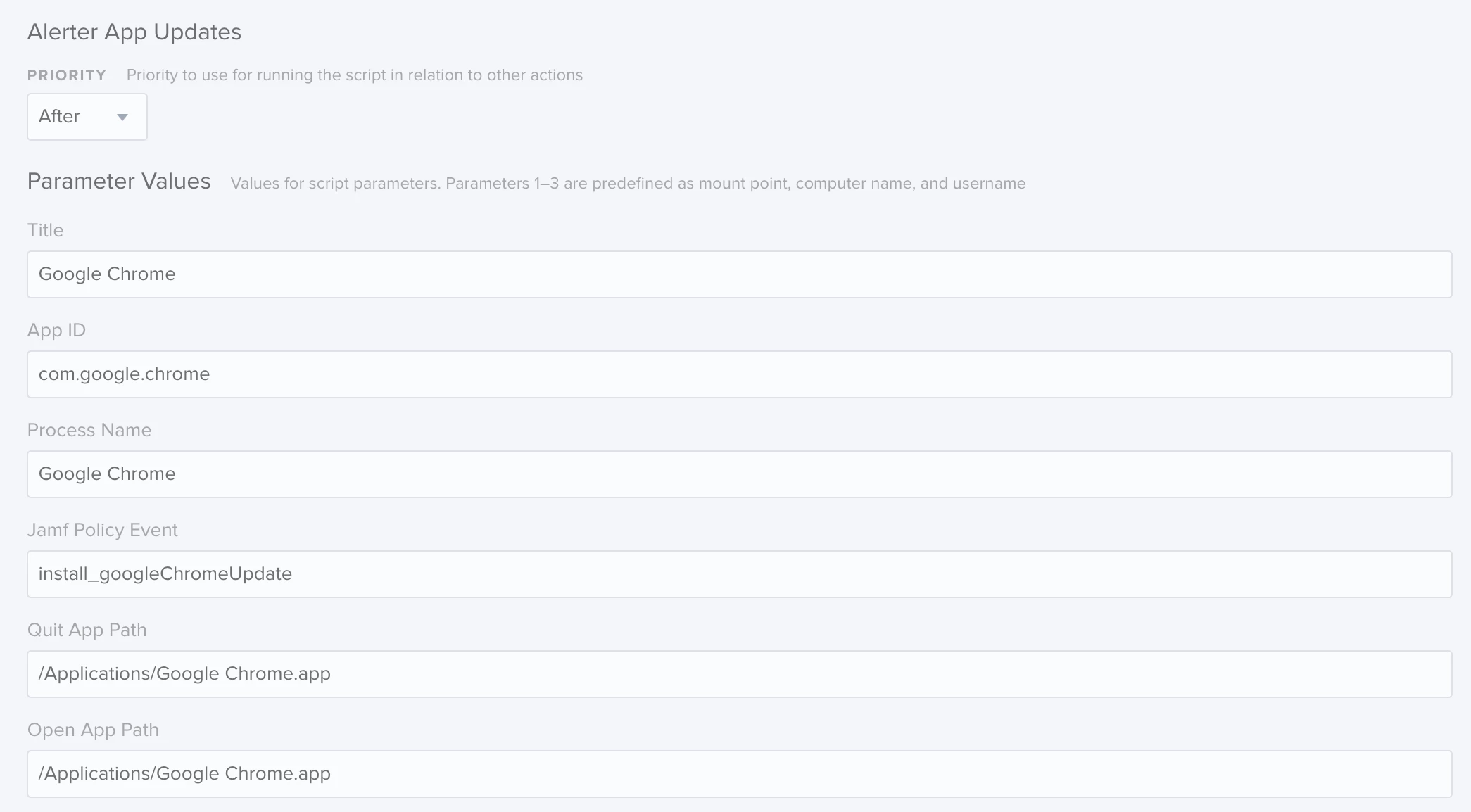
And what script variables I use for Google Chrome.

Hope that helps, happy to answer any questions you might have!


Hi

It’s not working for me. I think I did every step you said, but get an error


Script result: /Library/Application Support/JAMF/tmp/Alerter App Updates: line 60: [: /Library/Application: binary operator expected cat: Support/JAMF/.com.google.chrome.timer.txt: No such file or directory Checking for policies triggered by "install_googleChromeUpdate" for user "ursare1"... Executing Policy Install Latest GoogleChrome Downloading Chrome_96.0.4664.110.pkg... Downloading https://repository.example.com/Packages/Chrome_96.0.4664.110.pkg... Installing Chrome_96.0.4664.110.pkg... Successfully installed Chrome_96.0.4664.110.pkg. Running Recon... Retrieving inventory preferences from https://xxxxxx/... Finding extension attributes... Locating accounts... Locating applications... Locating package receipts... Searching path: /System/Applications Locating hard drive information... Locating software updates... Locating printers... Searching path: /Applications Locating hardware information (macOS 11.6.1)...


The only difference I have: my alerter is in /usr/local/bin

But I think, that’s not the point.

Any help?

Thanks 


PS I found it: a typo from copy paste. Sorry for that


allpurposeben
Forum|alt.badge.img+1
  • New Contributor
  • May 23, 2022

Am I correct in understanding that using this alternative workflow would mean that a pending patch would not appear in Self Service.app? For example:

  1. There's a policy to upgrade Chrome, set to run daily, running the script.
  2. Chrome Update Policy runs while Chrome is running.
  3. User gets notification to close Chrome and proceed or defer.
  4. They choose to defer
  5. A couple hours pass, it's lunch time, the user decides they are free to run updates now.
  6. They go to Self Service but since there's no actual patch policy in play, there won't be pending patch installs in Self Service.

Is that correct or am I missing something? The user would only ever have the opportunity to trigger the update when the script runs and asks them?


Forum|alt.badge.img+16
  • Author
  • Valued Contributor
  • May 24, 2022

@allpurposeben Correct, I never built in a logic for Self Service. It would need to be a separate policy created since the alerting policy is only available to be run once a day. Theoretically you could clone the daily alerting policy but change it to be ongoing within Self Service, using the same scope of only available to those not on the current version.