Question

CyberArk EPM Deployment

  • July 14, 2020
  • 47 replies
  • 477 views

Show first post

47 replies

Forum|alt.badge.img+9
  • Valued Contributor
  • December 5, 2020

@KCouture - this is essentially how I was able to get this to function in our environment as well, with one exception, we also added the PPPC settings that @spraguga provided above, I believe this will solve your app downloaded from the internet prompt(though don't quote me on that as I've only tested on 10.14 and 10.15 machines.

Interestingly enough, on a handful of 10.15 machines the install is failing with the below:

Executing Policy CyberArk EPM Agent v.11.8.0.722 Caching package CyberArkEPMAgentSetupMacOs-setX.dmg... Downloading https://use1-jcds.services.jamfcloud.com//download/25bf2928931e4f1fa129b89da4dfb751/CyberArkEPMAgentSetupMacOs-setX.dmg?token=d076ef6da9174490a4ed1add33e0fc887vytaz1rkvnube7vd831z5l5yyyurh82... Verifying DMG... Running script CyberArk_Install_From_DMG... Script exit code: 2 Script result: Check if dmg file exists. expected CRC32 $08F7B48B /dev/disk2 GUID_partition_scheme /dev/disk2s1 Apple_APFS /dev/disk3 EF57347C-0000-11AA-AA11-0030654 /dev/disk3s1 41504653-0000-11AA-AA11-0030654 /private/var/folders/zz/zyxvpxvq6csfxvn_n0000000000000/T/ci-XXXXXXXXXX.8AhCZhik/dmg "disk2" ejected. {"url":"https://login.epm.cyberark.com/VFAGT/VfAgent.asmx","setID":"ce250d0a-e3f1-4b1e-89ea-06b9738c345d","certificateCommonName":null,"registerToken":"dioP2qnSmvxvIntbJdZWSDPpjkqjOY20EvWvPVbqnyQ+TDdD83lFogSv4w79scPeHfg8fDcZEZIdpS1JcKPmkwvvechpJxtnHgRTz0gG9ptrA5BF0FATsaMG0yz7iWuTWfE6OJghmjPeAl+DWgSEyzWV24Lc6v3CrbNRu9XnBJwZxP0uITVUmhudDmAj5kk4yXVlLpIEVgEikEjBBo6UfBo+PdsiYVL8AbSPf5bXZrdtrSOMFKdghjpFD1wqrJRkJdZlEOA7w9dEXLxgwkE0+BWM712Bfcu5ZT5HCU0V8t/IZ1Kxtq3voYiyk1pT4QCEtDLwjZpsfSsf/iOmsbS5Mcz5D+jpi/dV/Aw4UcnZPYM/nzkHaGCtIkwOCwSMbygH+NGVzXzC+d9BPmBK4pRaTSeMZzffUNAu26Jr6z43SUJu4VwHRBfdh94q9g2KQYUTWq1tO7d+mjSTXyP6rIcvycpnuTT8Mi9OrKcZN1NTPhGxjITyIwhqXAthor5x2qh7fANB2qLKCVaEIU2Bc4aN2Yz55MK0gDYbzEYhrGwi3vVCjuhccCqWuQPqOKCct1IeW2tUYnOfkW0KIb/GuNpGT9rxMCcmXD9oNwpxnGKNGCDuuTYn6Sa//Q8elbShqEUB9poO9q144cmw04PpoFpByvYnu8TTI69SdM6zeXa0nxMxP7I7JBAAx1whVMAYhpmqj8m4CPLOU53EglgtRVIhZ4cWRtB/ttAbcCDoA+Pw2XboD9RmC5DNGuWhaWzP0L7lDKYsU0ozsjVqVM0sUvfXnSIRuyg3MiLHQUUtF6d8MZPhBFo+we2azEPez09d5+9Bc2a47YEBzhdCvxFOPuaWY0B6ele7xv/osQojbUWP2wNq5Zd7LW+mLT4ayzSLdriUZGoFbt8MttidmQK636c16jgL/Xy/A3a46rmxD16aE8XSiwfX4yk7dw8MriZvvNiY5vMOsJqRCc8L5+cCdBX1pg==","registerTokenExp":"2004457654"}Installing... Failed to check self-defense status: Error Domain=NSCocoaErrorDomain Code=4 "The file “CyberArkEPM” doesn’t exist." UserInfo={NSFilePath=/usr/local/bin/CyberArkEPM} /Library/Application Support/JAMF/tmp/CyberArk_Install_From_DMG: line 98: /usr/local/bin/CyberArkEPM: No such file or directory Cleaning up CyberArk EPM installation failed Error running script: return code was 2.

Curious if anyone else has seen this and knows what may be happening? It appears that perhaps the cached DMG is not being mounted/extracted properly? I'm not a scripting guru so am not sure.


Forum|alt.badge.img+3
  • New Contributor
  • December 7, 2020

I do have a PPPC made up for it, but mine looks different than yours. I did make mine with the old version of Cyberark installed so I'll give that a go


Forum|alt.badge.img+3
  • New Contributor
  • December 7, 2020

Sadly no change when I change my PPPC full disk. Maybe it needs to be compatible with Big Sur? My version of PPPC has a button for that


Forum|alt.badge.img+9
  • Valued Contributor
  • December 8, 2020

Have you tried checking the "Validate the Static Code Requirement" checkbox? That's the only difference I see between yours and ours.


Forum|alt.badge.img+3
  • New Contributor
  • December 8, 2020

So after digging around, it looks like it was gate keeper so I added

sudo xattr -rd com.apple.quarantine /Applications/CyberArk EPM.app

to a script to add to the payload which seems to do the trick although for some systems it give an error saying Operation not permitted and some it doesn't. I haven't been able to narrow down whats causing it for some systems


Forum|alt.badge.img+7
  • New Contributor
  • December 11, 2020

Hey Everyone!

I am having some issues with CyberArk and I feel everyone's pain in this thread. IDK if this is helpful but I neutered one of the scripts that CyberArk pre-built and made my life easier. What I did was I used Composer to build a pkg that put The CyberArk app and the json in /private/tmp. It had the contents in a folder called /CyberArk.

So path where I put my files is /private/tmp/CyberArk and within it was the app and the json.

I then just used this script,

Now I built my PPPC profile for Mojave and it was a dream, my install and script still works on Catalina but I am on the struggle bus for the PPPC. Everyone's suggestions above have still not worked for me. But wanted to share a super clean script that I struggled to work for and works great.

#!/bin/bash installationKey="youKeyGoesHereDontLookAtMine" PROTECTION_ARG=" -installationKey $installationKey" CYBERARKEPM_INSTALL_TMP="/private/tmp/CyberArk" cat "$CYBERARKEPM_INSTALL_TMP/CyberArkEPMConfiguration.json" echo "Installing..." $CYBERARKEPM_INSTALL_TMP/Install CyberArk EPM.app/Contents/MacOS/CyberArkEPMInstaller -withoutPwdRotation -configuration "$CYBERARKEPM_INSTALL_TMP/CyberArkEPMConfiguration.json" $PROTECTION_ARG epmVersionFull=$(/usr/local/bin/CyberArkEPM --version) if [[ ! $epmVersionFull ]]; then echo "CyberArk EPM installation failed" exit 2 fi echo "$epmVersionFull was successfully installed" exit 0

Kapil
Forum|alt.badge.img+5
  • New Contributor
  • February 22, 2021

Hi All,

I have created the CyberArk config profile with below info and it got installed successfully.

1) Approved kernel extension with bundle id: DF8U2CCCD8

2) PPPC with the following: Identifier: com.cyberark.CyberArkEPMEndpointSecurityExtension
Code Requirement:
anchor apple generic and identifier "com.cyberark.CyberArkEPMEndpointSecurityExtension" and (certificate leaf[field.1.2.840.113635.100.6.1.9] / exists / or certificate 1[field.1.2.840.113635.100.6.2.6] / exists / and certificate leaf[field.1.2.840.113635.100.6.1.13] / exists / and certificate leaf[subject.OU] = DF8U2CCCD8)
Service:
SystemPolicyAllFiles = Allow

3) System Extensions:
It will not work with the Team ID only. In my testing you must add the system extension for this to work.
Team ID: DF8U2CCCD8
Allowed System Ext: com.cyberark.CyberArkEPMEndpointSecurityExtension

I was executing the installer via below cmd as a script:
sudo /private/tmp/Install CyberArk EPM.app/Contents/MacOS/CyberArkEPMInstaller -configuration /private/tmp/CyberArkEPMConfiguration.json -installationKey XXXXXXXX -adminUser XYZ -adminPassword XYZ -nonAdminEPMUser

But the policy got failed and received below error in logs:
Script result: Could not complete installation on this computer: ExecutionError(executablePath: "/usr/sbin/installer", arguments: Optional(["-pkg", "/private/tmp/Install CyberArk EPM.app/Contents/Resources/CyberArkEPM.pkg", "-target", "LocalSystem"]), terminationStatus: 1, errorMessage: Optional(""))
Remove Endpoint Security extensions Remove launchd agents Remove launchd daemons Remove kext Remove authorization rights Failed to restore authorization right 'com.apple.system-extensions.admin': SecurityError(status: -60005 ("The authorization was denied."), additionalInfo: ("")) Remove PAM modules Remove sudoers settings Remove files and directories Remove users and groups

Can anyone please suggest to sort out this issue?

Thanks


Forum|alt.badge.img+9
  • Valued Contributor
  • February 22, 2021

@Kapil - this is what did the trick for us: CyberArk_JAMF_Deployment

With the exception of an outstanding issue with the config profile(PPPC settings cause the profile to fail to install, when those are removed, it installs) I have an outstanding Case open with CyberArk support on this.

Will update when that comes to resolution.


Kapil
Forum|alt.badge.img+5
  • New Contributor
  • February 23, 2021

@brianmcbride99 Thanks for your update Brian, Sure keep me posted.


Kapil
Forum|alt.badge.img+5
  • New Contributor
  • February 24, 2021

I have tried the below document from Cyberark and that too got failed


Forum|alt.badge.img+1
  • New Contributor
  • May 4, 2021

@brianmcbride99 Any Update on how to have the PPPC Config not fail after scoping?


Forum|alt.badge.img+9
  • Valued Contributor
  • May 4, 2021

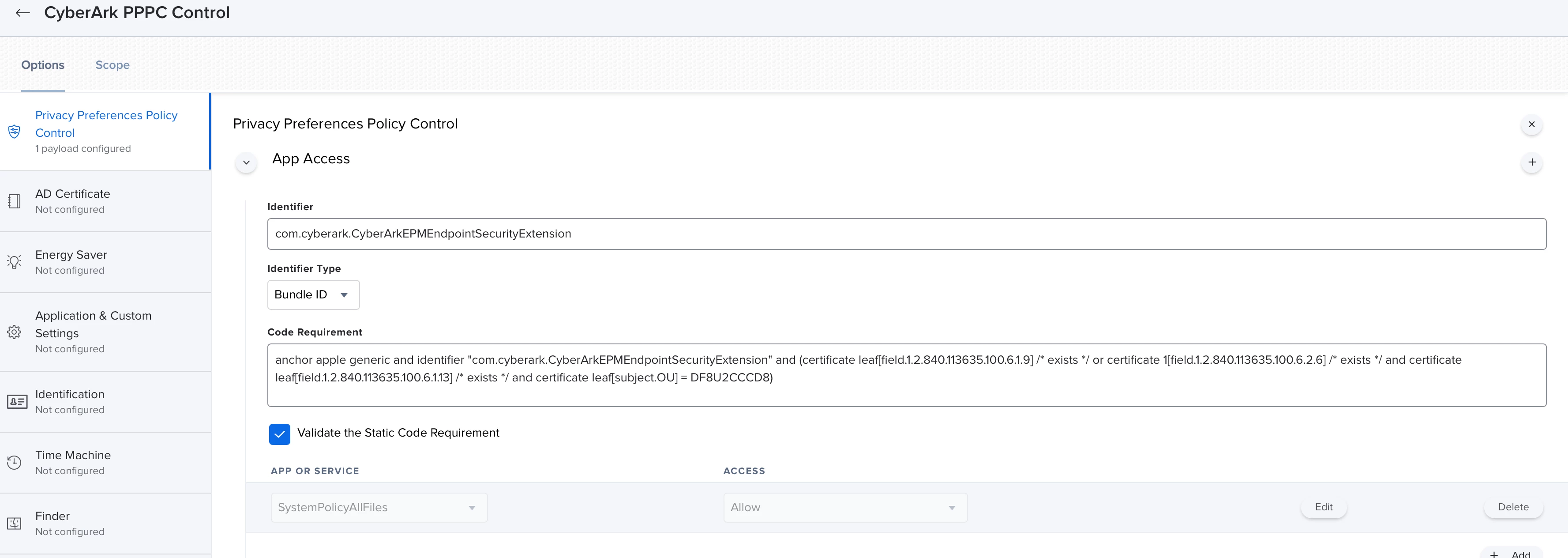
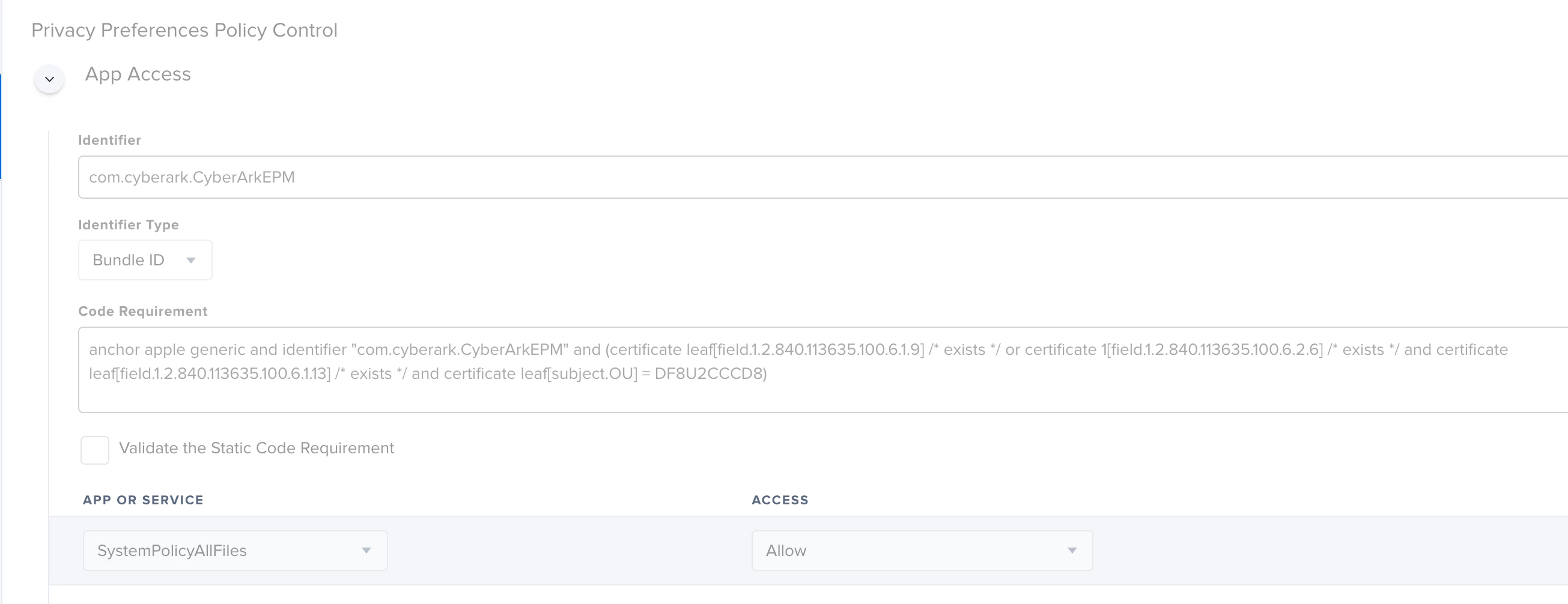
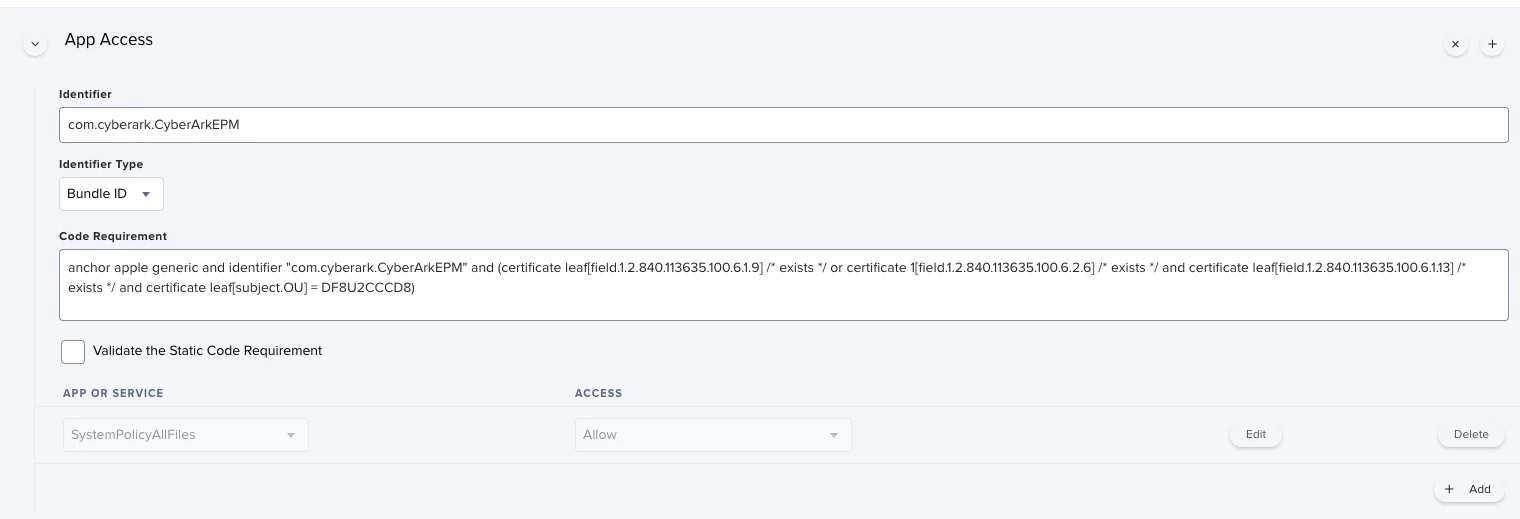
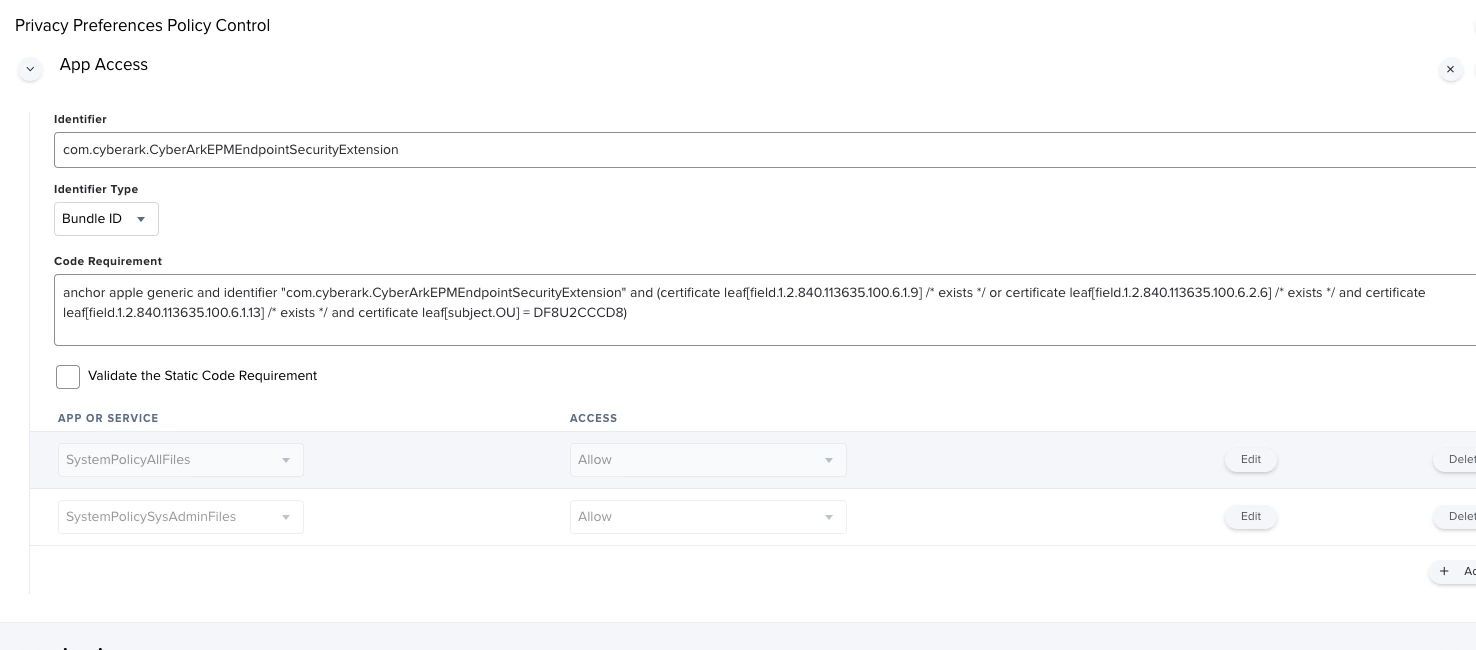
@tvargas - yes - apologies i meant to update this thread and forgot....there was actually a formatting issue in the PDF published by cyberark, it took a support call and digging into it to find out...an extra whitespace if i remember correctly. I was copying/pasting the PPPC code. i would have expected them to update their PDF by now, but if not here is the PPPC section of the config profile we are using:

The code requirement for this identifier 'com.cyberark.CyberArkEPMEndpointSecurityExtension' is:

anchor apple generic and identifier "com.cyberark.CyberArkEPMEndpointSecurityExtension" and (certificate leaf[field.1.2.840.113635.100.6.1.9] /* exists */ or certificate leaf[field.1.2.840.113635.100.6.2.6] /* exists */ and certificate leaf[field.1.2.840.113635.100.6.1.13] /* exists */ and certificate leaf[subject.OU] = DF8U2CCCD8)

The code requirement for this identifier 'com.cyberark.CyberArkEPM' is:

anchor apple generic and identifier "com.cyberark.CyberArkEPM" and (certificate leaf[field.1.2.840.113635.100.6.1.9] /* exists */ or certificate 1[field.1.2.840.113635.100.6.2.6] /* exists */ and certificate leaf[field.1.2.840.113635.100.6.1.13] /* exists */ and certificate leaf[subject.OU] = DF8U2CCCD8)

EDIT: The screenshots are reversed from the order i uploaded them, sorry about that, but you should get the gist.


mhasman
Forum|alt.badge.img+22
  • Valued Contributor
  • May 4, 2021

I configured profile per instruction, provided, but keep getting deployment error


Forum|alt.badge.img+9
  • Valued Contributor
  • May 4, 2021

@mhasman - can you please elaborate on which instructions you were utilizing and what the deployment error is you are receiving?


mhasman
Forum|alt.badge.img+22
  • Valued Contributor
  • May 5, 2021

Forum|alt.badge.img+9
  • Valued Contributor
  • May 5, 2021

@mhasman you will need to utilize the PDF here: https://cyberark-customers.force.com/s/article/EPM-How-to-configure-JAMF-for-EPM-Agent-distribution

It’s only made available after you login to their support portal.


mhasman
Forum|alt.badge.img+22
  • Valued Contributor
  • May 5, 2021

.


mhasman
Forum|alt.badge.img+22
  • Valued Contributor
  • May 5, 2021

.


Forum|alt.badge.img+1
  • New Contributor
  • August 12, 2021

@KCouture - this is essentially how I was able to get this to function in our environment as well, with one exception, we also added the PPPC settings that @spraguga provided above, I believe this will solve your app downloaded from the internet prompt(though don't quote me on that as I've only tested on 10.14 and 10.15 machines.

Interestingly enough, on a handful of 10.15 machines the install is failing with the below:

Executing Policy CyberArk EPM Agent v.11.8.0.722 Caching package CyberArkEPMAgentSetupMacOs-setX.dmg... Downloading https://use1-jcds.services.jamfcloud.com//download/25bf2928931e4f1fa129b89da4dfb751/CyberArkEPMAgentSetupMacOs-setX.dmg?token=d076ef6da9174490a4ed1add33e0fc887vytaz1rkvnube7vd831z5l5yyyurh82... Verifying DMG... Running script CyberArk_Install_From_DMG... Script exit code: 2 Script result: Check if dmg file exists. expected CRC32 $08F7B48B /dev/disk2 GUID_partition_scheme /dev/disk2s1 Apple_APFS /dev/disk3 EF57347C-0000-11AA-AA11-0030654 /dev/disk3s1 41504653-0000-11AA-AA11-0030654 /private/var/folders/zz/zyxvpxvq6csfxvn_n0000000000000/T/ci-XXXXXXXXXX.8AhCZhik/dmg "disk2" ejected. {"url":"https://login.epm.cyberark.com/VFAGT/VfAgent.asmx","setID":"ce250d0a-e3f1-4b1e-89ea-06b9738c345d","certificateCommonName":null,"registerToken":"dioP2qnSmvxvIntbJdZWSDPpjkqjOY20EvWvPVbqnyQ+TDdD83lFogSv4w79scPeHfg8fDcZEZIdpS1JcKPmkwvvechpJxtnHgRTz0gG9ptrA5BF0FATsaMG0yz7iWuTWfE6OJghmjPeAl+DWgSEyzWV24Lc6v3CrbNRu9XnBJwZxP0uITVUmhudDmAj5kk4yXVlLpIEVgEikEjBBo6UfBo+PdsiYVL8AbSPf5bXZrdtrSOMFKdghjpFD1wqrJRkJdZlEOA7w9dEXLxgwkE0+BWM712Bfcu5ZT5HCU0V8t/IZ1Kxtq3voYiyk1pT4QCEtDLwjZpsfSsf/iOmsbS5Mcz5D+jpi/dV/Aw4UcnZPYM/nzkHaGCtIkwOCwSMbygH+NGVzXzC+d9BPmBK4pRaTSeMZzffUNAu26Jr6z43SUJu4VwHRBfdh94q9g2KQYUTWq1tO7d+mjSTXyP6rIcvycpnuTT8Mi9OrKcZN1NTPhGxjITyIwhqXAthor5x2qh7fANB2qLKCVaEIU2Bc4aN2Yz55MK0gDYbzEYhrGwi3vVCjuhccCqWuQPqOKCct1IeW2tUYnOfkW0KIb/GuNpGT9rxMCcmXD9oNwpxnGKNGCDuuTYn6Sa//Q8elbShqEUB9poO9q144cmw04PpoFpByvYnu8TTI69SdM6zeXa0nxMxP7I7JBAAx1whVMAYhpmqj8m4CPLOU53EglgtRVIhZ4cWRtB/ttAbcCDoA+Pw2XboD9RmC5DNGuWhaWzP0L7lDKYsU0ozsjVqVM0sUvfXnSIRuyg3MiLHQUUtF6d8MZPhBFo+we2azEPez09d5+9Bc2a47YEBzhdCvxFOPuaWY0B6ele7xv/osQojbUWP2wNq5Zd7LW+mLT4ayzSLdriUZGoFbt8MttidmQK636c16jgL/Xy/A3a46rmxD16aE8XSiwfX4yk7dw8MriZvvNiY5vMOsJqRCc8L5+cCdBX1pg==","registerTokenExp":"2004457654"}Installing... Failed to check self-defense status: Error Domain=NSCocoaErrorDomain Code=4 "The file “CyberArkEPM” doesn’t exist." UserInfo={NSFilePath=/usr/local/bin/CyberArkEPM} /Library/Application Support/JAMF/tmp/CyberArk_Install_From_DMG: line 98: /usr/local/bin/CyberArkEPM: No such file or directory Cleaning up CyberArk EPM installation failed Error running script: return code was 2.

Curious if anyone else has seen this and knows what may be happening? It appears that perhaps the cached DMG is not being mounted/extracted properly? I'm not a scripting guru so am not sure.


I know this thread is pretty old by now, but curious if you found a solution to the "Failed to check self-defense status" error. Getting the same thing on a few MacOS 11.5 machines. 


Forum|alt.badge.img+1
  • New Contributor
  • August 12, 2021

I know this thread is pretty old by now, but curious if you found a solution to the "Failed to check self-defense status" error. Getting the same thing on a few MacOS 11.5 machines. 


Resolved - this happened because BigSur doesn't play well with "Approved Kernel Extensions". Removing that from the configuration policy resolved the issue.


Forum|alt.badge.img
  • New Contributor
  • October 4, 2021

@tvargas - yes - apologies i meant to update this thread and forgot....there was actually a formatting issue in the PDF published by cyberark, it took a support call and digging into it to find out...an extra whitespace if i remember correctly. I was copying/pasting the PPPC code. i would have expected them to update their PDF by now, but if not here is the PPPC section of the config profile we are using:

The code requirement for this identifier 'com.cyberark.CyberArkEPMEndpointSecurityExtension' is:

anchor apple generic and identifier "com.cyberark.CyberArkEPMEndpointSecurityExtension" and (certificate leaf[field.1.2.840.113635.100.6.1.9] /* exists */ or certificate leaf[field.1.2.840.113635.100.6.2.6] /* exists */ and certificate leaf[field.1.2.840.113635.100.6.1.13] /* exists */ and certificate leaf[subject.OU] = DF8U2CCCD8)

The code requirement for this identifier 'com.cyberark.CyberArkEPM' is:

anchor apple generic and identifier "com.cyberark.CyberArkEPM" and (certificate leaf[field.1.2.840.113635.100.6.1.9] /* exists */ or certificate 1[field.1.2.840.113635.100.6.2.6] /* exists */ and certificate leaf[field.1.2.840.113635.100.6.1.13] /* exists */ and certificate leaf[subject.OU] = DF8U2CCCD8)

EDIT: The screenshots are reversed from the order i uploaded them, sorry about that, but you should get the gist.


please note the instruction guide you to validate it's a one line config as PDF adds CR in the middle...

  1. Code Requirement (Verify the below is ONE line!): anchor apple generic and identifier "com.cyberark.CyberArkEPM" and (certificate leaf[field.1.2.840.113635.100.6.1.9] /* exists */ or certificate 1[field.1.2.840.113635.100.6.2.6] /* exists */ and certificate leaf[field.1.2.840.113635.100.6.1.13] /* exists */ and certificate leaf[subject.OU] = DF8U2CCCD8)

Forum|alt.badge.img+3
  • New Contributor
  • October 3, 2024

https://community.cyberark.com/s/question/0D52J00008tQnzbSAC/getting-return-code-when-installing-via-jamf we're getting an issue a typical corp using jamf, windwos defender, crowdstrike other macos security tools, I am not a mac person myself any ideas, the var/zzz folder seems to be the issue