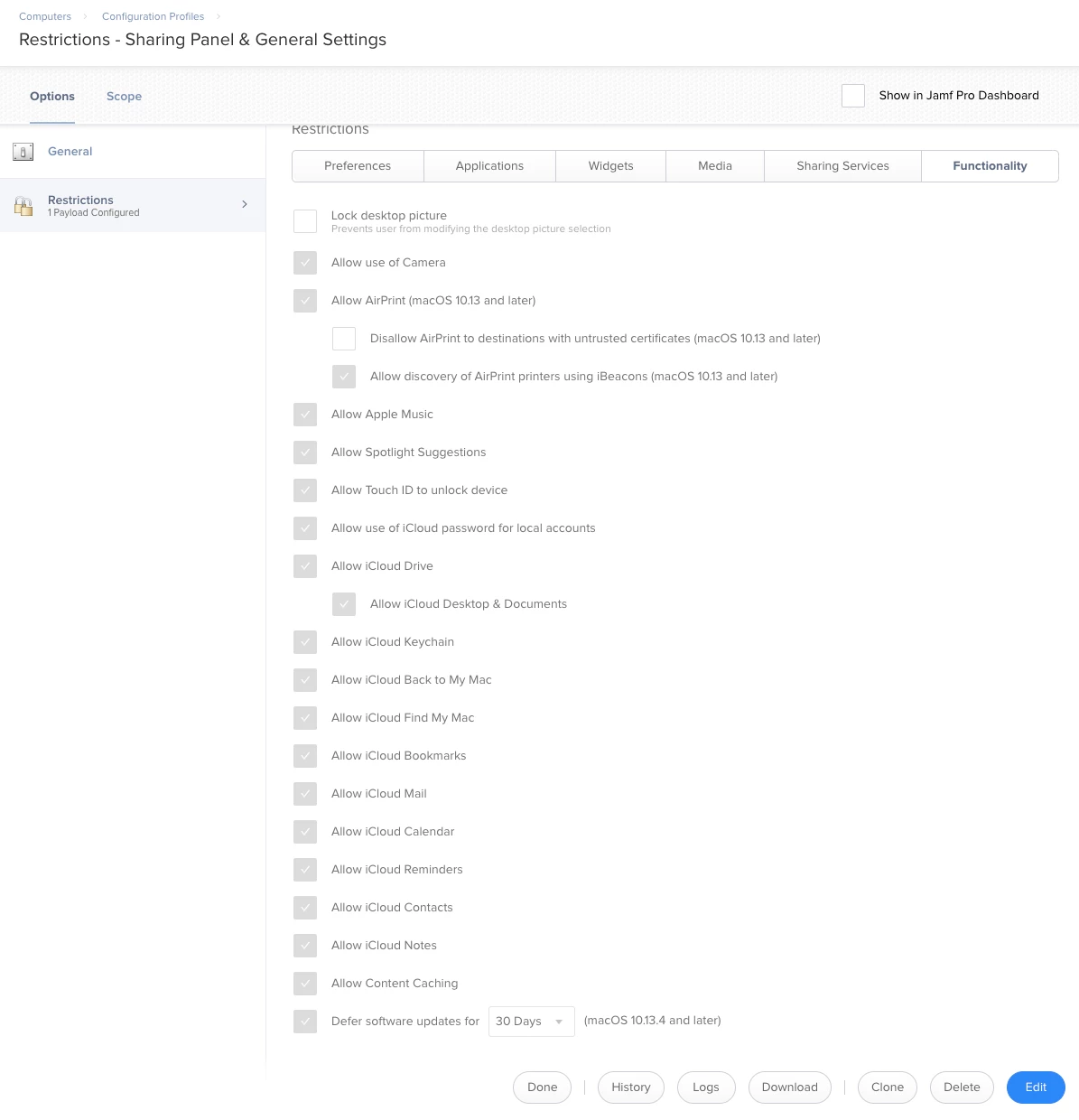
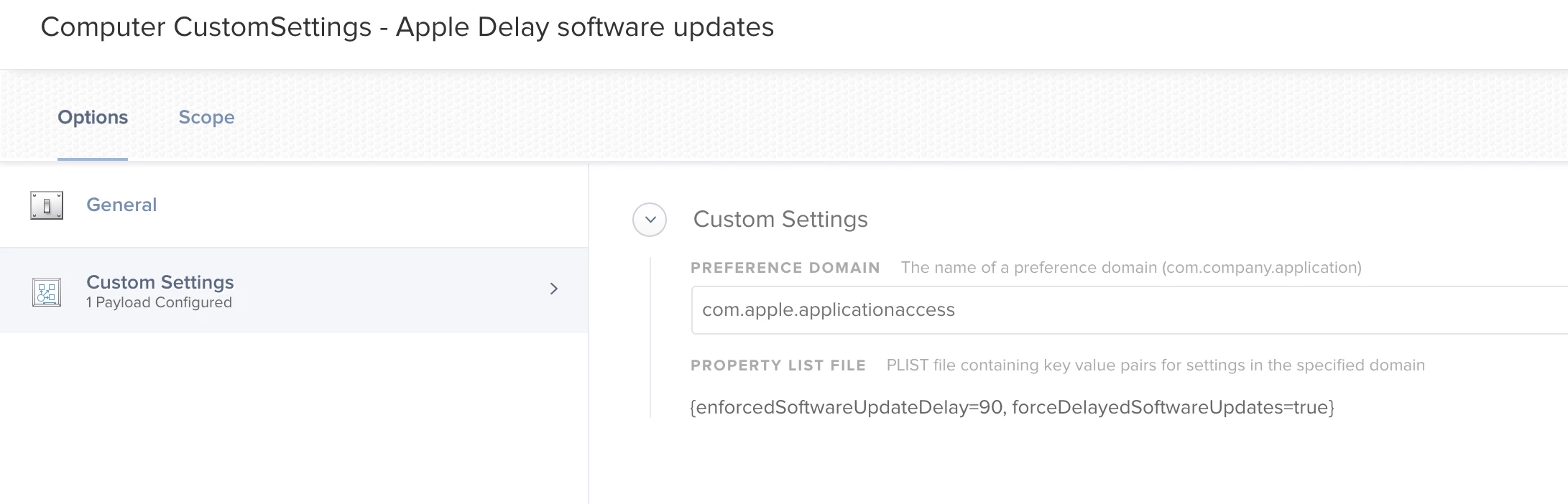
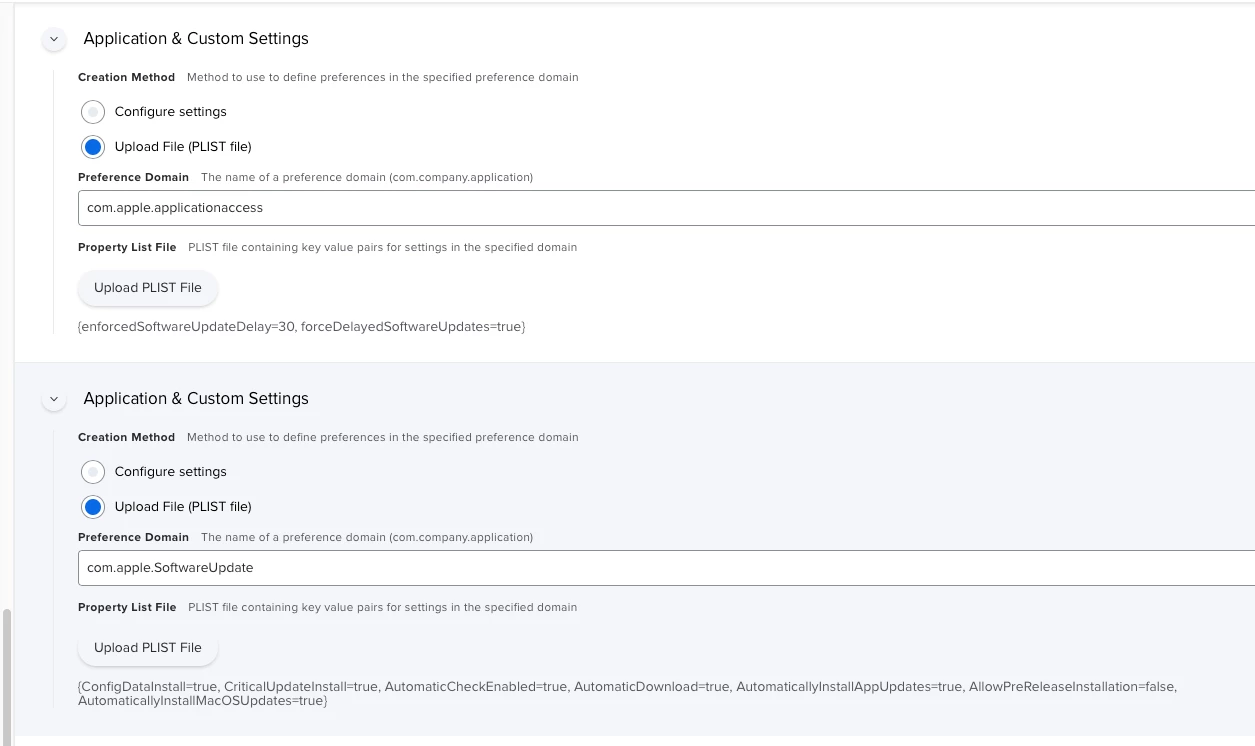
MacOS 10.13 provides support for deferred software updates.
Where did we see that deferring updates will only be 10.13.4 or later?
The article seems to show "defer" info for FileVault 2 and Content Caching Payload.
But yea, if we use Configuration Profile > Restrictions > Functionality > [x] Defer software updates for 90 days the other keys will be set or unset...so really should be a separate payload or key that we can set (digging around now).
I actually need more than 90 days, which I've told to my Apple SE and others many many times. I work at a school, where we update our iOS once per year, in the summer. Period, end of story. Zero flexibility on this as the staff members that maintain iOS devices (myself) don't have time to dick around with iOS upgrades at any time other than the summer. Nor do I want a kindergartner to accidentally upgrade an iPad from iOS 10 to 11, or 11 to 12, etc.
I don't give a flying f-bomb if this makes my iOS devices "less secure". They are all heavily managed, supervised, and monitored. They do not leave our campuses. Why can't I have the option to manage my iOS devices on my own schedule. Why must we be beholden to some arbitrary upgrade schedule determined by Apple? Everyone talks about Apple becoming more friendly to Enterprise. Nonsense. They need to start listening to those of us in the trenches and not giving us half or partial solutions that don't actually work with our schedule.
Currently, I block the mesu.apple.com URLs at our firewall, but I'm not confident this will be a working solution forever.
Rusty - are you scoped correctly with that config profile? Also, are the devices at least 11.3? If a device has an iOS version earlier than 11.3 then they will be able to update even if scoped correctly. Our 11.3+ devices are being deferred.
Seeing the same on MacOS. Safari 12 just got deployed to 3000 macs at my organization. Okta integration is broken. Config profile is definitely installed and scoped.
But yea, if we use Configuration Profile > Restrictions > Functionality > [x] Defer software updates for 90 days the other keys will be set or unset...so really should be a separate payload or key that we can set (digging around now).
I have been looking into this as well and I haven't found a good way of independently managing the software update settings apart from our other Restrictions payload. Did you ever find anything from your digging?
The behavior should be that each update is "invisible" from the day it's released until the number of days you've specified has passed. I don't believe the softwareupdate command will see these until then.
I've applied a custom PLIST as described by @donmontalvo above and can't seem to get it to work. Creating a new profile with the Restrictions payload does work but I'd rather not duplicate settings and run into a possible conflict down the line.
Has anyone been able to get the custom PLIST setting to work? I do see the entries show up in /Library/Managed Preferences/com.apple.applicationaccess, but they just don't seem to do anything.
Verified by scoping the PLIST config profile to one machine on 10.14.6, the restrictions payload on another. PLIST machine showed the new supplemental update, the restrictions payload machine did not.
Another option is to unsign the restrictions configuration profile, strip out the parts I don't need, sign it and upload to Jamf. However, the last time I did this the signing certificate downloaded from Jamf expired after a year, resulting in my profile showing 'Unverified' which is less than ideal.
I actually need more than 90 days, which I've told to my Apple SE and others many many times. I work at a school, where we update our iOS once per year, in the summer. Period, end of story. Zero flexibility on this as the staff members that maintain iOS devices (myself) don't have time to dick around with iOS upgrades at any time other than the summer. Nor do I want a kindergartner to accidentally upgrade an iPad from iOS 10 to 11, or 11 to 12, etc.
I don't give a flying f-bomb if this makes my iOS devices "less secure". They are all heavily managed, supervised, and monitored. They do not leave our campuses. Why can't I have the option to manage my iOS devices on my own schedule. Why must we be beholden to some arbitrary upgrade schedule determined by Apple? Everyone talks about Apple becoming more friendly to Enterprise. Nonsense. They need to start listening to those of us in the trenches and not giving us half or partial solutions that don't actually work with our schedule.
Currently, I block the mesu.apple.com URLs at our firewall, but I'm not confident this will be a working solution forever.
Hi damienbarrett,
May I know to forcely update the software update into users system, if the user is not installing the latest version? Is there any option like that if jamf pro? If yes, Can you tell me how to deploy or configure it in jamf pro?


 +21
+21