Answer

Delete all files & folders in directory except for one folder

  • January 14, 2019
  • 9 replies
  • 90 views

Forum|alt.badge.img+3
  • New Contributor

!/bin/bash

rm -rf /Users/user/Documents/
rm -rf /Users/user/Downloads/

rm -rf /Users/user/Desktop/
rm -rf /Users/user/Pictures/

rm -rf /Users/user/Music/*

exit 0

*Hi all,

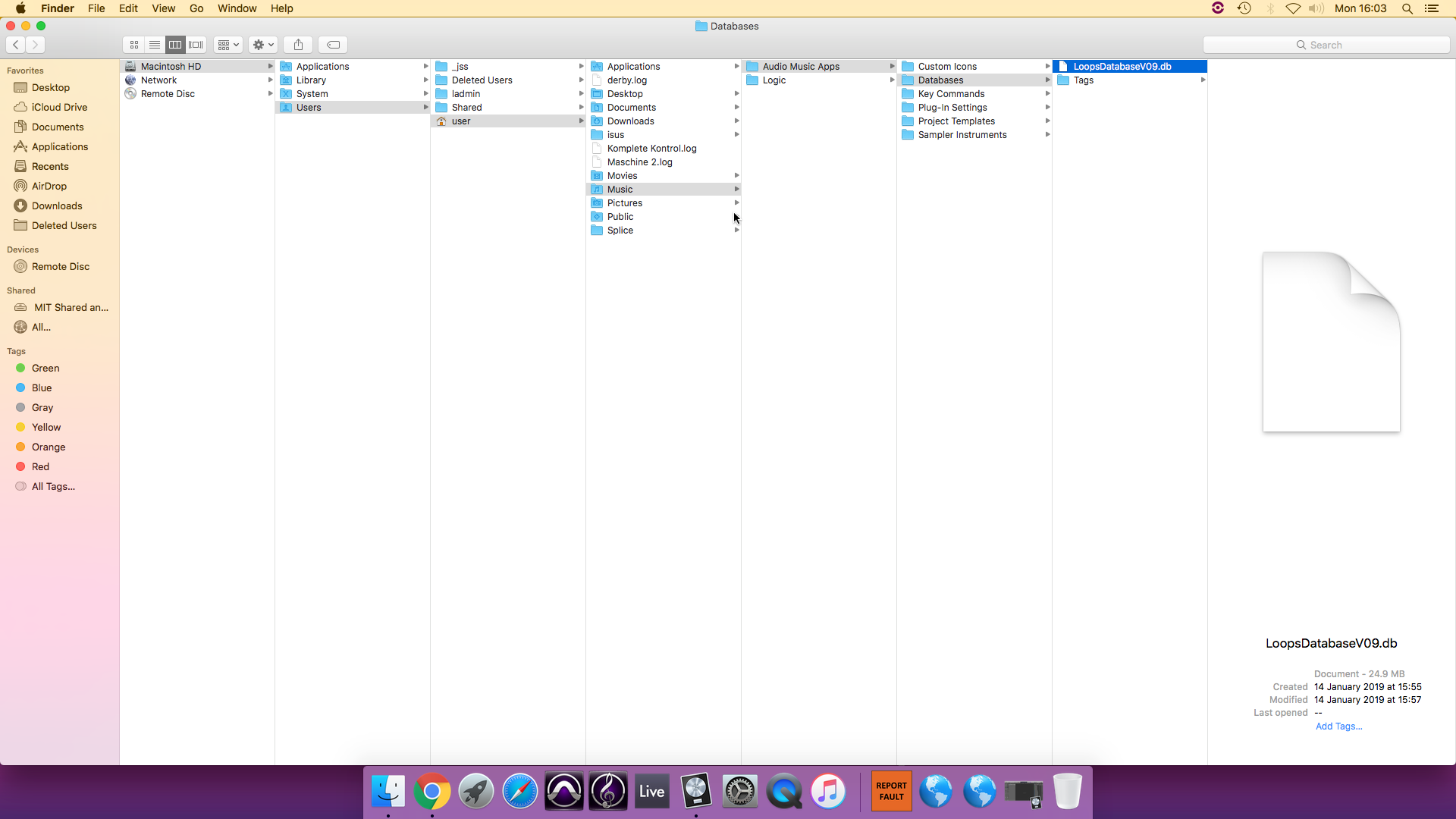
First time posting here, so apologies if this has already been posted before. We are currently using the script above to delete unwanted files created by students in our institution. However, we'd like to exclude a sub-directory called 'Apple Music Apps' within directory /Users/user/Music which has a file called 'LoopsDatabaseV09.db' which we don't want to delete.

Any help is greatly appreciated
Thank you

Best answer by ryan_ball

@sudhan Try this out.

First delete the files except the one you want to keep:

find /Users/user/Music ! -name "LoopsDatabaseV09.db" -type f -exec rm "{}" ;

Then delete the empty directories recursively:

find /Users/user/Music -type d -exec rmdir -p {} ;

This should leave LoopsDatabaseV09.db in the same directory it was originally located.

9 replies

dan-snelson
Forum|alt.badge.img+28
  • Honored Contributor
  • January 14, 2019

@sudhan Completely untested, but something like rm -rf /Users/user/Music/* !('LoopsDatabaseV09.db') should work.


Forum|alt.badge.img+3
  • Author
  • New Contributor
  • January 15, 2019

Hi @dan-snelson

Thank you for your instant reply. I tried your script and unfortunately, it's not working for us.

Please see the attached image.

Thank you once again.


Forum|alt.badge.img+12
  • Valued Contributor
  • January 15, 2019

I would set the system immutable flag for LoopsDatabaseV09.db with "sudo chflags simmutable $pathToFile". With that set even a "sudo rm -rf $pathToFile" will fail, and the file and its parent directories will survive. The downside is that the rm will create an error message.

A "sudo chflags nosimmutable $pathToFile" is needed to make the file 'removable' again.


Forum|alt.badge.img+18
  • Contributor
  • Answer
  • January 15, 2019

@sudhan Try this out.

First delete the files except the one you want to keep:

find /Users/user/Music ! -name "LoopsDatabaseV09.db" -type f -exec rm "{}" ;

Then delete the empty directories recursively:

find /Users/user/Music -type d -exec rmdir -p {} ;

This should leave LoopsDatabaseV09.db in the same directory it was originally located.


Forum|alt.badge.img+3
  • Author
  • New Contributor
  • January 15, 2019

Hi @mschroder ,

Thank you for getting back. I apologies, but what you are suggesting it bit beyond my basic knowledge of JAMF. But thank you anyway for your suggestion.


Forum|alt.badge.img+3
  • Author
  • New Contributor
  • January 15, 2019

Hi @ryan.ball ,

IT WORKED!!!!!!!!! Thank you also for getting back. Really appreciate your help. Hope this is also helpful for anyone else who's having the same issue.

Best wishes,
Sudhan


Forum|alt.badge.img+5
  • Contributor
  • August 7, 2021

Hi @ryan.ball ,

IT WORKED!!!!!!!!! Thank you also for getting back. Really appreciate your help. Hope this is also helpful for anyone else who's having the same issue.

Best wishes,
Sudhan


Why are you trying to do this? The Loops should be a shared resource available to all users. It seems like you have multiple accounts that might be downloading multiple loops into personal accounts. The better move would be to move all loops into the shared loops directory.


Forum|alt.badge.img+12
  • Valued Contributor
  • January 12, 2022

@sudhan Try this out.

First delete the files except the one you want to keep:

find /Users/user/Music ! -name "LoopsDatabaseV09.db" -type f -exec rm "{}" ;

Then delete the empty directories recursively:

find /Users/user/Music -type d -exec rmdir -p {} ;

This should leave LoopsDatabaseV09.db in the same directory it was originally located.


Giving error.

find /Users ! -name "administrator" -type d -exec rm "{}" ;

find: -exec: no terminating ";" or "+"


Forum|alt.badge.img+1
  • New Contributor
  • August 11, 2022

Giving error.

find /Users ! -name "administrator" -type d -exec rm "{}" ;

find: -exec: no terminating ";" or "+"


Mine is also giving error:

1:233: execution error: find: -exec: no terminating ";" or "+"
find: -exec: no terminating ";" or "+" (1)

Here is my script

#!/bin/bash

lastUser=`defaults read /Library/Preferences/com.apple.loginwindow lastUserName`

find /Users/$lastUser/Desktop ! -name "1.jpg" -type f -exec rm "{}" ;
find /Users/$lastUser/Desktop -type d -exec rmdir -p {} ;