Question

Delete or Disable Safari Password Storage

  • April 17, 2018
  • 5 replies
  • 79 views

Forum|alt.badge.img+6

Does anyone currently do this or know of a way to disable Safari from storing passwords? I know you can disable Autofill but that doesn't eliminate what is already stored prior to disabling it. I am aware they are stored in keychain as web form passwords but i don't see any sort of terminal command to eliminate it like "security find-internet-password -D "google.com"

5 replies

Forum|alt.badge.img+26
  • Valued Contributor
  • April 17, 2018

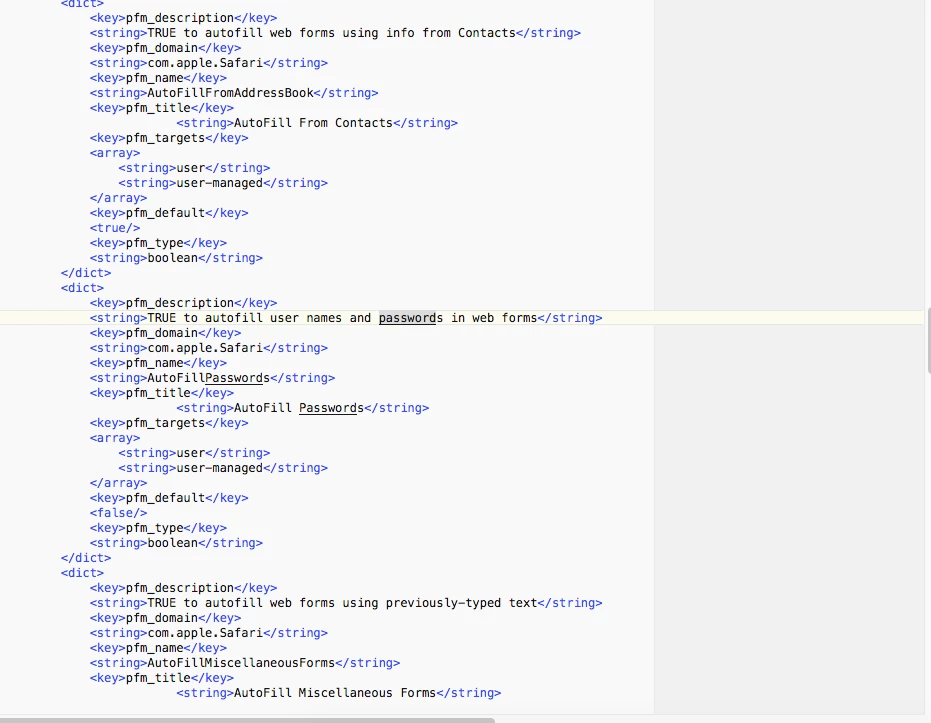
I'm able to see in the preference manifest for Safari that there seems to be a key that controls that. Maybe try using custom payloads based on one of these.


Forum|alt.badge.img+6
  • Author
  • Contributor
  • April 17, 2018

It looks like that disables AutoFill but it doesn't seem to delete the stored passwords that already exist but i'll give it another try!


Forum|alt.badge.img+1
  • New Contributor
  • April 30, 2018

So, with Autofill disabled via a profile, Safari still suggests passwords and still stores them. It won't 'fill' this info, but I don't want password suggestions or Safari to store any passwords.. Any suggestions?


Forum|alt.badge.img+1
  • New Contributor
  • April 30, 2018

Reset after the settings change: hold down the home button along with the power button until you see the Apple, then let go for : ShowBox Lucky Patcher Kodi too.


Forum|alt.badge.img+1
  • New Contributor
  • May 2, 2018

@zimou13 is this in reply to my question? I'm not sure how this is relevant to password store in Safari? Also.. whats a 'home' button?