Question

Detect Duo Appliation installed for smart group

  • November 17, 2020
  • 7 replies
  • 28 views

Forum|alt.badge.img+3

Hi, we roll out Duo 2FA to our fleet, we install it via jamf and it comes up as this plist file com.duosecurity.maclogon.plist. /private/var/root/Library/Preferences/com.duosecurity.maclogon.plist

Does anyone have a way I can view this application and create a smart group if it is in fact installed or get it to show in inventory? Any advice is appreciated. TIA.

7 replies

WilsonFredonia
Forum|alt.badge.img+4
  • Contributor
  • 14 replies
  • December 3, 2020

Hi Bryan,
I am testing making an extension attribute for this purpose and will follow up once I see how well it works.
Matt


Forum|alt.badge.img+2
  • New Contributor
  • 2 replies
  • January 4, 2022

hi Wilson, were you able to get this working?


WilsonFredonia
Forum|alt.badge.img+4
  • Contributor
  • 14 replies
  • January 4, 2022

hi Wilson, were you able to get this working?


Hi Juan,

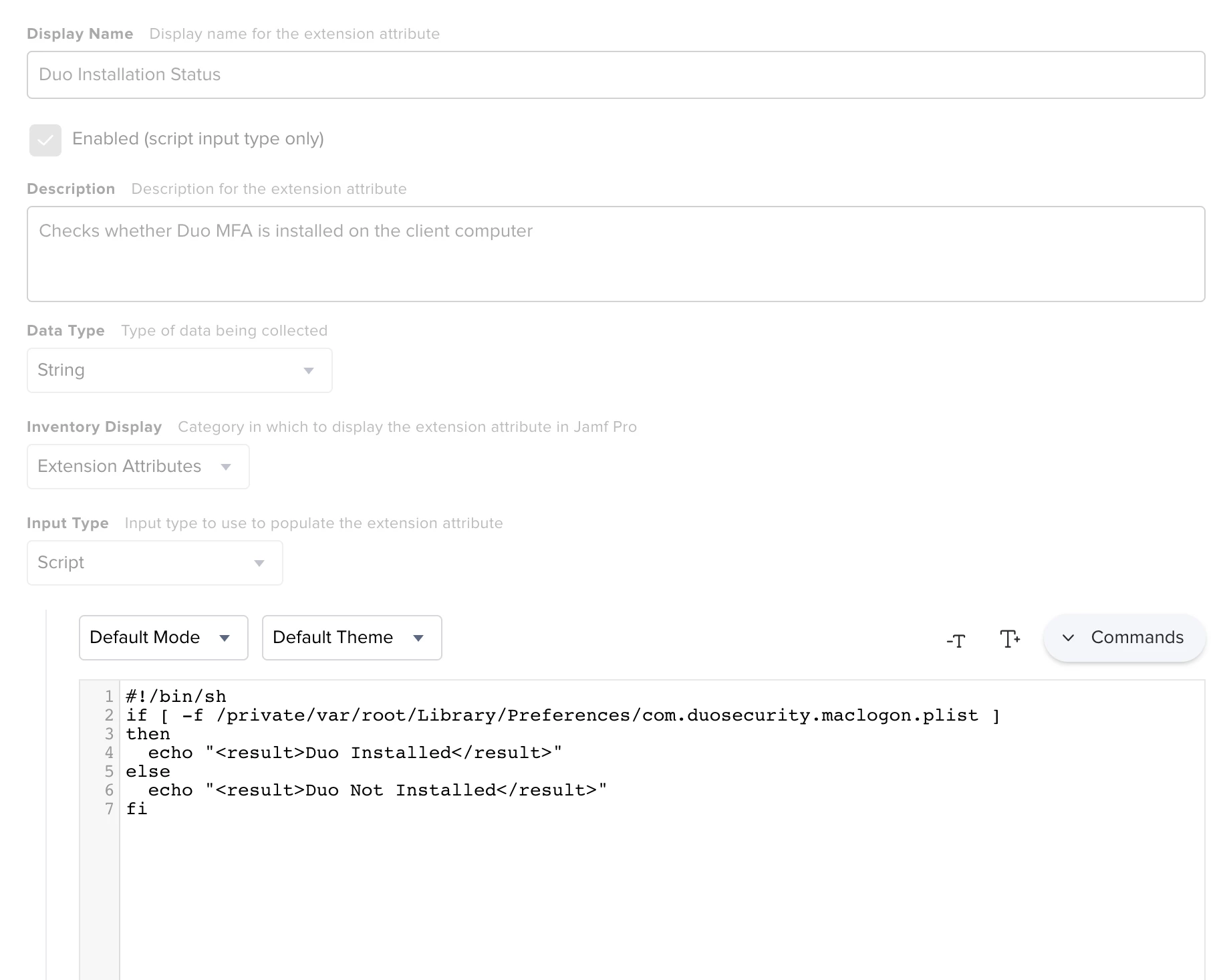
Yes, me and my colleague were able to get this working with the following script outputting a string. I was then able to create a smart group based off the EA and the OS version to make sure we updated the computers that were falling out of support.

#!/bin/sh if [ -f /private/var/root/Library/Preferences/com.duosecurity.maclogon.plist ] then echo "<result>Duo Installed</result>" else echo "<result>Duo Not Installed</result>" fi


Forum|alt.badge.img+3
  • Author
  • New Contributor
  • 6 replies
  • February 1, 2022

Hi Juan,

Yes, me and my colleague were able to get this working with the following script outputting a string. I was then able to create a smart group based off the EA and the OS version to make sure we updated the computers that were falling out of support.

#!/bin/sh if [ -f /private/var/root/Library/Preferences/com.duosecurity.maclogon.plist ] then echo "<result>Duo Installed</result>" else echo "<result>Duo Not Installed</result>" fi


This is great. 

Do you run that script on  your fleet? and then use the smart group?


WilsonFredonia
Forum|alt.badge.img+4
  • Contributor
  • 14 replies
  • February 1, 2022

This is great. 

Do you run that script on  your fleet? and then use the smart group?


The script is in the Extension Attribute portion of Jamf so that runs automatically across the fleet and then populates that portion of the inventory. I can then configure the Smart Group to populate based off of the EA response.


Forum|alt.badge.img+3
  • Author
  • New Contributor
  • 6 replies
  • February 1, 2022

This sounds promising, Can you elaborate on the Extension Attribute?

I see how to make one just not sure where I would input the bash script?  


WilsonFredonia
Forum|alt.badge.img+4
  • Contributor
  • 14 replies
  • February 1, 2022

This sounds promising, Can you elaborate on the Extension Attribute?

I see how to make one just not sure where I would input the bash script?  


Below is what the EA looks like as ours is configured. Here is Jamf's documentation on creating EAs