Question

Disable Local Remote Management

  • May 14, 2024
  • 5 replies
  • 121 views

bobson
Forum|alt.badge.img+1

We ran into an issue where one of the higher-ups within our organization was having printer troubles and one of our technicians remotely logged into their Mac with the managed admin credentials. The higher-up took issue with this as the user's account does contain sensitive documents and they're not a fan of the possibility that anyone in our department is able to remotely log in using the Screen Sharing app. Any ideas on how to designate Jamf Remote Assist as the only RD software and possibly disable or remove Screen Sharing capabilities without completely disabling RD? Ideally, the end-user would have to allow the screen sharing session and the Screen Sharing app allows any user to connect if they have the correct admin credentials.

5 replies

stevewood
Forum|alt.badge.img+35
  • Hall of Fame
  • May 14, 2024

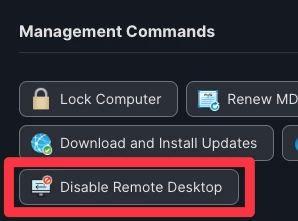
If you use the Disable Remote Desktop button under Management Commands on the Management tab of a computer record, that will disable Screen Sharing (and VNC). 


AJPinto
Forum|alt.badge.img+26
  • Legendary Contributor
  • May 14, 2024

If you guys need more access control in connecting to remote devices, you likely need a tool like Beyond Trust Remove Support, or Team Viewer. I would have larger conversations about this issue before making any decisions. 


talkingmoose
Forum|alt.badge.img+36
  • Community Manager
  • May 14, 2024

Anyone with admin privileges will be able to access anything on a user's computer regardless of whether they're using remote control software, command line tools, or even management systems like Jamf Pro. That's the nature of support.

Can that support be abused? Yes. This is why you hire trustworthy professionals and you put mechanisms in place to audit what they can do.

This is probably where you'll need to educate your higher-up and your staff.

  1. Make sure everyone (including those you support) understands Apple's measures to protect privacy.
  2. From this, your end users should know they can themselves turn off Apple's built-in screen sharing and that no one can remotely turn it back on again without them knowing and approving a connection.
  3. If your IT person turned it on beforehand without alerting the end user, they should be instructed to stop this practice. It's insecure and, as you can see, leads to a sense of distrust.
  4. Inform your end user that Jamf Remote Assist sessions are audited. While you can't prevent an administrator from connecting and operating on the computer, you will at least have a record of it when it happens.
  5. If you're using other remote desktop software, I recommend vetting whether it provides auditing. For example, Apple Remote Desktop doesn't provide centralized auditing. I'd recommend ceasing its use for end user support. It's just fine for managing unattended computers.
  6. Create a policy for your end users detailing how you'll use remote access software and publish it. (Consider doing this with your end users to address any concerns they may have.) Then hold yourselves to it. No exceptions. Or you're inviting distrust again.

As you can see, I'm approaching this as a people issue not a technical issue. You can't be both an administrator and non-administrator. But you can you can set expectations and use technology to hold yourselves accountable.


Forum|alt.badge.img
  • New Contributor
  • May 24, 2024

If you hide the local admin account, only User allowed sessions can occur


Forum|alt.badge.img
  • New Contributor
  • June 3, 2024

Thank you so much for the suggestion.