Question

Disable VNC in "Connect To:" option and only use Casper Remote

  • January 14, 2016
  • 9 replies
  • 47 views

rqomsiya
Forum|alt.badge.img+12

Hi all,

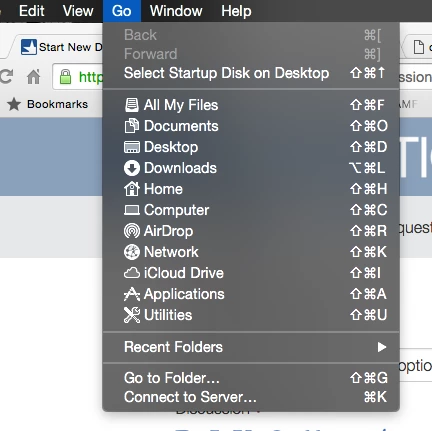
I'm trying to disable the ability for tech support to use the "Connect To Server" option in Yosemite. I want tech support to only use Casper Remote to remote in to users machines so they are prompted to accept the remote connection. When using VNC option in the "Connect To Server" and the tech enters the admin username/password, users aren't prompted to accept/allow the remote session.

Any ideas?

9 replies

kilodelta8
Forum|alt.badge.img+8
  • Contributor
  • January 14, 2016

Easy enough! You'll need to run the following on Technician Macs:

defaults write com.apple.finder ProhibitConnectTo -bool true

You'll also need to restart Finder - either using the killall Finder command, or by restarting the Mac.

To re-enable the Menu, just change that true flag to false.


apizz
Forum|alt.badge.img+15
  • Honored Contributor
  • January 14, 2016

We have a local standard account on all our machines which we set in Sharing to be the only account which can remotely access our managed machines, so you have to know the account password in order to use VNC.

In your case if you didn't want anyone to be able to remotely connect to your managed computers just set the Remote Management setting in Sys Prefs to Only these users: and leave the user field blank.


apizz
Forum|alt.badge.img+15
  • Honored Contributor
  • January 14, 2016

@kilodelta's solution is an interesting one, but then if your techs are admins on their machines they could just run the same commands to undo what you did to disable Connect To in the first place.

Even if they're not admins, if they ever needed to connect to any sharepoints or anything like that they wouldn't be able to, which could be a problem.


rqomsiya
Forum|alt.badge.img+12
  • Author
  • Honored Contributor
  • January 14, 2016

Yea i don't want to completely disable the "Connect To Server" option which is how we connect to our team share drives.

@aporlebeke : So I currently have the local admin account listed under "only these users:". If i remove that, will that break anything else?


mm2270
Forum|alt.badge.img+24
  • Legendary Contributor
  • January 14, 2016

Its a Configuration Profile option, so just use that instead of a local command. In the "Finder" payload, click on "Commands" -

We don't use this, but I believe that should be doing the same thing as the defaults command, but since its being deployed as a Config Profile option, they shouldn't be able to override it with a Terminal command.


rqomsiya
Forum|alt.badge.img+12
  • Author
  • Honored Contributor
  • January 14, 2016

I just want to disable the ability for my techs to VNC into a users machines without them being prompted. When they use Casper remote, it prompts them to allow/deny the connection (which is what i want).

Sorry for the confusion :/


bpavlov
Forum|alt.badge.img+18
  • Esteemed Contributor
  • January 14, 2016

@rqomsiyaJust to throw a bit of a monkey wrench in what you're trying to accomplish:
you can also open Safari and type vnc://1.2.3.4
you can also open terminal and type open vnc://1.2.3.4 (this is one is my favorite to use)
There are probably other methods too I'm sure.

And just wanted to add, these have been in OS X for quite some time. At least since 10.6.

You are trying to block one way of doing something that can be done in multiple ways. There may be a technical solution by only allowing specific users and leaving that blank. But ultimately, like it's been mentioned if techs have admin access then what you have is a social / corporate policy problem for which technical solutions may not work 100%.


apizz
Forum|alt.badge.img+15
  • Honored Contributor
  • January 14, 2016

@rqomsiya to my knowledge, that shouldn't mess anything else up but I'm not 100% certain. If you have a test machine / environment I'd say that'd be the best way to be sure.

As an admin though, I would at least want a way for me to VNC into machines if no one else. In your case that sounds like it would require you to configure a new standard user account on all your machines and giving only that user management rights.

I mention having a way just for use to connect to machines via VNC because I know there have been a few situations where I've tried to remotely connect to a machine via Casper Remote, but because the IP address in the JSS inventory was no longer accurate I could not connect until inventory was updated and the IP reflected the machine's updated address. To get around that I changed inventory updates from 1 week to once a day, but you could do something on the network side of things to make that a non-issue.


rqomsiya
Forum|alt.badge.img+12
  • Author
  • Honored Contributor
  • January 15, 2016

So i was able to figure out a way to disable just the VNC option of remote management.

Essentially what it does is disable the "Observe and Control" options.

Thanks all for your feedback and help! Much appreciated!

#!/bin/bash

sudo /System/Library/CoreServices/RemoteManagement/ARDAgent.app/Contents/Resources/kickstart -configure -users cgadmin -access -on -privs -DeleteFiles -TextMessages -ShowObserve -OpenQuitApps -GenerateReports -RestartShutDown -SendFiles -ChangeSettings 

exit 0