Question

Disabling iCloud/Siri/etc. in Apple Setup Assistant

  • February 6, 2017
  • 7 replies
  • 28 views

Forum|alt.badge.img+5

We are trying to disable the Apple ID and Siri screens of the Apple Setup Assistant on first boot and have not been successful.

Most of the discussions on this issue have been around disabling these prompts when a new user logs in. We actually want to keep the Apple Setup Assistant as-is for freshly imaged machines in order to keep the setup process as close to our DEP workflow.

Does anyone know what DEP does to actually skip steps in the Apple Setup Assistant and if it can be done via the shell for non-DEP'd machines?

7 replies

rqomsiya
Forum|alt.badge.img+12
  • Honored Contributor
  • February 6, 2017

We've been having the same issue here where the configuration profile within the JAMF payload doesn't take. Any one have any working solutions?


Forum|alt.badge.img+1
  • New Contributor
  • May 15, 2017

Having the same issue as well. Using Rich Trouton's "initial setup script" but still presents AppleID and Siri on first user logon.


Forum|alt.badge.img+6
  • Contributor
  • May 18, 2017

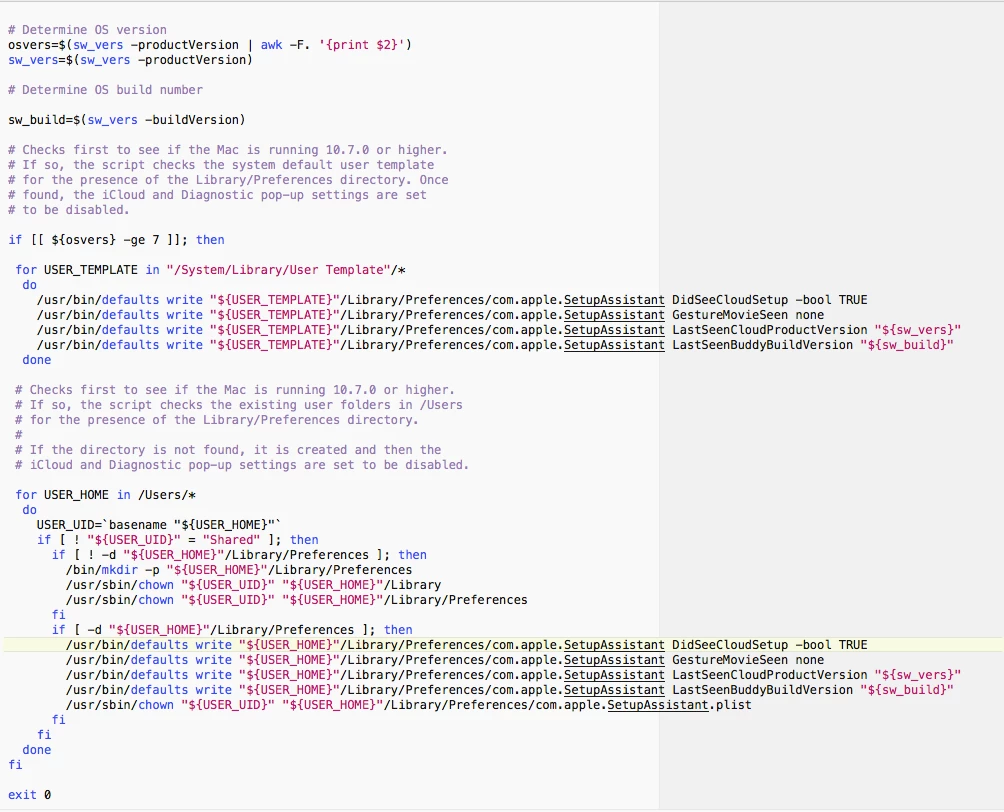
I use a script to disable the setup assistant which works on Sierra as well as El Capitan. It bypasses Siri as well.


Forum|alt.badge.img+6
  • Contributor
  • May 18, 2017

My apologies as I can't remember where I got this from, so I can't give proper credit for the script. I believe I found it here on jamf Nation.


Forum|alt.badge.img+13
  • Honored Contributor
  • May 18, 2017

I have used Rich's scripts including updated versions up to 10.12.4 as part of my first boot script successfully. @kmabe your script is the old one as there is no info for Siri, in particular:

/usr/bin/defaults write "${USER_TEMPLATE}"/Library/Preferences/com.apple.SetupAssistant DidSeeSiriSetup -bool TRUE
 /usr/bin/defaults write "${USER_HOME}"/Library/Preferences/com.apple.SetupAssistant DidSeeSiriSetup -bool TRUE

Forum|alt.badge.img+6
  • Contributor
  • May 19, 2017

@LSinNY, I understand it doesn't mention Siri, but I am running it on 10.12.5 and it still bypasses Siri when an AD user logs in. It bypasses all setup.


Forum|alt.badge.img+3
  • New Contributor
  • December 29, 2017

@kmabe,
Would you mind sharing your script and setup process?
I have been doing everything manaully via login scripts with old style workgroup manager...
We have moved to Jamf and am learning.