Solved

Displaylink:- Auto Launch Greyed out

  • July 13, 2022
  • 8 replies
  • 52 views

Forum|alt.badge.img+4

Hello All,

Please help me a payload to upload in jamf pro to grey out "Launch Automatically after login" option under DisplayLink.

Thank you.

 

Best answer by Hugonaut

Deploy this as a launch agent


<?xml version="1.0" encoding="UTF-8"?> <!DOCTYPE plist PUBLIC "-//Apple//DTD PLIST 1.0//EN" "http://www.apple.com/DTDs/PropertyList-1.0.dtd"> <plist version="1.0"> <dict> <key>Label</key> <string>com.loginitem.displaylink</string> <key>LimitLoadToSessionType</key> <string>Aqua</string> <key>ProgramArguments</key> <array> <string>/usr/bin/open</string> <string>/Applications/DisplayLink Manager.app</string> </array> <key>RunAtLoad</key> <true/> </dict> </plist>


8 replies

Hugonaut
Forum|alt.badge.img+15
  • Esteemed Contributor
  • Answer
  • July 13, 2022

Deploy this as a launch agent


<?xml version="1.0" encoding="UTF-8"?> <!DOCTYPE plist PUBLIC "-//Apple//DTD PLIST 1.0//EN" "http://www.apple.com/DTDs/PropertyList-1.0.dtd"> <plist version="1.0"> <dict> <key>Label</key> <string>com.loginitem.displaylink</string> <key>LimitLoadToSessionType</key> <string>Aqua</string> <key>ProgramArguments</key> <array> <string>/usr/bin/open</string> <string>/Applications/DisplayLink Manager.app</string> </array> <key>RunAtLoad</key> <true/> </dict> </plist>


Forum|alt.badge.img+2
  • New Contributor
  • July 14, 2022

Uploaded the following plist configuration to our devices and worked it like a charm:


<?xml version="1.0" encoding="UTF-8"?> <!DOCTYPE plist PUBLIC "-//Apple//DTD PLIST 1.0//EN" "http://www.apple.com/DTDs/PropertyList-1.0.dtd"> <plist version="1.0"> <dict> <key>AppAutostart</key> <string>1</string> </dict> </plist>


You can upload it to the "Application & Custom Settings" payload in a configuration profile - Just use the 

com.displaylink.DisplayLinkUserAgent as the "Preference Domain" 
 

Forum|alt.badge.img+4
  • Author
  • Contributor
  • July 15, 2022

Uploaded the following plist configuration to our devices and worked it like a charm:


<?xml version="1.0" encoding="UTF-8"?> <!DOCTYPE plist PUBLIC "-//Apple//DTD PLIST 1.0//EN" "http://www.apple.com/DTDs/PropertyList-1.0.dtd"> <plist version="1.0"> <dict> <key>AppAutostart</key> <string>1</string> </dict> </plist>


You can upload it to the "Application & Custom Settings" payload in a configuration profile - Just use the 

com.displaylink.DisplayLinkUserAgent as the "Preference Domain" 
 

Hello Mea,

After pushing the payload suggested. We re-started the machine and checked. still "Launch Automatically after login" is not greyed out.


Forum|alt.badge.img+2
  • New Contributor
  • August 1, 2022

Hello Mea,

After pushing the payload suggested. We re-started the machine and checked. still "Launch Automatically after login" is not greyed out.


Sorry about the late reply.

This profile will not grey out the option, it will just automatically enabled the option - The user can disable the option and it will stay disabled until either an reboot or an restart of the DisplayLink app.

It's not a perfect solution, but it's the best one that I have found so far :-)


Forum|alt.badge.img+8
  • Contributor
  • August 19, 2022

Uploaded the following plist configuration to our devices and worked it like a charm:


<?xml version="1.0" encoding="UTF-8"?> <!DOCTYPE plist PUBLIC "-//Apple//DTD PLIST 1.0//EN" "http://www.apple.com/DTDs/PropertyList-1.0.dtd"> <plist version="1.0"> <dict> <key>AppAutostart</key> <string>1</string> </dict> </plist>


You can upload it to the "Application & Custom Settings" payload in a configuration profile - Just use the 

com.displaylink.DisplayLinkUserAgent as the "Preference Domain" 
 

Curiously, the plist for the Auto start (located here: /Users/USERNAME/Library/Containers/com.displaylink.DisplayLinkUserAgent/Data/Library/Preferences/com.displaylink.DisplayLinkUserAgent.plist)

- shows a true or false choice. And attempting to manage it via true/false does not work. Using <string>1</string> also results in the app not autolaunching if the user unselects "Launch Automatically after login." I thought the managed preference always takes precedent?


<dict> <key>AppAutostart</key> <true/> </dict>


LouEly87
Forum|alt.badge.img
  • New Contributor
  • February 8, 2023

Deploy this as a launch agent


<?xml version="1.0" encoding="UTF-8"?> <!DOCTYPE plist PUBLIC "-//Apple//DTD PLIST 1.0//EN" "http://www.apple.com/DTDs/PropertyList-1.0.dtd"> <plist version="1.0"> <dict> <key>Label</key> <string>com.loginitem.displaylink</string> <key>LimitLoadToSessionType</key> <string>Aqua</string> <key>ProgramArguments</key> <array> <string>/usr/bin/open</string> <string>/Applications/DisplayLink Manager.app</string> </array> <key>RunAtLoad</key> <true/> </dict> </plist>


Very Very Helpful. Thank you.


Forum|alt.badge.img
  • New Contributor
  • October 20, 2023

The knowledgebase article on deploying with Jamf describes a simpler way. Just start at point 9.
https://support.displaylink.com/knowledgebase/articles/1965404-how-to-deploy-displaylink-macos-software-with-jamf


donmontalvo
Forum|alt.badge.img+36
  • Hall of Fame
  • April 16, 2024

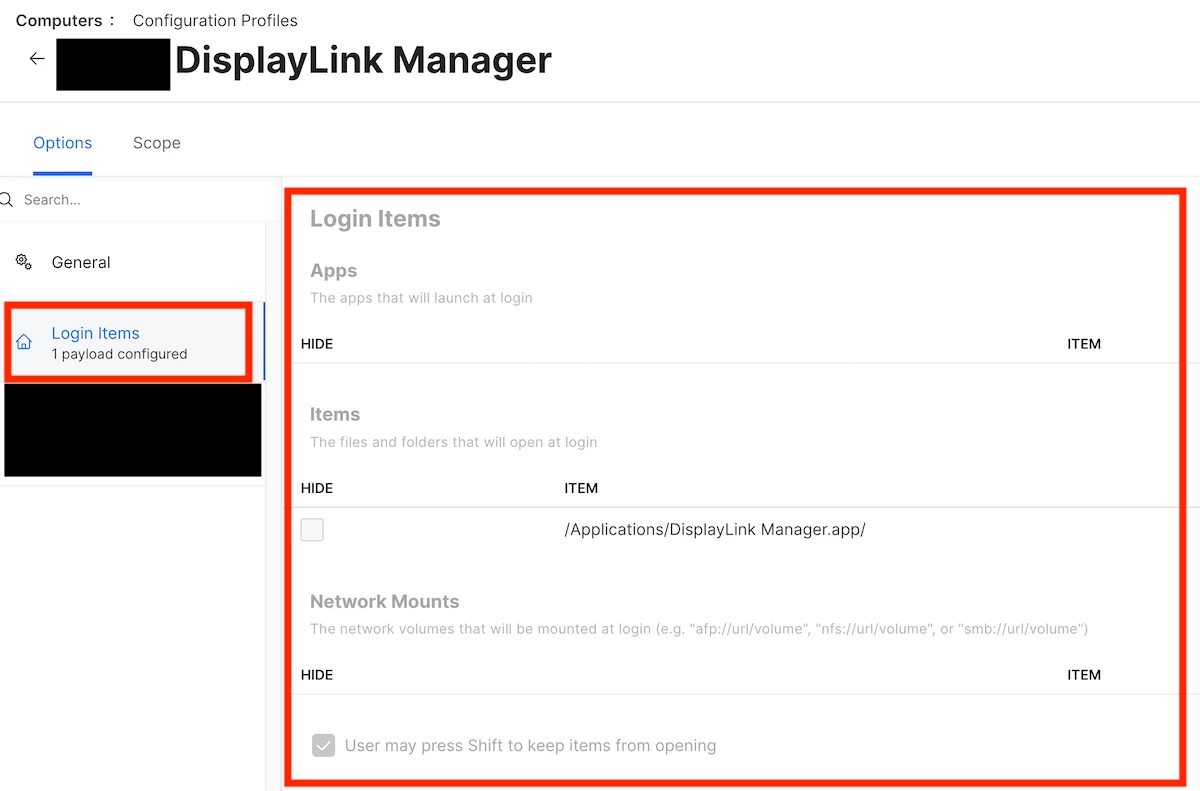
Fast forward, helooooo Login Items payload.