Question

EA for Outlook Add-ins

  • February 25, 2021
  • 22 replies
  • 75 views

Forum|alt.badge.img+10
  • Valued Contributor

With injection add-ins for Outlook being removed in May we would like to know what Outlook Add-ins users may of installed.

Is there a Jamf EA or script to find this out

22 replies

Forum|alt.badge.img+12
  • Valued Contributor
  • February 25, 2021

@MatG To start us off, I have updated EA's that detect Zoom and WebEx injection-based plug-ins on my Github: - WebEx - Zoom

Hope this helps!

Paul.


Forum|alt.badge.img+14
  • Valued Contributor
  • February 25, 2021

@pbowden Is the xml code supposed to be included as part of that? I think I can pull out of that the correct stuff but some might not know how.


Forum|alt.badge.img+12
  • Valued Contributor
  • February 25, 2021

@jhuls ahh, I formatted the file in the Upload format that Jamf expects for EAs. If this is confusing, I can convert it back to a regular shell script.


Forum|alt.badge.img+14
  • Valued Contributor
  • February 25, 2021

Ah, I'll give it a try. Honestly, I've never uploaded EA's so I didn't even think of it. If the script is small and simple enough to look through so I know what it does, I just copy and paste it in otherwise I download it, review, and test it locally first before plugging it into Jamf.

I can work with it either way. Just figured I would mention it in case it wasn't intended to be that way.


Forum|alt.badge.img

Add-ins for Outlook are applications that extend the usefulness of Outlook clients by adding information or tools that your users can use without having to leave Outlook. Add-ins are built by third-party developers and can be installed either from a file or URL or from the Office Store.

tellsubway


john_sherrod
Forum|alt.badge.img+17
  • Valued Contributor
  • April 7, 2021

@MatG Did you find a solution for this? I'd like to create an EA that displays whether or not the Salesforce for Outlook add-in is installed, but so far I can't find where it lives in the Finder.


Forum|alt.badge.img+12
  • Valued Contributor
  • April 9, 2021

@john.sherrod I have an EA on my GitHub that will list all the web-based add-ins that Outlook has loaded. https://github.com/pbowden-msft/ExtensionAttributes/blob/master/Outlook_AddIns.sh
If you're using the Salesforce add-in from AppSource (e.g. https://appsource.microsoft.com/en-us/product/office/wa104379334?tab=overview) this EA will find it.


john_sherrod
Forum|alt.badge.img+17
  • Valued Contributor
  • April 9, 2021

Thank you so much, @pbowden! I've put that into effect and I'm starting to see data populating into my smart group. Weirdly on my Mac I don't have a com.microsoft.Outlook folder in my ~/Library/Containers folder. Do you know why that might be? Outlook is fully functional on my Mac despite that folder not being present. Just curious if there are other Macs in my organization who are also missing that folder.


DBrowning
Forum|alt.badge.img+24
  • Esteemed Contributor
  • April 9, 2021

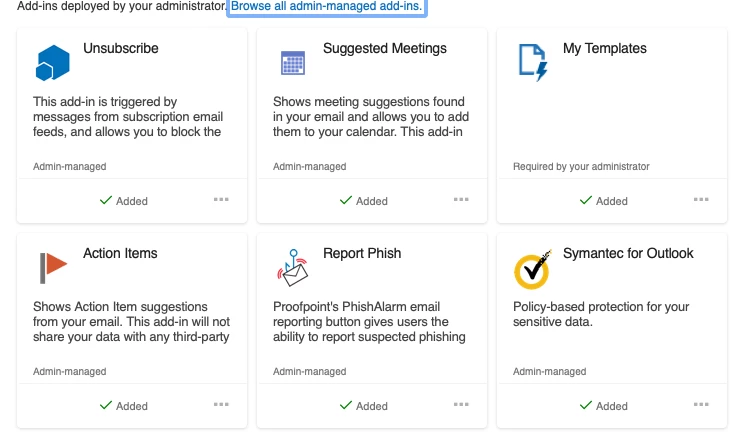
Yes Thank you @pbowden. Maybe I'm missing something, but when I run this on my laptop, I'm getting a result of "None". As you can see in the attached screenshot, I've got 6 add-ins added.

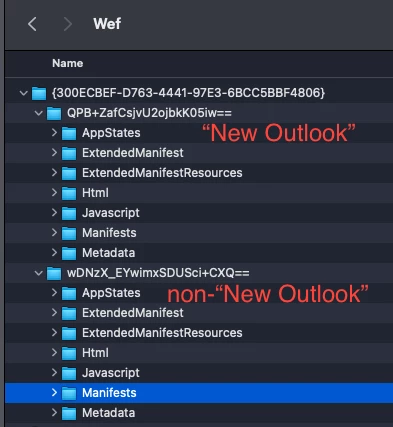
I've also noticed that I've got 2 folders which manifest files can be found. One that seems to be tied to "New Outlook" and the other is the non-"New Outlook".


john_sherrod
Forum|alt.badge.img+17
  • Valued Contributor
  • April 9, 2021

Found it. Mine's in ~/Library/Containers/Microsoft Outlook/Data/Library/Application Support/Microsoft/Office/16.0/Wef. I'll have to modify the EA script to look in both locations.


john_sherrod
Forum|alt.badge.img+17
  • Valued Contributor
  • April 9, 2021

Actually, figured out the issue. Even though it appears in the finder as the file path I listed above, when I drag into Terminal it shows the same file path as what Paul has in his EA script. So everything is working on my end!


Forum|alt.badge.img+12
  • Valued Contributor
  • April 15, 2021

@DBrowning Thanks for alerting me to this scenario! I've made some changes to the logic to account for multiple folders, and to also handle the binary files that New Outlook uses. Can you download the latest script (https://github.com/pbowden-msft/ExtensionAttributes/blob/master/Outlook_AddIns.sh) and let me know your results?

Thanks! Paul.


DBrowning
Forum|alt.badge.img+24
  • Esteemed Contributor
  • April 15, 2021

good news @pbowden!! That is working for my device now!!


Forum|alt.badge.img+12
  • Valued Contributor
  • April 15, 2021

Sweet, thanks for confirming @DBrowning !


john_sherrod
Forum|alt.badge.img+17
  • Valued Contributor
  • April 15, 2021

I can confirm it works for me as well, @pbowden ! Thank you so much!


Forum|alt.badge.img+10
  • Contributor
  • October 18, 2021

This is not working on macOS Monterey. I get two errors.

command substitution: line 28: syntax error near unexpected token `('

command substitution: line 28: `print -lr -- $HOME/Library/Containers/com.microsoft.Outlook/Data/Library/Application\\ Support/Microsoft/Office/16.0/Wef/**/Manifests(om[1,1])'


DBrowning
Forum|alt.badge.img+24
  • Esteemed Contributor
  • October 19, 2021

This is not working on macOS Monterey. I get two errors.

command substitution: line 28: syntax error near unexpected token `('

command substitution: line 28: `print -lr -- $HOME/Library/Containers/com.microsoft.Outlook/Data/Library/Application\\ Support/Microsoft/Office/16.0/Wef/**/Manifests(om[1,1])'


odd.... i've been running the betas of Monterey for a while now and its still working for me....


Forum|alt.badge.img+10
  • Contributor
  • November 10, 2021

odd.... i've been running the betas of Monterey for a while now and its still working for me....


@DBrowning I can now confirm it was a mistake on my part. The scripts works!! 😁


sbiondio4
Forum|alt.badge.img+2
  • New Contributor
  • May 13, 2022

@DBrowning I can now confirm it was a mistake on my part. The scripts works!! 😁


@isradame what did you do to fix that?  I'm getting the same syntax error, but can not figure out where the issues is. Thanks!! 


Forum|alt.badge.img+10
  • Contributor
  • May 13, 2022

@isradame what did you do to fix that?  I'm getting the same syntax error, but can not figure out where the issues is. Thanks!! 


@sbiondio4 I was getting the syntax error when testing using the CodeRunner application. But when I ran the Outlook_AddIns.sh on my test device, it worked.


Forum|alt.badge.img+2
  • New Contributor
  • June 3, 2022

This script works for me, but is there any way to include the version of each add-ins?

thank you


Forum|alt.badge.img+3
  • New Contributor
  • March 25, 2024

Would this EA work if we point to the other office apps to see what Addins it has?