Anyone already create a script to return what kind of drive is installed? Just looking to group machines by SSD or non-SSD.
Gabe Shackney
Princeton Public Schools

Anyone already create a script to return what kind of drive is installed? Just looking to group machines by SSD or non-SSD.
Gabe Shackney
Princeton Public Schools
Best answer by brock_walters
Hey guys -
Here are 2 other versions on the same theme...
I really like the 1st one posted here (1-liners rule!) I used a case statement to customize the output string written to the Extension Attribute field in the JSS but the result is basically the same. This example also shows how to pattern match with just awk alone :
#!/bin/bash
type=$(/usr/sbin/system_profiler SPStorageDataType | /usr/bin/awk '/Medium Type/{print $NF}')
case $type in
       SSD) echo "<result>SSD</result>"
            ;;
Rotational) echo "<result>HDD</result>"
            ;;
esac
Below I'm using a loop & a counter but without having to write arrays to a local file which isn't necessary. I'm sure there are other (better) ways to do this just using awk for parsing but the output is formatted nicely & it shows both internal & external storage devices connected to your computers. The weird sed command string is simply for handling spaces nicely in the volume name & the media name strings.
The JSS already collects this information in the individual device record under Storage, but, this Extension Attribute displays the type (SSD, rotational, etc.) as well as the Volume Name & other pertinent info in 1 place. You could definitely remove lines & collect less data if you intended to create an Extension Attribute to be used as a Smart Group criterion. Happy Extension Attributing!
#!/bin/bash
mountpoint=($(/usr/sbin/system_profiler SPStorageDataType | /usr/bin/awk -F ":" '/Mount Point/{$1="";print $0}' | /usr/bin/sed 's/ /-,--/g'))
mediumtype=($(/usr/sbin/system_profiler SPStorageDataType | /usr/bin/awk '/Medium Type/{print $NF}'))
internal=($(/usr/sbin/system_profiler SPStorageDataType | /usr/bin/awk '/Internal/{print $NF}'))
protocol=($(/usr/sbin/system_profiler SPStorageDataType | /usr/bin/awk '/Protocol/{print $NF}'))
medianame=($(/usr/sbin/system_profiler SPStorageDataType | /usr/bin/awk -F ":" '/Media Name/{$1="";print $0}' | /usr/bin/sed 's/ /-,--/g'))
total="${#internal[@]}"
/bin/echo -n "<result>"
for ((counter=0; counter < "$total"; counter++))
{
    echo "volume: ${mountpoint[$counter]}" | /usr/bin/sed 's/-,--/ /g;s/  //g'
    echo "type: ${mediumtype[$counter]}"
    echo "internal: ${internal[$counter]}"
    echo "protocol: ${protocol[$counter]}"
    echo "media: ${medianame[$counter]}" | /usr/bin/sed 's/-,--/ /g;s/  //g'
    echo
}
echo "</result>"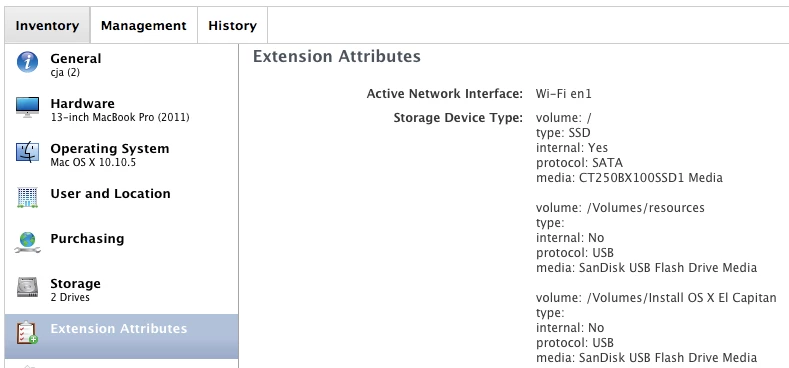
Enter your E-mail address. We'll send you an e-mail with instructions to reset your password.