IS there a way to ensure a machine only enables what it's allowed to have enabled even when and admin user is using it?
Short answer: No
As has been said a number of times before, once users are admins, its not possible to secure everything 100%. You can get pretty far along, or make it so difficult for them to bypass the controls that they deem it not worth the effort, but in short, you can't really stop them from figuring out some way around controls.
Here's my advice, as someone who also needs to ensure that a base of admin users numbering close to 10,000 aren't able to get around certain controls. (some we care about and others we don't really worry about)
Enable a Firmware Password that you do not give out to users.
Upside: Stops them from booting into Recovery HD to change settings, reset passwords and other stuff
Downside: Stops them from doing self triage repairs like Disk repairs from Recovery mode. (Also blocks all other alternate boot modes, like Safe mode, SUM and the rest) Repair permissions isn't as important under 10.11, so that kind of goes away at least.
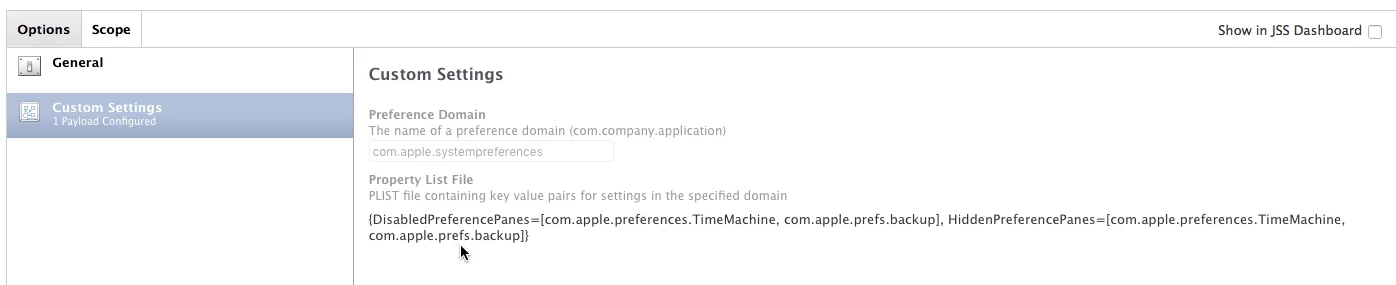
Enable a Configuration Profile that locks down System Preferences you don't want them to have access to.
a. Put a password on it to prevent removal so they can't blow it away in Terminal with profiles.
b. Along with that must ride a profile that enables and enforces a blank "HiddenPreferencePanes" array. This is important because it prevents them from enabling a long time hack that gets them access to those greyed out pref panes with a few clicks.
c. Make sure one of the panes you gray out is Profiles ;)
d. One last thing: be sure you have a valid reason for locking down a Pref Pane, and not just because you feel like IT overlord today. Its easier to explain and get buy-in on why they don't have access to something when you can point to concrete security reasons for it.
Upside: While you can't move the panes out of the default locations now (which was never a good idea anyway), it at least prevents casual and even more advanced user access
Downside: Profiles are generally equal opportunity and will block you from accessing those same preference panes when on any of the systems. You can try using some scoping to help make sure it only gets applied to some systems and not others, but in general, to be truly secure, you probably should just push it to all your systems, even IT ones.
Create/Enable as many EAs you can think of to check on all kinds of values from the system.
a. There are some in the JSS EA templates that may be helpful, though a number of them are broken in their current incarnation and will need to be reworked a bit.
b. If necessary, scope policies to Smart Groups that find machines out of compliance to push the settings back down with an ongoing policy. They'll be playing whack-a-mole trying to stop restrictions from being sent down, and in many cases, will eventually give up trying.
Those are a couple of the things we're doing, though there's certainly a lot more you can do. Does this stop the most persistent of users from circumventing things? No, not really, but it makes them spend an inordinate amount of time trying to get around stuff. As per usual, HR/company wide policies should always be there too - AUPs or other things the users sign and agree to, to put them on the spot when its discovered that they are getting around stuff. In essence, if there isn't something spelling out what is unacceptable for them to do, they can always play dumb and say they didn't know.
Outside all of this, there is the concept of trusting your client base to do the right thing and use the computers responsibly. You'd be surprised at how often this will end up being the case. You'll always have those bad apples who believe its "their" computer and they should be allowed to do whatever they want with it, security and protecting intellectual property be damned. No real getting away from those types. I know this model just doesn't work everywhere, but sometimes it ends up being a compromise between locking down too much and easing up some things that aren't really all that important to give them a little more sense of freedom and respect. Sometimes its not worth getting into a endless struggle with your users.