Question

El Capitan: Manually installing the current (9.73) JAMF Framework. Success!

  • July 29, 2015
  • 51 replies
  • 169 views

bradtchapman
Forum|alt.badge.img+20
Greetings, and welcome to the Caspert Report. Nation: The hive mind of the JAMF Nation collective has uncovered a dirty secret: the current public release of the Casper Suite cannot enroll a Mac running OS X 10.11 ("The Captain"). And even though the software-pirating teenager next door (who likes to dress up as a Pokémon for Halloween) says he runs beta software because it's so edgy, most adults know better than that. But enough about what "the authority" says! I listen with my GUT, and being the freedom-loving, won't-take-no-for-an-answer kind of Mac guy that I am, I salute Mr. Pimplestiltsteen and kids like him everywhere for sticking it to the man.

OK enough of that silliness. I miss Stephen Colbert and can't wait to see him on the Late Show.

So... before I go signing up for the Casper Public Beta program, I wanted to see if there was a way to get a 10.11 Mac to run the binaries, get enrolled, and enforce some policies. I managed to do just that, and my notes are published below. As I discovered late in the process, the jamf binaries have hard coded values for the executable path, so the .plist files will always get the wrong information and have to be modified post-enrollment.

(The test machine is a MacBookPro9,1 (Non-retina 15", 2.3GHz Core i7), which I am using to type this post. It's running OS X 10.11 Developer Beta 4 (15A226f) and is enrolled on a dev JSS, checking in every 5 minutes. Several test policies have worked as expected).

One of the folders that is restricted by the new operating system is /usr/sbin, which is the install path of the current public release (9.73) of the JAMF Framework. Asking customers to turn off the new System Integrity Protection feature is not up for discussion.

So, where will the binaries go?

As has been pointed out by others on JAMFNation, /usr/local/bin is a good candidate because it's already in the default "path" export variable for every Mac, and it's not in the "restricted" folder list for the new security system.

As a newly-minted CCT and a long-time Mac analyst, I wanted a little challenge for myself. So I figured out how to install it manually, and it seems to be working just fine. This whole process can be semi-automated with ARD and a little scripting, if desired. SSH (Remote Login) must already be enabled for this to work.

Step 1. Pack up the jamf binaries on the source computer:

Copy the two binaries from a working computer. I recommend using tar in this manner to preserve the ownership and permissions, but not the absolute path:

sudo tar -czf jamf.tar -C /usr/sbin/ jamf jamfAgent

Step 2. Create the /usr/local/bin folder and unpack the binaries on the destination computer:

sudo mkdir /usr/local/bin
sudo tar -xf jamf.tar -C /usr/local/bin

Step 3. Verify Ownership / Permissions of the jamf binaries:

List the contents of the /usr/local/bin folder and verify ownership and permissions of the jamf binaries. It should be owned by root:wheel, with 555 for jamf, and 6755 for jamfAgent (6755 is setuid & setguid to owner when executing, rwx user, rx group, rx others). If these are not correct, change them immediately using chown and chmod.

ls -l /usr/local/bin/
-r-xr-x--x  1 root  wheel  4194560 Jul 28 20:25 jamf
-rwsr-sr-x@ 1 root  wheel   415392 Jul 28 20:25 jamfAgent

Step 4. Create the hidden management account:

sudo jamf createAccount -username casperadmin -realname casperadmin -password YourSecretPassword -admin -hiddenUser

Step 5. Create the jamf configuration file (.plist):

sudo jamf -createConf -url https://server.jamfcloud.com    // cloud JSS instance
   - OR -
sudo jamf -createConf -server jss.company.lan    // primary internal JSS

Step 6. Enroll the computer:

sudo jamf enroll -prompt

For #6, you will be asked for the following accounts:
JSS Username & Password = any account with enroll privileges
SSH Username & Password = hidden management account from Step #4.

(Actually, I don't know if this step can really be automated because of the user interaction required.)

There will be an error at the end of the process:

Checking for policies triggered by enrollmentComplete

There was an error.

     *** -[NSConcreteTask terminationStatus]: task not launched

Unfortunately the policy task will fail to launch because the LaunchAgent and LaunchDaemons are configured to point to non-existant JAMF binaries at /usr/sbin/. It must be corrected or else the services will fail to launch, and your JSS will be a sad panda because the computer will never check in.

Step 7. Edit .plist files

Use Terminal to sudo edit three files used by the JAMF Framework, replacing the string /usr/sbin/ with /usr/local/bin/ wherever it is found:

  • /Library/LaunchAgents/com.jamfsoftware.jamf.agent.plist
  • /Library/LaunchDaemons/com.jamfsoftware.jamf.daemon.plist
  • /Library/LaunchDaemons/com.jamfsoftware.task.1.plist

Step 8: Reboot computer.

Once the computer has rebooted, it will check itself in at the pre-determined interval. Or you can do it manually, but I preferred to wait to ensure it actually worked on its own.

If this works for you, please comment.
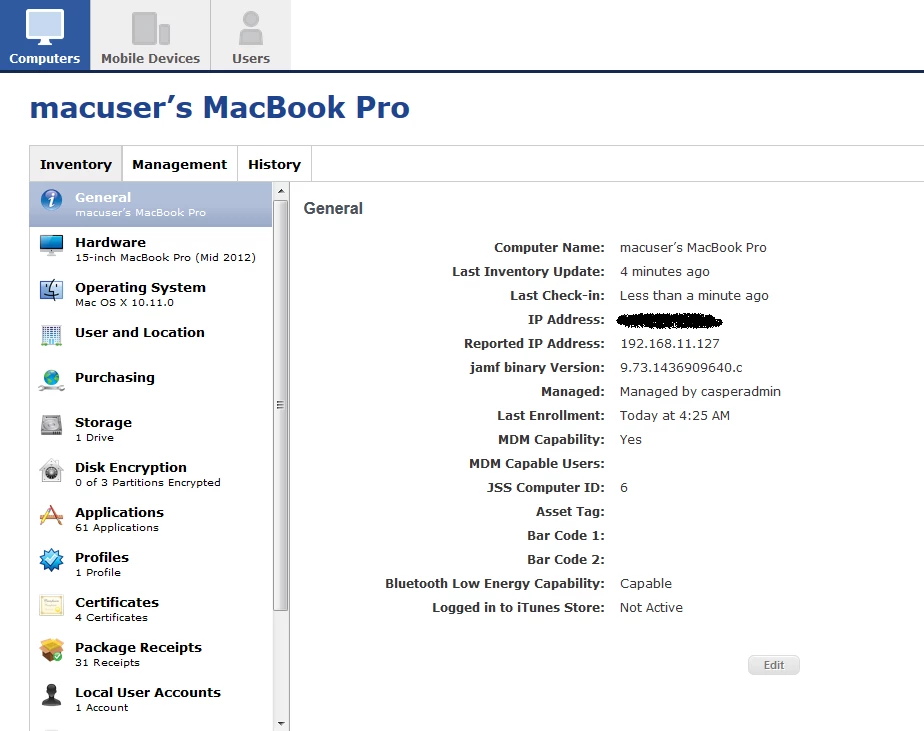
Here's a screenshot of the computer record from within the JSS:

51 replies

roiegat
Forum|alt.badge.img+16
  • Valued Contributor
  • July 29, 2015

Awesome! I have a 10.11 on a virtual machine I've been wanting to test out. Will give this a go and see if I can package it to make it easier.


bradtchapman
Forum|alt.badge.img+20
  • Author
  • Valued Contributor
  • July 29, 2015

Screenshot of computer record has been moved to the first post.


Forum|alt.badge.img+5
  • Contributor
  • July 29, 2015

sweet, just tested it on my 10.11 test machine (15" 2015 MacBook Pro, on the current developer beta) and it worked a charm.


peterlbk
Forum|alt.badge.img+11
  • Jamf Heroes
  • July 29, 2015

Things seem to work, however, a manual recon gives this error:

-[NSError init] called; this results in an invalid NSError instance. It will raise an exception in a future release. Please call errorWithDomain:code:userInfo: or initWithDomain:code:userInfo:. This message shown only once.

the binaries do their job however for as far as I can see...


bradtchapman
Forum|alt.badge.img+20
  • Author
  • Valued Contributor
  • July 29, 2015

Yep, @peterloobuyck, I got the same error here. Glad to know it worked!


peterlbk
Forum|alt.badge.img+11
  • Jamf Heroes
  • July 29, 2015

@bradtchapman , I added an app on the Mac and after a manual recon it showed up, then I deleted the app and re-ran recon and it was gone. Seems that works fine now. Now I'll keep on testing some other functionality.

EDIT: I checked a script to run a firefox installer and then removed firefox. ran jamf policy and that works too...


bradtchapman
Forum|alt.badge.img+20
  • Author
  • Valued Contributor
  • July 29, 2015

@peterloobuyck

Excellent.


Forum|alt.badge.img+17
  • Employee
  • July 29, 2015

Wow!

This is great. I wanted to let everyone know what they can expect from the Casper Suite, as well.

As mentioned, El Capitan introduces some great security features impacting what can write to specific areas of the file system. The Casper Suite is certainly affected, and the binary has had to move. Here's a gist of what you can expect from the Casper Suite. I hope this will help everyone plan their work and preparation for El Capitan.

  1. Most important, the binary is moving. We're moving away from /usr/sbin to /usr/local. This change will apply to all OS X versions OS X 10.7 and later. 10.5 and 10.6 will still stay in /usr/sbin, untouched as with most upgrades. This move will actually happen at upgrade time, much like when the binary itself upgrades version to version. Newly managed devices (OTA, Recon, DEP, etc) get the binary at /usr/local right out of the gate.
  2. As mentioned, there is some explicit reference to /usr/sbin throughout the binary and also in some of the client apps (Casper Admin, Recon, Casper Remote). These are also updated to reflect the new path.
  3. We know there are some places that admins may have explicitly referenced the path as well and there is work represented in you as the admin to update those scripts. We've tried to catch all those areas we can and notify when possible. Specifically, the JSS will scan migrated scripts, extension attributes, and any policies called to Execute Commands in the Files and Processes payload. On upgrade, the JSS will search for "/usr/sbin/jamf" and notify Full Admins of changes they may need to make.

We're excited to get this out to give folks time to address their needs and prepare for El Capitan. We're looking to get this out in the next public beta. Until then, the workflows described here are helpful to get some testing in place and see what impacts you may experience. The beta will be a great indicator, as well, and will help folks prepare.


bradtchapman
Forum|alt.badge.img+20
  • Author
  • Valued Contributor
  • July 29, 2015

@john.miller

Thank you for the feedback. It's good to know where JAMF is heading on this.


kitzy
Forum|alt.badge.img+14
  • Valued Contributor
  • July 29, 2015
Specifically, the JSS will scan migrated scripts, extension attributes, and any policies called to Execute Commands in the Files and Processes payload. On upgrade, the JSS will search for "/usr/sbin/jamf" and notify Full Admins of changes they may need to make.

This is amazing. Thank you.


Forum|alt.badge.img+21
  • Contributor
  • July 29, 2015

Great, so if I have scripts outside of the JSS that run and call the binary I'll have to check for that. @john.miller, you folks will need to be exceptional about informing customers of this change.


Forum|alt.badge.img+33
  • Hall of Fame
  • July 29, 2015

As a follow-up to @john.miller's news, an updated version of CasperCheck is now available which can handle both the current and future locations of the jamf binary. I have a post on this available here:

https://derflounder.wordpress.com/2015/07/29/updated-caspercheck-now-available/


mm2270
Forum|alt.badge.img+24
  • Legendary Contributor
  • July 29, 2015

Well, yeah, we will all have some work to do if we've been specifically referencing the jamf binary in scripts by the full path (hooray for the scripts that just call 'jamf' without any path)
But I personally think its awesome that the JSS upgrade will help you identify any scripts using the full older path so we can correct them. That should save a significant amount of headaches. That's the kind of stuff I like to hear! Thanks to @john.miller for chiming in on this thread and letting us know where things are headed!


Forum|alt.badge.img+2
  • New Contributor
  • July 30, 2015

I hope @john.miller just made a typo and the jamf binary will be not really in /usr/local/jamf. This would be very uncommon. The correct path should be /usr/local/sbin/jamf. @spotmac already started a discussion about this issue here:

https://jamfnation.jamfsoftware.com/discussion.html?id=15316


Forum|alt.badge.img+17
  • Employee
  • July 30, 2015

Hey everyone

Sorry for the confusion. In my comment about the binary moving to /usr/local, I meant that directory space implying following the standard practices as far as actual path. The full path to the new binary is /usr/local/bin/jamf.

Sorry for the confusion.


Forum|alt.badge.img+33
  • Hall of Fame
  • July 30, 2015

CasperCheck has now been updated with the correct path information:

https://github.com/rtrouton/CasperCheck


acodega
Forum|alt.badge.img+15
  • Valued Contributor
  • July 30, 2015
Great, so if I have scripts outside of the JSS that run and call the binary I'll have to check for that. @john.miller, you folks will need to be exceptional about informing customers of this change.

I'm sure this will be easy to do by reading JAMF Nation or the release notes.


bradtchapman
Forum|alt.badge.img+20
  • Author
  • Valued Contributor
  • July 31, 2015

Hey @roiegat , did you ever figure out a way to package / automate setting up the binaries on an El Capitan machine?

I discovered a new flag in the 'sed' command today: -i . It stands for "inside" or "in-place" and will tell sed to do a search-and-replace within the target file(s). It supports wildcards like *jamf* but for safety I am writing them out one at a time:

sudo sed -i .bak 's//usr/sbin//usr/local/bin/g' /Library/LaunchAgents/com.jamfsoftware.jamf.agent.plist
sudo sed -i .bak 's//usr/sbin//usr/local/bin/g' /Library/LaunchDaemons/com.jamfsoftware.jamf.daemon.plist
sudo sed -i .bak 's//usr/sbin//usr/local/bin/g' /Library/LaunchDaemons/com.jamfsoftware.task.1.plist

For those of you who are wondering what's going on in the greentext:

's/                    // sed commands always open with a single quote; this signifies the start of the search and replace function
/usr/sbin           // the search pattern; the backslashes are required to explicitly use forward slashes because...
/                    // is a special separator between the search pattern and the replacement section, or "hold space."
/usr/local/bin   // the "hold space" or replacement pattern.
/g'                // tells sed to replace the pattern with the replacement, and closes the statement with a single tick.

WARNING

If you ever find yourself having to write or modify a script, for the love of all that is holy, do not use TextEdit, even in Plain Text mode. OS X added a new feature in Lion or Mountain Lion that will replace single ticks and double quotes with prettier, typographical versions of the same thing. These typographical alternates are NOT recognized in Unix as equivalent characters; in fact, they are seen as Unicode (non-ASCII) characters. These mistakes have fouled up plenty of scripts, and there are lots of posts on JAMFNation about it. You should invest in something like BBEdit or TextWrangler, or use vi or nano on the command line.


roiegat
Forum|alt.badge.img+16
  • Valued Contributor
  • August 4, 2015

@bradtchapman Not yet. I basically wanted to test all our current components on El Capitan and see what I would need to start working with vendors on. Nicely enough things all work in the current state (except Casper). Were in a middle of the update here so not much free time to play on this.

I did find that when a machine is bound to AD and locked, it sometimes won't let me unlock the screen. Sometimes it acts like it doesn't have a local account when I try to log in offline as well. But I'm sure it's early El Capitan issues.


donmontalvo
Forum|alt.badge.img+36
  • Hall of Fame
  • August 8, 2015

@bradtchapman awesome effort!

@john.miller do we know when the next Beta will open up? Will this be version 10? If necessary I can take my answer offline. :)


bradtchapman
Forum|alt.badge.img+20
  • Author
  • Valued Contributor
  • August 8, 2015

@donmontalvo Thanks! I responded to your Connected Backup thread.


Forum|alt.badge.img+17
  • Employee
  • August 8, 2015

@donmontalvo No specific date, yet, but soon. We've got some other work done, too, that's exciting and we want to get out to the JAMF Nation. Stay tuned...


bentoms
Forum|alt.badge.img+35
  • Hall of Fame
  • August 8, 2015

@john.miller Awesome, looking forward to it!


bradtchapman
Forum|alt.badge.img+20
  • Author
  • Valued Contributor
  • August 12, 2015

I re-enrolled one of my test machines on a different dev server this week.

First I ran sudo jamf createConf -url https://mynewserver.jamfcloud.com

Then I ran sudo jamf enroll -prompt and supplied the JSS & SSH credentials. No problem there.

That's when I noticed a message during the policy check:

mbp15test:Preferences macuser$ sudo jamf policy
Checking for policies triggered by "recurring check-in" ...
Upgrading jamf binary...
The management framework will be enforced as soon as all policies are done executing.
Upgrading jamf agent...
Upgrading jamfHelper.app...
Upgrading JAMF notification service...
Upgrading Self Service.app...
Executing Policy Update Inventory...
   Running Recon...
Retrieving inventory preferences from https://mynewserver.jamfcloud.com/...

Hmm, that's weird. "Upgrading jamf binary?" The current version is just going to try to put it in /usr/sbin , but that's going to fail because System Integrity Protection is enabled.

Or so I thought...

mbp15beta:sbin macuser$ ls -la /usr/sbin/jamf*
-r-xr-x--x  1 root  wheel  4194560 Aug 11 13:11 /usr/sbin/jamf
-rwsr-sr-x  1 root  wheel   415392 Aug 11 13:11 /usr/sbin/jamfAgent

mbp15beta:sbin macuser$ ls -la /usr/local/bin/jamf*
-r-xr-x--x  1 root  wheel  4194560 Jul 28 20:25 /usr/local/bin/jamf
-rwsr-sr-x@ 1 root  wheel   415392 Jul 28 20:25 /usr/local/bin/jamfAgent
mbp15beta:sbin macuser$

So...how did JAMF manage to install the latest binaries in /usr/sbin if this folder is restricted??


Forum|alt.badge.img+10
  • New Contributor
  • August 25, 2015

Apple has an undocumented exception for /usr/sbin/jamf

http://openradar.appspot.com/22395084