Does anyone know of a script that can check this box? The script below works in macOS Mojave, but not macOS Catalina.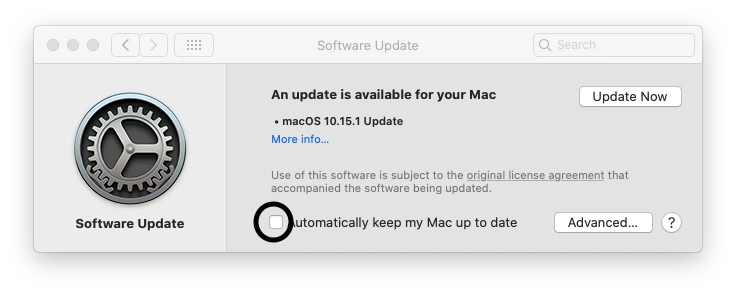
!/bin/sh
/usr/bin/defaults write /Library/Preferences/com.apple.SoftwareUpdate.plist AutomaticallyInstallMacOSUpdates -bool true
/usr/bin/defaults write /Library/Preferences/com.apple.SoftwareUpdate.plist AutomaticCheckEnabled -bool true
/usr/bin/defaults write /Library/Preferences/com.apple.SoftwareUpdate.plist AutomaticDownload -bool true
/usr/bin/defaults write /Library/Preferences/com.apple.SoftwareUpdate.plist CriticalUpdateInstall -bool true
/usr/bin/defaults write /Library/Preferences/com.apple.SoftwareUpdate.plist ConfigDataInstall -bool true
/usr/bin/defaults write /Library/Preferences/com.apple.commerce.plist AutoUpdate -bool true