Question

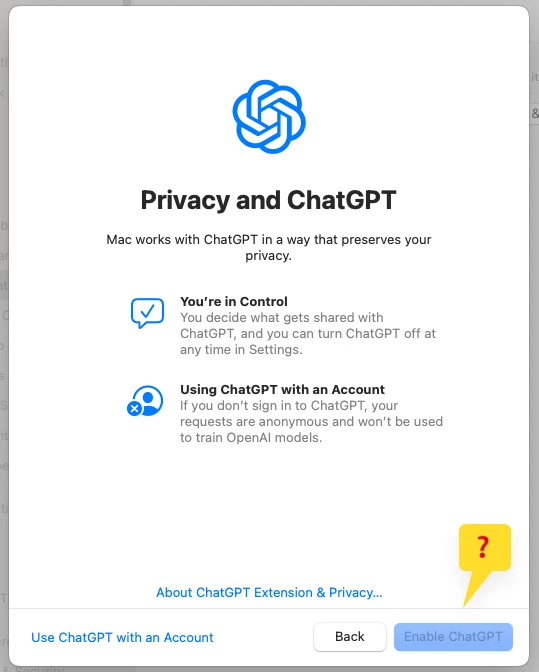
'Enable ChatGPT' button blued out

  • May 7, 2025
  • 35 replies
  • 601 views

Show first post

35 replies

Forum|alt.badge.img+4
  • Author
  • Contributor
  • May 9, 2025

If this helps, I just tried unticking Allow Apple Intelligence: Writing Tools (macOS 15 or later, supervised), in jamf and saving the existing profile. My machine updated (dock refreshed), but I can still not use ChatGPT


oh, and my plist shows

<key>allowWritingTools</key> <false/>
after making this change
 
(allowExternalIntelligenceIntegrations is set to true)

Forum|alt.badge.img+14
  • Honored Contributor
  • May 9, 2025

oh, and my plist shows

<key>allowWritingTools</key> <false/>
after making this change
 
(allowExternalIntelligenceIntegrations is set to true)

That's because un-checking the box disables the feature.

As I have mentioned before, iMazing Profile Creator is a far better option for crafting 'Restrictions' profiles. Jamf has a habit of including additional preferences when creating such profiles in the UI.


Forum|alt.badge.img+2
  • New Contributor
  • May 9, 2025

I get the same as @Greg1 , but if I enable the feature in Jamf GUI or even iMazing as far as I can tell it only puts an entry in the plist IF the item is disallowed.

As I'm enabling it (the default) there's nothing in the plist that should disable AI and ChatGPT?

Yes there are other thing in there too - by default but nothing related to AI and ChatGPT


Forum|alt.badge.img+2
  • New Contributor
  • May 9, 2025

I get the same as @Greg1 , but if I enable the feature in Jamf GUI or even iMazing as far as I can tell it only puts an entry in the plist IF the item is disallowed.

As I'm enabling it (the default) there's nothing in the plist that should disable AI and ChatGPT?

Yes there are other thing in there too - by default but nothing related to AI and ChatGPT


Sorry that was nonsense, IF you look at the config profile through the Mac's UI you see nothing, but if you look at the plist you see things like;

<key>allowExternalIntelligenceIntegrationsSignIn</key>
<true/>

<key>allowExternalIntelligenceIntegrations</key>
<true/>

<key>allowGenmoji</key>
<true/>

<key>allowedExternalIntelligenceWorkspaceIDs</key>
<array>
</array>

<key>allowImagePlayground</key>
<true/>

<key>_isAppleIntelligenceRestricted</key>
<false/>

<key>allowMailSummary</key>
<true/>

to name a few, so I'm no further forward :(


Forum|alt.badge.img+14
  • Honored Contributor
  • May 9, 2025

Setting any keys relating to Apple Intelligence creates a hidden key in com.apple.applicationaccess:

<key>_isAppleIntelligenceRestricted</key> <true/>

This lets the system know that Apple Intelligence is managed. My point here is to not set any keys relating to Apple Intelligence if you don't want to restrict them. For your Restrictions profile, use iMazing to craft a test profile without selecting any of the Apple Intelligence features so that the hidden key doesn't get created to begin with.

This will ensure that <true> keys are not pushed for features you have no interest in managing and allow your users to use Apple Intelligence features normally.


Forum|alt.badge.img+2
  • New Contributor
  • May 14, 2025

Got a reply from Jamf :(

Thank you for bringing this to our attention. I have tested the profile you provided and was able to replicate the issue you described. Upon further investigation, I found that this behavior has been documented internally as a product issue:
PI135178 – Unable to enable ChatGPT even if allowExternalIntelligenceIntegrations is set to true

At this time, there is no known workaround. However, please be assured that our development team is actively investigating this issue to identify a permanent fix.

For more information on managing Apple Intelligence features, including ChatGPT integration, you may find the following resource helpful:
https://derflounder.wordpress.com/2025/01/29/managing-apple-intelligence-features-on-macos-sequoia-15-3/

We have attached this case to the PI, so that we raise awareness and suggest to keep an eye out on the release notes for the upcoming Jamf Pro versions so that we can verify if the issue has been addressed or not.

We're truly sorry for the impact this is having in your environment and we can assure you we're working hard on getting to the bottom of it and provide with the best solution.

We are marking this case as inactive, but as always, I remain at your disposal should you have any further questions.

Thank you for working with Jamf Support and we wish you a marvellous day!


Forum|alt.badge.img+4
  • Author
  • Contributor
  • May 15, 2025

Got a reply from Jamf :(

Thank you for bringing this to our attention. I have tested the profile you provided and was able to replicate the issue you described. Upon further investigation, I found that this behavior has been documented internally as a product issue:
PI135178 – Unable to enable ChatGPT even if allowExternalIntelligenceIntegrations is set to true

At this time, there is no known workaround. However, please be assured that our development team is actively investigating this issue to identify a permanent fix.

For more information on managing Apple Intelligence features, including ChatGPT integration, you may find the following resource helpful:
https://derflounder.wordpress.com/2025/01/29/managing-apple-intelligence-features-on-macos-sequoia-15-3/

We have attached this case to the PI, so that we raise awareness and suggest to keep an eye out on the release notes for the upcoming Jamf Pro versions so that we can verify if the issue has been addressed or not.

We're truly sorry for the impact this is having in your environment and we can assure you we're working hard on getting to the bottom of it and provide with the best solution.

We are marking this case as inactive, but as always, I remain at your disposal should you have any further questions.

Thank you for working with Jamf Support and we wish you a marvellous day!


Many thanks @ceeghb for submitting an official ticket, I was shortly going to do the same. It's time for me to take a look at Kandji as it comes so highly recommended, and I'm growing tired of jamf boasting about 'day one support', and here we are on day 240, and it doesn't work properly (and this is by far the only issue II'm having).


Forum|alt.badge.img+2
  • New Contributor
  • June 11, 2025

@Greg1 still waiting for Jamf for a solution, but might have found a work around, excluded mac from our "staff restriction" policy - the one where it's specified in there, to enable all AI 🙄, but as we know doesn't work, but...
excluding macs from this policy obviously allows AI to work as normal, but found after I enabled AI AND applied the original policy again didn't break it!


Forum|alt.badge.img+2
  • New Contributor
  • August 13, 2025

I see Jamf has pushed out a fix for this;

[PI135178] Fixed: In a computer configuration profile with a Restrictions payload configured to allow integration with external intelligence services, users may be prevented from enabling ChatGPT on computers in scope. This is due to the profile containing the key "allowedExternalIntelligenceWorkspaceIDs", even if the corresponding setting is not selected


Forum|alt.badge.img+4
  • Author
  • Contributor
  • September 16, 2025

Yes, this is now working 👍🏻