Solved

Enable Screen Sharing

  • March 23, 2015
  • 20 replies
  • 113 views

Forum|alt.badge.img+11

I forgot to enable screen sharing for new imaged Macs and now I can't use Casper Remote to remote to the devices. How can I enable screen sharing via a script or profile?

Best answer by MAD0oM

@NealIV

1:
(sudo /System/Library/CoreServices/RemoteManagement/ARDAgent.app/Contents/Resources/kickstart -activate -configure -access -off -restart -agent -privs -all -allowAccessFor -allUsers)

This will work, but theres times this won't be enough. The above command enables Screen Sharing by enabling Remote Management however, you lose the ability to add fine grained control to who can connect & those who can’t...

2:

(!/Bin/Bash
/usr/libexec/PlistBuddy -c ‘Set :com.apple.screensharing:Disabled NO’ /private/var/db/launchd.db/com.apple.launchd/overrides.plist
launchctl load /System/Library/LaunchDaemons/com.apple.screensharing.plist
for userid in $(ps -Ajc | grep loginwindow | grep -v grep | awk ‘{print $1}’); do
if [ "$userid" = "USER" ] ; then
launchctl load /System/Library/LaunchAgents/com.apple.screensharing.agent.plist
else
su “$userid” -c ‘launchctl load /System/Library/LaunchAgents/com.apple.screensharing.agent.plist’
fi
done)

enable only Screen Sharing, not Remote Management. This allows you to use System Preferences to restrict who can screen share to your machine e.g. local administrators, network administrator etc.

It comes down to what works best for your environment and situation.

20 replies

Forum|alt.badge.img+7
  • Contributor
  • March 23, 2015

I create a profile with the following command:

sudo /System/Library/CoreServices/RemoteManagement/ARDAgent.app/Contents/Resources/kickstart -activate -configure -access -off -restart -agent -privs -all -allowAccessFor -allUsers


Forum|alt.badge.img+7
  • Contributor
  • March 23, 2015

I use this script:

!/bin/bash

/usr/libexec/PlistBuddy -c ‘Set :com.apple.screensharing:Disabled NO’ /private/var/db/launchd.db/com.apple.launchd/overrides.plist
launchctl load /System/Library/LaunchDaemons/com.apple.screensharing.plist
for userid in $(ps -Ajc | grep loginwindow | grep -v grep | awk ‘{print $1}’); do
if [ "$userid" = "USER" ] ; then
launchctl load /System/Library/LaunchAgents/com.apple.screensharing.agent.plist
else
su “$userid” -c ‘launchctl load /System/Library/LaunchAgents/com.apple.screensharing.agent.plist’
fi
done


Forum|alt.badge.img+11
  • Author
  • Contributor
  • March 23, 2015

Whats the difference between the two?


Forum|alt.badge.img+7
  • Contributor
  • Answer
  • March 23, 2015

@NealIV

1:
(sudo /System/Library/CoreServices/RemoteManagement/ARDAgent.app/Contents/Resources/kickstart -activate -configure -access -off -restart -agent -privs -all -allowAccessFor -allUsers)

This will work, but theres times this won't be enough. The above command enables Screen Sharing by enabling Remote Management however, you lose the ability to add fine grained control to who can connect & those who can’t...

2:

(!/Bin/Bash
/usr/libexec/PlistBuddy -c ‘Set :com.apple.screensharing:Disabled NO’ /private/var/db/launchd.db/com.apple.launchd/overrides.plist
launchctl load /System/Library/LaunchDaemons/com.apple.screensharing.plist
for userid in $(ps -Ajc | grep loginwindow | grep -v grep | awk ‘{print $1}’); do
if [ "$userid" = "USER" ] ; then
launchctl load /System/Library/LaunchAgents/com.apple.screensharing.agent.plist
else
su “$userid” -c ‘launchctl load /System/Library/LaunchAgents/com.apple.screensharing.agent.plist’
fi
done)

enable only Screen Sharing, not Remote Management. This allows you to use System Preferences to restrict who can screen share to your machine e.g. local administrators, network administrator etc.

It comes down to what works best for your environment and situation.


dubel
Forum|alt.badge.img+12
  • Contributor
  • April 14, 2015

This is what I'm looking for as well, but when I run the script I get the following.

Unrecognized Command
/System/Library/LaunchDaemons/com.apple.screensharing.plist: Service is disabled

And Screen Sharing is not enabling. Could you provide the raw script just to make sure I'm not missing something. Thanks!


Forum|alt.badge.img+8

I'm interested as well.
I need to enable the Screen Sharing after the imaging process for remote assistance purposes.
Anyone?


Forum|alt.badge.img+18
  • Honored Contributor
  • May 21, 2015

I'd still like to find a solid solution for this as well. JAMF really needs to step up and get this sorted in a future release. Having to tell users to manually enable screensharing is super annoying.


Forum|alt.badge.img+18
  • Honored Contributor
  • May 21, 2015

Forum|alt.badge.img+5
  • Contributor
  • May 21, 2015

Just voted it up


Forum|alt.badge.img+18
  • Valued Contributor
  • May 21, 2015

a simple entry in a script like this should do it.

/System//Library/CoreServices/RemoteManagement/ARDAgent.app/Contents/Resources/kickstart -configure -allowAccessFor -allUsers -privs -all

Forum|alt.badge.img+18
  • Honored Contributor
  • May 21, 2015

True, but I don't want to enable remote management, I want screen sharing with user acceptance prompt, as it worked prior to Yosemite. The prompt is required by our security office, and enabling Remote Management is not an acceptable work-around here.


mm2270
Forum|alt.badge.img+24
  • Legendary Contributor
  • May 21, 2015

Didn't this thread help solve the issue? https://jamfnation.jamfsoftware.com/discussion.html?id=12808 Is it not viable to make the necessary changes to the overrides file and then load the LaunchDaemon? While this leaves Screen Sharing enabled even after the screen share session ends, it should at least help, and users should see the "prompt" for allowing the connection.

I get that JAMF should fix this, and I agree, but no need to wait around gnashing teeth over something we can fix ourselves in the interim. If the above is actually not working, I'd be curious to hear that.


Forum|alt.badge.img+16
  • Valued Contributor
  • May 21, 2015

The user acceptance prompt is based on your remote privileges on the JSS not the client configuration right? I have a kickstart script that enables screensharing for the management user only, when a tech is configured with Screen Share with Remote Computers Without Asking disabled the end users are still prompted to accept.

#!/bin/sh

/System/Library/CoreServices/RemoteManagement/ARDAgent.app/Contents/Resources/kickstart -activate -configure -users insertmanagementuser -access -on -privs -all -restart
/System/Library/CoreServices/RemoteManagement/ARDAgent.app/Contents/Resources/kickstart -activate -configure -allowAccessFor -specifiedUsers -restart

Forum|alt.badge.img+5
  • Contributor
  • August 30, 2015

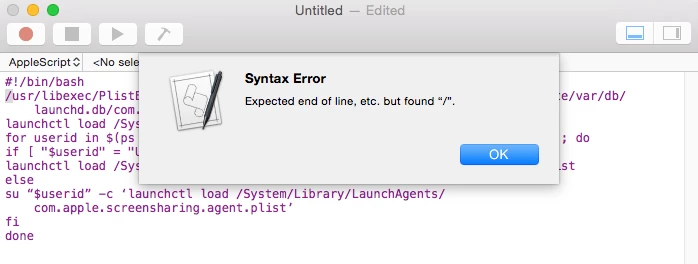
@MAD0oM

i tried to copy your script on a script editor but i'm having a syntax

can you help me with this? i need to push this script to enable screen sharing to all mac connected to our MDM.


mm2270
Forum|alt.badge.img+24
  • Legendary Contributor
  • August 30, 2015

@jamfmdm That script is a bash script, as indicated by the first line (#!/bin/bash) You can't throw that into Applescript Editor because Applescript Editor only works with Applescripts.
Get yourself a free copy of TextWrangler, either direct from the BareBones site - http://www.barebones.com/products/textwrangler/ or from the Mac App Store and toss it into that instead and save it.
Alternately, if your JSS is set up for it, you may be able to simply copy/paste it into a new script window in your JSS and skip putting it into a local file.


Forum|alt.badge.img+22
  • Honored Contributor
  • December 8, 2015

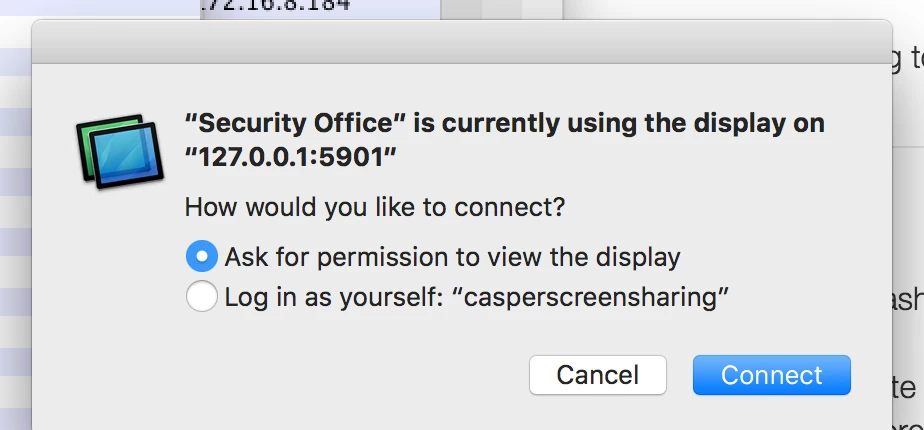
Need to jump on the thread as the screen sharing bug has bit us and I need to re-enable on all of our devices. I've gone through the thread, added a script in the JSS that contains "sudo launchctl load -w /System/Library/LaunchDaemons/com.apple.screensharing.plist", attached it to a policy and this works properly by turning screen sharing on. after the policy executes. However in my
JSS account, I have the setting enabled to not prompt me, but when I try Casper Remote I connect to the remote device but get prompted to ask for permission (see attached)


Forum|alt.badge.img+4
  • Contributor
  • January 31, 2017

hey guys,

I would like to have a policy for setting the following:

enable screen sharing for only these users:
enable remote login for ALL users

So starting the sharing plist isn't a problem. But I can't set the remote login incl. the ALL users. Any idea for that?


anickless
Forum|alt.badge.img+9
  • Contributor
  • January 31, 2017

sudo /System/Library/CoreServices/RemoteManagement/ARDAgent.app/Contents/Resources/kickstart -activate -configure -access -on -users "your 1st user", "2nd user" -privs -all -restart -agent -menu

I rely heavily on this script to enable ARD and SSH.


Forum|alt.badge.img+15
  • Esteemed Contributor
  • February 1, 2017

All that's needed for Casper Remote Screen Sharing is for Screen Sharing to be enabled (you don't even need to load the LaunchDaemon).

launchctl enable system/com.apple.screensharing

Keep in mind that when you run ARD kickstart you're likely turning on more than you need to. If you aren't using ARD or don't want to use ARD, consider leaving it turned off and just enable screen sharing.


Forum|alt.badge.img+10
  • Contributor
  • February 13, 2018

@cbrewer Thanks! Thats's perfect.