
Question

Enabling SecureToken on management account ?

  • Sep 19, 2019 4:24 PM UTC
  • 6 replies
  • 122 views

Forum|alt.badge.img+4

Hey guys,

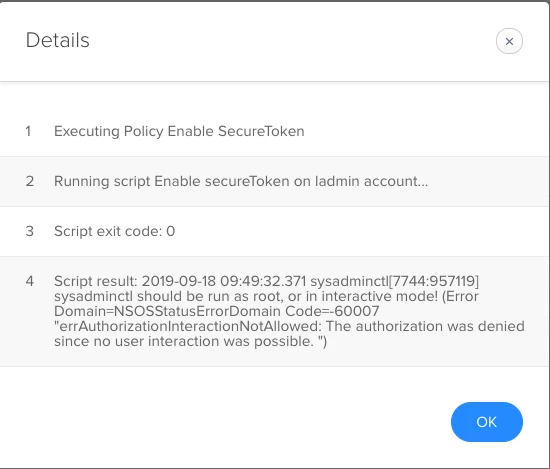
i'm completely new to Jamf and still trying to find my feet there, I have configured PreStage enrollment and it works fine but I want to enable SecreToken on the management account. During the setup assistant user creates an "admin" local user account for themselves and login so they get SecureToken enabled on their account so how can I enable it on the management account that got created using PreStage enrollment process ? I tried this

sysadminctl interactive -secureTokenOn "management account" -password "password"
but it returns this error in the screenshot

6 replies

Cayde-6
Forum|alt.badge.img+22
  • Honored Contributor
  • Sep 19, 2019 6:44 PM UTC

Following


Forum|alt.badge.img+18
  • Contributor
  • Sep 20, 2019 7:17 PM UTC

You need two sets of credentials: one for a secure token admin on the system, and one for the account you are assigning a secure token to.

If only the user has a secure token in your workflow, you need their username and password to grant a token to another account.


Forum|alt.badge.img+2
  • New Contributor
  • Sep 20, 2019 8:38 PM UTC

One callout... if you have your JAMF environment setup to randomly generate your management account password.

You wouldn't be able to enable SecureToken for the management account.


Forum|alt.badge.img+4
  • Author
  • Contributor
  • May 27, 2020 7:27 AM UTC

@trippmcc the password of the management account is not generated randomly ! is there a way to enable secure token on that account ?


Forum|alt.badge.img+13
  • Valued Contributor
  • Apr 22, 2021 11:18 AM UTC

Unfortunately, There is no way to automate this.. The 1st local account must be logged into physically before it gets the securetoken.
Pain in the ass really... I have set my prestage with locked admin username, then the IT support person will just login to that account. Then, when bootstraptoken came along, it grants securetokens to any new user mobile or local.


Winterhalter
Forum|alt.badge.img+4
  • Contributor
  • Jun 16, 2023 6:42 PM UTC

My management account is set to random password so this doesn't help me, but you can add with a script in non-interactive mode:

/usr/sbin/sysadminctl -adminUser LocalUserWithSecureToken -adminPassword HasItAccountPassword -secureTokenOn LocalUserThatNeedsSecureToken -password NeedsItAccountPassword