While this is, arguably, a feature that Jamf should be able to handle at its core, what is the best method in 2021, across the gamut of supported OS's and architectures, to enforce Apple software updates?
I understand that theres resistance to using any terminal commands for software updates. As stated in the Nudge channel, Since 2018 this has been a problem since Apple doesn't test softwareupdate commands that are triggered by a script. In addition to that, this requires a password if the computer is Apple Silicon.
I recently rolled out the UEX-Tool-For-Jamf, and two of the components in it are no longer developed and throw gatekeeper issues in Big Sur.
I would like to use Nudge, but, my confidence in my users is low enough to not expect Nudge to work fine on its own. Nudge cannot force the update to happen.
What is the best way to handle software updates? Is there MDM magic I am missing? What is the downside to having the checkbox "keep my mac up to date" checked via a config profile?
Best answer by AJPinto
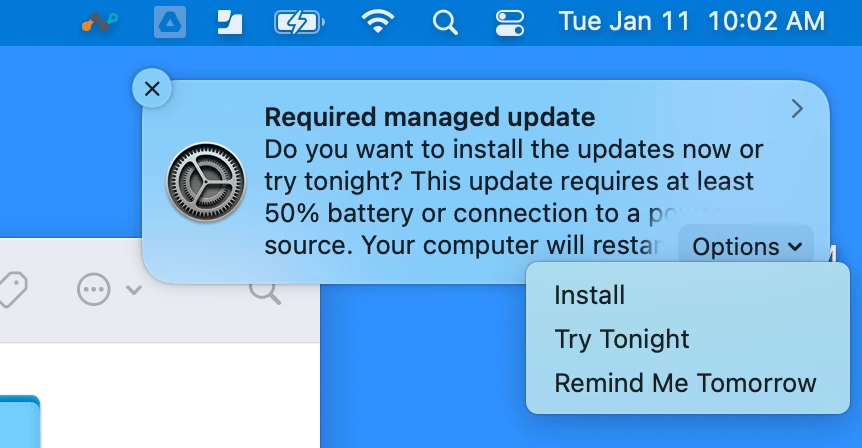
Do you know, if you select either try tonight or remind me tomorrow, is it possible to bring this back up on a machine without waiting until the option you selected? For example, if a user tells it to remind me tomorrow, but then decided that afternoon that they would like to install the upgrade because they decide it is a good time, is there a way to accommodate that? Perhaps something that could be made available in self service that would force it to re-display?
Your questions are getting rather detailed. I suggest making a new JAMF nation post rather than commenting on a post that is over a year old. You will get more replies. JAMF and softwareupdates have sucked for a very long time, and changes apple has made only exacerbate the issue with how poorly JAMF manages OS updates.
You question is more of a user agency than management action question.
My suggestion: If a user changes their mind and wants to run updates before their deferral just tell them to open system preferences > software update. If the user wants to run updates, empower them to run updates themselves.
As far as using self-service, your experiences will vary between Apple Silicon and Intel Macs.
Apple Silicon – MDM can only push updates using MDM commands. JAMF teased about letting us use MDM commands in a policy last fall for OS updates. However, as many things they failed to deliver. Unfortunately, the only way to issue a software update command is from the JAMF console by an admin. You can get crafty with API, but I would not recommend it.
Intel – You can create a policy using the softwareupdate binary and shove that in self-service. The command would be “sudo softwareupdate -aiR” (i = install / a = all / R=Reboot). You “can” do this with apple silicon, but it will prompt the user to enter their password.
It seems to me like this should be something so easy to accomplish through the basic GUI and not have a million hoops to jump through to make it all work lol. Thanks for the info!
It's definitely a lot of work, but totally worth it.
In my case we developed an MDM-based patch schedule using a jump host on the same subnet as my Jamf Pro server, rather than a script within Jamf Pro which runs locally on an endpoint, potentially exposing credentials. It did allow me to support headless Macs on Big Sur and above (including M1) where the softwareupdate binary is either broken or doesn't work at all.
The account I'm using also only has the ability to issue SWU commands to computers and mobile devices, so if the credentials were ever compromised they can't be used for any other purpose.
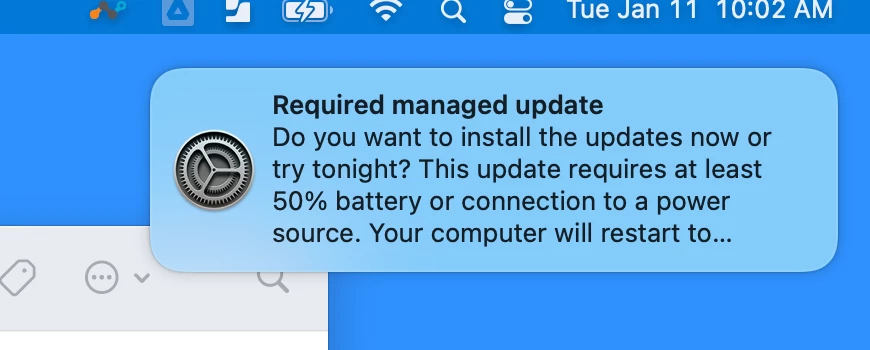
Question. If you hit Try tonight, do you know what time it'll run?
It should try to run the updates between 12a-4a. They mentioned this somewhere in WWDC2021 if I remember correctly. "Uses machine learning to determine the best time to install update between 12a and 4a blah blah blah"
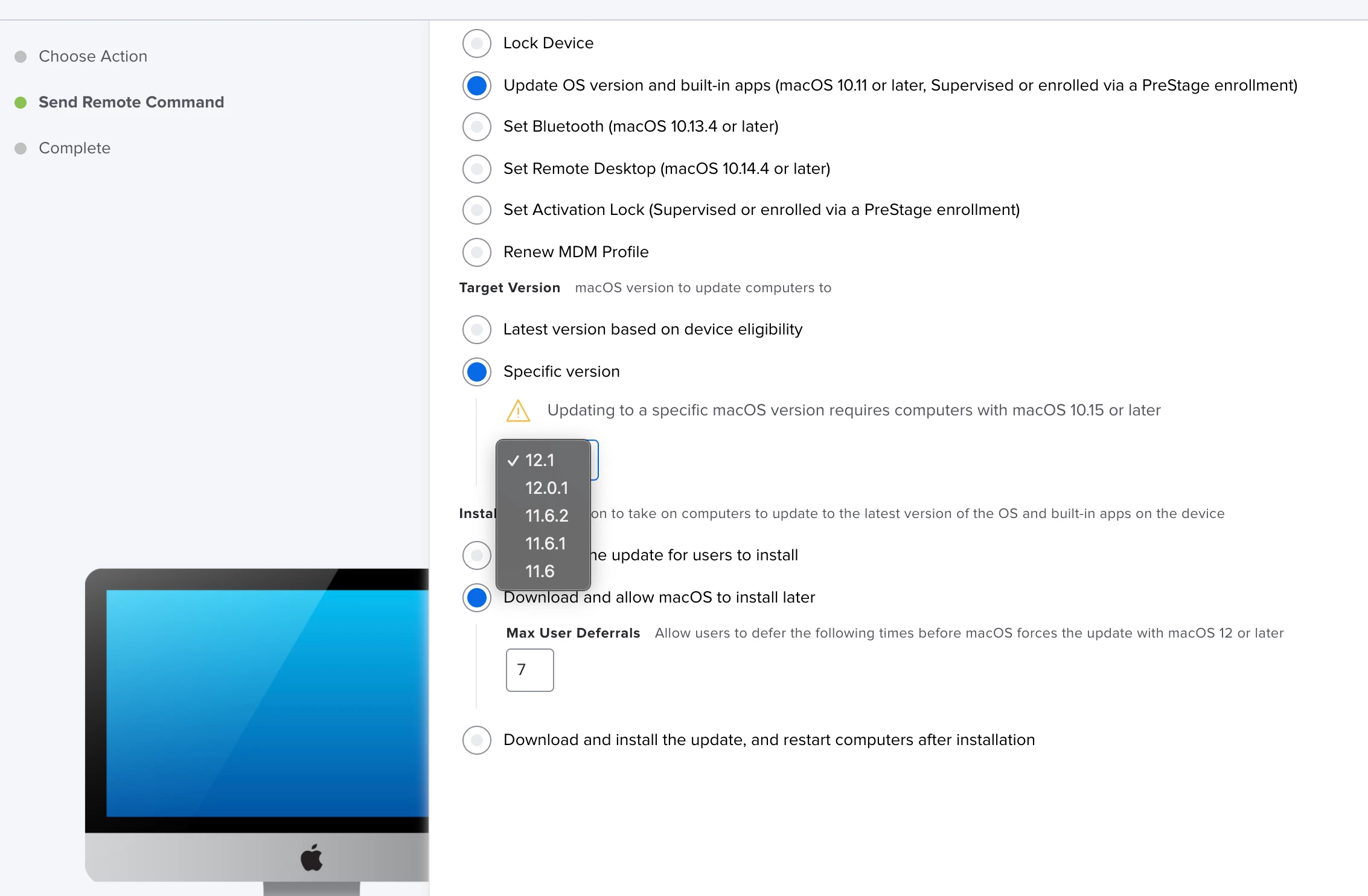
Not going to lie, I really like the new Mass action command with deferment:
On Machine: A way to Schedule this would be amazing, however this is a really great start!
Do you know, if you select either try tonight or remind me tomorrow, is it possible to bring this back up on a machine without waiting until the option you selected? For example, if a user tells it to remind me tomorrow, but then decided that afternoon that they would like to install the upgrade because they decide it is a good time, is there a way to accommodate that? Perhaps something that could be made available in self service that would force it to re-display?
Do you know, if you select either try tonight or remind me tomorrow, is it possible to bring this back up on a machine without waiting until the option you selected? For example, if a user tells it to remind me tomorrow, but then decided that afternoon that they would like to install the upgrade because they decide it is a good time, is there a way to accommodate that? Perhaps something that could be made available in self service that would force it to re-display?
Your questions are getting rather detailed. I suggest making a new JAMF nation post rather than commenting on a post that is over a year old. You will get more replies. JAMF and softwareupdates have sucked for a very long time, and changes apple has made only exacerbate the issue with how poorly JAMF manages OS updates.
You question is more of a user agency than management action question.
My suggestion: If a user changes their mind and wants to run updates before their deferral just tell them to open system preferences > software update. If the user wants to run updates, empower them to run updates themselves.
As far as using self-service, your experiences will vary between Apple Silicon and Intel Macs.
Apple Silicon – MDM can only push updates using MDM commands. JAMF teased about letting us use MDM commands in a policy last fall for OS updates. However, as many things they failed to deliver. Unfortunately, the only way to issue a software update command is from the JAMF console by an admin. You can get crafty with API, but I would not recommend it.
Intel – You can create a policy using the softwareupdate binary and shove that in self-service. The command would be “sudo softwareupdate -aiR” (i = install / a = all / R=Reboot). You “can” do this with apple silicon, but it will prompt the user to enter their password.
It should try to run the updates between 12a-4a. They mentioned this somewhere in WWDC2021 if I remember correctly. "Uses machine learning to determine the best time to install update between 12a and 4a blah blah blah"
Was there anything you had to do to get the "Required Managed Update" prompt? I tested it on an intel Mac yesterday while I was remoted it, but I didn't get any prompts. The user locked his Mac and the update did run successfully, but never seen the initial prompt.
I'm not a fan of the Software Update deferments living in the Restrictions profile, alongside other settings (that are static and never change). I wish these settings were located in the (duh!) Jamf Software Update profile.
I'm considering breaking our Software Update settings into their own discreet profile(s) so that I can edit them without worrying about other Restriction payloads being affected. Since Software Deferments live in the com.apple.applicationaccess preference domain, I dont think this should be a problem.
Is anyone else doing this (or similar)?
Update: In July 2022, I broke out my Deferment restrictions from the other Restrictions. So now my scope look like this:
Restrictions: All Computers (does NOT contain any SU deferment payloads - I disabled them all) Deferments SU Restriction - Production: All non-IT Macs (30-day minor updates and 90-day major updates) Deferments SU Restriction - IT: All IT Macs (7-day minor updates and 30-day major updates)
For me and (1) other Mac admin at my org, we are in a scope that excludes us both from any SU deferments so we see Apple updates (Major and minor) at zero-day and thus we can start testing ASAP.