Solved

Extension Attribute - Location Services Big Sur

  • March 18, 2021
  • 12 replies
  • 47 views

Forum|alt.badge.img+6

I found this script for collection whether Location Services is enabled, but it's for OSX. I'm super new to Macs as well as scripting, so I'm wondering what would need to be updated to get it working for Big Sur.

<?xml version="1.0" encoding="UTF-8"?>
<extensionAttribute>
<displayName>Location Services</displayName>
<description/>
<dataType>string</dataType>
<scriptContentsMac>#!/bin/bash&#13;
&#13;
uuid=$(system_profiler SPHardwareDataType | grep "Hardware UUID" | awk '{print $3}')&#13;
domain="/var/db/locationd/Library/Preferences/ByHost/com.apple.locationd.${uuid}"&#13;
plist="${domain}.plist"&#13;
&#13;
if [[ -f "${plist}" ]]&#13;
then&#13; status=$(defaults read "${domain}" LocationServicesEnabled)&#13; if [[ "${status}" == "1" ]]&#13; then&#13; result="Enabled"&#13; else&#13; result="Disabled"&#13; fi&#13;
else&#13; result="Unavailable"&#13;
fi&#13;
&#13;
echo "&lt;result&gt;${result}&lt;/result&gt;"</scriptContentsMac>
<scriptContentsWindows/>
</extensionAttribute>

Best answer by sdrake

@PhillyPhoto I got it working, thanks to my husband who is more script-savvy than I! And before you comment about the inclusion of "sudo" in the script - I tried it without and it simply will. not. work. without it. Very odd.

#!/bin/bash domain="/var/db/locationd/Library/Preferences/ByHost/com.apple.locationd" result="Unavailable" status=$(sudo -u "_locationd" defaults -currentHost read "${domain}" LocationServicesEnabled) if [[ "${status}" == "1" ]]; then result="Enabled" else result="Disabled" fi echo "<result>${result}</result>"

12 replies

Forum|alt.badge.img+13
  • Valued Contributor
  • 217 replies
  • March 18, 2021

That's the entire XML file for the whole Extension Attribute. Have you tried this in the script portion for it?

#!/bin/bash

uuid=$(system_profiler SPHardwareDataType | grep "Hardware UUID" | awk '{print $3}')
domain="/var/db/locationd/Library/Preferences/ByHost/com.apple.locationd.${uuid}"
plist="${domain}.plist"

if [[ -f "${plist}" ]]
then
    status=$(defaults read "${domain}" LocationServicesEnabled)
    if [[ "${status}" == "1" ]]
    then
        result="Enabled"
    else
        result="Disabled"
    fi
else
    result="Unavailable"
fi

echo "<result>${result}</result>"

Forum|alt.badge.img+13
  • Valued Contributor
  • 217 replies
  • March 18, 2021

I just tried this myself on a Big Sur device, and even though the plist exists and "LocationServicesEnabled" is in it, for some reason defaults is saying it can't find it.


Forum|alt.badge.img+6
  • Author
  • Contributor
  • 22 replies
  • March 18, 2021

@PhillyPhoto thank you for pointing that out! I am a complete beginner with this, so even that insight is super helpful :)


Forum|alt.badge.img+6
  • Author
  • Contributor
  • 22 replies
  • March 18, 2021

@PhillyPhoto weird... I just tried it and it's "working" - the Extension Attribute is now filled, but it says "Disabled" for my device despite it actually being enabled.


Forum|alt.badge.img+13
  • Valued Contributor
  • 217 replies
  • March 18, 2021

@sdrake I get the same thing, and running it as a script shows the error:

Running script Security - Location Services...
Script exit code: 0
Script result: 2021-03-18 19:26:38.590 defaults
The domain/default pair of (/var/db/locationd/Library/Preferences/ByHost/com.apple.locationd.12345678-1234-1234-1234-1234567890, LocationServicesEnabled) does not exist
<result>Disabled</result>

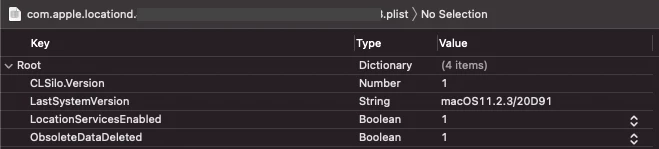
I even copied the plist to my desktop, gave myself permissions, and converted it to XML1 to verify:


Forum|alt.badge.img+6
  • Author
  • Contributor
  • 22 replies
  • Answer
  • April 2, 2021

@PhillyPhoto I got it working, thanks to my husband who is more script-savvy than I! And before you comment about the inclusion of "sudo" in the script - I tried it without and it simply will. not. work. without it. Very odd.

#!/bin/bash domain="/var/db/locationd/Library/Preferences/ByHost/com.apple.locationd" result="Unavailable" status=$(sudo -u "_locationd" defaults -currentHost read "${domain}" LocationServicesEnabled) if [[ "${status}" == "1" ]]; then result="Enabled" else result="Disabled" fi echo "<result>${result}</result>"

Forum|alt.badge.img+13
  • Valued Contributor
  • 217 replies
  • April 6, 2021

@sdrake the "sudo" in the script is having the command run as another user (the "-u" switch), in this case "_locationd".

Thank your husband for us!


Forum|alt.badge.img+6
  • Author
  • Contributor
  • 22 replies
  • April 9, 2021

@PhillyPhoto That makes sense! And will do. :) Also editing to remove the "uuid" line as it's not referenced anywhere and isn't necessary.


Forum|alt.badge.img+23
  • Esteemed Contributor
  • 850 replies
  • November 8, 2021

Hi,

You really don't need anything more than this:


#!/bin/zsh test=$( defaults read /var/db/locationd/Library/Preferences/ByHost/com.apple.locationd LocationServicesEnabled ) [ "$test" = "1" ] && echo "<result>Enabled</result>" || echo "<result>Disabled</result>"


 I haven't been able to set it this way, but it reads out reliably.

With this you're reading from the memory cfprefsd cache instead of the file directly. That's why there's no .plist on the end of the file path.


Forum|alt.badge.img+1
  • New Contributor
  • 4 replies
  • March 18, 2022

@PhillyPhoto I got it working, thanks to my husband who is more script-savvy than I! And before you comment about the inclusion of "sudo" in the script - I tried it without and it simply will. not. work. without it. Very odd.

#!/bin/bash domain="/var/db/locationd/Library/Preferences/ByHost/com.apple.locationd" result="Unavailable" status=$(sudo -u "_locationd" defaults -currentHost read "${domain}" LocationServicesEnabled) if [[ "${status}" == "1" ]]; then result="Enabled" else result="Disabled" fi echo "<result>${result}</result>"

How is this script being pushed, as a script and attached to a policy or as an execution command(under files and processes) in a policy? I tried both and it does not enable location services. Also can you paste your in a code format. Thank you


Forum|alt.badge.img+23
  • Esteemed Contributor
  • 850 replies
  • March 18, 2022

Seen a few posts on previous scripts. Here's the one i'm using for Big Sur / Monterey.

#!/bin/zsh

# Enable location services script

# Find the device UUID
uuid=$( /usr/sbin/ioreg -d2 -c IOPlatformExpertDevice | /usr/bin/awk -F\\" '/IOPlatformUUID/{print $(NF-1)}' )

# Enable macOS Location Services
/usr/bin/defaults write /var/db/locationd/Library/Preferences/ByHost/com.apple.locationd LocationServicesEnabled -int 1
/usr/bin/defaults write /var/db/locationd/Library/Preferences/ByHost/com.apple.locationd.$uuid LocationServicesEnabled -int 1

# Set date and time automatically
/usr/bin/defaults write /Library/Preferences/com.apple.timezone.auto Active -bool YES
/usr/bin/defaults write /private/var/db/timed/Library/Preferences/com.apple.timed.plist TMAutomaticTimeOnlyEnabled -bool YES
/usr/bin/defaults write /private/var/db/timed/Library/Preferences/com.apple.timed.plist TMAutomaticTimeZoneEnabled -bool YES

# Force time zone and time sync
/usr/sbin/systemsetup -setusingnetworktime on
/usr/sbin/systemsetup -gettimezone
/usr/sbin/systemsetup -getnetworktimeserver

# Restart location services daemon
/usr/bin/killall locationd

exit 0

Forum|alt.badge.img+1
  • New Contributor
  • 4 replies
  • March 18, 2022

Seen a few posts on previous scripts. Here's the one i'm using for Big Sur / Monterey.

#!/bin/zsh

# Enable location services script

# Find the device UUID
uuid=$( /usr/sbin/ioreg -d2 -c IOPlatformExpertDevice | /usr/bin/awk -F\\" '/IOPlatformUUID/{print $(NF-1)}' )

# Enable macOS Location Services
/usr/bin/defaults write /var/db/locationd/Library/Preferences/ByHost/com.apple.locationd LocationServicesEnabled -int 1
/usr/bin/defaults write /var/db/locationd/Library/Preferences/ByHost/com.apple.locationd.$uuid LocationServicesEnabled -int 1

# Set date and time automatically
/usr/bin/defaults write /Library/Preferences/com.apple.timezone.auto Active -bool YES
/usr/bin/defaults write /private/var/db/timed/Library/Preferences/com.apple.timed.plist TMAutomaticTimeOnlyEnabled -bool YES
/usr/bin/defaults write /private/var/db/timed/Library/Preferences/com.apple.timed.plist TMAutomaticTimeZoneEnabled -bool YES

# Force time zone and time sync
/usr/sbin/systemsetup -setusingnetworktime on
/usr/sbin/systemsetup -gettimezone
/usr/sbin/systemsetup -getnetworktimeserver

# Restart location services daemon
/usr/bin/killall locationd

exit 0

I just tested it (trigger as a custom event). we have a start up script(DEPNotify Starter) for our out of box experience that goes through the installation/enrollment process. I am making the "location services" policy to trigger at "login" after the user login with there ADFS entity. If that does not work, then at "start up".

Many thanks!