Solved

Extension attribute to track Macs with T2 chips?

  • February 1, 2022
  • 10 replies
  • 58 views

howie_isaacks
Forum|alt.badge.img+23

I wanted to be able to have quick way of finding all of my managed Macs with a T2 chip. I made a smart group that tracks by model and it seems to work well, but I don't know if there's a way to use an extension attribute to query each system for the presence of a T2 chip. We can do this with the processor architecture. Can we do this to detect a T2 chip?

Best answer by mm2270

This command will print out the chip type, though I don't usually like to use system_profiler in EAs. If anyone knows of a faster command to use to get it, please post here.

/usr/sbin/system_profiler SPiBridgeDataType | awk -F': ' '/Model Name:/{print $NF}'

On my T2 Mac it prints back:

Apple T2 Security Chip

10 replies

wmehilos
Forum|alt.badge.img+11
  • Valued Contributor
  • February 1, 2022

I'd personally probably just make a smart group to track this, doing "Model is $Model OR" in the Criteria for each model of Mac that has a T2. Kinda a pain to manually add in 16 separate criteria but you at least know it's not ever going to change outside of the off chance Apple releases updated Intel models. 


mm2270
Forum|alt.badge.img+24
  • Legendary Contributor
  • Answer
  • February 1, 2022

This command will print out the chip type, though I don't usually like to use system_profiler in EAs. If anyone knows of a faster command to use to get it, please post here.

/usr/sbin/system_profiler SPiBridgeDataType | awk -F': ' '/Model Name:/{print $NF}'

On my T2 Mac it prints back:

Apple T2 Security Chip


Forum|alt.badge.img+7

#!/bin/bash

IBRIDGE="$(/usr/sbin/system_profiler SPiBridgeDataType | /usr/bin/grep 'Model Name')"
if [[ "${IBRIDGE}" =~ "T2" ]] ;
then
/bin/echo "<result>Yes</result>"
else
/bin/echo "<result>No</result>"
fi


howie_isaacks
Forum|alt.badge.img+23
  • Author
  • Esteemed Contributor
  • February 1, 2022

This command will print out the chip type, though I don't usually like to use system_profiler in EAs. If anyone knows of a faster command to use to get it, please post here.

/usr/sbin/system_profiler SPiBridgeDataType | awk -F': ' '/Model Name:/{print $NF}'

On my T2 Mac it prints back:

Apple T2 Security Chip


The missing step for me was leveraging the command "/usr/sbin/system_profiler" I was looking through the apps available in /usr/bin and /usr/sbin but I had not yet made it into sbin.


howie_isaacks
Forum|alt.badge.img+23
  • Author
  • Esteemed Contributor
  • February 1, 2022

#!/bin/bash

IBRIDGE="$(/usr/sbin/system_profiler SPiBridgeDataType | /usr/bin/grep 'Model Name')"
if [[ "${IBRIDGE}" =~ "T2" ]] ;
then
/bin/echo "<result>Yes</result>"
else
/bin/echo "<result>No</result>"
fi


This helped but when I created a script using this, I kept getting errors. I tried what @mm2270 posted above in a script and I was able to get the result I needed.


howie_isaacks
Forum|alt.badge.img+23
  • Author
  • Esteemed Contributor
  • February 1, 2022

Thanks for the help. Here's the EA I made. I tested it on my T2 equipped 2019 MacBook Pro and on my 2017 27-inch iMac. The result for the MacBook Pro was "Yes". The result for the iMac was "No". This appears to be working as intended. The goal is to identify all Macs with a T2 chip so I can add them to Apple Business Manager if they are not already in it. After this is done, I won't need the EA to be active on my Jamf Pro servers.

#!/bin/zsh ###Checks if a Mac equipped with a T2 security chip. iBridge="$(/usr/sbin/system_profiler SPiBridgeDataType | awk -F': ' '/Model Name:/{print $NF}')" if [[ $iBridge = "Apple T2 Security Chip" ]] then echo "<result>Yes</result>" else echo "<result>No</result>" fi


howie_isaacks
Forum|alt.badge.img+23
  • Author
  • Esteemed Contributor
  • February 4, 2022

I feel a bit dumb for not thinking about this before.

All Apple Silicon Macs have a T2 chip or something similar, so this EA wouldn't really apply to them. Because of this, when "/usr/sbin/system_profiler SPiBridgeDataType" is ran on them, they produce a different result. An Intel Mac will return something like:

Controller Information:
Model Name: Apple T2 Security Chip

That's what my 2019 15-inch MacBook Pro returns. An Apple Silicon Mac doesn't have the same components. So... I have to change the EA to stop checking for the T2 chip when it determines that it is running on an Apple Silicon Mac. I'm trying to remember how to do this. The script needs to run the "/usr/bin/arch" command to check the processor architecture. If it's Intel, then the script should check for a T2 chip. If it's arm64, it should stop and return a "Yes" result.


brockwalters
Forum|alt.badge.img+8
  • Valued Contributor
  • August 5, 2022

I feel a bit dumb for not thinking about this before.

All Apple Silicon Macs have a T2 chip or something similar, so this EA wouldn't really apply to them. Because of this, when "/usr/sbin/system_profiler SPiBridgeDataType" is ran on them, they produce a different result. An Intel Mac will return something like:

Controller Information:
Model Name: Apple T2 Security Chip

That's what my 2019 15-inch MacBook Pro returns. An Apple Silicon Mac doesn't have the same components. So... I have to change the EA to stop checking for the T2 chip when it determines that it is running on an Apple Silicon Mac. I'm trying to remember how to do this. The script needs to run the "/usr/bin/arch" command to check the processor architecture. If it's Intel, then the script should check for a T2 chip. If it's arm64, it should stop and return a "Yes" result.


Here's what I am going to use:


#!/bin/sh # Jamf extension attribute to determine if a Mac has  Silicon SoC or Intel CPU with  T2 # Macs that do not fit either criteria are unable to make use of 'System Preferences > Erase All Contents and Settings' if [ "$(/usr/sbin/sysctl -in hw.optional.arm64)" = 1 ] && /usr/sbin/sysctl -n machdep.cpu.brand_string | /usr/bin/grep -qw 'Apple' && /usr/bin/uname -v | /usr/bin/grep -q 'ARM64' || [ "$(/usr/sbin/system_profiler SPiBridgeDataType | /usr/bin/awk '/Model Name:/{print substr($0,19)}')" = 'Apple T2 Security Chip' ] then echo "<result>yes</result>" else echo "<result>no</result>" fi


Forum|alt.badge.img+9
  • Contributor
  • January 19, 2023

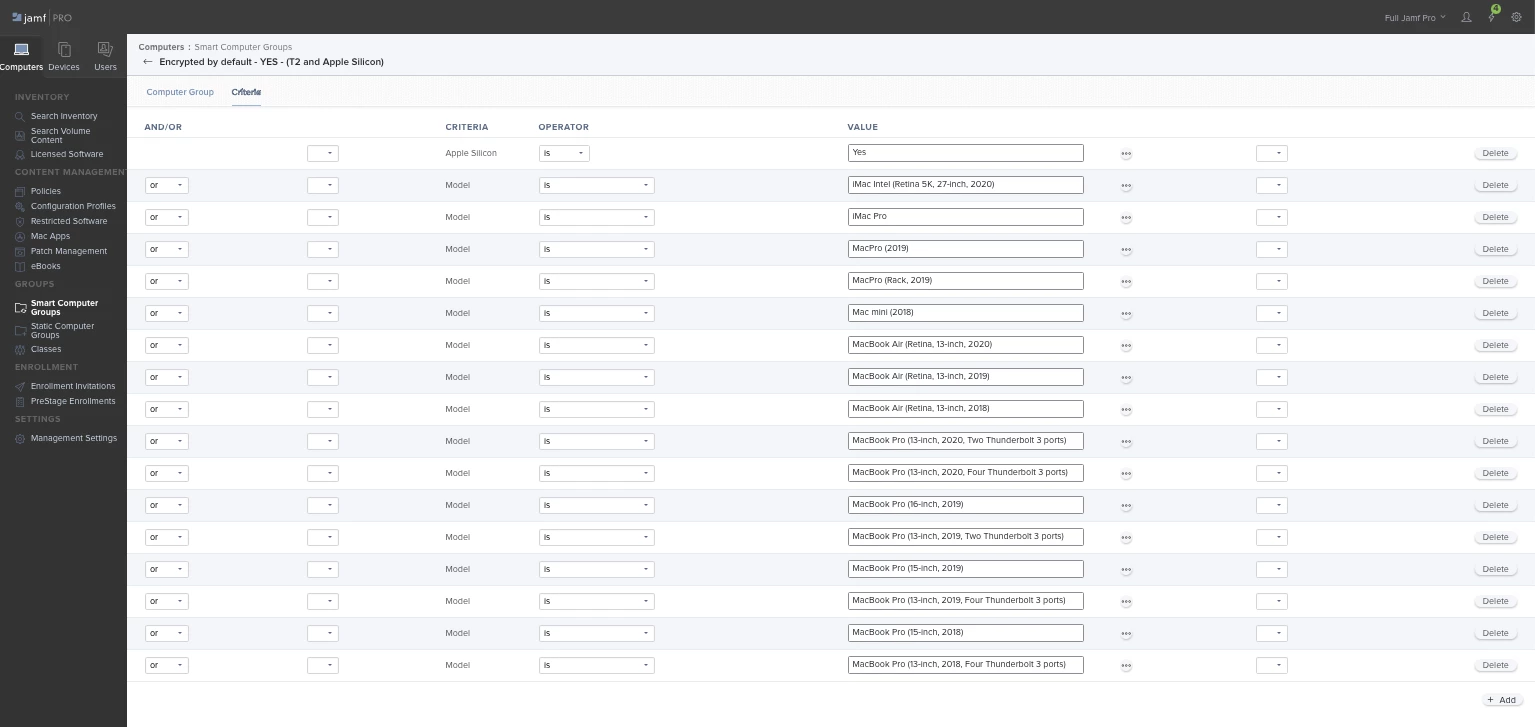
I'd personally probably just make a smart group to track this, doing "Model is $Model OR" in the Criteria for each model of Mac that has a T2. Kinda a pain to manually add in 16 separate criteria but you at least know it's not ever going to change outside of the off chance Apple releases updated Intel models. 


This is what I did too. It sounds like more of a pain than it was. Only took about 10 minutes to create.

Used the list in this KB article to populate the fields, although I was reminded that some hardware models report their model version to Jamf slightly differently than is formatted in the list, e.g. "iMac (Retina 5K, 27-inch, 2020)" actually reports to Jamf as "iMac Intel (Retina 5K, 27-inch, 2020)". So if you're going to make those model values super specific, be sure you're writing them in the way that they appear in the Jamf record, not in the article.


Forum|alt.badge.img+9
  • Contributor
  • January 19, 2023

This is what I did too. It sounds like more of a pain than it was. Only took about 10 minutes to create.

Used the list in this KB article to populate the fields, although I was reminded that some hardware models report their model version to Jamf slightly differently than is formatted in the list, e.g. "iMac (Retina 5K, 27-inch, 2020)" actually reports to Jamf as "iMac Intel (Retina 5K, 27-inch, 2020)". So if you're going to make those model values super specific, be sure you're writing them in the way that they appear in the Jamf record, not in the article.


(Obviously my group is to show any T2 Macs OR any Apple Silicon Macs. Note if you're just looking for T2 Macs, remove the first criteria I included.)