
Question

Fails to enroll with DEP

  • September 15, 2016
  • 11 replies
  • 49 views

Forum|alt.badge.img+5

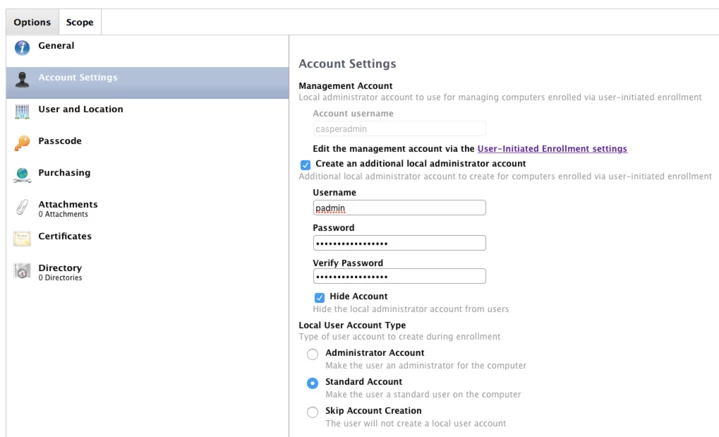
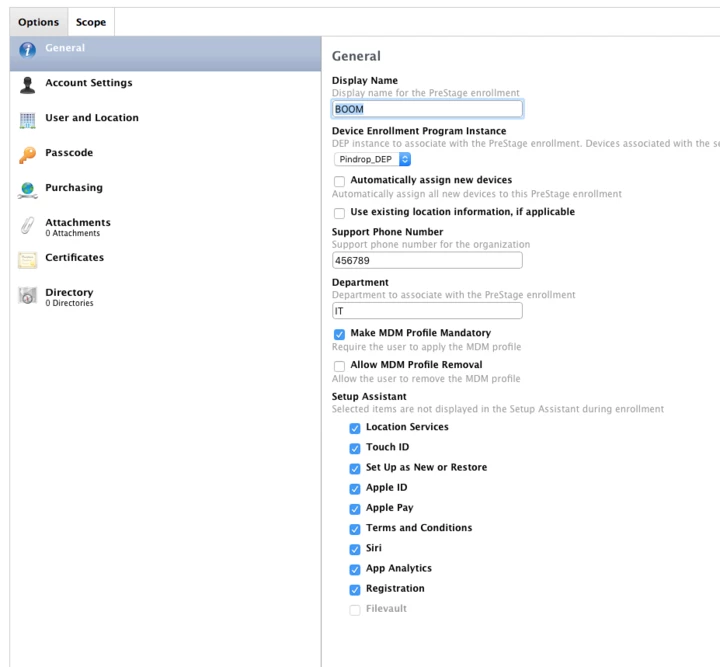
I will attach our PreStage settings

When we run through the Setup Assistant DEP will kick in and say "We are going to config your computer." It will wait there for a couple mins and then error our saying:
“Failed to contact Mobile Device Management server"

If we then go into the JSS we will see the SN's in the inventory but not managed. This is a hosted JSS.

Any thoughts?
11 replies

Forum|alt.badge.img+5
  • Contributor
  • September 15, 2016

You may have terms and conditions to accept with Apple at deploy.apple.com or school.apple.com.


Forum|alt.badge.img+5
  • Author
  • Contributor
  • September 15, 2016

Already accepted the T&C's.

Also. If we turn off DEP, finish the setup assistant, then turn DEP back on we will get the warning saying "hey, this is part of DEP blah blah" We can finish the enrollment there with no problems.

It must have something to do with the prestage that is jacked up but am out of idea's.


bentoms
Forum|alt.badge.img+35
  • Hall of Fame
  • September 15, 2016

@careybell does the JSS have a public cert or a self signed one?

Also, is it clustered?


Forum|alt.badge.img+5
  • Author
  • Contributor
  • September 15, 2016

We have narrow it down the the account creation. If I remove the "Account Settings" and don't try to create local user everything works fine. If I do anything within "Account Settings" thats when it will fail on us.


Forum|alt.badge.img+5
  • Author
  • Contributor
  • September 15, 2016
@careybell does the JSS have a public cert or a self signed one? Also, is it clustered?

To answer your question. It is self signed. Cluster? This is a AWS hosted JSS.


Forum|alt.badge.img+5
  • Author
  • Contributor
  • September 16, 2016

Is anyone able to create local accounts during the setup? Just want to make sure this is not some sort of known bug. Don't really see this being a bug but thought, what the hell I will through it out there.


Forum|alt.badge.img+9
  • Contributor
  • October 24, 2016

We are also having this same problem. @bentoms I believe our JSS is clustered.


Forum|alt.badge.img+9
  • Contributor
  • June 2, 2017

Hello All,
Any further updates on this matter?
We are a hosted JamF Pro.
I removed the account creation. Nothing.
Tried a default PreStage setup. Nothing
Tried with External Internet Connection. Nothing
Tried with LAN Connection. Nothing.
Switch SSL Certificate Verification to 'Always except during Enrolment'. Nothing.
Not sure when the issue started but the last time I used DEP to image/setup a OS X device it worked. Now it does not. We are running 9.98 (will be 9.99 on Sunday).

cheers.


Forum|alt.badge.img+10
  • Contributor
  • June 6, 2017

I've been told by JAMF that in order to use the Account Settings payload you also need to have the Directory payload configured. While it is not called out anywhere if you only configure the Account Settings the entire prestage will fail.


Forum|alt.badge.img+14
  • Honored Contributor
  • July 3, 2017

@pueo

Did you get this resolved? Seeing same issue here, with the only differnce being we're now using a public SSL cert.


Forum|alt.badge.img+9
  • Contributor
  • July 11, 2017

@ooshnoo

I ended up on a support call with JamF. The issue ended up not being our Hosted JamF but the device it self.
Amongst a few other tid bits below are the instructions JamF Support sent me while on a Web Ex sesh.

Try this out.
If we are no longer being prompted to enroll through DEP, let's proceed through the Setup Assistant as normal. Once we're in, let's do the following:

  1. Enable SSH on DEP device and verify you can connect to it from another client
  2. Run the following commands on the DEP device: sudo rm /var/db/.AppleSetupDone sudo rm -rf /var/db/ConfigurationProfiles/ sudo rm /Library/Keychains/apsd.keychain
  3. Re-scope DEP device to PreStage / verify it is already scoped
  4. Reboot the DEP device
  5. When the DEP device is at the beginning of the Setup Assistant, SSH into it from another client
  6. On the other client computer, run ‘tail -f /var/log/system.log’ to watch the DEP enrollments live

Good luck.

Cheers
A.
