Question

FDA enable for Admin By Request

  • July 21, 2023
  • 4 replies
  • 96 views

Forum|alt.badge.img+6

Hi All,

looking for some guidance - Im trying to enable Admin By Request have Full Disk Access across my mac fleet.

I have a PPPC that I have deployed and its says completed but on the mac (Ventura) When I check in in Security / Privacy -> Full Disk access , its not ticked .. 

 I have seen on the other app - that although on FDA is enabled - the mac UI may not be updated. 

 Here is the config that I have deployed as per ABR instructions..

macOS Client: IT Admin Manual (adminbyrequest.com)
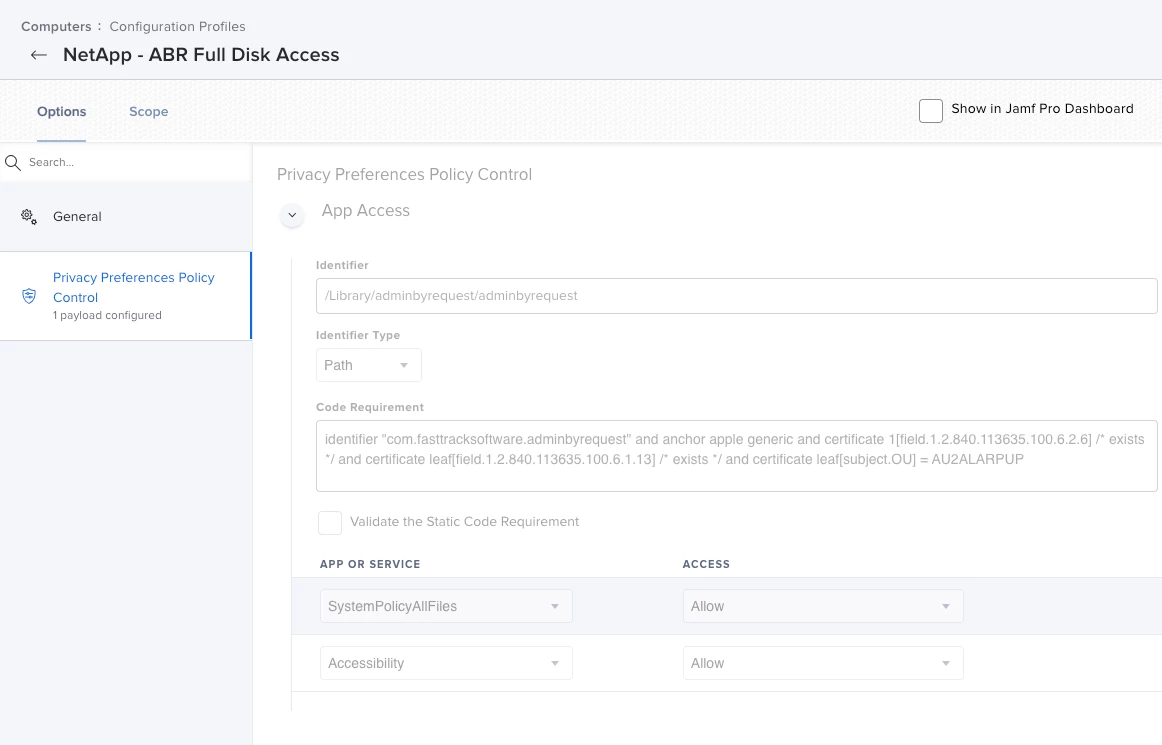
Im wondering if there is a way i can locally in terminal to see if the FDA is enabled or not ..


Any input be great!


Thanks

4 replies

jamf-42
Forum|alt.badge.img+17
  • Esteemed Contributor
  • July 21, 2023

you can. you need to allow terminal full disk access (best to switch off after) then use this: 

sudo sqlite3 /Library/Application\\ Support/com.apple.TCC/TCC.db 'select client,auth_value from access where service = "kTCCServiceSystemPolicyAllFiles"'

Those with value 2 have full disk access, you will see terminal in the list. 

This is pretty good re Apple TCC database: 

https://www.rainforestqa.com/blog/macos-tcc-db-deep-dive


Bol
Forum|alt.badge.img+11
  • Contributor
  • July 21, 2023

No need for sudo but same result, this will just list apps by identifier if fde;

sqlite3 /Library/Application\\ Support/com.apple.TCC/TCC.db \\
  'select client from access where auth_value and service = "kTCCServiceSystemPolicyAllFiles"'
com.apple.Terminal
com.microsoft.OneDrive-mac
org.tempel.findanyfile


Bol
Forum|alt.badge.img+11
  • Contributor
  • July 21, 2023

Also export if needed;

sqlite3 /Library/Application\\ Support/com.apple.TCC/TCC.db <<!
.headers on
.mode csv
.output /tmp/TCC.csv
SELECT datetime(last_modified, 'unixepoch', 'localtime'),client,auth_value from access;
!

 And approved or denied;

defaults read ~/Library/Preferences/com.apple.universalaccessAuthWarning.plist


pkleiber
Forum|alt.badge.img+9
  • Contributor
  • August 4, 2023

@rkelegha1 PPPC settings not shown in the GUI is unfortunately normal behaviour with Configuration Profiles and Setting Full Disk Access :(

We also use Admin By Request and have implemented the same Configuration profile.