Question

FireFox install/update script

  • November 12, 2019
  • 30 replies
  • 206 views

Show first post

30 replies

Forum|alt.badge.img+3
  • New Contributor
  • December 21, 2021

PS.

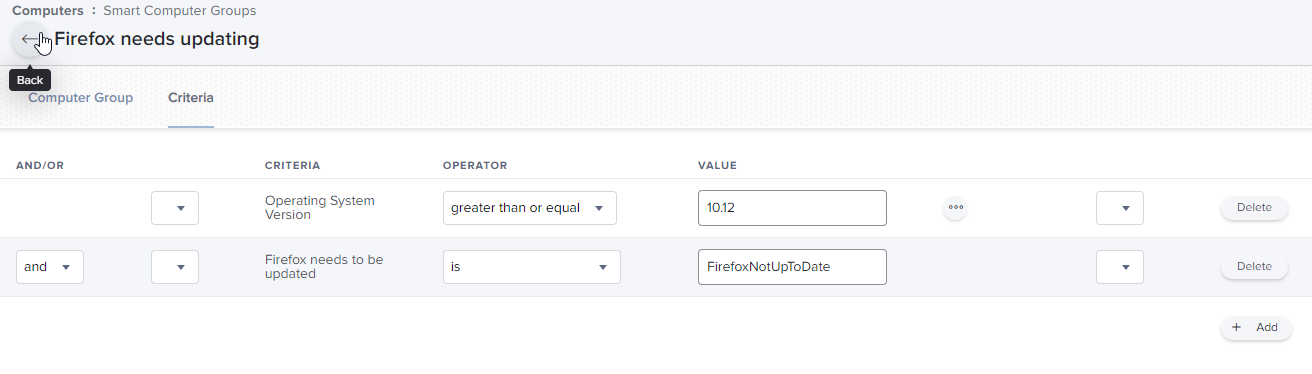
I then created a Smart Computer Group: 

using the Smart Computer Group as the scope I set the Policy with the installation script to run Ongoing.


I know I could have set the script to check if Firefox was running, but I was not worried about it installing underneath.  I have not had problems with it, just like Firefox and Chrome install the newest version while the program is still running and then just ask you to restart.  Our users mainly use Chrome and just use Firefox for testing issues occasionally.  You can have the policy prompt the user to restart Firefox when the policy is finished running.


Forum|alt.badge.img+3
  • New Contributor
  • January 10, 2022

I altered a VLC script and created a script for the Extension Attribute here: https://community.jamf.com/t5/jamf-pro/install-update-vlc/td-p/194385

I then took those scripts and altered them for Firefox ESR installation:


#!/bin/bash
mkdir /tmp/downloads
cd /tmp/downloads

#Installing Firefox ESR
curl -L -o Firefox.dmg "https://download.mozilla.org/?product=firefox-esr-latest-ssl&os=osx&lang=en-US"

hdiutil mount -nobrowse Firefox.dmg -mountpoint /Volumes/Firefox
rsync -vaz /Volumes/Firefox/Firefox.app/ /Applications/Firefox.app
sleep 20
hdiutil unmount "/Volumes/Firefox"

rm -rf /tmp/downloads*

And the Extension Attribute:


#!/bin/bash

CurrentFirefox=$(curl "https://ftp.mozilla.org/pub/firefox/releases/" | grep "esr" | tail -n2 | head -n1 | /usr/bin/sed -e 's/<[^>][^>]*>//g' | /usr/bin/awk '{print $1}' | tr -d '[a-z]' | sed 's/.$//')
if [ -d /Applications/Firefox.app ]; then
FirefoxVersion=$( sudo defaults read /Applications/Firefox.app/Contents/Info CFBundleShortVersionString )
FirefoxCheck=$FirefoxVersion
else
FirefoxCheck="Notinstalled"
fi
if [ "$FirefoxCheck" == "$CurrentFirefox" ]; then #Is Firefox up to date?
result="FirefoxUpToDate"
else result="FirefoxNotUpToDate"
fi
echo "<result>$result</result>"


I was getting Firefox saying it wasn't up to date today even after running the script.  So I did some troubleshooting.  I found that the site I was pulling the version from, to compare to the version installed, has the version of ESR being released tomorrow.

So I updated the Extension Attribute:


#!/bin/bash CurrentFirefox=$(curl -L https://www.mozilla.org/en-US/firefox/organizations/notes/ | grep "Firefox ESR" | sed -n 1p | sed 's/<[^>][^>]*>//g' | tr -d '[a-z, A-Z]') if [ -d /Applications/Firefox.app ]; then FirefoxVersion=$( sudo defaults read /Applications/Firefox.app/Contents/Info CFBundleShortVersionString ) FirefoxCheck=$FirefoxVersion else FirefoxCheck="Notinstalled" fi if [ "$FirefoxCheck" == "$CurrentFirefox" ]; then #Is Firefox up to date? result="FirefoxUpToDate" else result="FirefoxNotUpToDate" fi echo "<result>$result</result>"


MattF-TX
Forum|alt.badge.img+5
  • New Contributor
  • February 4, 2022

I altered a VLC script and created a script for the Extension Attribute here: https://community.jamf.com/t5/jamf-pro/install-update-vlc/td-p/194385

I then took those scripts and altered them for Firefox ESR installation:


#!/bin/bash
mkdir /tmp/downloads
cd /tmp/downloads

#Installing Firefox ESR
curl -L -o Firefox.dmg "https://download.mozilla.org/?product=firefox-esr-latest-ssl&os=osx&lang=en-US"

hdiutil mount -nobrowse Firefox.dmg -mountpoint /Volumes/Firefox
rsync -vaz /Volumes/Firefox/Firefox.app/ /Applications/Firefox.app
sleep 20
hdiutil unmount "/Volumes/Firefox"

rm -rf /tmp/downloads*

And the Extension Attribute:


#!/bin/bash

CurrentFirefox=$(curl "https://ftp.mozilla.org/pub/firefox/releases/" | grep "esr" | tail -n2 | head -n1 | /usr/bin/sed -e 's/<[^>][^>]*>//g' | /usr/bin/awk '{print $1}' | tr -d '[a-z]' | sed 's/.$//')
if [ -d /Applications/Firefox.app ]; then
FirefoxVersion=$( sudo defaults read /Applications/Firefox.app/Contents/Info CFBundleShortVersionString )
FirefoxCheck=$FirefoxVersion
else
FirefoxCheck="Notinstalled"
fi
if [ "$FirefoxCheck" == "$CurrentFirefox" ]; then #Is Firefox up to date?
result="FirefoxUpToDate"
else result="FirefoxNotUpToDate"
fi
echo "<result>$result</result>"


mgeorgecv - thanks for posting that.  Your script is the only one that I've found that works perfectly for remotely updating Firefox.  You're a UNIX scripting Jedi in my book! 👍


dvasquez
Forum|alt.badge.img+16
  • Valued Contributor
  • March 31, 2022

PS.

I then created a Smart Computer Group: 

using the Smart Computer Group as the scope I set the Policy with the installation script to run Ongoing.


Fantastic work!  

Thank you Sir!


Forum|alt.badge.img
  • New Contributor
  • November 19, 2024

Hello,

I just added a github with an automatic installation and update of firefox in french with architecture recognition and prompt to the user.


https://github.com/skalplaks/InstallFirefoxFR.sh/tree/main