I am a bit confused on how to activate FileVault from JAMF Side. I was thinking to use the Individual Key as I don't want to do any manual work on uploading all the keys into Jamf (I rather JAMF do everything automatically), and so I am wondering if that is the right approach. I am also getting confused on when it tells me to define it to a management account or "Current or Next User."
Can someone explain if they started fire vault from the group up or point to a nice Nation post so I can follow their footsteps.
Thanks.
Best answer by gachowski
I think that Apple has depreciated Institutional keys, so don't use them. Also, the Jamf policy won't escrow the key so I feel the best solution is an all in one profile !
1. set up the configuration profile the way you want to .. I recommend on log in,
2. set up a policy to reboot the machines You can use Jamf helper to explain to the users what is going on and if you want you can also allow the user to defer ( but with FV I don't recommend unless the machine is already in use)
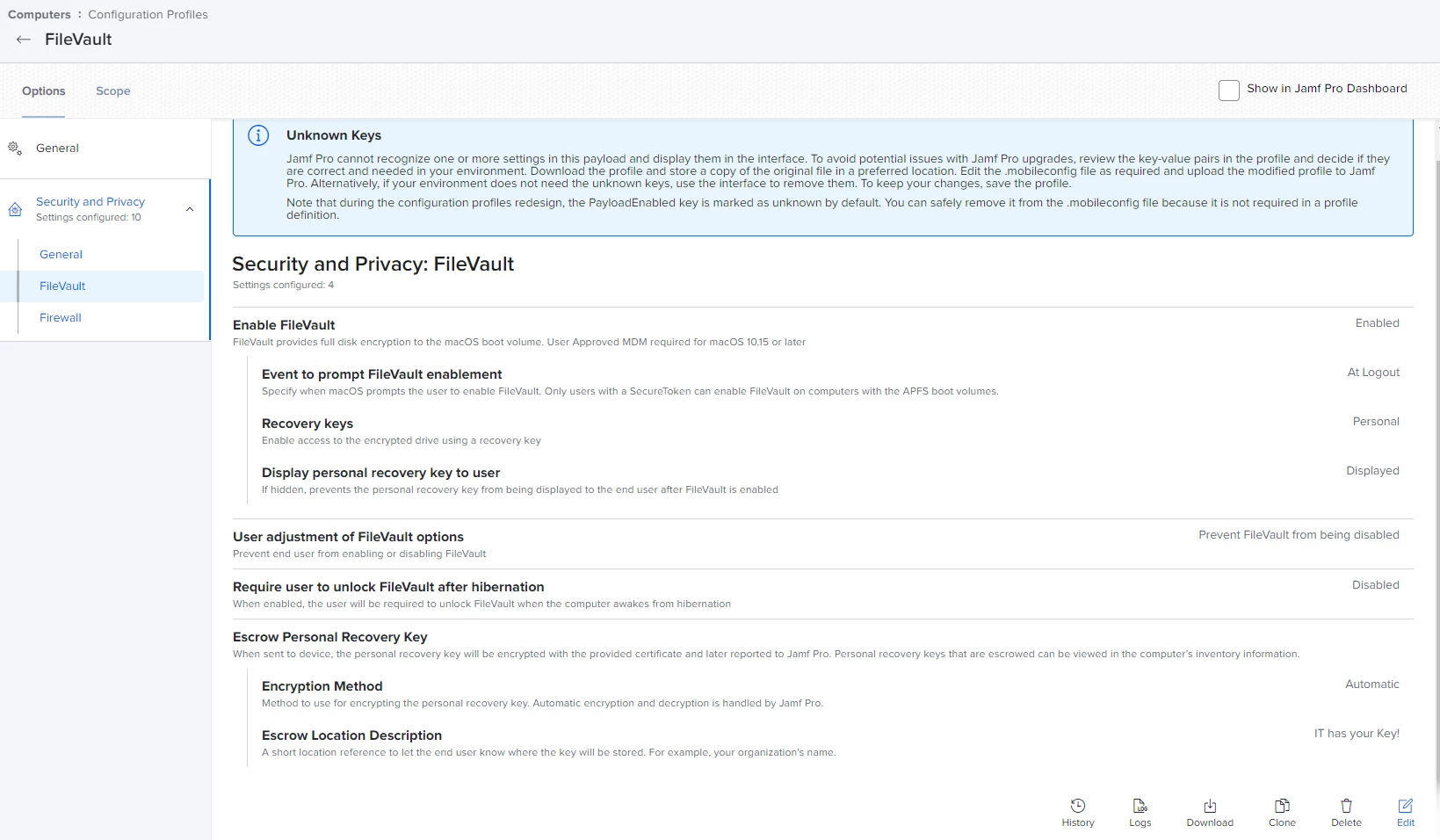
Configuration profiles has worked better for me then policies. You have the choice of personal, institutional, or both recovery keys which to me made the most sense to do personal (seems self defeating to has single institutional key that would work on all) , but you will want to escrow those into Jamf and there is no manually uploading for that. Below is a sample config;
heads up in case you were not already aware.. this will not work with mobile accounts (i.e. the ones made when bound to AD), they do not have the security token required for filevault.
I think that Apple has depreciated Institutional keys, so don't use them. Also, the Jamf policy won't escrow the key so I feel the best solution is an all in one profile !
1. set up the configuration profile the way you want to .. I recommend on log in,
2. set up a policy to reboot the machines You can use Jamf helper to explain to the users what is going on and if you want you can also allow the user to defer ( but with FV I don't recommend unless the machine is already in use)
I think that Apple has depreciated Institutional keys, so don't use them. Also, the Jamf policy won't escrow the key so I feel the best solution is an all in one profile !
1. set up the configuration profile the way you want to .. I recommend on log in,
2. set up a policy to reboot the machines You can use Jamf helper to explain to the users what is going on and if you want you can also allow the user to defer ( but with FV I don't recommend unless the machine is already in use)
Important correction: a Jamf policy that enables FileVault DOES escrow the resulting PRK for recent versions of Jamf and macOS. See details here.