Question

Full disk access to install Forcepoint (formerly known as web sense)

  • March 4, 2020
  • 6 replies
  • 70 views

Forum|alt.badge.img+4

HI

we face the issue to install Forcepoint on our Macs, but I can't even install it myself via command line because the HD is read only.
So deploying it an masse is even more tedious

Anyone out there who has been able to install it on Catalina, and wants to share how?

any help is appreciated

6 replies

Forum|alt.badge.img+3
  • New Contributor
  • July 9, 2020

Have you had any luck getting a ForcePoint package built for Self Service, and or automated deployment via policy ?

I've been attempting to build a custom package in Composer but I'm having no luck.... The ForcePoint directory includes 5 files, two of which are installer .pkg's - that you actually have to install manually with administrative privileges as you know; at present it's a manual and tedious process that I'd like to automate.... Any insights would be greatly appreciated.

ForcePoint directory of contents....

1) ca.cer
2) DLPClientConfig.hsw
3) localConfig.xml
4) WebsenseEndpoint.pkg
5) WebsenseEPClassifier.pkg


Forum|alt.badge.img+10
  • Valued Contributor
  • September 14, 2020

if you are just deploying the endpoint client, you just need to package the WebsenseEndponit.pkg. Other files are not required.

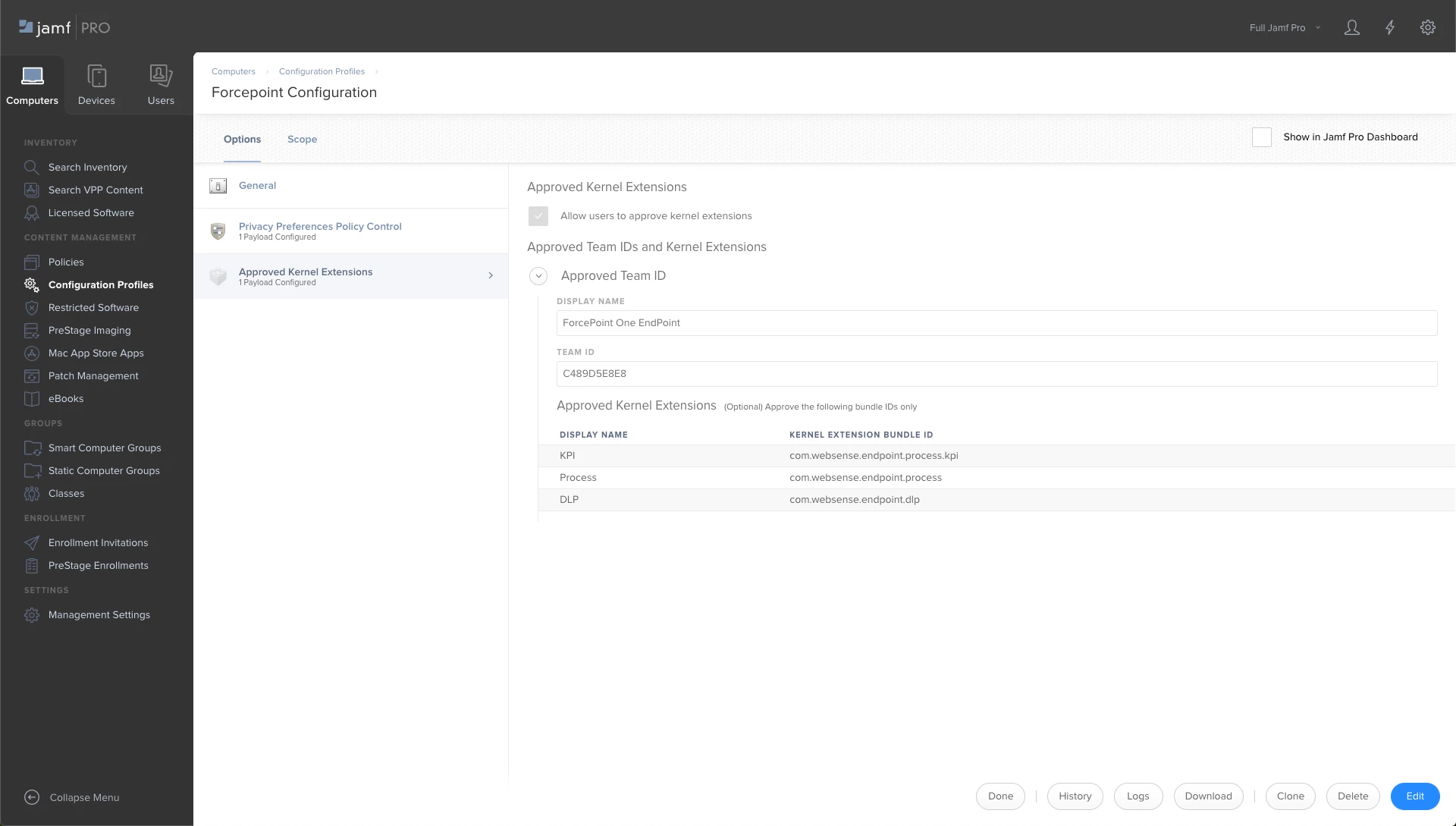
You will need to add a - Configuration Profile > Approved Kernel Extensions with Team ID C489D5E8E8 - Configuration Profile > Privacy Preferences Policy Control. I just need to know the CODE REQUIREMENT for it as I don't know it.


AJPinto
Forum|alt.badge.img+26
  • Legendary Contributor
  • September 15, 2020

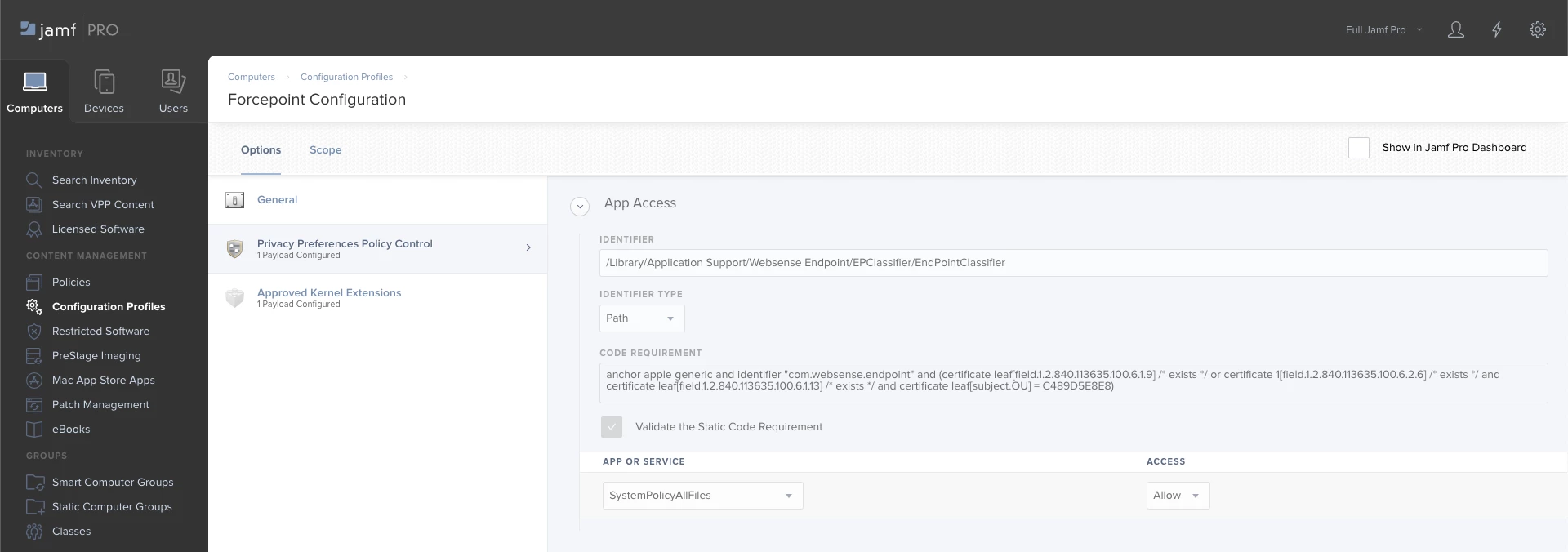
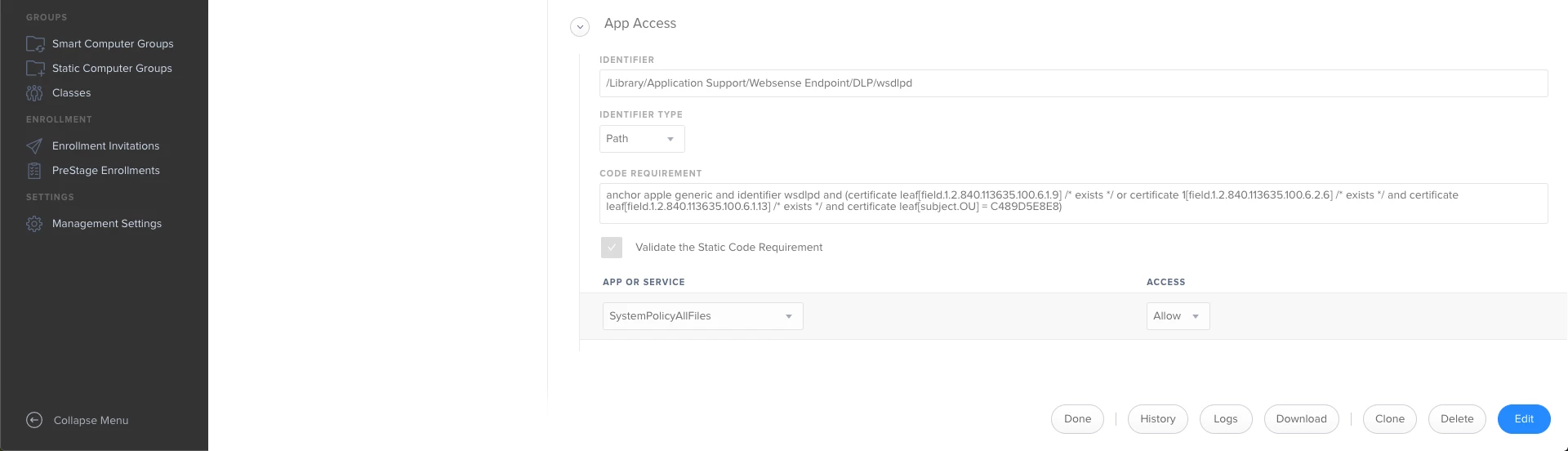
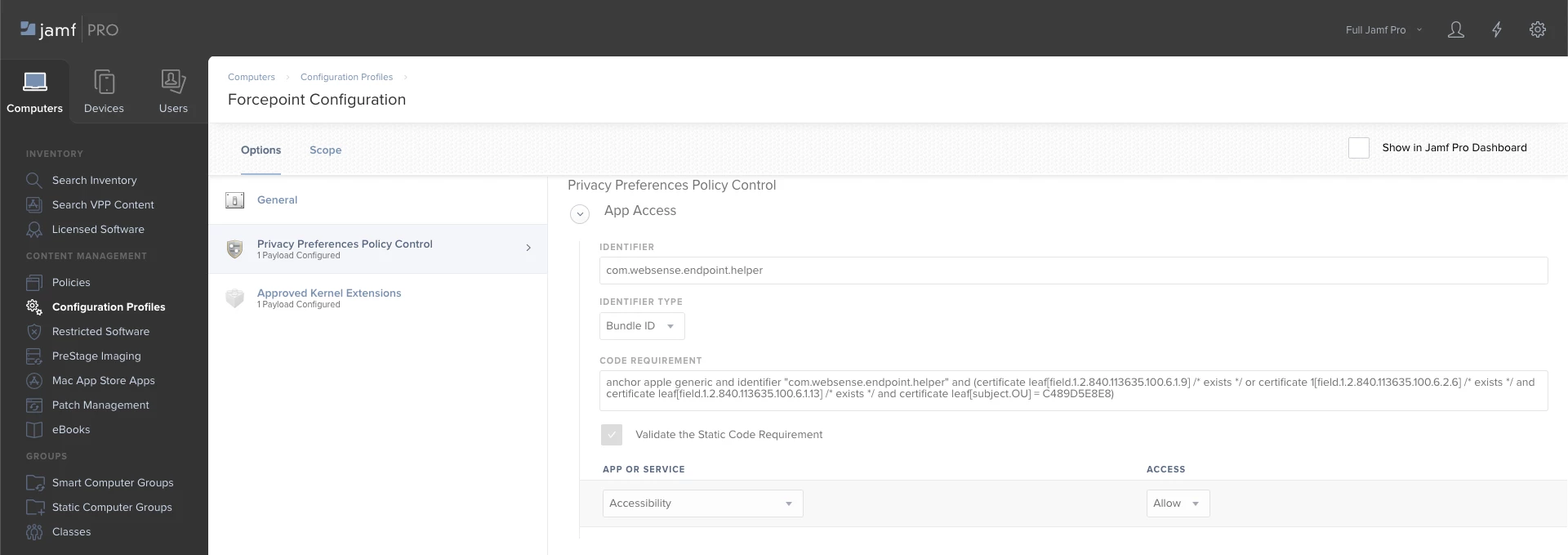
Forcepoint is kinda annoying, the application manufacturer makes the product for macOS but does not officially support it on macOS. We deploy the forcepoint installer and use a scrip to install it, and have a configuration profile to do everything needed for forcepoint to work. I attached screenshots of our configuration profile for forcepoint, and the script we use to install it. If this does not get you going you may need to get with forcepoint.

#!/bin/sh
## postinstall

pathToScript=$0
pathToPackage=$1
targetLocation=$2
targetVolume=$3

tritonClassifier="/private/tmp/RGBK/Forcepoint_Endpoint_20.05/WebsenseEPClassifier.pkg"
tritonEndpoint="/private/tmp/RGBK/Forcepoint_Endpoint_20.05/WebsenseEndpoint.pkg"

#Install WebsenseEPClassifier.pkg
sudo installer -pkg $tritonClassifier -target / -allowUntrusted

#Install WebsenseEndpoint.pkg
sudo installer -pkg $tritonEndpoint -target /

#Wait 5 Seconds and deleted local installation files
sleep 5
sudo rm -rfv /private/tmp/RGBK/Forcepoint_Endpoint_20.05

exit 0 ## Success

Forum|alt.badge.img+7
  • Contributor
  • August 3, 2021

I know I am a little late to the party here and it may be irrelevant now, but can @AJPinto can you paste the text for the code snapshot?  I am not sure I transcribed that right.  I'm wrestling with Forcepoint One config right now as it is.  Being quite a few versions behind does not help though.  😕😕


Forum|alt.badge.img
  • New Contributor
  • January 13, 2022

@dshepp33 

Even I'm late for the party but here you go the Code Requirements, not sure if you still looking for these 😄 😛 


Team ID: C489D5E8E8
Bundle ID: com.websense.endpoint


1 Identifier:
/Library/Application Support/Websense Endpoint/EPClassifier/EndPointClassifier

Id type: Path

code requirement:

anchor apple generic and identifier "com.websense.endpoint" and [certificate leaf[field.1.2.840.113635.100.6.1.9] /* exists */ or certificate 1[field.1.2.840.113635.100.6.2.6] /* exists */ and certificate leaf[field.1.2.840.113635.100.6.1.13] /* exists */ and certificate leaf[subject.OU] =C489D5E8E8]

syspolicyallfiles - allow

static code validation: check mark


2 Identifier:
/Library/Application Support/Websense Endpoint/DLP/wsdlpd

ID type: Path

code:

anchor apple generic and identifier wsdlp and [certificate leaf[field.1.2.840.113635.100.6.1.9] /* exists */ or certificate 1[field.1.2.840.113635.100.6.2.6] /* exists */ and certificate leaf[field.1.2.840.113635.100.6.1.13] /* exists */ and certificate leaf[subject.OU] =C489D5E8E8]

syspolicyallfiles - allow

static code validation: check mark


3 Identifier:
com.websense.endpoint.helper

ID type: Bundle ID

Code:

anchor apple generic and identifier "com.websense.endpoint.helper" and [certificate leaf[field.1.2.840.113635.100.6.1.9] /* exists */ or certificate 1[field.1.2.840.113635.100.6.2.6] /* exists */ and certificate leaf[field.1.2.840.113635.100.6.1.13] /* exists */ and certificate leaf[subject.OU] =C489D5E8E8]


static code validation: check mark

Accessibility: Allow


For similar config, check https://techzone.vmware.com/deploying-vmware-carbon-black-cloud-sensor-workspace-one-uem#macos-prerequisites-for-deploying-carbon-black-cloud-sensor


Forum|alt.badge.img+8
  • Valued Contributor
  • April 11, 2024

Can someone confirm this is still working in 2024