Question

Garageband Sound Library

  • April 13, 2017
  • 9 replies
  • 138 views

Forum|alt.badge.img+5

I have Garageband listed under Mac App Store Apps in my JSS. It has successfully installed on the end users accounts. However, each user now needs to go in and download the sounds library which takes quite a bit of time per user and hinders their use in the classroom. Is there a way to push the sounds library remotely?

9 replies

mm2270
Forum|alt.badge.img+24
  • Legendary Contributor
  • April 13, 2017

@nhubbard I don't know if this is helpful at all, but recently, another JamfNationer and I went through the process of figuring out where the sound library and other additional GB content gets downloaded on a Mac, so it could be scripted to install it from a local download. You can find that thread here

While your situation is a bit different, you may be able to use the info in that thread combined with enabling the App Store debug menu trick, which you can find at this link to grab a copy of the downloaded packages and then deploy them.
Rich also has an article on his blog about a tool called AppStoreExtract that can help with these types of App Store downloads. You can search for that if that sounds like it might help.


Brad_G
Forum|alt.badge.img+16
  • Valued Contributor
  • April 13, 2017

@nhubbard If you use the method above of capturing the installers from the App Store you will likely also need to know the order in which they install. Or at least that was what I ran into a few GB versions ago.

With the most recent copy I packaged up, the number of installer packages went from just under a dozen to several dozen. I didn't want to have to move all of those up to the JSS and worry about order. I was able to use Composer and capture the library files after installation. The key for me was to configure Composer to also look at the Receipts folder and include them in my build. Otherwise GB would assume it needed to download the additional instruments again.


Forum|alt.badge.img+8
  • Valued Contributor
  • April 13, 2017

You can download all the packages with appleLoops.py (https://github.com/carlashley/appleLoops).

I believe all the mandatory loops (the loops downloaded when you first start up GB) combined are about 2 gigs. All the optional loops (the loops that are greyed out initially) combined are about 20 gigs!

I managed to package all the mandatory loops .pkgs into a single package that would cache the .pkgs into the temp directory then install them with a shell script.

The optional loops proved difficult due to package due to the size and amount of packages which mean you may have to separate them into smaller chunks.


Forum|alt.badge.img+5
  • Author
  • Contributor
  • April 14, 2017

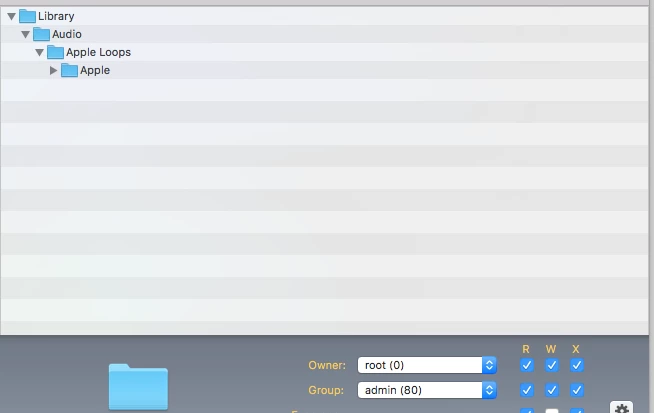
I am not sure if this is going to work or not, I read through all the responses here (thank you to everyone because I most definitely have learned a lot so far). I am used to using composer so I brought up GB, reinstalled the sounds library, found the files and made a package of just the sound from there. (See attached). I have not yet tried it on any of the laptops, but will this work? Will it put it into the correct folder for my end users, or not really?


Forum|alt.badge.img+8
  • Contributor
  • April 14, 2017

We find that it works better in the long run to acquire the packages that Apple uses and then run each of those. It places the sound files int eh correct locations and even modifies the hidden plist files to let GarageBand know that they are installed.


Brad_G
Forum|alt.badge.img+16
  • Valued Contributor
  • April 14, 2017

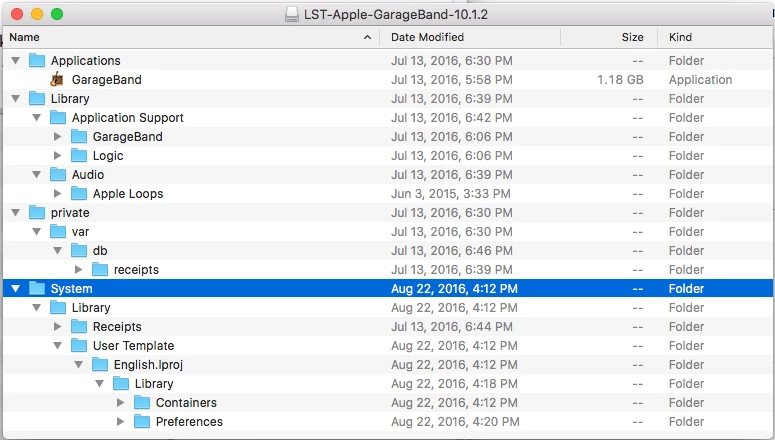
Just as something to reference, here is a screen shot of what my installation looks like. Keep in mind I'm pushing the GB app along with all the loops and instruments available (used in teaching in Music Dept in higher ed.) I had to make sure to get the receipts as GB would try to re-download all the loops otherwise. As always, test, test, test.


Forum|alt.badge.img+13
  • Honored Contributor
  • April 15, 2017

@nhubbard that is exactly what I do for this one Lab where the instructor insists on the older apple loops. Along with the rest of the GB stuff , the pkg is like 70GB now


Forum|alt.badge.img+7
  • Valued Contributor
  • April 3, 2020

I know this is an old post but might help someone...

Grab the GarageBand or Logic installers for sound libraries use the below...
SoundsLibrariesExtract

Then use InstallPKGsfromDMG from below
InstallPKGsfromDMG

Please note: Ensure you have the .app installed first as some of the sample library installers will fail if the .app is missing.


Forum|alt.badge.img+7
  • Valued Contributor
  • February 2, 2026

Having to do this for garage band, and remember what i did several years ago… one thing here is that this script link no longer works


InstallPKGsfromDMG


i believe it is this here: https://github.com/mlope653/Bash/blob/main/InstallPKGfromDMG


Also it did not work. jamf log says that it detected 38 packages with no failures (but also does not show any successes), but when i open garage band it prompts for admin credentials, and all the sound files have little arrows next to them, that also prompt for admin credentials…

will have to dig a bit deeper.


EDIT2: Ok so i got it working in a hacky way, but you know what, i have 25 macs that need this and i hate dealing with them, so here it is from another thread, allow apple software to install as a limited user. Not the most elegant, but i really dont want to spend more time on stupid garageband:


/usr/bin/security authorizationdb write system.install.apple-software allow