Question

GoToMeeting

  • April 3, 2015
  • 14 replies
  • 42 views

gskibum
Forum|alt.badge.img+13

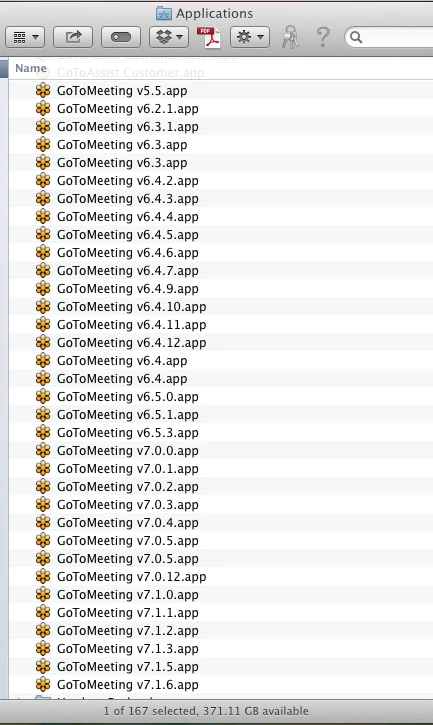
This post is 9/10 gripe, and 1/4 how to I prevent this. No doubt everyone's seen this. ;-)

What are these developers thinking?
14 replies

Chris_Hafner
Forum|alt.badge.img+27
  • Jamf Heroes
  • April 3, 2015

Yep, I've seen this. I can think of a few ways to take care of it as no settings are stored in the app itself (So far as I know). However, take that with a grain of salt as we don't institutionally deploy GoToMeeting so I haven't paid the most attention to it. Now, having said that I got curious and decided to check on a few things. It looks like 35 client machines have GoToMeeting (the app) installed. On those 35 units are 651 copies of GoToMeeting vx.x.x.app

So, There are probably many may ways to deal with this. • A script to check all versions and delete all but the newest. • A policy that deletes any and all pre-existing versions and then installs the latest (Probably the easiest). • Whatever really useful idea @mm2270 comes up with that I'm not thinking about. This last one is probably the best.

Regardless, I'd probably scope a SMART group to identify any user that had more than a single version (as they are downloaded when the user joins a GoToMeeting meeting) and then run whatever I needed to based on that.


acodega
Forum|alt.badge.img+15
  • Valued Contributor
  • April 3, 2015

The issue is that participants must have the same GoToMeeting version as the person hosting the meeting. GoToMeeting has a KB about it. I see now they've changed their auto updater so it will remove older versions. I don't think users see multiple GoToMeetings in Launchpad only when they open the Applications folder.


Chris_Hafner
Forum|alt.badge.img+27
  • Jamf Heroes
  • April 3, 2015

Ewww... Thanks for the update on that one Adam. Boy, that makes it messy. I went through and checked all those articles and it's even worse than it sounds. Looks like they're trying to manage it via the "autoupdate" process but it doesn't get all of the versions apparently. There also seems to be a lot of work around manually removing old preferences in order to allow the new autoupdate process to function as they intend.


acodega
Forum|alt.badge.img+15
  • Valued Contributor
  • April 3, 2015

Are users opening the Applications folder? Who cares since GoToMeeting doesn't make a mess of Launchpad?


emily
Forum|alt.badge.img+26
  • Hall of Fame
  • April 3, 2015

If only users kept their junk up to date. Or that GoToMeeting made sure that their apps were auto-updating so everyone was just using the newest version for meetings! I bet it wouldn't be as big of a deal if they didn't put the version number in the app name…


mm2270
Forum|alt.badge.img+24
  • Legendary Contributor
  • April 3, 2015

@Chris_Hafner Sorry, have no good ideas other than perhaps to not use GoToMeeting? The above seems like an extreme case of lazy programming to me. Have they not heard of the term "backward compatibility"? All I can think of is thank goodness others vendors aren't doing this. What a nightmare we'd have on our hands.

And @adamcodega - yes, people still open the Applications folder, or have the Applications folder in their Dock in List view, or many other things that access that. Not everyone uses Apple's OS in the 'utopian' way Apple seems to think we do. Just because LaunchPad is there doesn't give them a pass on this if you ask me. Though if their latest updater is deleting the older versions, that's at least a step in the right direction.


gskibum
Forum|alt.badge.img+13
  • Author
  • Valued Contributor
  • April 3, 2015

Launchpad? Isn't that one of those OS X features nobody uses? Outside of Apple Retail stores I've never seen it used. Yes users either use the Dock or the Applications folder, or the Applications folder in the Dock.

Glad the latest version cleans up after itself. Hopefully that will mitigate this mess. I didn't realize this.


acodega
Forum|alt.badge.img+15
  • Valued Contributor
  • April 3, 2015

LaunchPad is the spaceship. Zoom zoom!


Chris_Hafner
Forum|alt.badge.img+27
  • Jamf Heroes
  • April 3, 2015

Oh man. Launchpad is HUGE in education. At least it has been huge for us. Our students and faculty began to use Spotlight as a launcher a few years ago much to my dismay. When launchpad "launched" it at least gave them a functional launcher. They almost never go to their Applications folder.

@mm2270 No you did make a good suggestion. It even looks like I'm following it. Out of our 650+ users only 35 have had to use it so far.

Now, for a fun shift of question. Is this better or worse than adobe?


emily
Forum|alt.badge.img+26
  • Hall of Fame
  • April 3, 2015

Adobe is always the worst. @Chris_Hafner


acodega
Forum|alt.badge.img+15
  • Valued Contributor
  • April 3, 2015

On my computer, I have a GoToMeeting icon and then a GoToMeeting folder in Applications. Is it different for other people? I just wanted to see if there was a real issue here or not. Let's make an award for most versions of GoToMeeting on a single Mac.


gskibum
Forum|alt.badge.img+13
  • Author
  • Valued Contributor
  • April 3, 2015

Wow it seems this GoToMeeting thing isn't as common as I thought. My users are mostly older professionals, and long time Mac users. I guess because of the demographic I see this more than IT in education would.

For ages I have seen this on the majority of Macs I admin. Probably a vast majority. Although this one probably gets the award for the most versions.

Adobe make me go grrrrrrrr too.


Chris_Hafner
Forum|alt.badge.img+27
  • Jamf Heroes
  • April 3, 2015

@emilykausalik Yea, I guess your right ;-)

@adamcodega I've got two users tied @ 35 versions each. Also, GoToMeeting seems to only show a single icon in launchpad for our Yosemite users. I've have to check mavericks.


Chris_Hafner
Forum|alt.badge.img+27
  • Jamf Heroes
  • April 3, 2015

@gskibum Yep. New users develop their own methods regularly. It's quite interesting actually because I get to see the effects of UI on new users constantly. Actually, I even make sure that my work issued computers all run the same base configuration as my users so I can ensure and verify a good user experience. It hurts my soul a little bit though as new UI concepts are not always any good.