
Question

Heads up to Zscaler and Safari 11 users

  • October 13, 2017
  • 6 replies
  • 63 views

Forum|alt.badge.img+4

This is just meant as a heads up to the other people using Zscaler and Safari.
I was seeing problems with websites not loading, content on websites not loading, and general layout issues on websites.
All worked without issues as soon as Zscaler was out of the equation.

Turns out it was caused by the "Prevent cross-site tracking setting":
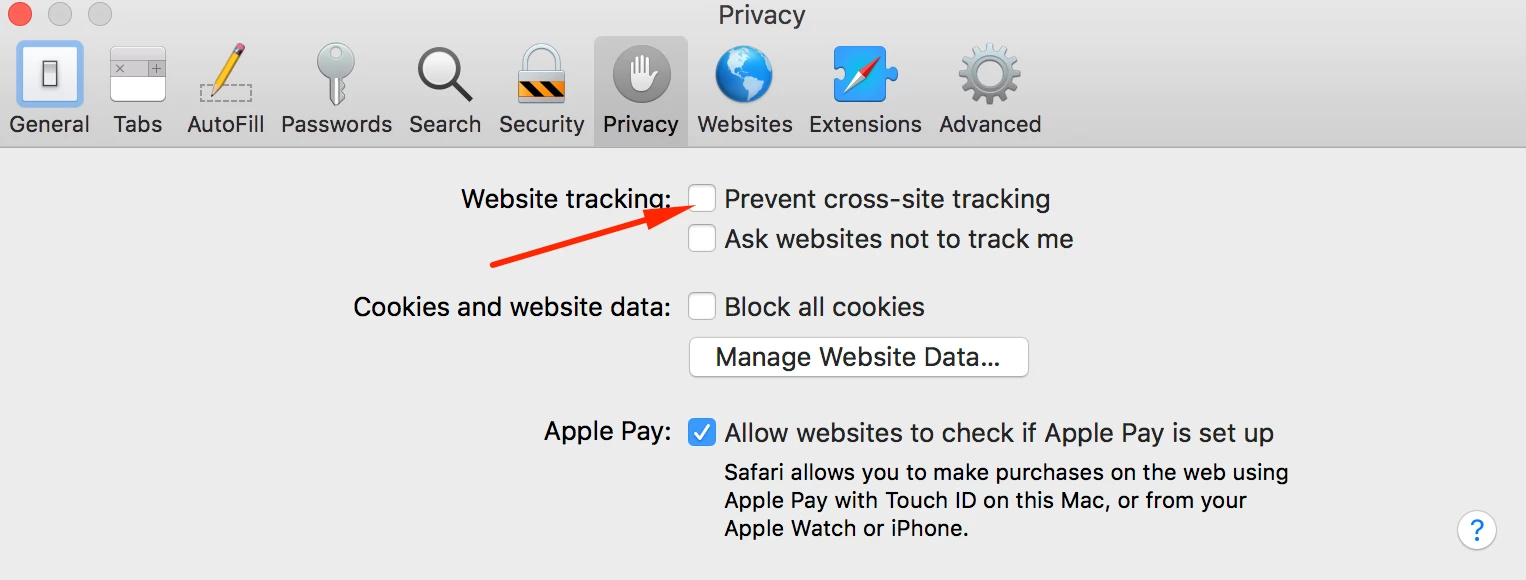
As soon as that was unchecked, everything started to act normal.
The setting caused Zscaler authentication to get stuck on redirection to the Zscaler gateway.

Hope I can save a fellow admin the headache I had because of this.

Good weekend to all.

6 replies

Forum|alt.badge.img+8
  • Valued Contributor
  • October 13, 2017

I appreciate the heads up and we will keep this in mind!


Forum|alt.badge.img+11
  • Valued Contributor
  • November 30, 2017

Is there a script we can run with Jamf to make sure the setting is correct?


Forum|alt.badge.img+4
  • Author
  • Contributor
  • November 30, 2017

I haven't figured out that part yet, but if someone does, I would be very interested to know how.


Forum|alt.badge.img+10
  • Valued Contributor
  • April 19, 2018

Did anyone figure out if this preferences can be set via a JAMF policy?


  • September 20, 2019

disabling "Prevent cross-site tracking setting" fixed the issue on my MacOS. However I need to push this change globally to all MacOS.
Is there any sample script that we can run from Jamf to disable "Prevent cross-site tracking setting"?


Forum|alt.badge.img+1
  • New Contributor
  • May 1, 2020

com.apple.Safari.plist uploaded to a custom configuration profile

<?xml version="1.0" encoding="UTF-8"?>
<!DOCTYPE plist PUBLIC "-//Apple//DTD PLIST 1.0//EN" "http://www.apple.com/DTDs/PropertyList-1.0.dtd">
<plist version="1.0">
<dict>
    <key>BlockStoragePolicy</key>
    <string>1</string>
</dict>
</plist>