Question

Help with configuration profile for GlobalProtect

  • May 3, 2020
  • 71 replies
  • 955 views

Show first post

71 replies

Forum|alt.badge.img+16
  • Honored Contributor
  • November 24, 2020

I am not able to get connect-method key to work either ... I also think that the setting can be pushed/overridden once the agent's 1st connection is made.


Forum|alt.badge.img+4
  • Contributor
  • December 15, 2020

After my ticket with PAN I was able to get the connect-method and portal address working, however I had to abandon the config profile and just use a separate Composer Package to drop the plist file in the directory. So I have one stock PKG file to install the client, then a PKG I created to drop the plist in /Library/Preferences. I will paste my plist that worked below if anyone needs it. (This worked for 5.2.2 and 5.2.3)

<?xml version="1.0" encoding="UTF-8"?> <!DOCTYPE plist PUBLIC "-//Apple//DTD PLIST 1.0//EN" "http://www.apple.com/DTDs/PropertyList-1.0.dtd"> <plist version="1.0"> <dict> <key>Palo Alto Networks</key> <dict> <key>GlobalProtect</key> <dict> <key>PanGPS</key> <dict/> <key>PanSetup</key> <dict> <key>Portal</key> <string>YOUR PORTAL HERE</string> </dict> <key>Settings</key> <dict> <key>connect-method</key> <string>on-demand</string> </dict> </dict> </dict> </dict> </plist>

Forum|alt.badge.img+23
  • Esteemed Contributor
  • December 20, 2020

I've ended up taking the above info, and some of @elliotjordan 's work and come up with this. It sits in the postinstall pkg I wrap around Palo Alto's installer.

# Remove GlobalProtectService keychain item from all users' login keychains.
USER_LIST=$(/usr/bin/dscl . -list /Users UniqueID | awk '$2 > 500 {print $1}')

for THIS_USER in $USER_LIST; do
    USER_HOME=$(/usr/bin/dscl . -read "/Users/$THIS_USER" NFSHomeDirectory | awk '{print $2}')
    USER_KEYCHAIN="$USER_HOME/Library/Keychains/login.keychain-db"
    if [[ -f "$USER_KEYCHAIN" ]]; then
        if /usr/bin/security find-generic-password -s "GlobalProtectService" "$USER_KEYCHAIN" &>/dev/null; then
            /usr/bin/security delete-generic-password -s "GlobalProtectService" "$USER_KEYCHAIN" &>/dev/null
        fi
    fi
done

# Fix for the GP connecting all the time instead of on demand
defaults delete /Library/Preferences/com.paloaltonetworks.GlobalProtect.settings.plist
rm /Library/Preferences/com.paloaltonetworks.GlobalProtect.settings.plist
defaults write /Library/Preferences/com.paloaltonetworks.GlobalProtect.settings.plist '{ "Palo Alto Networks" = { GlobalProtect = { Settings = { "connect-method" = "on-demand" }; }; }; }'

It's not that sophisticated but it works, and unlike deploying a plist as mentioned above ... it is cfprefsd compatible.


Forum|alt.badge.img+23
  • Esteemed Contributor
  • December 20, 2020

Blast. Made a mistake with the copy. The defaults line is missing a ;

defaults write /Library/Preferences/com.paloaltonetworks.GlobalProtect.settings.plist '{ "Palo Alto Networks" = { GlobalProtect = { Settings = { "connect-method" = "on-demand"; }; }; }; }'

bwoods
Forum|alt.badge.img+14
  • Honored Contributor
  • January 4, 2021

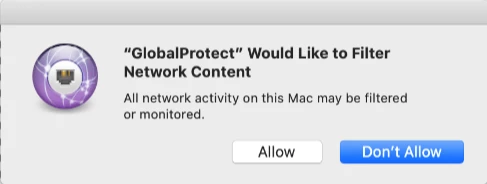
Does anyone have information regarding a Content Filter for Global Protect? I want to prevent the filter prompts that appear during installation.


Forum|alt.badge.img+23
  • Esteemed Contributor
  • January 11, 2021

As far as i'm aware GP isn't installing a content filter, even on latest 5.2.4.


bwoods
Forum|alt.badge.img+14
  • Honored Contributor
  • January 11, 2021

@franton I'm currently testing Global Protect 5.2.4 on 11.1 and during installation I'm receiving Content Filter prompts that disrupt DEPNotify. Palo Alto provided 4 configuration profiles to get around this issue in addition to the System Extension/Kernel Extension/PCC/Notificaion profile that you need to configure yourself. One of the provided profiles does not install if you are running Jamf Cloud version 26 due to a Jamf Pro issue. Jamf says that the issue should be resolved in the next release.

You may also not see this if your GP Protect Admins have turned specific features such as "Enforcement" off.


Forum|alt.badge.img+7
  • New Contributor
  • January 19, 2021

@bwoods Could you share the CP's from Palo Alto that allowed you to get around these issues?

Thanks in advance...


bwoods
Forum|alt.badge.img+14
  • Honored Contributor
  • January 20, 2021

@smpotter contact me on the macadmins #paloalto Slack channel. My name is brndnwds6 on Slack.


Forum|alt.badge.img+4
  • New Contributor
  • January 20, 2021

I have recently configured for my environment and this solution worked perfectly.
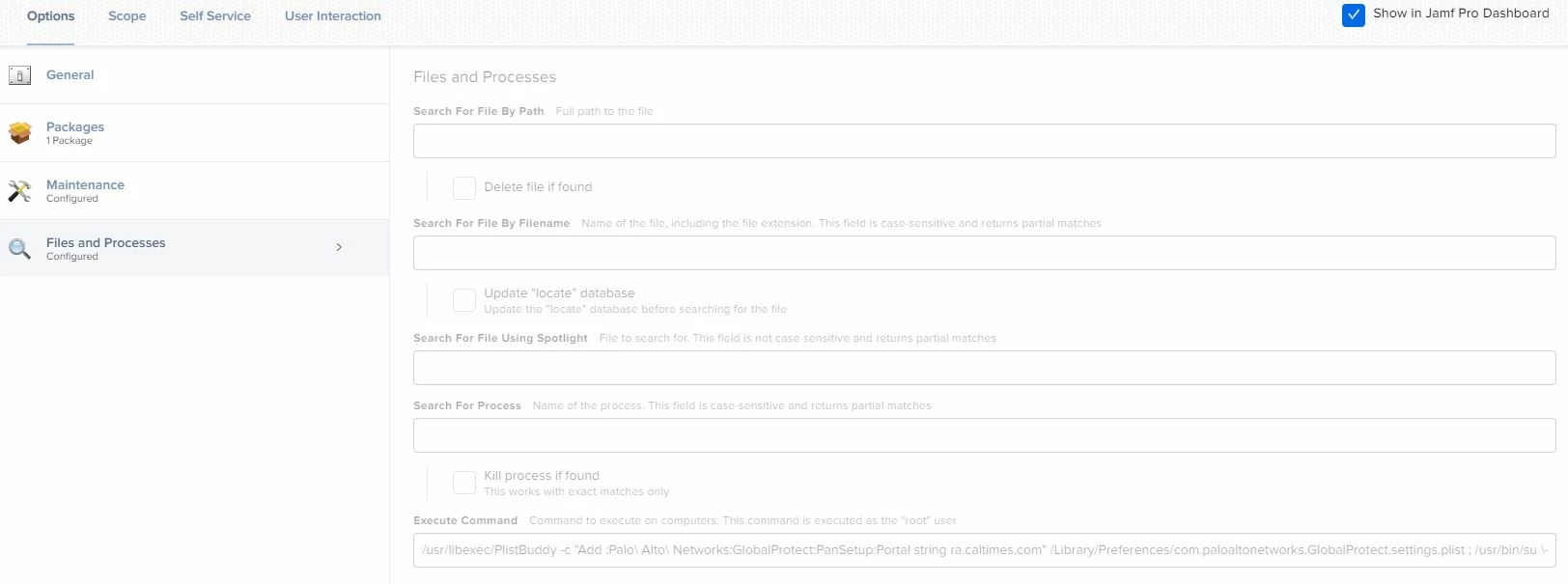
Policies > Files and Processes
Execute Command
/usr/libexec/PlistBuddy -c "Add :Palo Alto Networks:GlobalProtect:PanSetup:Portal string servername" /Library/Preferences/com.paloaltonetworks.GlobalProtect.settings.plist ; /usr/bin/su - "/usr/bin/stat -f%Su /dev/console" -c "/usr/bin/pkill -l -U /usr/bin/stat -f%Su /dev/console GlobalProtect" ; /bin/sleep 3 ; /usr/local/bin/jamf recon

Post installation, it updates the server name and works great.


Forum|alt.badge.img+2
  • New Contributor
  • February 5, 2021

Hi everyone, so been trying to set this up for a few days and can't figure it out. the documentation from PA is not really clear, so far I have tried everything that was suggested here but no luck. And when I made changes to the Plist the address only gets added after a reboot. am I missing something?


Forum|alt.badge.img+4
  • New Contributor
  • February 6, 2021

@mmunoz I tried the above process and it worked well all OS. We kept 10.10 only excluded. Please let me know if this works for you.


Forum|alt.badge.img+4
  • New Contributor
  • February 6, 2021


sdagley
Forum|alt.badge.img+25
  • Jamf Heroes
  • April 19, 2021

Anybody else seeing GlobalProtect 5.2.5-84 triggering a "You are making changes to System Certificate Trust Settings" authorization prompt at the first connection attempt after initial install (so @franton's removal of the GPService keychain isn't applicable) on Big Sur systems?


tender
Forum|alt.badge.img+7
  • Contributor
  • May 5, 2021

Yes @sdagley I have the same issue. Did you figure it out?

thanks!


sdagley
Forum|alt.badge.img+25
  • Jamf Heroes
  • May 5, 2021

@tender It appears that prompt is a requirement on Big Sur now based on the responses I received to my question.


tender
Forum|alt.badge.img+7
  • Contributor
  • May 6, 2021

@sdagley: It was something on the VPN backend setting. The root cert was configured to install and disabling that resolved the issue.


sdagley
Forum|alt.badge.img+25
  • Jamf Heroes
  • May 6, 2021

@tender Thanks for that info. I'll have to get with our GP team to find out if they're doing the same, and if that certificate is really required. Hopefully it can be deployed via a Configuration Profile if it is.


Forum|alt.badge.img+1
  • New Contributor
  • May 14, 2021

@Saikat I get an error when running that command.
Running command /usr/libexec/PlistBuddy -c "Add :Palo Alto Networks:GlobalProtect:PanSetup:Portal string myvpn" /Library/Preferences/com.paloaltonetworks.GlobalProtect.settings.plist ; /usr/bin/su - "/usr/bin/stat -f%Su /dev/console" -c "/usr/bin/pkill -l -U /usr/bin/stat -f%Su /dev/console GlobalProtect" ; /bin/sleep 3 ; /usr/local/bin/jamf recon...
Result of command:
su: unknown login: /usr/bin/stat -f%Su /dev/console


Forum|alt.badge.img+4

@Jamie.Boyd you made a mistake in the command. Please see the command line below.

/usr/libexec/PlistBuddy -c "Add :Palo Alto Networks:GlobalProtect:PanSetup:Portal string servername" /Library/Preferences/com.paloaltonetworks.GlobalProtect.settings.plist ; /usr/bin/su - "/usr/bin/stat -f%Su /dev/console" -c "/usr/bin/pkill -l -U /usr/bin/stat -f%Su /dev/console GlobalProtect" ; /bin/sleep 3 ; /usr/local/bin/jamf recon


Forum|alt.badge.img+1
  • New Contributor
  • May 14, 2021

Thanks @saikat.tripathi. I'm copying and pasting the command directly into Jamf, and changing the portal string to my vpn name. Can you tell me where the difference is? It looks exactly the same to me.


sdagley
Forum|alt.badge.img+25
  • Jamf Heroes
  • May 15, 2021

@saikat.tripathi @Jamie.Boyd The forum software tends to mangle code if one doesn't use the ` (backtick) escape character at the beginning and end of the code. Better yet is to put the script fragment in a separate block by using the ``` (triple-backtick) on a new line, followed by the script lines, and closed by another ``` on a new line. Or just type the code, select it, then use the icon above the Post Response field that looks like >_ to mark the selection as a code block.

You might also find creating a Script in Jamf Pro for this rather than stuffing it into a Files and Processes -> Execute Command makes life easier since you're not limited to a single line for the entire command.


Forum|alt.badge.img

To suppress the keychain system popup for GP 5.2.x you need to export the PaloAltoCA from keychain, upload it in a configuration profile with cert payload, mark it as Allow apps to access and scope it to your device(s). This isnt documented anywhere but was the obvious change that prompted that popup

For its VPN and content filter settings I have been battling with the incompetent Palo Alto support to issue the settings required but this is what they said: "Upon checking found that the JAMF is not the supported MDM from the PaloAlto. The supported MDM are the AirWatch ,Microsoft Intune ,MobileIron ,Google Admin console"

So i asked them for the MobileIron and Airwatch settings.... not heard back yet. I will post here the settings if they ever supply them...


Forum|alt.badge.img
  • New Contributor
  • August 23, 2021

@sdagley: It was something on the VPN backend setting. The root cert was configured to install and disabling that resolved the issue.


@tender Do you know to go about disabling the installation of the Palo Alto root cert?  Thanks in advance!


sdagley
Forum|alt.badge.img+25
  • Jamf Heroes
  • August 24, 2021

@tender Do you know to go about disabling the installation of the Palo Alto root cert?  Thanks in advance!


@tfish Way would you want to disable the installation of the Palo Alto root cert? That's probably  necessary for GlobalProtect to establish a connection.