Solved

High Sierra restriction

  • July 17, 2017
  • 16 replies
  • 72 views

Forum|alt.badge.img+20

has anyone setup software restriction for macOS High Sierra yet?

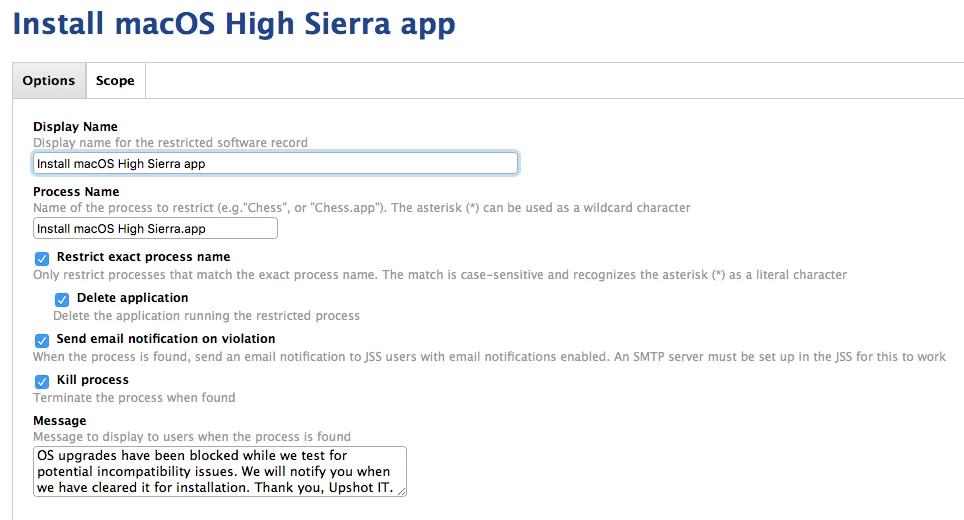
I had macOS Sierra restriction setup with Restrict Exact Process Name = Install macOS Sierra.app

and created a new restriction with Install macOS High Sierra.app

Best answer by davidacland

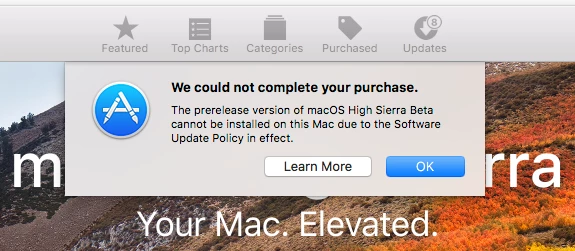
Install macOS High Sierra Beta.app

16 replies

davidacland
Forum|alt.badge.img+18
  • Valued Contributor
  • July 17, 2017

I haven't yet, although our users know not to work from beta OS versions.

The only way to be sure is to download the beta OS installer and double check the name.


Forum|alt.badge.img+7
  • Contributor
  • July 17, 2017

Yes, we made a record for each of these process names just to cover all bases: Install macOS 10.13 Beta, Install macOS High Sierra, Install macOS High Sierra Developer Preview, Install macOS High Sierra Public Beta


Forum|alt.badge.img+4
  • New Contributor
  • July 19, 2017

Someone that has downloaded the beta, can you post the name of the installer?


davidacland
Forum|alt.badge.img+18
  • Valued Contributor
  • Answer
  • July 19, 2017

Install macOS High Sierra Beta.app


Forum|alt.badge.img+4
  • Contributor
  • September 15, 2017

@mcarver Do you think restricting those process names will cover you when High Sierra moves past beta and launches?


emily
Forum|alt.badge.img+26
  • Hall of Fame
  • September 15, 2017

If you want to prevent beta installations this profile from Apple will work for that:
https://support.apple.com/en-us/HT203018


bentoms
Forum|alt.badge.img+35
  • Hall of Fame
  • September 15, 2017

That's me, catching myself out via the method that @emily just linked.


Forum|alt.badge.img+4
  • Contributor
  • September 17, 2017

So overall how many different installers are being blocked prior to High Sierra launching, and after it has been released?


Forum|alt.badge.img+5
  • New Contributor
  • September 21, 2017

@erickj, if you are referring to what @emily posted, it will block the installation of any beta installers for the foreseeable future. It will not block the installation of High Sierra once it becomes public release if you don't have a specific restriction in place for it.


Forum|alt.badge.img+9
  • Valued Contributor
  • September 26, 2017

I'm assuming that the same restrictions I had for Sierra will work for High Sierra, but just change some details.


antoinekinch11
Forum|alt.badge.img+9

@itupshot Are these restrictions working? I had a user successfully upgrade over the weekend even with this restriction in place. Hmmmm.


bpavlov
Forum|alt.badge.img+18
  • Esteemed Contributor
  • October 2, 2017

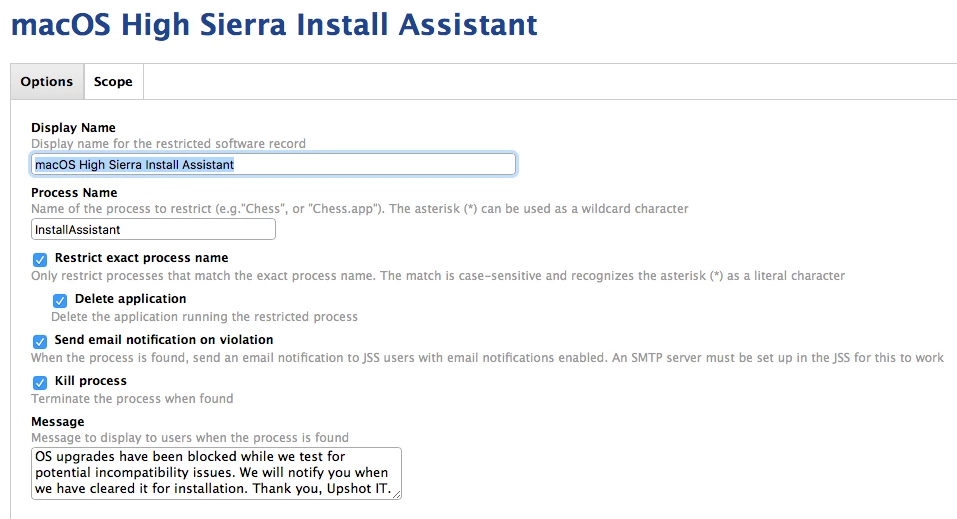
@antoinekinch the second screenshot should definitely work as InstallAssistant is the process name for the installer when it's launched. Even if someone renames the app, it should detect it. If you're not sure, you should test it out.


Forum|alt.badge.img+7
  • Valued Contributor
  • October 2, 2017

try unchecking "Restrict exact process name" and do:

*InstallAssistant* or *High Sierra*

the key is to Not use "Restrict exact process name".


antoinekinch11
Forum|alt.badge.img+9

Thanks @bpavlov I am going in the lab now to test different versions of this to be sure. Was just hoping someone had already!


Forum|alt.badge.img+11
  • Valued Contributor
  • October 2, 2017

Can anyone verify that doing the exact process name does not work? There seems to be some conflicting info on that. I'm going to do my own testing but I don't have HS yet.


Forum|alt.badge.img+18
  • Contributor
  • October 2, 2017

Exact process name works. I use "Install macOS High Sierra.app" for the name.