Question

Home page and startup page set for Safari and Firefox

  • February 21, 2023
  • 14 replies
  • 570 views

Asifahmed
Forum|alt.badge.img+9

Hello All,


I was looking for the best way to set homepage and start up page set for Safari and Firefox browsers through JAMF. 

I am able to do it for Google Chrome through a JSON file and config profile, but JSON is not working for both Safari and Firefox, please help me to do it.


14 replies

sdagley
Forum|alt.badge.img+25
  • Jamf Heroes
  • February 21, 2023

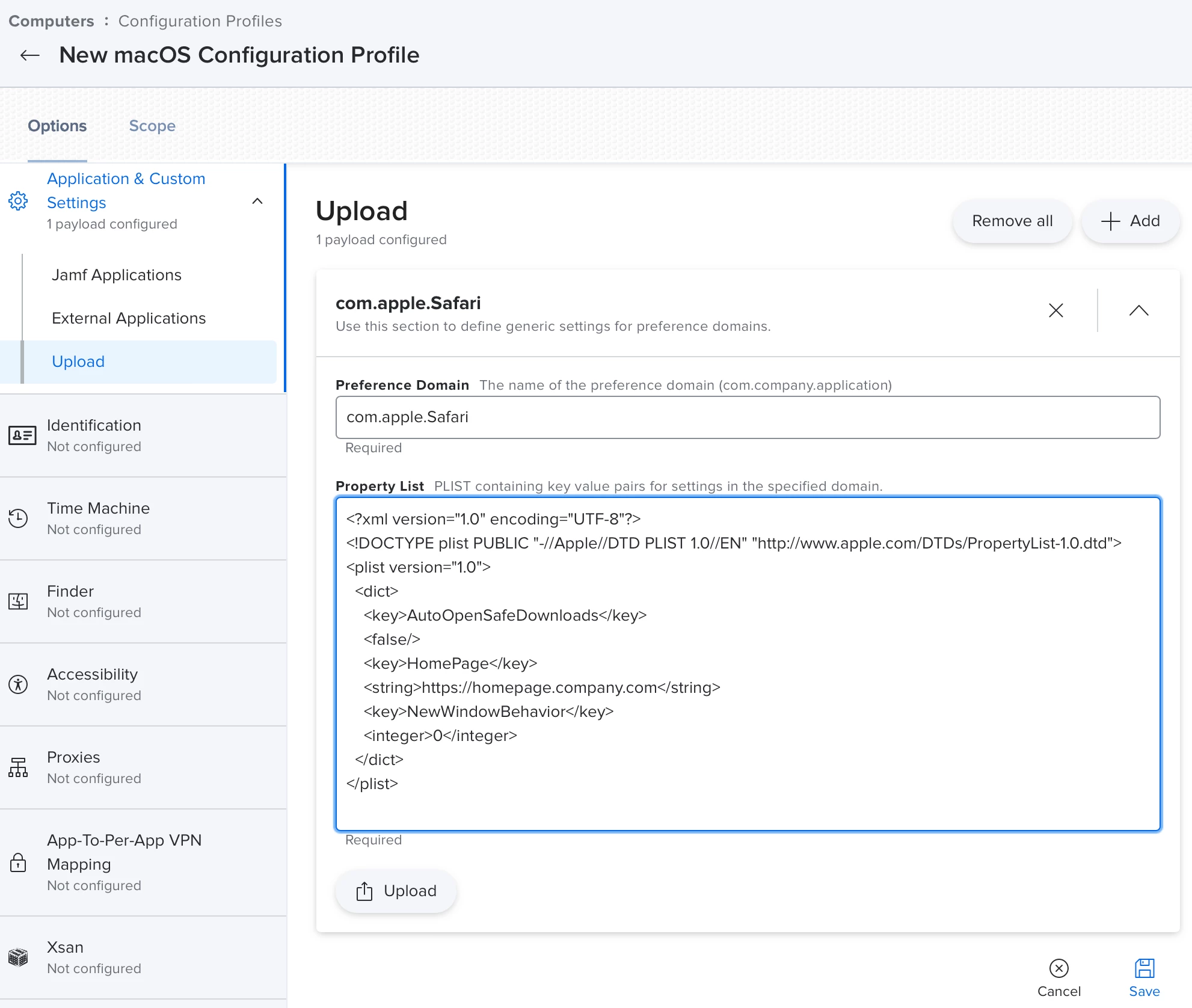
@Asifahmed The Configuration Profile data for the com.apple.Safari domain to set the Safari home page is:


<?xml version="1.0" encoding="UTF-8"?> <!DOCTYPE plist PUBLIC "-//Apple//DTD PLIST 1.0//EN" "http://www.apple.com/DTDs/PropertyList-1.0.dtd"> <plist version="1.0"> <dict> <key>HomePage</key> <string>https://homepage.company.com</string> <key>NewWindowBehavior</key> <integer>0</integer> </dict> </plist>


Note that Safari won't respond to this setting the very first time it is launched. 

For Firefox the domain is org.mozilla.firefox, and the payload data is:


<?xml version="1.0" encoding="UTF-8"?> <!DOCTYPE plist PUBLIC "-//Apple//DTD PLIST 1.0//EN" "http://www.apple.com/DTDs/PropertyList-1.0.dtd"> <plist version="1.0"> <dict> <key>EnterprisePoliciesEnabled</key> <true/> <key>Homepage</key> <dict> <key>URL</key> <string>https://homepage.company.com</string> <key>Locked</key> <true/> <key>StartPage</key> <string>homepage</string> </dict> </dict> </plist>


Here's how creating the Configuration Profile payload would look for Safari. From that you can figure out the one for Firefox:


Asifahmed
Forum|alt.badge.img+9
  • Author
  • Contributor
  • February 21, 2023

@Asifahmed The Configuration Profile data for the com.apple.Safari domain to set the Safari home page is:


<?xml version="1.0" encoding="UTF-8"?> <!DOCTYPE plist PUBLIC "-//Apple//DTD PLIST 1.0//EN" "http://www.apple.com/DTDs/PropertyList-1.0.dtd"> <plist version="1.0"> <dict> <key>HomePage</key> <string>https://homepage.company.com</string> <key>NewWindowBehavior</key> <integer>0</integer> </dict> </plist>


Note that Safari won't respond to this setting the very first time it is launched. 

For Firefox the domain is org.mozilla.firefox, and the payload data is:


<?xml version="1.0" encoding="UTF-8"?> <!DOCTYPE plist PUBLIC "-//Apple//DTD PLIST 1.0//EN" "http://www.apple.com/DTDs/PropertyList-1.0.dtd"> <plist version="1.0"> <dict> <key>EnterprisePoliciesEnabled</key> <true/> <key>Homepage</key> <dict> <key>URL</key> <string>https://homepage.company.com</string> <key>Locked</key> <true/> <key>StartPage</key> <string>homepage</string> </dict> </dict> </plist>


Here's how creating the Configuration Profile payload would look for Safari. From that you can figure out the one for Firefox:


That is why I was looking for startup page for both browsers, so that it will open my company's URL

Any idea?


Asifahmed
Forum|alt.badge.img+9
  • Author
  • Contributor
  • February 21, 2023

@Asifahmed The Configuration Profile data for the com.apple.Safari domain to set the Safari home page is:


<?xml version="1.0" encoding="UTF-8"?> <!DOCTYPE plist PUBLIC "-//Apple//DTD PLIST 1.0//EN" "http://www.apple.com/DTDs/PropertyList-1.0.dtd"> <plist version="1.0"> <dict> <key>HomePage</key> <string>https://homepage.company.com</string> <key>NewWindowBehavior</key> <integer>0</integer> </dict> </plist>


Note that Safari won't respond to this setting the very first time it is launched. 

For Firefox the domain is org.mozilla.firefox, and the payload data is:


<?xml version="1.0" encoding="UTF-8"?> <!DOCTYPE plist PUBLIC "-//Apple//DTD PLIST 1.0//EN" "http://www.apple.com/DTDs/PropertyList-1.0.dtd"> <plist version="1.0"> <dict> <key>EnterprisePoliciesEnabled</key> <true/> <key>Homepage</key> <dict> <key>URL</key> <string>https://homepage.company.com</string> <key>Locked</key> <true/> <key>StartPage</key> <string>homepage</string> </dict> </dict> </plist>


Here's how creating the Configuration Profile payload would look for Safari. From that you can figure out the one for Firefox:


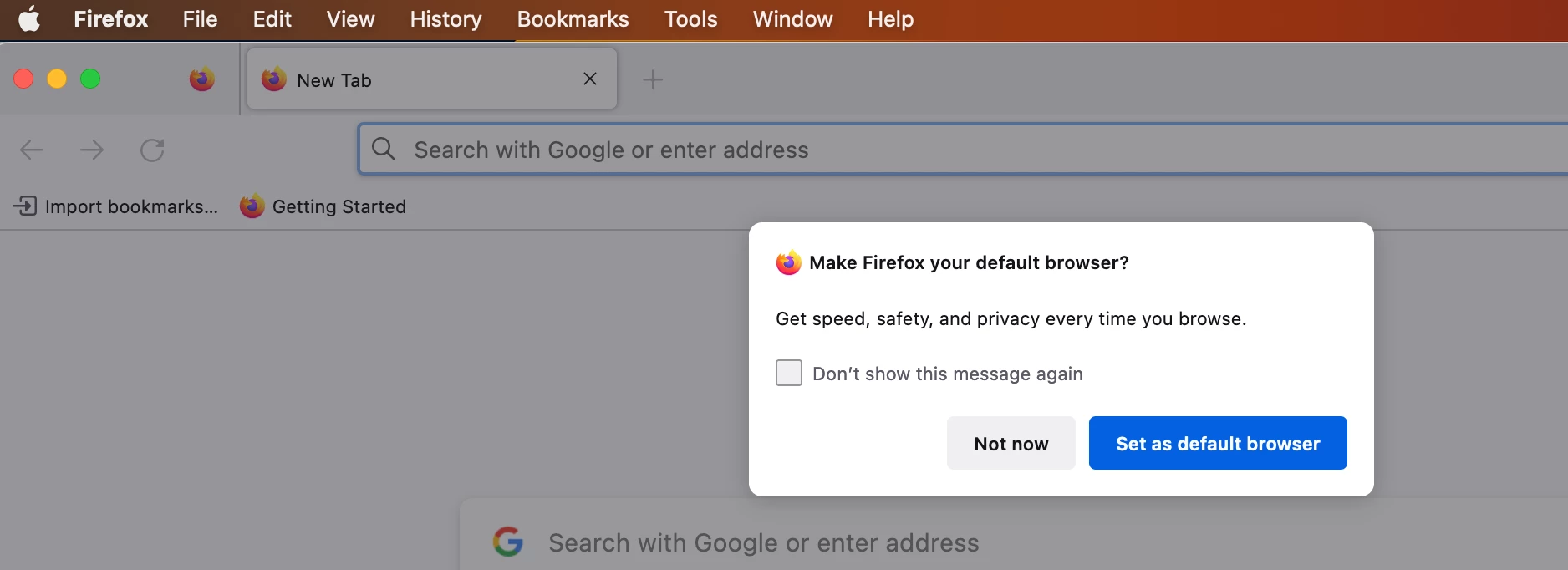
Any idea to suppress the first message for Firefox?


pete_c
Forum|alt.badge.img+16
  • Honored Contributor
  • February 21, 2023

Add the following to your profile:

<key>DontCheckDefaultBrowser</key>
<true/>

As per https://github.com/mozilla/policy-templates/blob/master/mac/org.mozilla.firefox.plist


Asifahmed
Forum|alt.badge.img+9
  • Author
  • Contributor
  • February 21, 2023

Add the following to your profile:

<key>DontCheckDefaultBrowser</key>
<true/>

As per https://github.com/mozilla/policy-templates/blob/master/mac/org.mozilla.firefox.plist


I used the JSON schema and did what you wanted to do with plist, but did not work.

Any other idea?


sdagley
Forum|alt.badge.img+25
  • Jamf Heroes
  • February 21, 2023

I used the JSON schema and did what you wanted to do with plist, but did not work.

Any other idea?


Did you relaunch the browsers? The settings in the Configuration Profile won't take effect until the apps are restarted. You'll also want to install the profiles as Computer Level, not User.


Asifahmed
Forum|alt.badge.img+9
  • Author
  • Contributor
  • February 21, 2023

Did you relaunch the browsers? The settings in the Configuration Profile won't take effect until the apps are restarted. You'll also want to install the profiles as Computer Level, not User.


I did accordingly what you said.


sdagley
Forum|alt.badge.img+25
  • Jamf Heroes
  • February 21, 2023

I did accordingly what you said.


Are you sure the Preference Domains are capitalized exactly as shown in the earlier posts? (They are case sensitive) Have you verified that the Configuration Profiles have installed on the Mac you're testing on? (Look in System Preferences/Settings->Profiles)


Asifahmed
Forum|alt.badge.img+9
  • Author
  • Contributor
  • February 22, 2023

Are you sure the Preference Domains are capitalized exactly as shown in the earlier posts? (They are case sensitive) Have you verified that the Configuration Profiles have installed on the Mac you're testing on? (Look in System Preferences/Settings->Profiles)


I did copy paste the preference domain what you mentioned. I checked that config profile is deployed successfully. But no luck. Any other way instead of plist, like as JSON schema


Asifahmed
Forum|alt.badge.img+9
  • Author
  • Contributor
  • February 27, 2023

@Asifahmed The Configuration Profile data for the com.apple.Safari domain to set the Safari home page is:


<?xml version="1.0" encoding="UTF-8"?> <!DOCTYPE plist PUBLIC "-//Apple//DTD PLIST 1.0//EN" "http://www.apple.com/DTDs/PropertyList-1.0.dtd"> <plist version="1.0"> <dict> <key>HomePage</key> <string>https://homepage.company.com</string> <key>NewWindowBehavior</key> <integer>0</integer> </dict> </plist>


Note that Safari won't respond to this setting the very first time it is launched. 

For Firefox the domain is org.mozilla.firefox, and the payload data is:


<?xml version="1.0" encoding="UTF-8"?> <!DOCTYPE plist PUBLIC "-//Apple//DTD PLIST 1.0//EN" "http://www.apple.com/DTDs/PropertyList-1.0.dtd"> <plist version="1.0"> <dict> <key>EnterprisePoliciesEnabled</key> <true/> <key>Homepage</key> <dict> <key>URL</key> <string>https://homepage.company.com</string> <key>Locked</key> <true/> <key>StartPage</key> <string>homepage</string> </dict> </dict> </plist>


Here's how creating the Configuration Profile payload would look for Safari. From that you can figure out the one for Firefox:


Safari and Firefox homepage set worked through Plist but don't understand why it doest work through JSON. Now I will go for Edge.


Forum|alt.badge.img+1
  • New Contributor
  • February 27, 2023

sdagley
Forum|alt.badge.img+25
  • Jamf Heroes
  • February 27, 2023

I did copy paste the preference domain what you mentioned. I checked that config profile is deployed successfully. But no luck. Any other way instead of plist, like as JSON schema


@Asifahmed Those settings have to be in XML format.Your problem isn't likely to be the format of the setting, but that they are not applying properly. Do you have _any_ other Configuration Profiles that are configured for those preference domains?


Asifahmed
Forum|alt.badge.img+9
  • Author
  • Contributor
  • February 27, 2023

Try the following:

https://github.com/Jamf-Custom-Profile-Schemas/ProfileManifestsMirror/blob/main/manifests/ManagedPreferencesApplications/org.mozilla.firefox.json


I was able to manage it with both plist and JSON to manage Firefox, for Safari it was plist and it worked finally. Thanks!


Asifahmed
Forum|alt.badge.img+9
  • Author
  • Contributor
  • February 27, 2023

@Asifahmed Those settings have to be in XML format.Your problem isn't likely to be the format of the setting, but that they are not applying properly. Do you have _any_ other Configuration Profiles that are configured for those preference domains?


I was able to manage it with both plist and also with JSON to manage Firefox, for Safari it was plist and it worked finally. Thanks!