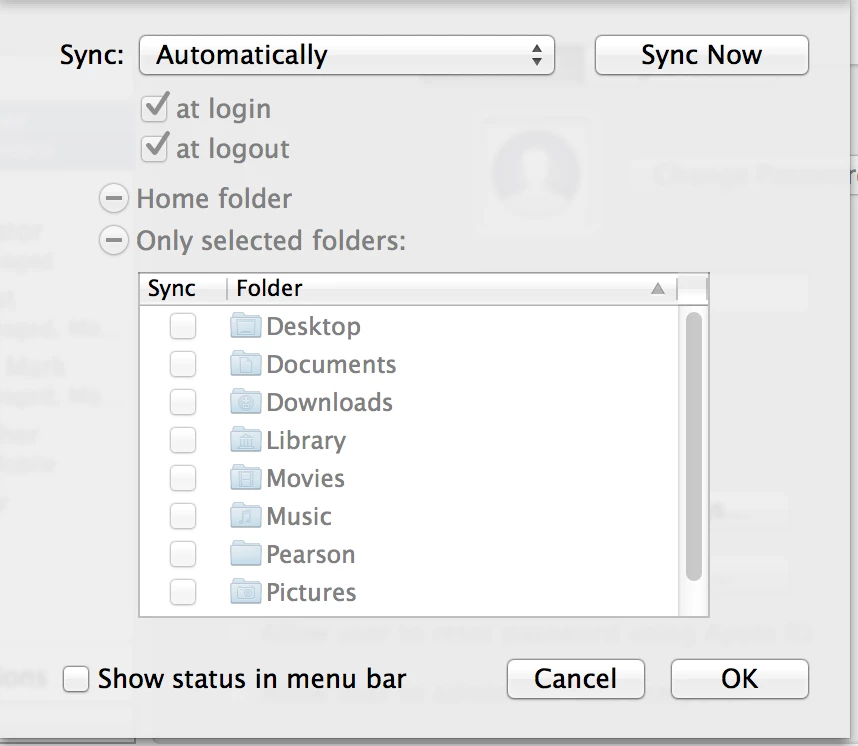
Our binding process (AD) creates a mobile account, with home directory pointed to local startup disk. We want files to all be local, but network home directories to mount.
If I image a computer with no MCX settings, the default mobile settings in users/groups is Sync Automatically and login/Logout checked. "Sync only folders" is selected with no folders sync'd under that. You would assume nothing would sync.
We noticed every user who logs in is getting empty LibraryPreference folder in their network home folder, and there are a lot of connections to file servers (like thousands) when users are logging in/out.
Our file server admin would like me to try to stop these connections. I'd like to finally find MCX settings to set this to Manual and login/logout unchecked. Apple hasn't been helpful, and I also have a ticket in with JAMF.
I set these settings manually (without MCX) and looked at the homesync plist in userslibraryprefs. I was able to replicate this plist exactly using MCX - and confirmed the plist gets pushed to HDLibManaged Prefsusername.
However, in Mobile Account settings, it's setting itself back to the default sync automatically (other options grayed out) at login and logout (with login and logout boxes checked and grayed out).
I wonder if it's some timing issue where the MCX settings are coming down right as the login is happening, etc. We've seen some timing issues with MCX this year (we're all Lion, 8.52 JSS).
Anyone out there have MCX settings to set homesync to manual and uncheck and gray out login/logout buttons?