Solved

How do people block iOS apps?

  • February 2, 2015
  • 13 replies
  • 56 views

Forum|alt.badge.img+13

With the new Outlook app being the security nightmare it is... I find myself wanting to block it. Seems like this isn't possible in Casper... is that a correct assumption? I've never needed to block an iOS app before.

Would a config profile "poisoning" the app's settings somehow work?

Best answer by jarednichols

Use ABQ on the Exchange (2007+) side to block the user agent string of the app.

See http://blogs.technet.com/b/exchange/archive/2010/11/15/3411539.aspx.

13 replies

davidacland
Forum|alt.badge.img+18
  • Valued Contributor
  • February 3, 2015

I don't think you can block apps apart from the default options (Game Centre, Camera etc).

I was wondering about pushing settings with the app but that would assume you are deploying the app.

How about blocking websites / URLs with a profile?


Forum|alt.badge.img+15
  • Contributor
  • February 3, 2015

We don't block apps but if you get a "restricted app" we apply certain restrictions like removing the App Store.

You are correct, there isn't a way with Casper or the MDM spec to block specific Apps unless you remove the App Store altogether or use the Peekaboo App Store method.

One thing we are looking at doing is blocking Vshare use by sending a wipe command to any device that has it installed. Might be a little aggressive for Outlook depending on your environment.

Good luck


Forum|alt.badge.img+24
  • Valued Contributor
  • Answer
  • February 3, 2015

Use ABQ on the Exchange (2007+) side to block the user agent string of the app.

See http://blogs.technet.com/b/exchange/archive/2010/11/15/3411539.aspx.


bentoms
Forum|alt.badge.img+35
  • Hall of Fame
  • February 3, 2015

@lashomb, we use ABQ as @jarednichols pointed out.

I've been doing some testing with that & the new app & will blog the findings tomorrow & will link here.


Forum|alt.badge.img+13
  • Author
  • Valued Contributor
  • February 4, 2015

Hmm this is Office365... I'll have to see what they have for settings available. Thanks guys.


bentoms
Forum|alt.badge.img+35
  • Hall of Fame
  • February 4, 2015

daz_wallace
Forum|alt.badge.img+13
  • Contributor
  • February 5, 2015

Nice write up. Cheers Ben!


davidacland
Forum|alt.badge.img+18
  • Valued Contributor
  • February 5, 2015

Thanks Ben, just read it. I can now describe the problem in more clarity!


Forum|alt.badge.img+24
  • Valued Contributor
  • February 5, 2015

Good job!


Forum|alt.badge.img+11
  • Contributor
  • April 28, 2016

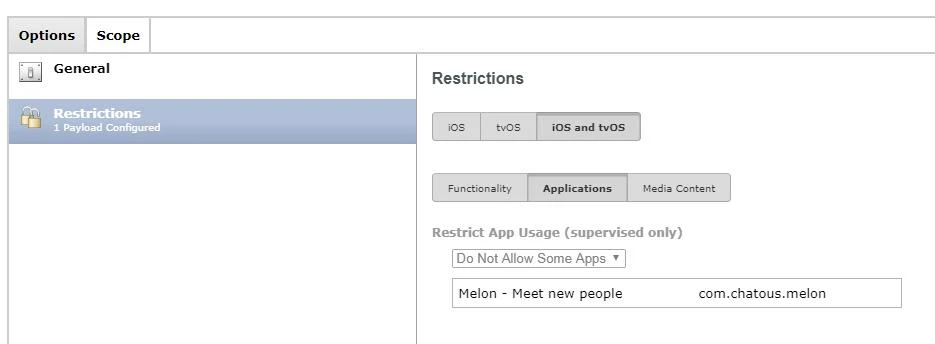
You can now block apps through a restrictions profile! (JSS v 9.91)


Forum|alt.badge.img
  • New Contributor
  • June 8, 2017

Are there any details on how to accomplish this? I've been searching around but cannot find anything. Thank you.


Forum|alt.badge.img+5
  • Contributor
  • September 15, 2017

Im late to the party but we do this

Under, Mobile Devices - config profiles- options-Restrictions - ios and tvOS - applications - restrict app usage then select Do not Allow some apps.

Add the apps you want blocking / denying

then what happens is users download them from app store then they disappear on ipad and if they go back to app store it says open but nothing happens when they open the app. Works well here for certain apps we dont want students using.


Forum|alt.badge.img+6
  • Contributor
  • June 12, 2019

also if you have o365 you can create conditional access rules

https://docs.microsoft.com/en-us/azure/active-directory/conditional-access/app-based-conditional-access#exchange-online-policy