Solved

How do you make OSX Upgrade Non-Interactive? (Disable Entry of Apple ID on Reboot, etc)

  • October 17, 2017
  • 7 replies
  • 39 views

Hugonaut
Forum|alt.badge.img+15

Hello All,

We have a good number of machines with 10.9.5, currently have a 10.10.5 upgrade in self service. Would like to make this upgrade non interactive. Example; Upon Upgrade Completion, Users are asked to enter an Apple ID or Skip the step. How do I hide this step so the upgrade is seemless?

Thanks!

Best answer by Hugonaut

for the record figured it out if anyone comes across this,

used this shell script - https://derflounder.wordpress.com/2014/10/16/disabling-the-icloud-and-diagnostics-pop-up-windows-in-yosemite/

created a plist, put it in launch daemons and had it call on the derflounder script.

Then update runs, installs, boots, no diagnostics.

7 replies

DBrowning
Forum|alt.badge.img+25
  • Esteemed Contributor
  • October 17, 2017

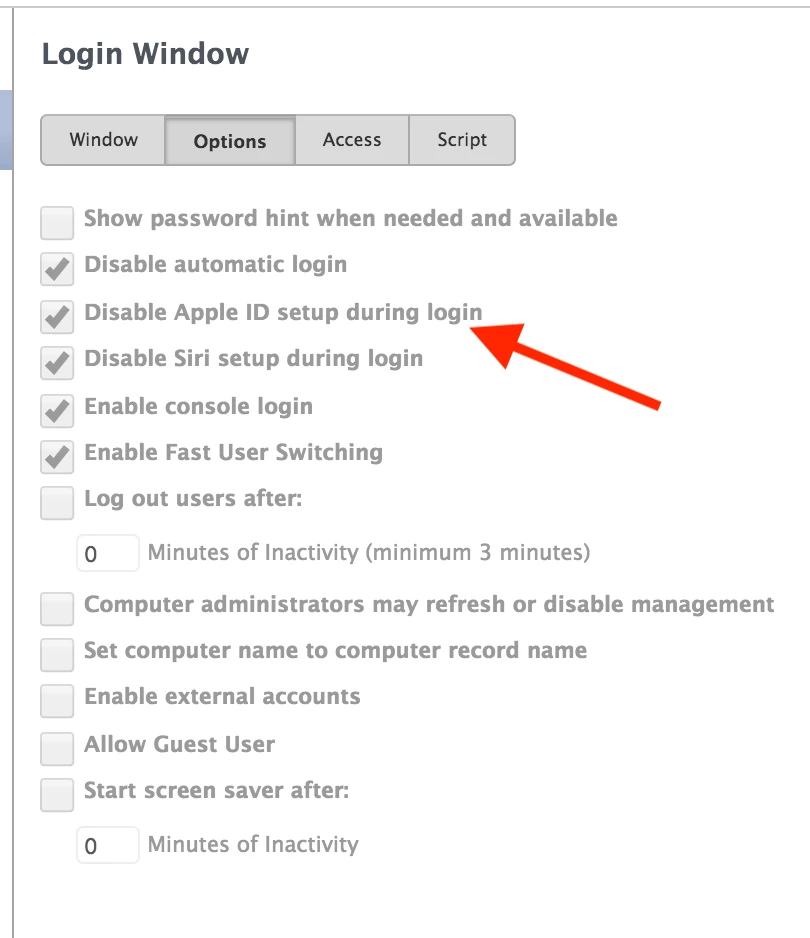
You will want to push a config profile with this setting:

This assumes you have MDM enabled or a workflow for using configuration profiles.


Hugonaut
Forum|alt.badge.img+15
  • Author
  • Esteemed Contributor
  • October 17, 2017

This Was Driving me Crazy, I've been filing through settings like you wouldn't believe. Thank you, checking out now


Hugonaut
Forum|alt.badge.img+15
  • Author
  • Esteemed Contributor
  • October 17, 2017

It skipped that during initial setup & logged in & then it went back to the cloud 'Sign in with Your Apple ID' screen again... any other possible solutions?!


bentoms
Forum|alt.badge.img+35
  • Hall of Fame
  • October 17, 2017

I think that profile works on 10.11+?

@Hugonaut 10.10.5.. now? 10.13 was released this month. Can I ask why so far behind?


Hugonaut
Forum|alt.badge.img+15
  • Author
  • Esteemed Contributor
  • October 17, 2017

@bentoms Thanks for clarifying that! Still cant figure this out -_-

I work at a school and we've been using macs for quite some time now, dating back to leopard. All students get macbooks, we have macbook pros from 2011 in use, as well as 2015 macbook airs. We are staying behind due to some hardware/software compatibility issues. (We do have Sierra & High Sierra machines for the staff though)

looking forward to getting everyone on el cap though! just a matter of time


Hugonaut
Forum|alt.badge.img+15
  • Author
  • Esteemed Contributor
  • Answer
  • October 26, 2017

for the record figured it out if anyone comes across this,

used this shell script - https://derflounder.wordpress.com/2014/10/16/disabling-the-icloud-and-diagnostics-pop-up-windows-in-yosemite/

created a plist, put it in launch daemons and had it call on the derflounder script.

Then update runs, installs, boots, no diagnostics.


Forum|alt.badge.img+4
  • New Contributor
  • March 18, 2019

Miss you!