Solved

How much data do our users save?

  • April 20, 2023
  • 8 replies
  • 57 views

jconrod
Forum|alt.badge.img+4

My boss asked, "How much data do our users save on their Macs?"

Anyone know how I can figure this out? 

I manage around 800 Macs with Jamf Pro and they don't all have the same size of internal drive, so looking at something like "boot drive percentage full" or "boot drive available MB" isn't too helpful.

Thanks,

  --Jeff

Best answer by mschlosser

du -sh /directory/path

when excuted from jamf would spit back the size of each folder

du -sh /Users/

Would give you 

a decent estimate at least for the home directories; which is where the vast majority of user data would be


8 replies

Forum|alt.badge.img+11
  • Contributor
  • Answer
  • April 20, 2023

du -sh /directory/path

when excuted from jamf would spit back the size of each folder

du -sh /Users/

Would give you 

a decent estimate at least for the home directories; which is where the vast majority of user data would be


mm2270
Forum|alt.badge.img+24
  • Legendary Contributor
  • April 20, 2023

The du -sh command will work to get back a size of their entire home directory, or specific directories within it, but keep in mind it's going to be a slow task in some cases. Du is no speed demon, because it literally calculates the size of every single file and then adds it all up into one result. For those users who may have many GBs of files saved in their home directory, expect it to take a while to finish.

For this reason I would recommend using a policy with a script to do the calculation and then maybe save it into a file that can be picked up in an Extension Attribute or in some other fashion. Don't make an EA doing du on people's home folders or it will drastically increase the recon times for every device.


AJPinto
Forum|alt.badge.img+26
  • Legendary Contributor
  • April 21, 2023

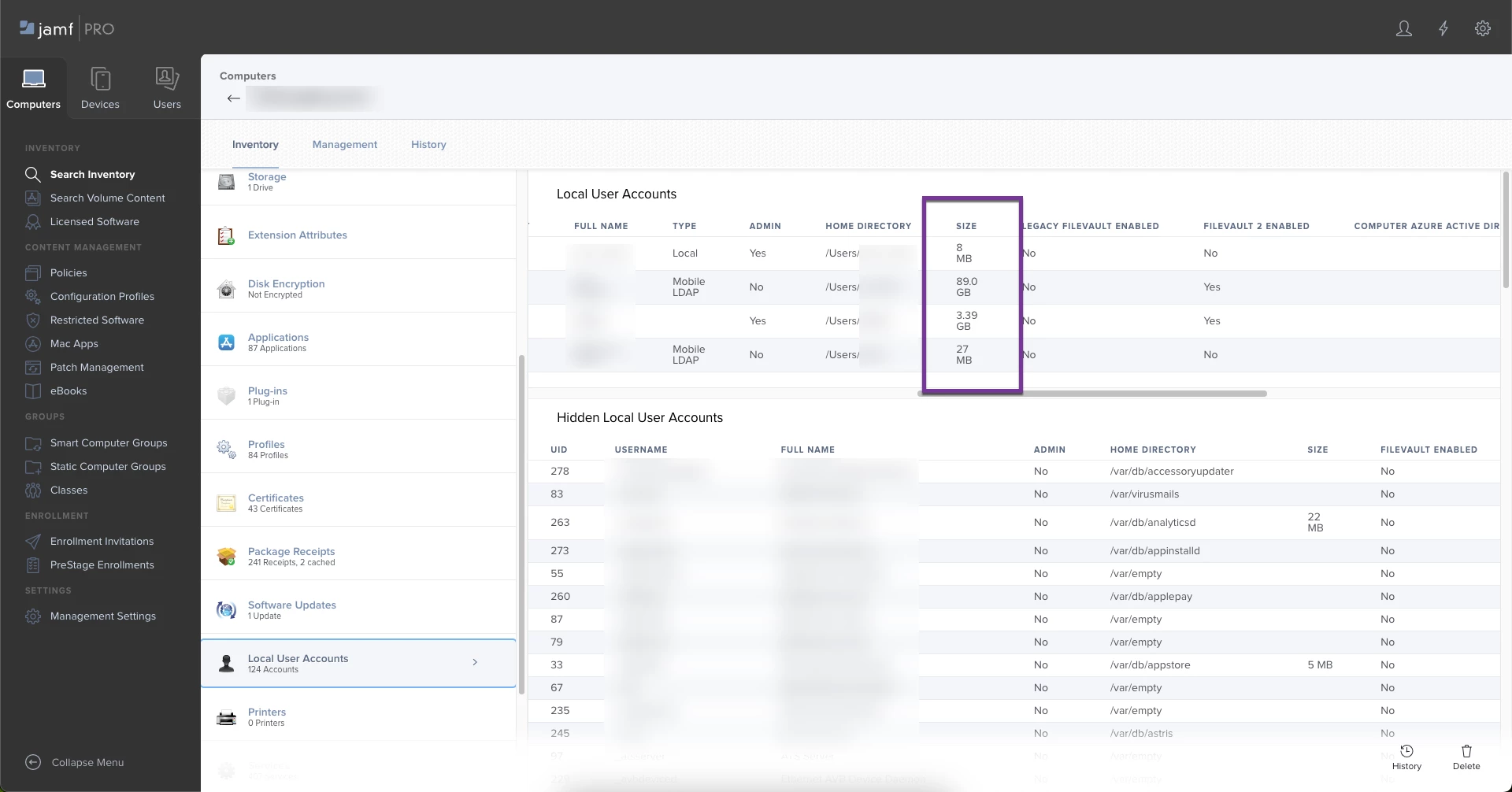
Inventory Record > General > Local User Accounts > Scroll to the right and look at "Size". That should give you a decent idea of how much data is being used for the user profile. Beyond that I probably would not use JAMF to attempt to identify disk usage. Any Commands that could gather this information will take a significant amount of time to process, and tie up all management while they are running.


jconrod
Forum|alt.badge.img+4
  • Author
  • Contributor
  • April 21, 2023

Inventory Record > General > Local User Accounts > Scroll to the right and look at "Size". That should give you a decent idea of how much data is being used for the user profile. Beyond that I probably would not use JAMF to attempt to identify disk usage. Any Commands that could gather this information will take a significant amount of time to process, and tie up all management while they are running.


Thanks!  Where the heck is "Inventory Record"?


AJPinto
Forum|alt.badge.img+26
  • Legendary Contributor
  • April 21, 2023

Thanks!  Where the heck is "Inventory Record"?


When you search for a Mac or a Device and click the device name, that is its inventory record.


jconrod
Forum|alt.badge.img+4
  • Author
  • Contributor
  • April 21, 2023

When you search for a Mac or a Device and click the device name, that is its inventory record.


Thanks!  Any idea of how I could get a report that shows the sizes of all the local user accounts in my environment?  


AJPinto
Forum|alt.badge.img+26
  • Legendary Contributor
  • April 21, 2023

Thanks!  Any idea of how I could get a report that shows the sizes of all the local user accounts in my environment?  


JAMF only lets you run reports against the entire disk usage, not just a single user. 


Forum|alt.badge.img+10
  • Valued Contributor
  • April 22, 2023

When you search for a Mac or a Device and click the device name, that is its inventory record.


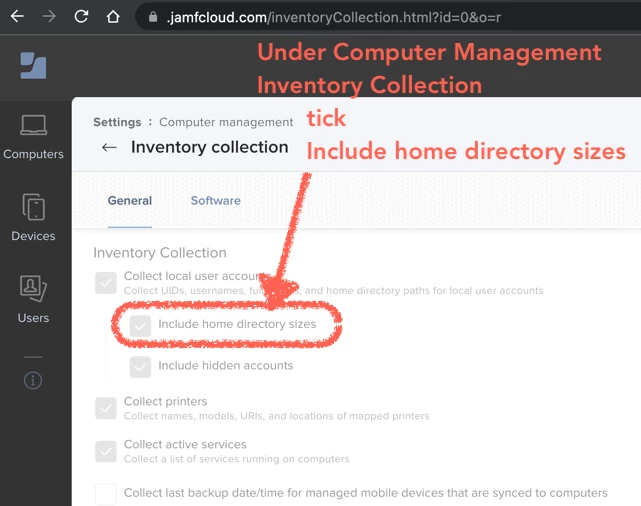
A note for posterity - you may need to enable this, at least it was not on by default in my jamfcloud environment. To do so, go to Settings > Computer Management > Inventory Collection > tick Include home directory sizes. 

Beware - enabling this will add time to inventory, esp. if you've got folks with many gigs of small files like developers pulling down an entire large software repo. :-p