Solved

How to deploy Adobe CC Uninstaller

  • December 19, 2016
  • 7 replies
  • 59 views

Forum|alt.badge.img+14

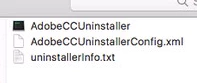
I used the Adobe CCP to create an uninstaller, and it generaated a binary executable file, as shown in attached pic.

Anyone know the best way to deploy such a file?

Best answer by dpertschi

CCP Uninstaller

Text file just lists what will be uninstalled.
The xml file is referenced by the script, so you'll have to package the script and xml together, drop them into a temp directory and then trigger the script.

7 replies

Forum|alt.badge.img+6
  • Contributor
  • December 19, 2016

Is there any information in that text file?


dpertschi
Forum|alt.badge.img+19
  • Contributor
  • Answer
  • December 19, 2016

CCP Uninstaller

Text file just lists what will be uninstalled.
The xml file is referenced by the script, so you'll have to package the script and xml together, drop them into a temp directory and then trigger the script.


Forum|alt.badge.img+1
  • New Contributor
  • September 26, 2019

Hi ... could anyone share the script .. it would be really helpful


smcmjeff
Forum|alt.badge.img+2
  • New Contributor
  • September 26, 2019

@Ram Here is my most postinstall script from the composer package I created. Just modify the path to the directory.

#!/bin/sh
## postinstall

pathToScript=$0
pathToPackage=$1
targetLocation=$2
targetVolume=$3

cd /Users/Shared/Remove_cc

sudo ./AdobeCCUninstaller


exit 0      ## Success
exit 1      ## Failure

Forum|alt.badge.img+1
  • New Contributor
  • September 26, 2019

@smcmjeff thank you so much ..


georgecm12
Forum|alt.badge.img+12
  • Valued Contributor
  • September 26, 2019

@smcmjeff Two suggestions: /private/tmp would probably be a better place to put temporary stuff like this. It's less visible to the end-user, and has the plus of automatically deleting itself at reboot.

Also preinstall/postinstall scripts run as root by default, you don't need to "sudo."


alexkaloostian
Forum|alt.badge.img+5
  • New Contributor
  • February 13, 2020

Im trying this method, but running the script with or without sudo just brings up a Terminal window that says "script was not run with administrator privileges" when I try running it via a Self Service policy.