Question

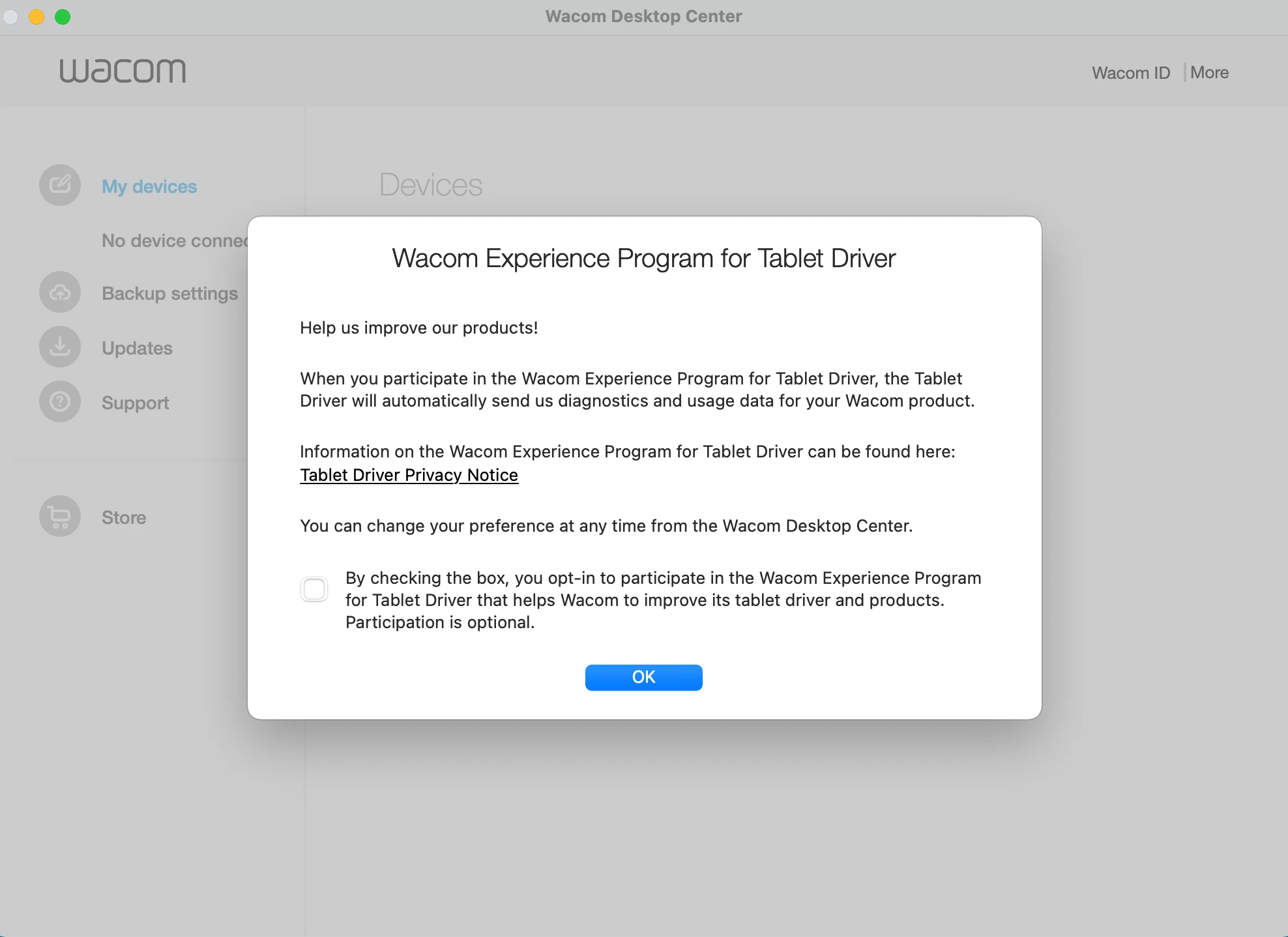
How to disable auto launching "Wacom Desktop Center" app during user's first login

  • July 14, 2021
  • 56 replies
  • 479 views

Show first post

56 replies

Forum|alt.badge.img+1
  • New Contributor
  • December 2, 2023

I just needed to click on "more" in the upper right corner of the wacom desktop center to disable the autostart


Forum|alt.badge.img+9
  • Contributor
  • December 4, 2023

I just needed to click on "more" in the upper right corner of the wacom desktop center to disable the autostart


But that's not a viable solution for a deployment of 150+ computers.


Forum|alt.badge.img+1
  • New Contributor
  • December 4, 2023

But that's not a viable solution for a deployment of 150+ computers.


You can possibly use RegistryChangesView from Nirsoft, to find the change which is triggered by this button.


Forum|alt.badge.img+10
  • Contributor
  • December 4, 2023

You can possibly use RegistryChangesView from Nirsoft, to find the change which is triggered by this button.


That is a Windows-only tool. I suppose the snapshot function in Jamf Composer should fill the same purpose on Macs, however I haven't tried it this.


Forum|alt.badge.img+9
  • Contributor
  • December 4, 2023

That is a Windows-only tool. I suppose the snapshot function in Jamf Composer should fill the same purpose on Macs, however I haven't tried it this.


It gives no feedback as far as the Wacom autolaunch.

As near as anyone has found, Wacom has two LaunchAgents that run at startup and the only way to disable launch at startup unilaterally, is to delete one or both, but at the same time, Wacom requires those services to run, so disabling or deleting the LaunchAgents renders the Wacom software non-functional.


Forum|alt.badge.img+10
  • Contributor
  • December 4, 2023

It gives no feedback as far as the Wacom autolaunch.

As near as anyone has found, Wacom has two LaunchAgents that run at startup and the only way to disable launch at startup unilaterally, is to delete one or both, but at the same time, Wacom requires those services to run, so disabling or deleting the LaunchAgents renders the Wacom software non-functional.


Yes, that is the same result I have found. There's a way to disable the app from starting, but it also disables the driver 🤷


Forum|alt.badge.img+9
  • Contributor
  • May 21, 2024

It gives no feedback as far as the Wacom autolaunch.

As near as anyone has found, Wacom has two LaunchAgents that run at startup and the only way to disable launch at startup unilaterally, is to delete one or both, but at the same time, Wacom requires those services to run, so disabling or deleting the LaunchAgents renders the Wacom software non-functional.


Well, I was hoping after 6 months there would be some new discoveries on this topic, but it appears that we are still at the same place. 


Forum|alt.badge.img+4
  • Contributor
  • July 11, 2024

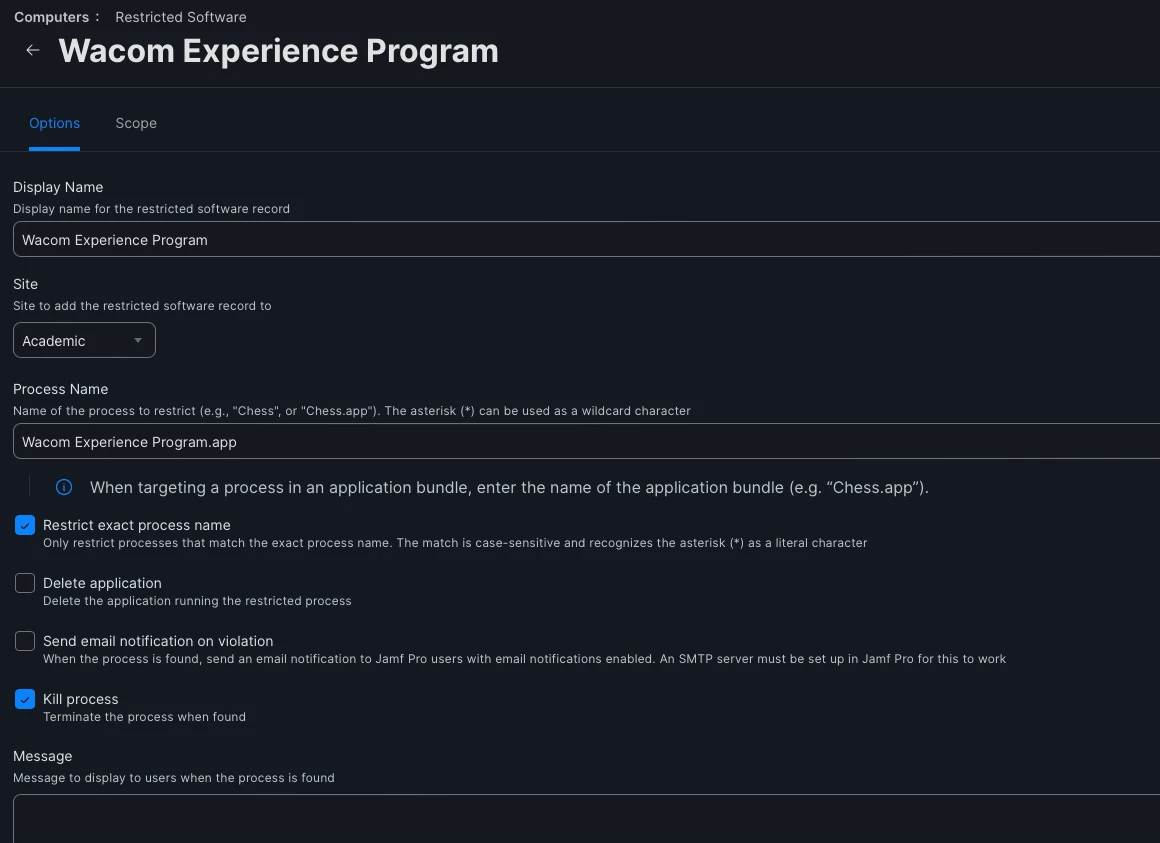
I added the Wacom Experience Program to the Restricted Software and that did the trick for me.


Forum|alt.badge.img+4
  • Contributor
  • July 11, 2024

That's genius!


Forum|alt.badge.img+5
  • Contributor
  • July 11, 2024

I added the Wacom Experience Program to the Restricted Software and that did the trick for me.


Didn't work for me unfortunately (Intel iMacs running 13.6.7). "Wacom Center" still opens at every user login. If I restrict that, the tablet breaks.


snowfox
Forum|alt.badge.img+9
  • Contributor
  • July 16, 2024

Leaving this note here for summer 2025:  Have read in the macOS 15 beta release notes (which are publicly available) that ~/Library/Group Containers will be SIP protected.  This may prevent or cause issues with the customisation of the install using the default user template.


Forum|alt.badge.img+9
  • Contributor
  • July 31, 2024

I added the Wacom Experience Program to the Restricted Software and that did the trick for me.


Works great for the Wacom Experience Program, which is effectively just spam.

Not necessarily a solution for Wacom Center, which is fairly integral to Wacom use. I'm trying to think of a way to write a script that would only kill the application if it is launched within a minute or so of startup, and only the first time. This would be going with the assumption that the first launch is the AutoLaunch, and any later launches are a user launching it.


mhuston
Forum|alt.badge.img+1
  • New Contributor
  • August 14, 2024

I contacted WACOM and they sent me an enterprise driver; It works great in my lab!
 +  no popups! 
 -  still need privileges to setup Apple input access, etc in settings..  That's an Apples security settings issue.


Forum|alt.badge.img+9
  • Contributor
  • August 14, 2024

I contacted WACOM and they sent me an enterprise driver; It works great in my lab!
 +  no popups! 
 -  still need privileges to setup Apple input access, etc in settings..  That's an Apples security settings issue.


Do you have a direct contact or did you just use their general support contact?


mhuston
Forum|alt.badge.img+1
  • New Contributor
  • August 14, 2024

Do you have a direct contact or did you just use their general support contact?


I started a WACOM forum question, that lead to support response.

https://support.wacom.com/hc/en-us/community/posts/25369629201943-OSX-How-to-prevent-Wacom-Center-etc-from-automatically-starting-when-each-user-login#community_comment_25458991653271

They sent the driver to me via an email link.


whiteb
Forum|alt.badge.img+9
  • Valued Contributor
  • August 14, 2024

I started a WACOM forum question, that lead to support response.

https://support.wacom.com/hc/en-us/community/posts/25369629201943-OSX-How-to-prevent-Wacom-Center-etc-from-automatically-starting-when-each-user-login#community_comment_25458991653271

They sent the driver to me via an email link.


I'd be interested in trying this driver. Anything to get rid of the Desktop Center app. I reached out to their support a few weeks ago and they didn't have anything helpful for me.

With this driver, what bundle ID's do you still have PPPC's for?

My current WACOM PPPC has:

  • com.wacom.wacomtablet
  • com.wacom.FirmwareUpdater
  • com.wacom.Wacom-Desktop-Center
  • com.wacom.TabletDriver
  • com.wacom.WacomTouchDriver
  • com.wacom.IOManager
  • com.wacom.Wacom-Display-Settings
  • com.wacom.RemoveWacomTablet

I feel like those have accumulated from WACOM changing things over the years and not all of them are actually necessary.


mhuston
Forum|alt.badge.img+1
  • New Contributor
  • August 14, 2024

I'd be interested in trying this driver. Anything to get rid of the Desktop Center app. I reached out to their support a few weeks ago and they didn't have anything helpful for me.

With this driver, what bundle ID's do you still have PPPC's for?

My current WACOM PPPC has:

  • com.wacom.wacomtablet
  • com.wacom.FirmwareUpdater
  • com.wacom.Wacom-Desktop-Center
  • com.wacom.TabletDriver
  • com.wacom.WacomTouchDriver
  • com.wacom.IOManager
  • com.wacom.Wacom-Display-Settings
  • com.wacom.RemoveWacomTablet

I feel like those have accumulated from WACOM changing things over the years and not all of them are actually necessary.


I don't know how long this link will stay active... But this is what they sent me.
* The link still worked on Aug 14, 2024.
---
Here is the download link to our MacOS enterprise driver: https://wacom.app.box.com/s/8dot9xi4ud0e46h1bxvczik1pnuwk4z6


mhuston
Forum|alt.badge.img+1
  • New Contributor
  • August 14, 2024

I'd be interested in trying this driver. Anything to get rid of the Desktop Center app. I reached out to their support a few weeks ago and they didn't have anything helpful for me.

With this driver, what bundle ID's do you still have PPPC's for?

My current WACOM PPPC has:

  • com.wacom.wacomtablet
  • com.wacom.FirmwareUpdater
  • com.wacom.Wacom-Desktop-Center
  • com.wacom.TabletDriver
  • com.wacom.WacomTouchDriver
  • com.wacom.IOManager
  • com.wacom.Wacom-Display-Settings
  • com.wacom.RemoveWacomTablet

I feel like those have accumulated from WACOM changing things over the years and not all of them are actually necessary.


Does your PPPC successfully handle apple security question issues; Does an OSX admin account still need to approve access?  The enterprise driver only removes Desktop Center app etc. 


ianatkinson
Forum|alt.badge.img+5
  • Contributor
  • August 15, 2024

If they have an enterprise driver it shouldn't be hidden away and shared randomly why don't they just put it on the downloads page with some instructions and save us all the headaches!

Booo!


Forum|alt.badge.img+9
  • Contributor
  • August 15, 2024

If they have an enterprise driver it shouldn't be hidden away and shared randomly why don't they just put it on the downloads page with some instructions and save us all the headaches!

Booo!


I agree 100% since I am using AutoPKG in order to keep our Wacom driver up to date. Making it this ridiculous begging to receive the driver scenario defeats my ability to keep our drivers as up to date as possible.


mhuston
Forum|alt.badge.img+1
  • New Contributor
  • August 15, 2024

Does your PPPC successfully handle apple security question issues; Does an OSX admin account still need to approve access?  The enterprise driver only removes Desktop Center app etc. 


I choose to be optimistic about this;  in the future the enterprise driver hopefully will  be made available to all who need it.

  • I will ask that they officially add enterprise driver support to Wacom web site.

Its people like us who do the ordering of equipment for computer labs, I should think our opinion’s and needs should matter.

Cheers
Mike


Forum|alt.badge.img+5
  • Contributor
  • August 20, 2024

I don't know how long this link will stay active... But this is what they sent me.
* The link still worked on Aug 14, 2024.
---
Here is the download link to our MacOS enterprise driver: https://wacom.app.box.com/s/8dot9xi4ud0e46h1bxvczik1pnuwk4z6


The download link worked for me today, Aug 20, 2024.  Thanks, you're a life saver!

I just threw this up on Mac Self Service for our computer services folks to install as needed.  My testing showed that during the install, on macOS 14 Sonoma, there were two System Settings changes requiring admin credentials (in this order I think):

Privacy & Security => Accessibility => "com.wacom.IOManager" toggle

Privacy & Security => Input Monitoring => "WacomTabletDriver" toggle

One of those prompted to quit and relaunch the driver, but I don't remember which one, so I just rebooted for good measure.

Upon login to the computer as a standard user there were ZERO auto launched Wacom items.  Connecting a Wacom tablet resulted in just one user approvable notification, and the tablet worked as expected and the tablet control item showed in the menu bar.  Wacom apps could be launched and worked as expected, etc.

So, the only problem with deploying hands-free would seem to be the two prompted security items.  Maybe I can figure out a PPPC for those?


Forum|alt.badge.img+9
  • Contributor
  • August 28, 2024

With the availability of the new Enterprise Driver, I took some time to compare the original driver to the new driver (and more specifically, the installer) and found that they are virtually identical. In fact, it takes only one file to change a standard driver install to an enterprise driver install.

To make your standard install operate as an enterprise install, simply create a com.wacomtablet.defaults.xml file in the /Library/Preferences folder. The contents of the xml file are as follows:


<?xml version="1.0" encoding="utf-8"?> <!--Author: Wacom Co.,Ltd.--> <root> <!-- Set Enterprise Mode --> <OperatingMode>Enterprise</OperatingMode> </root>


Once you add that file, it doesn't matter what driver you initially installed, this will force it to run in Enterprise Mode.

I have tested this on version 6.4.6-3 and 6.4.7-2

From what I understand from reading the Wacom documentation, this was introduced in version 6.4.4 and should function from this point forward. So no need to request the specific Enterprise Driver from Wacom, just add this file and you should be able to enable Enterprise Mode without any special drivers.


smolyeet
Forum|alt.badge.img+7
  • Contributor
  • August 28, 2024

With the availability of the new Enterprise Driver, I took some time to compare the original driver to the new driver (and more specifically, the installer) and found that they are virtually identical. In fact, it takes only one file to change a standard driver install to an enterprise driver install.

To make your standard install operate as an enterprise install, simply create a com.wacomtablet.defaults.xml file in the /Library/Preferences folder. The contents of the xml file are as follows:


<?xml version="1.0" encoding="utf-8"?> <!--Author: Wacom Co.,Ltd.--> <root> <!-- Set Enterprise Mode --> <OperatingMode>Enterprise</OperatingMode> </root>


Once you add that file, it doesn't matter what driver you initially installed, this will force it to run in Enterprise Mode.

I have tested this on version 6.4.6-3 and 6.4.7-2

From what I understand from reading the Wacom documentation, this was introduced in version 6.4.4 and should function from this point forward. So no need to request the specific Enterprise Driver from Wacom, just add this file and you should be able to enable Enterprise Mode without any special drivers.


this is awesome! I haven't had a moment yet to work on Wacom, but i'm curious if this can be managed with a manage preference / configuration profile from whichever MDM.


Forum|alt.badge.img+9
  • Contributor
  • August 28, 2024

this is awesome! I haven't had a moment yet to work on Wacom, but i'm curious if this can be managed with a manage preference / configuration profile from whichever MDM.


I was hoping so, but unfortunately this one must be a .xml file, where all other managed preferences are created as .plist files. I will be writing a script to create the file as necessary.