Question

How To Install Matlab R2020a Silently

  • Jun 10, 2020 1:50 PM UTC
  • 19 replies
  • 591 views

Forum|alt.badge.img+3

Is it possible to Install Matlab R2020a silently? I have a registration key and a license.dat File.

19 replies

unknown_err
Forum|alt.badge.img+17
  • Contributor
  • Jun 10, 2020 5:10 PM UTC

Yes, you'll need to use the "download without installing" option in the installer app to download all the files to a Mac, then repackage it for deployment with the key, license, and edited installer_input.txt file (this file is in the downloaded files from Mathworks). I do this and make it a Self Service policy. These are the main steps I take when I'm packaging any new version.

  1. Download DMG from mathworks.com
  2. Mount DMG and run installer
  3. Click Advanced Options
  4. Select "I want to do a standard install"
  5. Log in with mathwork account
  6. Click Advanced Options
  7. Select "I want to download without installing"
  8. Once all files are downloaded, edit “installer_input.txt” with FIK, path to license.dat.
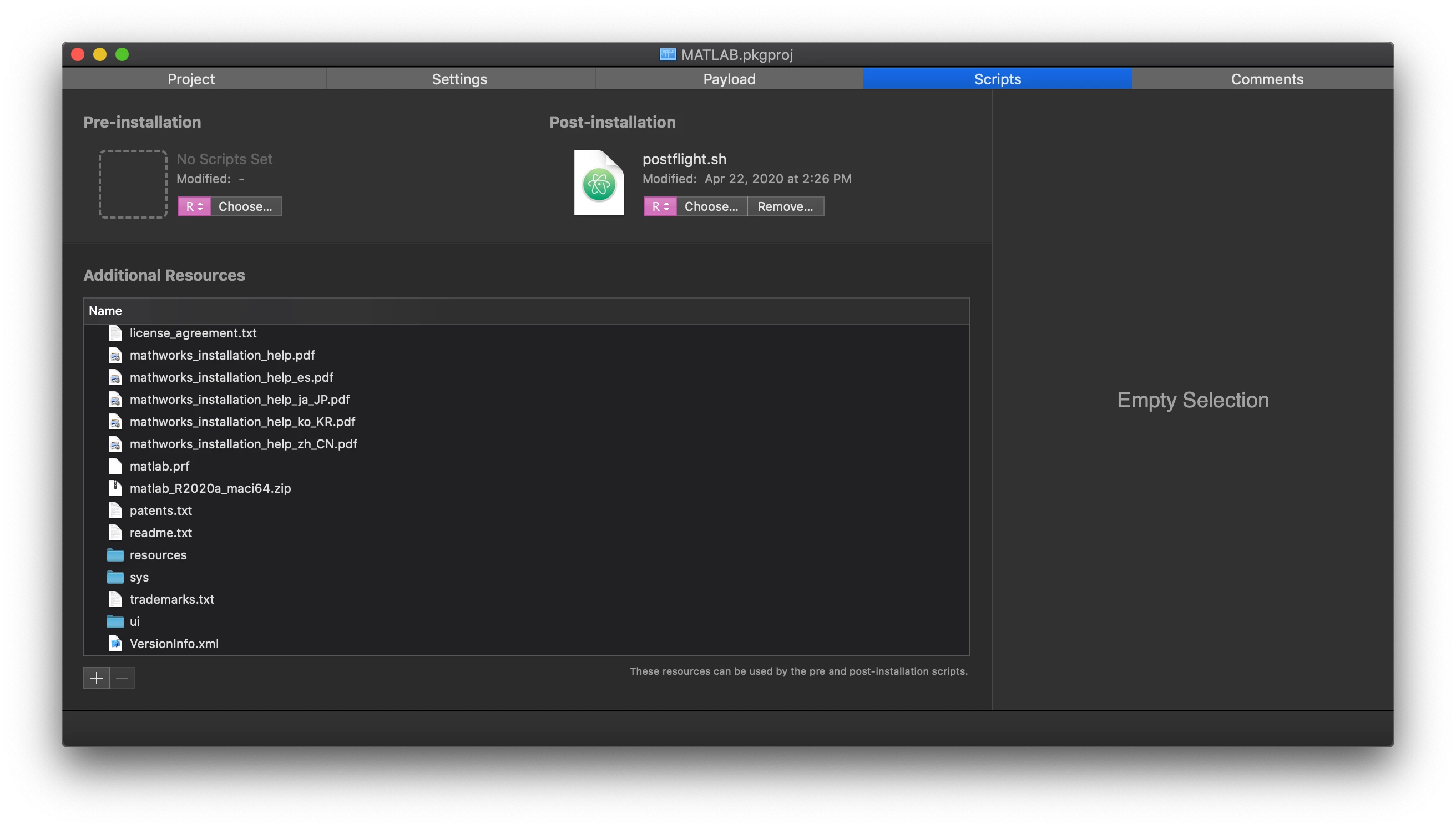
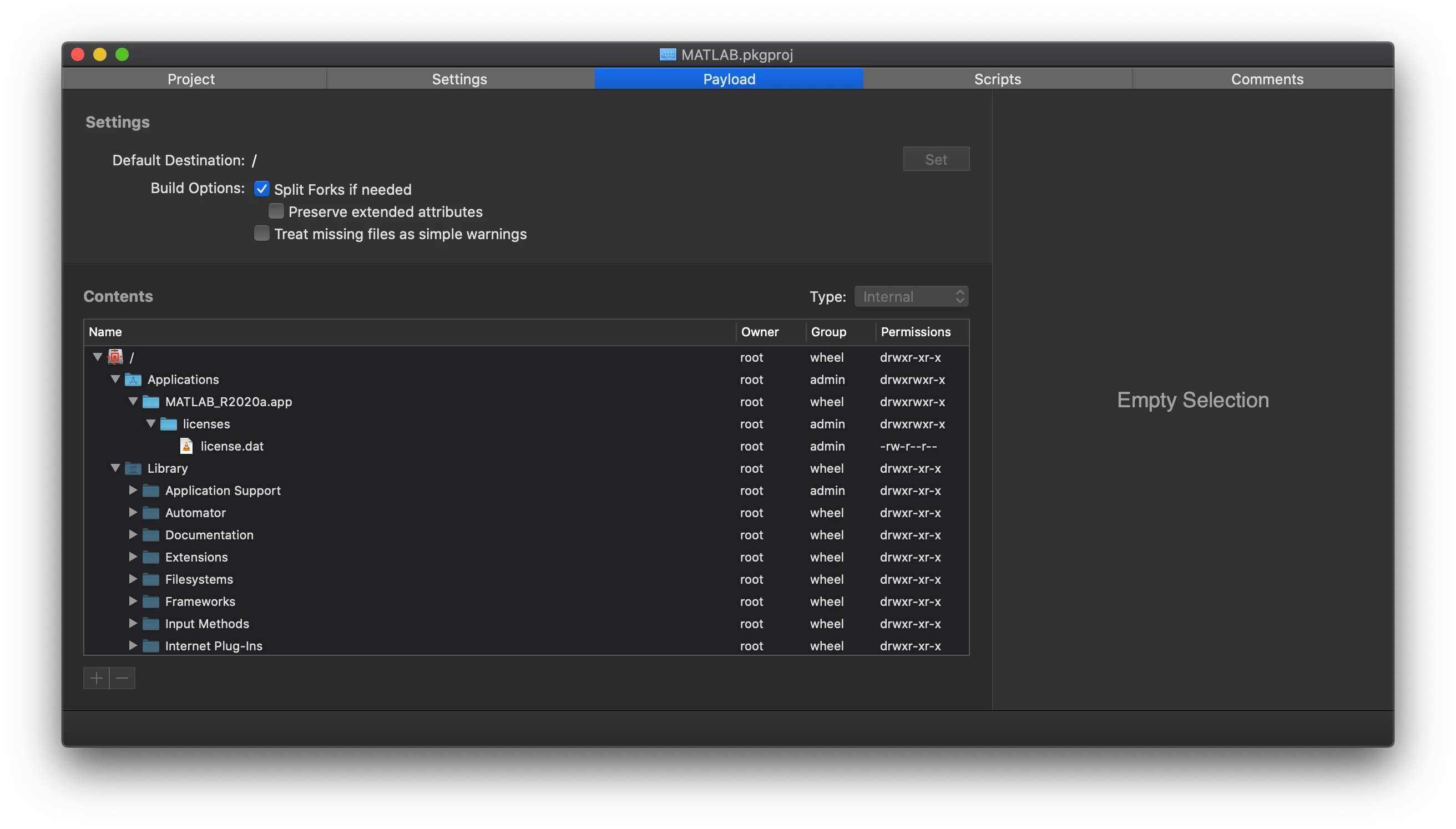
  9. Build with Packages to place the license.dat file in /Applications/MATLAB_R2020.app/licenses/ and put the contents of the downloaded Matlab folder into the "Additional Resources" of the Packages project.
  10. Use post flight script to run installer using the installer_input.txt (that command is below) plus any other customizations like preference file or certs.
    "$INSTALL_DIR"/install -inputFile "$INSTALL_DIR"/installer_input.txt

Forum|alt.badge.img+3
  • Author
  • New Contributor
  • Jun 11, 2020 7:49 AM UTC


Thank you for your Answer. But I don't unsterstand the step 9 - 10. In Step 8 I edit the installer_input.txt:
destinationFolder=/Applications
fileInstallationKey=1234-1234-1234-1234-1234
agreeToLicense=yes
licensePath=./license/license.dat

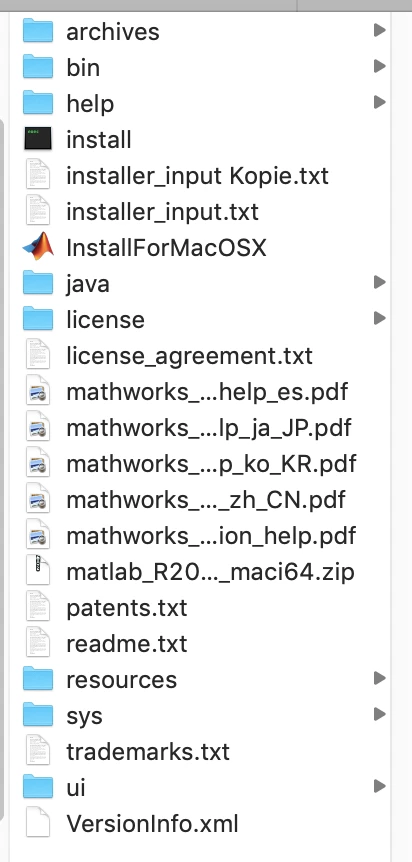
I create a Folder in /Downloads/Matlab/license and copy my license.dat file in the folder.

That is what I do, can you explain the step 9 and 10. On the attachment, you can see my Folder Matlab in Downloads.

You say in Step 9:

Build with Packages to place the license.dat file in /Applications/MATLAB_R2020.app/licenses/ and put the contents of the downloaded Matlab folder into the "Additional Resources" of the Packages project.

I don`t have a Matlab folder in Applications.


unknown_err
Forum|alt.badge.img+17
  • Contributor
  • Jun 11, 2020 2:01 PM UTC

I use the Packages app to repackage the Matlab software. If you use something else your workflow will be a little different, but the end result should be the same. I can give more detail about how I do it in Packages though if that helps. The main thing is to put the license file in the right file path and to place those downloaded files somewhere on the Mac and then trigger the install from that directory. I use Packages to do this because it creates a temporary directory for those files and I don't have to worry about it.

More details about doing this in Packages,
In the Payload tab of Packages, I add the folders where the app will be installed. The license.dat file needs to be in /Applications/MATLAB_R2020.app/licenses/, so I create that location and place the file there. Then, I put all those files that were downloaded (that are currently in the downloads folder) and drag them into the Additional Resources section of the Scripts tab in the Packages. Then I use a postflight script to set the directory and install matlab using those files (those commands are below, I can't share the whole script because of other customizations we do).

INSTALL_DIR="$(dirname $0)"
"$INSTALL_DIR"/install -inputFile "$INSTALL_DIR"/installer_input.txt


Forum|alt.badge.img+3
  • Author
  • New Contributor
  • Jun 17, 2020 4:47 AM UTC

Thank you, it works fine.


Forum|alt.badge.img+4
  • Contributor
  • Nov 20, 2020 12:13 AM UTC

@unknown_err Thank you for this, I've built a package such as this using Packages but I'm getting an error message which I think its due to the postflight script.

Do I need to do any modifications to these lines for the postflight.sh?

INSTALL_DIR="$(dirname $0)"
"$INSTALL_DIR"/install -inputFile "$INSTALL_DIR"/installer_input.txt


unknown_err
Forum|alt.badge.img+17
  • Contributor
  • Nov 20, 2020 4:03 PM UTC

@winterboer You shouldn't need to unless the installer_input.txt file was renamed.


Forum|alt.badge.img+4
  • Contributor
  • Nov 20, 2020 6:17 PM UTC

@unknown_err made zero changes to file names.

Do I need to modify the syntax for my own environment?


unknown_err
Forum|alt.badge.img+17
  • Contributor
  • Nov 20, 2020 6:30 PM UTC

@winterboer Not for the file names or the postflight, you should be able to keep it as is. What error are you seeing? The only things you'd need to modify with this workflow would be the contents of the installer_input.txt file and the license file unless you have other modifications to make.


Forum|alt.badge.img+10
  • Contributor
  • Mar 18, 2021 6:16 PM UTC

Thank you @unknown_err , I am also trying to make this work. I am not sure if something is wrong with my postflight script, but it should work as is right?


unknown_err
Forum|alt.badge.img+17
  • Contributor
  • Mar 22, 2021 1:52 PM UTC

@jchen1225 Yes, it should work as is for the workflow using the Packages app or as long as the postflight script is in the same directory as the installer_input.txt file and the other Matlab installer files.


Forum|alt.badge.img+10
  • Contributor
  • Mar 25, 2021 10:50 AM UTC

Thanks @unknown_err , it works great with R2021a as well.


jmahlman
Forum|alt.badge.img+17
  • Valued Contributor
  • Nov 17, 2021 5:52 PM UTC

Anyone know if there is a way to do this without providing a license? I want to make the installer available but ask the user for a license key (or have them login to their MatLab account).


mvught
Forum|alt.badge.img+10
  • Contributor
  • Nov 17, 2021 7:30 PM UTC

Anyone know if there is a way to do this without providing a license? I want to make the installer available but ask the user for a license key (or have them login to their MatLab account).


You can use: https://github.com/primalcurve/matlab-packager

or the first workflow and no license in the installer file. Then its installing and asking for the key after opening Matlab


mvught
Forum|alt.badge.img+10
  • Contributor
  • Mar 24, 2023 1:52 PM UTC

Steps have changed slightly "R2023a"

  1. Download DMG from mathworks.com
  2. Mount DMG and run installer
  3. Log in with your company account, and select your license.
  4. Click Advanced Options
  5. Select "I want to download without installing"
  6. Once all files are downloaded, edit “installer_input.txt” with FIK, path to license.dat.
  7. Build with Packages to place the license.dat file in /Applications/MATLAB_R2023a.app/licenses/ and put the contents of the downloaded Matlab folder into the "Additional Resources" of the Packages project.
  8. Use post flight script to run installer using the installer_input.txt (that command is below) plus any other customizations like preference file or certs.
    "$INSTALL_DIR"/install -inputFile "$INSTALL_DIR"/installer_input.txt

Forum|alt.badge.img+10
  • Contributor
  • Aug 15, 2023 2:48 PM UTC

Steps have changed slightly "R2023a"

  1. Download DMG from mathworks.com
  2. Mount DMG and run installer
  3. Log in with your company account, and select your license.
  4. Click Advanced Options
  5. Select "I want to download without installing"
  6. Once all files are downloaded, edit “installer_input.txt” with FIK, path to license.dat.
  7. Build with Packages to place the license.dat file in /Applications/MATLAB_R2023a.app/licenses/ and put the contents of the downloaded Matlab folder into the "Additional Resources" of the Packages project.
  8. Use post flight script to run installer using the installer_input.txt (that command is below) plus any other customizations like preference file or certs.
    "$INSTALL_DIR"/install -inputFile "$INSTALL_DIR"/installer_input.txt

Nice thanks, are you building the package on Intel still? I don't think package app works on Silicon machines...


mvught
Forum|alt.badge.img+10
  • Contributor
  • Aug 18, 2023 12:22 PM UTC

Yes on both no problem, but we only have Silicons here a handfull Intels left.


Hasibravo
Forum|alt.badge.img+7
  • Contributor
  • Aug 25, 2024 4:21 AM UTC

Steps have changed slightly "R2023a"

  1. Download DMG from mathworks.com
  2. Mount DMG and run installer
  3. Log in with your company account, and select your license.
  4. Click Advanced Options
  5. Select "I want to download without installing"
  6. Once all files are downloaded, edit “installer_input.txt” with FIK, path to license.dat.
  7. Build with Packages to place the license.dat file in /Applications/MATLAB_R2023a.app/licenses/ and put the contents of the downloaded Matlab folder into the "Additional Resources" of the Packages project.
  8. Use post flight script to run installer using the installer_input.txt (that command is below) plus any other customizations like preference file or certs.
    "$INSTALL_DIR"/install -inputFile "$INSTALL_DIR"/installer_input.txt

Thank you for your guidance in detail.
I need to do the packaging of Matlab R2024a 
Are there any changes, or is it still the same?


mvught
Forum|alt.badge.img+10
  • Contributor
  • Aug 26, 2024 10:44 AM UTC

@Hasibravo  I would wait a while until the problems are fixed. We are still on version 2023a and it runs stably and does not crash on intel and silicon.
But steps remain the same ;) https://nl.mathworks.com/matlabcentral/answers/2113686-fix-to-frequent-application-not-responding-for-matlab-on-the-mac/


Scott_Paul
  • New Contributor
  • Jul 20, 2026 1:48 PM UTC

I am reading through everything and using Packages. The one step that I do not understand is how you obtained the license.dat file.  I checked all the contents in the download folders within Matlab and from Mathworks, I don’t see any way of obtaining that. I even asked Gemini, and it could not provide an accurate result.  Could you all provide some clarity?

Thanks