Solved

how to track software updates that are installed on a machine?

  • February 12, 2018
  • 4 replies
  • 38 views

Forum|alt.badge.img+4

example: 2018-001 updates for Sierra, et all - short of user caching the software and doing a remote install (package receipt would be a good way to track deployment), how can we track it via natural installs of updates?

i can go to system information > software > installations > and find the installer that im looking for, but how does that translate to a trackable table or extention in JSS?

Best answer by mm2270

In the Smart Group criteria, click Show all criteria, or Show Advanced Criteria to list everything.
Scroll down to look for either "Packages Installed by Installer.app/SWU" or "Packages Installed by Casper", depending on which one you expect to locate it under. Add the one you want. You could also add both with an "or" modifier between them and add the receipt name in both places.
You can click the small (…) button to list all package receipts to look for the one you want. Be warned though, that if you have a large install base, it could take a while to load all package receipts, since it's loading all known ones across all your Macs. It's often better and faster to type in the receipt name, or most of it, then click the (…) button to load ones that have that string in them.

A report would be basically the same as above. Use the "Packages Installed by Installer.app/SWU" or "Packages Installed by Casper" criteria items, plug in the receipt name, any other criteria you need to narrow down the search and save, or generate the report.

4 replies

mm2270
Forum|alt.badge.img+24
  • Legendary Contributor
  • February 13, 2018

@jche Jamf Pro captures package receipts, including any installed via things like softwareupdate or when a user installs them from the App Store > Updates tab. As long as it's installed via an actual .pkg installer, it should write a receipt on the system, and get picked up.
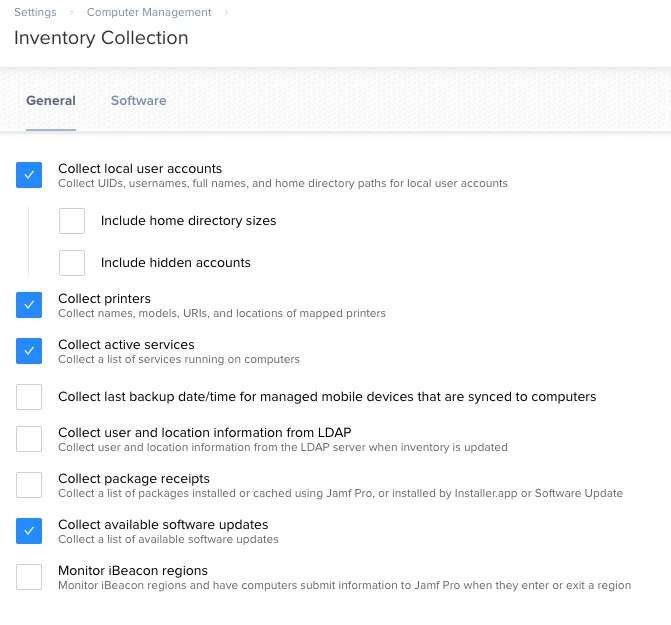
You might need to enable this in Inventory collection settings though. I can't recall at the moment if it's on by default.


Forum|alt.badge.img+11
  • Valued Contributor
  • February 13, 2018

The default is off, as in the attached image.


Forum|alt.badge.img+4
  • Author
  • Contributor
  • February 13, 2018

@dmw3 how do i generate a report based on that? or even a smart group i guess.


mm2270
Forum|alt.badge.img+24
  • Legendary Contributor
  • Answer
  • February 13, 2018

In the Smart Group criteria, click Show all criteria, or Show Advanced Criteria to list everything.
Scroll down to look for either "Packages Installed by Installer.app/SWU" or "Packages Installed by Casper", depending on which one you expect to locate it under. Add the one you want. You could also add both with an "or" modifier between them and add the receipt name in both places.
You can click the small (…) button to list all package receipts to look for the one you want. Be warned though, that if you have a large install base, it could take a while to load all package receipts, since it's loading all known ones across all your Macs. It's often better and faster to type in the receipt name, or most of it, then click the (…) button to load ones that have that string in them.

A report would be basically the same as above. Use the "Packages Installed by Installer.app/SWU" or "Packages Installed by Casper" criteria items, plug in the receipt name, any other criteria you need to narrow down the search and save, or generate the report.