Question

How to upgrade users from macOS 10.12.x to 10.13.1

  • January 9, 2018
  • 6 replies
  • 45 views

Forum|alt.badge.img+12

Currently we are holding our users on 10.12.x due to some application's agent compatibility, but we are wanting to upgrade these users to 10.13.1, even though 10.13.2 is available.

So my question is, how might we upgrade our users from an older feature release of macOS to a specific release of the latest macOS? Is this even possible?

Some additional info:
- We have a reposado server in place to supply the updates as well as control the update catalog
- We could supply a Apple MacOS Server with the Software Update Service enabled
- I'm aware that when you try to upgrade to High Sierra, you will have to get the latest version from Apple. I want to know if we can get an older version of a feature release.

6 replies

Forum|alt.badge.img+7
  • Contributor
  • January 9, 2018

Hi @stevesmith

You will need to get your Hands on a 10.13.1 Installer from the App Store.
Hopefully one of your Macs have already downloaded it as only the 10.13.2 is available now.

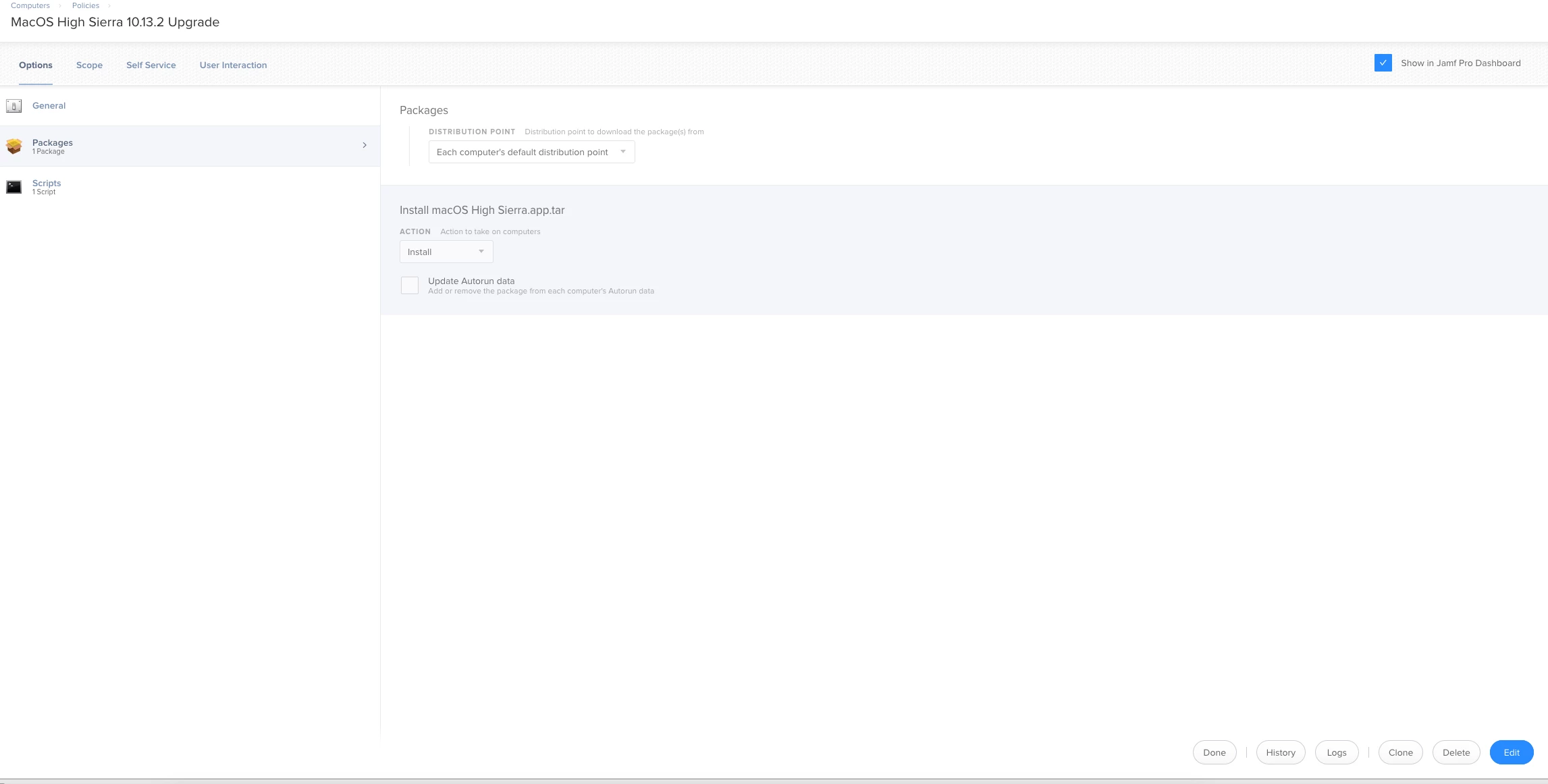
Then drag that entire Install MacOS High Sierra.app into Casper Admin.

Then create a policy that install the created package like so.

You need to be on at least jamf pro 9.101 for this to work.


Forum|alt.badge.img+13
  • Honored Contributor
  • January 9, 2018

@stevesmith Along with the above, there a many methods to upgrade your clients, so I will speak to your other points:

  • if you are running a reposado server, I'd make sure to run the lastest code, update my config, use mod_rewrites, and download the updates( if applicable) prior to upgrading the endpoints. for example 10.13/10.12 updates use 285GB of storage. I'd also look at repotoddy to help with automated update roll outs.

  • On the macOS server you should look at using the caching service if its pre-10.13.


Forum|alt.badge.img+10
  • Valued Contributor
  • January 9, 2018

I use @bpavlov 's upgrade script. He did a really nice job on it and it works fantastically. It caches the installer first and then runs it and provides some end user feedback.

https://www.jamf.com/jamf-nation/discussions/25509/macos-high-sierra-upgrade-methods-options


pete_c
Forum|alt.badge.img+16
  • Honored Contributor
  • January 9, 2018

I've been using the -startosinstall method originally detailed on Rich's blog after caching the Install macOS High Sierra.app, still works great.


sharriston
Forum|alt.badge.img+10
  • Valued Contributor
  • January 11, 2018

There are several security flaws that have been patched in 10.13.2, including a supplemental update the prevents 10.13 machines from checking in with the JSS. 10.13.1 had the Root Flaw vulnerability where root with no password could unlock any preferences on your computer, not to mention Meltdown and Spectre patches which just came out this week. If you are going to upgrade I would at least go the latest version so these security flaws will be mitigated.


ThijsX
Forum|alt.badge.img+20
  • Employee
  • January 11, 2018

+1 for @bpavlov his method!