

I have a number of Ubuntu Server VM's as my Casper distribution points serving via AFP and SMB on JSS 9.92
I also have Graham Gilbert's docker implemented BSDpy solution running for Netboot services on the VM's
https://grahamgilbert.com/blog/2015/04/22/getting-started-with-bsdpy-on-docker/
When I follow the instructions on this post to enable http downloads https://jamfnation.jamfsoftware.com/article.html?id=216
I get the following error
(98)Address already in use: AH00072: make_sock: could not bind to address [::]:80
I know that one of my BSDpy docker instances is already using port 80
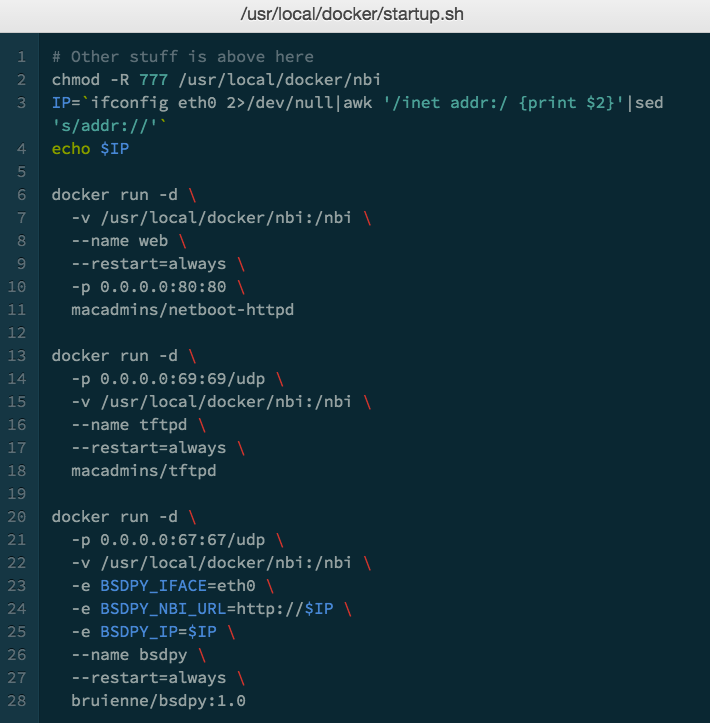
I'm wondering is this as simple as changing the port apache2 is using
Or should I change the docker port?
This has all come about from an idea to do a quick test on http downloads in my Self Service as I am having issues whereby the file sharing points sometimes take forever (over 5 minutes) to load when running a policy from the Self Service app. Seemingly randomly, but mostly when I am at a user's desk trying to show them how to use Self Service. That's actually my my issue and I haven't had any luck finding any mentions of a similar issue on here


