Solved

In Jamf Protect, How to pull the insight's non-compliant system list as csv file or report.

  • May 24, 2023
  • 4 replies
  • 46 views

Forum|alt.badge.img+3

How can I pull the specific insight's non-compliant system list as a csv file or as report in Jamf Protect? is there any options available for this?

Best answer by MattT

Thank you for the response ThijsX, Actually i mean when we click on one of the controls from insights, we get to see the non-complaint systems listing. I'm here asking how to get the non-complaint systems list.


Hey @Saranya, thanks for raising this.  This information today would need to be pulled from either the UI manually or via the API, unfortunately we don't currently have an in-UI option for exporting the data in the way that you're looking for.

I completely understand the use-case and why you're requesting this, so thank you again for bringing this up.  I've captured the details and we'll investigating making this possible in a future release focused around enhancing this feature that we already have planned.

4 replies

ThijsX
Forum|alt.badge.img+19
  • Employee
  • May 24, 2023

Hey @Saranya 

You can download a report (CSV) for each computer.


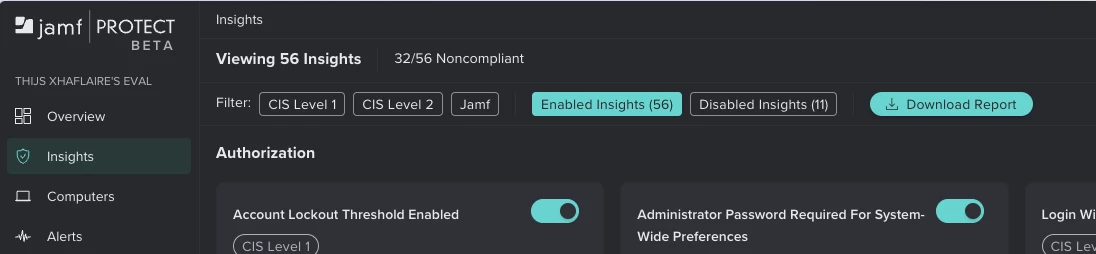
Alternatively you could also download an report (CSV) in Insights to show all compliant/non-compliant insights.


A third option is that you could use the GraphQL API to retrieve compliance states for a single device.

https://github.com/jamf/jamfprotect/blob/main/jamf_protect_api/scripts/python/generate_computer_compliance_report.py


Forum|alt.badge.img+3
  • Author
  • New Contributor
  • May 24, 2023

Hey @Saranya 

You can download a report (CSV) for each computer.


Alternatively you could also download an report (CSV) in Insights to show all compliant/non-compliant insights.


A third option is that you could use the GraphQL API to retrieve compliance states for a single device.

https://github.com/jamf/jamfprotect/blob/main/jamf_protect_api/scripts/python/generate_computer_compliance_report.py


Thank you for the response ThijsX, Actually i mean when we click on one of the controls from insights, we get to see the non-complaint systems listing. I'm here asking how to get the non-complaint systems list.


MattT
Forum|alt.badge.img+12
  • Employee
  • Answer
  • May 24, 2023

Thank you for the response ThijsX, Actually i mean when we click on one of the controls from insights, we get to see the non-complaint systems listing. I'm here asking how to get the non-complaint systems list.


Hey @Saranya, thanks for raising this.  This information today would need to be pulled from either the UI manually or via the API, unfortunately we don't currently have an in-UI option for exporting the data in the way that you're looking for.

I completely understand the use-case and why you're requesting this, so thank you again for bringing this up.  I've captured the details and we'll investigating making this possible in a future release focused around enhancing this feature that we already have planned.



Forum|alt.badge.img+3
  • Author
  • New Contributor
  • May 24, 2023

Hey @Saranya, thanks for raising this.  This information today would need to be pulled from either the UI manually or via the API, unfortunately we don't currently have an in-UI option for exporting the data in the way that you're looking for.

I completely understand the use-case and why you're requesting this, so thank you again for bringing this up.  I've captured the details and we'll investigating making this possible in a future release focused around enhancing this feature that we already have planned.

Matt, thank you for the clarification.