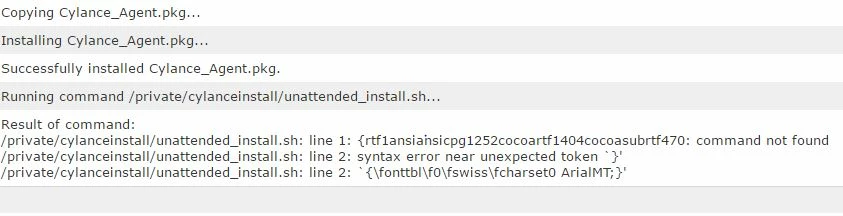
I'm having some difficulty figuring out how to use Casper to install Cylance on every Mac in our organization. I've tried to create a shell script that will run it (not through Casper yet) but when I try on a test Mac it fails.
I have the Cylance.pkg and a cylance_install_token file in the same folder as the script. I copied the verbiage from a larger script that someone in our InfoSeec team had created a while ago to install this and other security software and it works there. Maybe I missed something?
If I can get this script to actually install it then I can go to the next step and figure out how to use Casper to push it out.
!/bin/sh
Cylance AV Client Install
echo "Installing Cylance AV Agent for Mac.
"; echo "Cylance AV Agent Start: " date"
" >> $LOG;
installer -pkg CylancePROTECT.pkg -target LocalSystem echo "Cylance AV Agent Stop: " date"
" >> $LOG; echo "Completed Cylance AV Agent for Mac Installation.
";
The output I get from Terminal is
BUR-JMENDEL4-i:~ jmendel$ /Users/jmendel/Desktop/Cylance Installer/Cylance.sh
Installing Cylance AV Agent for Mac.
/Users/jmendel/Desktop/Cylance Installer/Cylance.sh: line 5: $LOG: ambiguous redirect installer: Error the package path specified was invalid: 'CylancePROTECT.pkg'. /Users/jmendel/Desktop/Cylance Installer/Cylance.sh: line 7: $LOG: ambiguous redirect Completed Cylance AV Agent for Mac Installation.
• Open /private/tmp (On a computer with composer) • Create a folder called "Cylance" (Just a suggestion on name) • Drag the cylancePROTECT.pkg into this new folder. • Create a shell script as suggested (example below) and call it something like "install_cylance_with_token.sh"
• Copy the script into that new directory (/private/tmp/Cylance) • Open Composer • Drag the entire "Cylance" directory into Composer (the "Cylance" folder that you created in /private/tmp/) • Check permissions on everything in that composer list. • Package what you have in composer as a .pkg or a .dmg as you prefer. I see no benefit to having this packaged as a .dmg so... • Upload this new package to Casper Admin with whatever notes and settings you prefer. In all likelihood, this will need to be installed after boot, but I'm not positive.
• Create a policy as described above, using the "execute command" field in "Files and Processes" as described. In the case of my example, that would be:
This is what I've done this morning to check. It's working well for me.
P.S. I did consider simply trying to edit the source of the installer as there seems to be a script in the package where we could stick the token, but this process seems simpler.
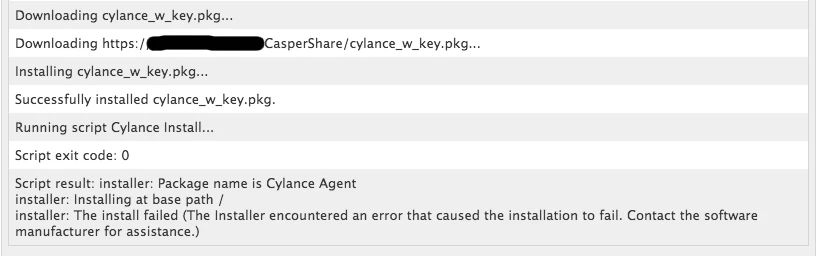
I followed the steps and it did install with the token. I did get this error in the logs though, but the install was succesful.
Executing Policy Cylance Unattended with Token Mounting dmartin_share to /Volumes/CasperShare... Verifying package integrity... Copying Cylance.pkg... Installing Cylance.pkg... Successfully installed Cylance.pkg. Running command /private/tmp/Cylance/install_cylance_with_token.sh... Result of command: installer: Package name is Cylance Agent installer: Installing at base path / installer: The install failed (The Installer encountered an error that caused the installation to fail. Contact the software manufacturer for assistance.)
I see that this was already solved but figured I'd toss in how I accomplished this.
Using Composer to capture everything, I created a folder in /private named cylanceinstall and dropped my cylanceprotect.pkg and my UNATTENDED_INSTALL.sh in there, and turned that into a .pkg that would do the same on end-user machines. Then I created my CYLANCE_TRIGGER.sh, uploaded that to my JSS, and set it to run AFTER. I created a policy that included both my .pkg and the CYLANCE_TRIGGER.sh. The pkg gets pushed out first, creates the folder and dumps the .pkg and the unattended.sh into it, then the trigger.sh triggers the unattended.sh to run the install. I can't locate my unattended_install.sh at the moment, but I know it includes our token.
I got it to install but I still get errors from the logs:
Executing Policy Cylance Unattended with Token Mounting dmartin_share to /Volumes/CasperShare... Verifying package integrity... Copying Cylance.pkg... Installing Cylance.pkg... Successfully installed Cylance.pkg. Running command /private/tmp/Cylance/install_cylance_with_token.sh... Result of command: installer: Package name is Cylance Agent installer: Installing at base path / installer: The install failed (The Installer encountered an error that caused the installation to fail. Contact the software manufacturer for assistance.)
Also, periodically the agent would run in Offline Mode. Is this to be expected?
@jonathanla Was having the same issue. Perhaps, due to a previous installation of Cylance while he was testing this out. He uninstalled Cylance fully, and then re-installed via this method and stopped getting that error. Is your circumstance similar?
@Chris_Hafner I was able to get that error to go away but it has reappeared on every completed log.
installer: The install failed (The Installer encountered an error that caused the installation to fail. Contact the software manufacturer for assistance.)
In the instructions above I followed the thread as everything was being described and completely spaced on one difference between what I wrote for instructions and what I did in my production environment. In the instructions above I had you add the following command:" /private/tmp/Cylance/install_cylance_with_token to the "Execute Command" field in the "Files and Processes" section of your JSS policy. This SHOULD work.
However, in my production environment, I added that command to a postinstall script, via composer and then wrapped the whole thing up as a .pkg. That way I could throw the .pkg on a flash drive if I ever wanted to. It is also a bit more "fool proof" as it won't rely on the JSS to get the rest of the policy right.
If you add a postinstall script to the Composer package, you MUST save it out as a .pkg and NOT .dmg.
@Chris_Hafner No conferences for me this year. Maybe a JAMF Roadshow in Munich, assuming I get time off. I'm saving for a personal training pass so I can do JSS 10 certs when they come out.
That's a good idea! I'm waiting for 10 before budgeting for my CCE. Anyways, back to Cylance:
Today is our transition and our JSS policy is running along at full bore. It's taking mear moments to uninstall Sophos and install Cylance. The Cylance dashboard is picking up everything beautifully! That said, my uninstall process is NOT doing anything to disassociate our device records from the Sophos console. Too bad, though. It would have been nice to pass that info along to all of you. I figured that I wouldn't bother as we're moving away from Sophos. That said, here's to you Sophos, you've treated us well.
P.S. 5-6 years into using the Casper suite, I am still amazed at how powerful this suite is. I continually think about how much work this would have been 15 years ago!
P.S. After initial deployment, Cylance has already quarantined some genio and trovi processes that Sophos didn't pick up across the fleet. It found a few other things too, but mostly windows crud on the personal Windows VM's around here. All 13 instances are labeled PUP as they should, and we're happily quarantined.
@gachowski There is plenty of controversy surrounding some of their comparisons. Particularly between Cylance and Sophos. Yet, we've done our own POC and I find that it catches the Mac adware better than most. I was pretty skeptical at first, and there are certainly "gotchas" that other's mention in other threads (Particularly how it works offline... i.e. by not connecting to their servers for certain checks). The good news is, I'll have a whole high school full of students downloading 'stuff' in September. I guess I'll really see how it goes then!
Update: Reboot issue after installing Cylance during imaging.
OK, So I haven't gotten to the bottom of this yet, though I figured that I'd post it here and then follow up with what I discover. In any event, my Cylance install package (described above) works well, on units that have already been deployed. However, it is preventing newly imaged machines to hang at the "spinning wheel" during reboot or shutdown. Being forcibly shut down and restarted seems to alleviate any ongoing issues. The package is being installed after reboot along with a number of Adobe packages and the like.
Again, I'll post up what I find. If anyone else ahs experienced this I would love to know!
@Chris_Hafner We are currently moving from Sophos to Cylance as well. Right in time to move to Sierra too.
Question - Did you write in an uninstall script for Sophos to go with the install of Cylance? If so, would you mind sharing?
Being on Sierra, Sophos no longer wishes to play nice and we have had a heck of a time getting it to want to uninstall. Had to do a hands on terminal uninstall. Sigh
@sabrina.oconnor I really just call the Sophos uninstaller after quitting the SophosUIServer
Include these lines in a script and they will accomplish the task. I'm sure there are better ways to do it, but this worked for me.
# This should quit Self-Service and the remaining Sophos Processes.
killall "SophosUIServer"

# This should uninstall the Sophos Cloud instance (9.3 in specific)
/Library/Application Support/Sophos/saas/Installer.app/Contents/MacOS/tools/InstallationDeployer --remove
Thanks for that. I was drawing a blank on the InstallationDeployer name. We run enterprise, so had to do a bit of a rework but made it much easier.
I did mean to ask if anyone solved the issue of receiving the error regarding the installer saying it failed. Yet a few lines prior it says it installed. I've tested on numerous computers (all OSx Sierra) and can confirm Cylance is working.
A complete uninstall and reinstall puts out the same message in the logs.
Interesting. I don't see those failures in my installs. That said, I am running the Cylance installer as a .pkg with the installer script running as part of the postflight. That might mask any errors...
I noticed that if I drop the pkg onto a machine via Casper Remote no issue, if I then try to initiate the script via Casper Remote is when I get the error (again it does install Cylance).
Removed Cylance from the test machine, dropped the pkg back onto the test machine and this time on the test machine as Root, manually typed in the script via Terminal. No errors. Everything installed and is happy.
Removed Cylance again....dropped the pkg back onto the test machine (again) but this time on my main Mac ssh into the test machine via Terminal and manually typed in the script. The error popped up (Cylance does install). Ok, so it's not playing nice when having to ssh. All other packages/scripts we have been using are working.