I'm having some difficulty figuring out how to use Casper to install Cylance on every Mac in our organization. I've tried to create a shell script that will run it (not through Casper yet) but when I try on a test Mac it fails.
I have the Cylance.pkg and a cylance_install_token file in the same folder as the script. I copied the verbiage from a larger script that someone in our InfoSeec team had created a while ago to install this and other security software and it works there. Maybe I missed something?
If I can get this script to actually install it then I can go to the next step and figure out how to use Casper to push it out.
!/bin/sh
Cylance AV Client Install
echo "Installing Cylance AV Agent for Mac.
"; echo "Cylance AV Agent Start: " date"
" >> $LOG;
installer -pkg CylancePROTECT.pkg -target LocalSystem echo "Cylance AV Agent Stop: " date"
" >> $LOG; echo "Completed Cylance AV Agent for Mac Installation.
";
The output I get from Terminal is
BUR-JMENDEL4-i:~ jmendel$ /Users/jmendel/Desktop/Cylance Installer/Cylance.sh
Installing Cylance AV Agent for Mac.
/Users/jmendel/Desktop/Cylance Installer/Cylance.sh: line 5: $LOG: ambiguous redirect installer: Error the package path specified was invalid: 'CylancePROTECT.pkg'. /Users/jmendel/Desktop/Cylance Installer/Cylance.sh: line 7: $LOG: ambiguous redirect Completed Cylance AV Agent for Mac Installation.
• Open /private/tmp (On a computer with composer) • Create a folder called "Cylance" (Just a suggestion on name) • Drag the cylancePROTECT.pkg into this new folder. • Create a shell script as suggested (example below) and call it something like "install_cylance_with_token.sh"
• Copy the script into that new directory (/private/tmp/Cylance) • Open Composer • Drag the entire "Cylance" directory into Composer (the "Cylance" folder that you created in /private/tmp/) • Check permissions on everything in that composer list. • Package what you have in composer as a .pkg or a .dmg as you prefer. I see no benefit to having this packaged as a .dmg so... • Upload this new package to Casper Admin with whatever notes and settings you prefer. In all likelihood, this will need to be installed after boot, but I'm not positive.
• Create a policy as described above, using the "execute command" field in "Files and Processes" as described. In the case of my example, that would be:
This is what I've done this morning to check. It's working well for me.
P.S. I did consider simply trying to edit the source of the installer as there seems to be a script in the package where we could stick the token, but this process seems simpler.
Just wanted to chime in that I was getting the same error as @sabrina.oconnor above. I had done things a bit differently also.
Result of command:
installer: Package name is CylancePROTECT
installer: Upgrading at base path /
installer: The upgrade failed (The Installer encountered an error that caused the installation to fail. Contact the software manufacturer for assistance.)
Instead of having a script that generated the key file, I just created the key file and included it in the folder. I then ran as a post process in Casper after install:
Looking at the install.log in /var/log you will see a bunch of errors with the .postinstall script that the Cylance Installer runs. If you drag the original Cylance installer into Composer you can see that postinstall script in the scripts folder.
installer[69957]: install:didFailWithError:Error Domain=PKInstallErrorDomain Code=112 "An error occurred while running scripts from the package “CylancePROTECT.pkg”." UserInfo=0x7fb3b0458d20 {NSFilePath=./postinstall, NSURL=file://localhost/private/tmp/Cylance/CylancePROTECT.pkg#CylancePROTECT.pkg, PKInstallPackageIdentifier=com.cylance.agent, NSLocalizedDescription=An error occurred while running scripts from the package “CylancePROTECT.pkg”.} Oct 17 12:08:04 MBP13.local installd[69941]: PackageKit: Removing client PKInstallDaemonClient pid=69957, uid=0 (/usr/sbin/installer) Oct 17 12:08:04 MBP13.local installd[69941]: PackageKit: Running idle tasks Oct 17 12:08:04 MBP13.local installd[69941]: PackageKit: Done with sandbox removals Oct 17 12:08:05 MBP13.local installer[69957]: Install failed: The Installer encountered an error that caused the installation to fail. Contact the software manufacturer for assistance.
Everything installed just fine this way, but I wanted to remove that error. So in the end I went back to following the steps that @Chris_Hafner outlined above. But I still have that error show up doing it that way also.
What is strange. Is that I do not get the error when I run a "sudo jamf policy" on the computer. It installs just fine.
installer: Package name is CylancePROTECT
installer: Upgrading at base path /
installer: The upgrade was successful.
Maybe I'll just live with the error if we can't figure this out. So far it looks good.
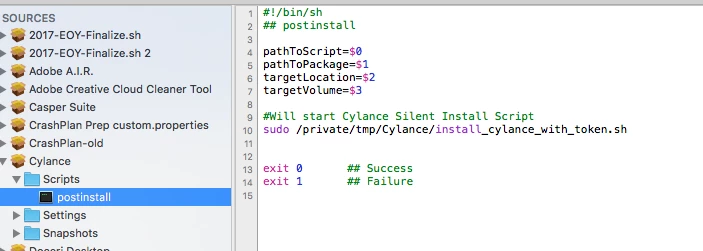
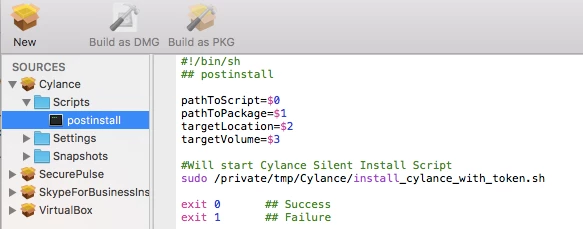
Watching the issues that you folks are having, I'm starting to suspect that there's a bit of 'funkiness' going on in the "execute command"portion of the process. Try building the install command into the actual .pkg as a postinstall script. Here's how it look on my production .pkg
Hey @Chris_Hafner - I tried your suggestion on a test machine before I head out the door for the day and it worked great. No errors this time. I will test a little more and let you know if I run into any issues, but thanks for the suggestion!
Just wanted to add to this thread, I took @Chris_Hafner 's advice above, including adding the post install script in composer, and I got Cylance to install and run perfectly, first try. Thanks to everybody involved, you saved me endless amounts of annoyance. :)
@mikesols Yes, indeed! Using the latest installer (1.2.1400.524) has resolved this issue for us. There is still a small period in which the unit will not shut down, immediately after imaging but those times are now very short. Only a min or two. I haven't run logs on it yet so I'm assuming that the initial configuration (online) is causing that. What are you noticing?
@Chris_Hafner I would just like to chime in that I have tried following the steps on this post (specifically what you have done) and have not been able to get it to install.
Here is what I have done:
Created the Cylance folder in private/temp copied it to composer added the postinstall script created a pkg
I tried running the .pkg on my machine and it "appears" to install because it says it completed successfully, but nothing happens. It is actually not installed. I then took that same .pkg and put it into Casper and same thing (i had some hope that maybe the execute part would work)
All i did was add my token to the file and made sure the patch was correct.
I am not sure why it fails. When i look in the tmp folder i see that it created the folder Cylance along with the .sh and the cylancePROTECT.pkg, but it does not seem to do anything.
Is there a good way to troubleshoot this?
If i run the CylancePROTECT.pkg file it will ask me for the token, and everything works fine (obviously).
Picking through what you've typed the first question I have is, are you putting the script that contains your token in the folder with Cylance (in /tmp). The script should contain at least the following with your token in the place indicated.
@Chris_Hafner Thanks so much for the help with this. I was able to get the token installed at the same time as the package now. In the past, I had to enter the token in after Cylance was pushed. Now, it's done in one step. Thanks so much.
P.S. I had no issues with your steps. I think the check permissions part might throw some peeps off.
Ahhh, sorry. I've been spacey on vacation. It's the first one I've had in 11 years! That said, can you run this manually? i.e. load the .pkg and install script into the tmp directory of a test machine and then run the script manually? That will tell us if we have anything funky with Composer/permissions.
I created a Cylance folder under /private/tmp When i do a Command+i, my user account does not have permissions (system= RW, wheel=RO, everyone=RO)
I have the 2 files in this folder: CylancePROTECT.pkg and my script install_cylance_with_token.sh
If i launch terminal and run /private/tmp/Cylance/install_cylance_with_token.sh i get a permission denied error (which seems to make sense) I am a full admin on this machine as well.
I do have RW access to both of the files, just not the folder they are both in. I would have assumed if I created the folder I should have permissions to the folder.
So I was not thinking i am doing something wrong, I deleted that Rylance folder, created a new one and now i had RW permissions on the folder. Copied the files into that folder again and ran /private/tmp/Cylance/install_cylance_with_token.sh in Terminal, and got Permission Denied again.
I know this is me doing something wrong, i just do not have enough Mac knowledge yet to figure it out :)
Sorry to take so long responding. I've figured out how to work 100+ hours a week now-a-days! So, it sounds like your policy is still not working (via policy or self-service). The "cygnet_install_token" is a security token for other purposes correct? Could you screen shot your composer setup with the post install script (Remove your token first!). Assuming that there's not a permissions issue on the units you're testing this on, there's likely something very simple in the way.
@Chris_Hafner No need to apologize, you are helping me and your busy.... I don't want to know how you cram 100+ hours in a week.... I just keep telling myself it is not possible :P
The cygnet_install_token is only for the chance install, as your script has this: echo PLACE_TOKEN_HERE > /private/tmp/Cylance/cyagent_install_token I assume that is when it gets generated, but it is not used for anything else that i know of.
My postinstall does not have my token in it only the script that i have called install_cylance_with_token.sh
#!/bin/sh
#!/bin/bash

echo my token here > /private/tmp/Cylance/cyagent_install_token
sudo installer -pkg /private/tmp/Cylance/CylancePROTECT.pkg -target /

exit 0
All of the permissions set on the files in Composer are described in an above post: So in the Cylance folder I created under /private/tmp/Cylance I have
Wow, I'm not sure why I didn't notice this before but your "isntall_cylance_with_token.sh" script doesn't seem to have execute permission. When dealing with the /private/tmp directory I find it easier to give everything in that folder the same permissions as the /tmp directory itself. Using composer this is VERY easy to do. In your composer window, Highlight your "Cylance" source, then select the /tmp/ directory. Then select the "gear" icon next to the permissions check boxes in the lower right-hand side of the window. Try selecting "Apply Permissions to Applications and All Enclosed Items.
Compile that as a .pkg and give it a shot!
P.S. Generally, you want to be very careful when applying permissions... However, if you choose the proper parent folder (in this case /private/tmp/) and simply apply permissions within that directory you're not likely to go wrong.
@Chris_Hafner I tried running your Stop and Uninstall commands but to no avail. We have a scenario/inssue with Cylance where we need to uninstall Cylance from a few dozen computers and then re-install it with a new token. I have the installer compiled and works perfectly but I'm running into an issue trying to compile an uninstaller due to the uninstall token that's required.
@rosskivowitz What's the issue you're running into, specifically? Oh, and why are you compiling an uninstaller? In theory, you should already have an uninstaller built into the client. This is what is called into play with the previously mentioned command: