I'm having some difficulty figuring out how to use Casper to install Cylance on every Mac in our organization. I've tried to create a shell script that will run it (not through Casper yet) but when I try on a test Mac it fails.
I have the Cylance.pkg and a cylance_install_token file in the same folder as the script. I copied the verbiage from a larger script that someone in our InfoSeec team had created a while ago to install this and other security software and it works there. Maybe I missed something?
If I can get this script to actually install it then I can go to the next step and figure out how to use Casper to push it out.
!/bin/sh
Cylance AV Client Install
echo "Installing Cylance AV Agent for Mac.
"; echo "Cylance AV Agent Start: " date"
" >> $LOG;
installer -pkg CylancePROTECT.pkg -target LocalSystem echo "Cylance AV Agent Stop: " date"
" >> $LOG; echo "Completed Cylance AV Agent for Mac Installation.
";
The output I get from Terminal is
BUR-JMENDEL4-i:~ jmendel$ /Users/jmendel/Desktop/Cylance Installer/Cylance.sh
Installing Cylance AV Agent for Mac.
/Users/jmendel/Desktop/Cylance Installer/Cylance.sh: line 5: $LOG: ambiguous redirect installer: Error the package path specified was invalid: 'CylancePROTECT.pkg'. /Users/jmendel/Desktop/Cylance Installer/Cylance.sh: line 7: $LOG: ambiguous redirect Completed Cylance AV Agent for Mac Installation.
• Open /private/tmp (On a computer with composer) • Create a folder called "Cylance" (Just a suggestion on name) • Drag the cylancePROTECT.pkg into this new folder. • Create a shell script as suggested (example below) and call it something like "install_cylance_with_token.sh"
• Copy the script into that new directory (/private/tmp/Cylance) • Open Composer • Drag the entire "Cylance" directory into Composer (the "Cylance" folder that you created in /private/tmp/) • Check permissions on everything in that composer list. • Package what you have in composer as a .pkg or a .dmg as you prefer. I see no benefit to having this packaged as a .dmg so... • Upload this new package to Casper Admin with whatever notes and settings you prefer. In all likelihood, this will need to be installed after boot, but I'm not positive.
• Create a policy as described above, using the "execute command" field in "Files and Processes" as described. In the case of my example, that would be:
This is what I've done this morning to check. It's working well for me.
P.S. I did consider simply trying to edit the source of the installer as there seems to be a script in the package where we could stick the token, but this process seems simpler.
@Chris_Hafner There's an option in Cylance to require an uninstall password. Due to the nature of our business, we have this enabled for all of our end users. So the command you just provided will yield an error because Cylance is expecting them/us to enter in that password. The command you provided is for a silent uninstall, which I'm not sure will work when the uninstall password is required.
We've been working on an unrelated issue (the one that caused this issue) with Cylance and they informed us that the best way to resolve this is actually to write a script/create a pkg that just pushes out the installation token, which is what I'm working on now. Thanks for your help and quick response but I think I've got it covered since chatting with Cylance.
@Chris_Hafner Well, we're still having tons of issues with them but it's more in regards to our PC deployment, not Mac. I was able to get everything working on the Mac side except for hiding the UI up in the status bar. Any chance you are aware of an easy way to integrate that into the policy? I like the workflow you laid out so modifying the .pkg would be difficult and I've yet to find a script that would modify the info.plist file to disable the UI for Cylance.
Interesting. I never thought of that but I can see why you might want that to happen. Off the top of my head, I have no idea. I KNOW it's doable in Sierra because the user can simply drag it out fo their dock (just tried it). However, it must be in a menu extra plist somewhere. I'm currently breaking our new NAGIOS server but when Iv;e got a free moment I'll see if I can figure this out for Sierra at least. Hopefully, someone will jump in with a great idea in the mean time!
@Chris_Hafner I appreciate your time whenever you can. As per their support article, it's a simple attribute "NoCylanceUI". However, I tried to be cute and add it to your shell script as the following:
But that didn't work. It installed successfully, obviously, but then was prompted for the install token. So it definitely didn't like my addition to the shell script. Thanks in advance for any help you (or anyone) is able to provide. I've definitely learned that Cylance is a fickle, fickle thing when it comes to installing and uninstalling for both Mac and Windows.
@fgeronimo Thanks for that. I tried it and it still took some caressing but I was ultimately able to get it working. Thanks for your help as well @Chris_Hafner!
@Chris_Hafner To be honest, I think somehow my copy/paste got messed up. I went back and looked at it again last night and I must have tried something funky yesterday. My script is exactly the same as @fgeronimo's, however, when I tried theirs, it prompted me for my install token. I tried it again later on and it worked so I definitely must have messed up the copy/paste which is, needless to say, hard for me to admit. But the following script worked for us:
@Chris_Hafner I had to come on here just to thank you for the instructions for Cylance to install! I too was having issues which related to simple permissions. After recompiling and uploading back to JSS, it quickly installed on my machine without issues. Thanks again!
Has anyone had any luck with getting the script to work with the most recent release of Cylance? I'm new to JAMF and have had lots of issues with trying to get the script to work properly.
I'm having a extremely hard time trying to get the script to work properly. The .pkg file I created in Composer finishes successfully though Cylance is not installed. Also, when I run the script (by running "sudo sh /private/tmp/Cylance/install_cylance_with_token.sh") a new file is created that contains the token but the below errors are displayed.
myusername$ sudo sh /private/tmp/Cylance/install_cylance_with_token.sh : command not founde/install_cylance_with_token.sh: line 3: installer: Error trying to locate volume at / : command not founde/install_cylance_with_token.sh: line 6:
I've verified the folder permissions are correct in Composer but still no luck. I'm fairly new to scripting with macOS (and also with JAMF in general) though I copied the script from the original post to verify I didn't miss something.
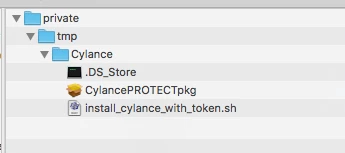
OK, just to cover all of our bases. Please double check the following. There should be a Directory in /private/tmp called Cylance. This will look like this in Composer (feel free to remove the .DS_Store)
I've screwed this up in the past by changing the name of something... like the installer package itself.
The "install_cylance_with_token.sh" contains the following (note, TOKEN-GOES-HERE should be repalced by your actual token):
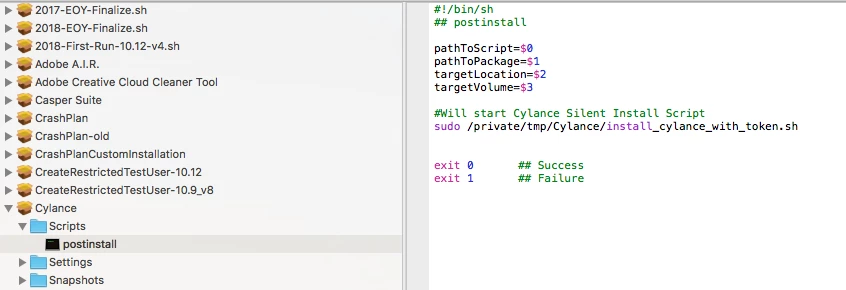
The post install script was not present, I added it and then from a Terminal ran "sudo sh /Private/temp/Cylance/install_cylance_with_token.sh and it ran without issue. I re-saved the /Private/temp/Cylance/install_cylance_with_token.sh on the device and I just tested it via JAMF.
Packaged into composer and uploaded to jamf. when the command to run the unattended file initiates, it installs cylance and creates a txt file called cyagent_install_token in the location of where the install install pkg is contain the "token" and then Cylance pops up asking to input the token key
I'm I going wrong somewhere, as I would like the token to be entered too during the installation
@Quan.nong Are yous till dealing with this? Sorry, I haven't been following this post very well. I would start looking into permissions but I figured I'd verify you still have the issue first.
Did anyone have an issue with the execution script saying "permission denied" when running from /private/tmp/Cylance? The script looks right, but I can't get the script to run...
@cmudgeUWF No, but when I built my Cylance package in Composer I set the package and everything in it to full read/write for everybody. I haven't had any permission issues with it.
I am able to get Cylance installed correctly, but the pkg also installs an Uninstaller app that I dont want on the users machine. Does anyone know how to remove it?