Question

InstallLatestMSProduct.sh not downloading package during enrollment process.

  • January 5, 2026
  • 15 replies
  • 114 views

Forum|alt.badge.img+1

Hey guys. We have a few policies run with trigger of “enrollment complete” for new prestage loads. We’ve typically had these install packages, mostly for Microsoft stuff. We’d like to make sure the machines get the latest version at load, and don’t necessarily want to update the package every time. We thought we could use the InstallLatestMSProduct.sh script within one of these policies to test, and it turns out, the package being called via linkID won’t download, and the policy fails. We have the same policy set for self service and that downloads the package just fine, so we think there’s something with the enrollment process that isn’t allowing the policy with a script to download the package properly. Has anyone seen this? Is it not advised to run a script as part of a policy with “enrollment complete” as trigger? Thanks in advance.

15 replies

Chubs
Forum|alt.badge.img+23
  • Jamf Heroes
  • January 5, 2026

What is in that script?  Excuse my ignorance if that’s a “normalized name” for something.


Chubs
Forum|alt.badge.img+23
  • Jamf Heroes
  • January 5, 2026

I will say that running it with enrollment complete isn’t advisable because so many other things happen with that trigger.  It’s advisable to start a queued approach with each policy calling a custom trigger or something so you can tier it out.


Chris_Hafner
Forum|alt.badge.img+27
  • Jamf Heroes
  • January 5, 2026

Adding to what Chub’s is saying, definitely be careful using Enrollment Complete, but there’s nothing wrong with running a script, executed via an enrollment complete trigger, that then calls policies or what have you to manage the process so things don’t trip over each other. But it definitely needs to be managed.


Essentially, that’s what we’re still doing generally, with a modified version of DEP Notify. Though Setup-Your-Mac from Dan Snelson is a more up to date project that you could look into. The “macOS Onboarding” features right from Jamf might fit your needs too! My apologies if you’re familiar with all of these. 


Chubs
Forum|alt.badge.img+23
  • Jamf Heroes
  • January 5, 2026

You could also look at the Jamf Setup Manager as an alternative to this too - it’s not as near as heavy as SYM.


Forum|alt.badge.img+1
  • Author
  • New Contributor
  • January 5, 2026

I will say that running it with enrollment complete isn’t advisable because so many other things happen with that trigger.  It’s advisable to start a queued approach with each policy calling a custom trigger or something so you can tier it out.


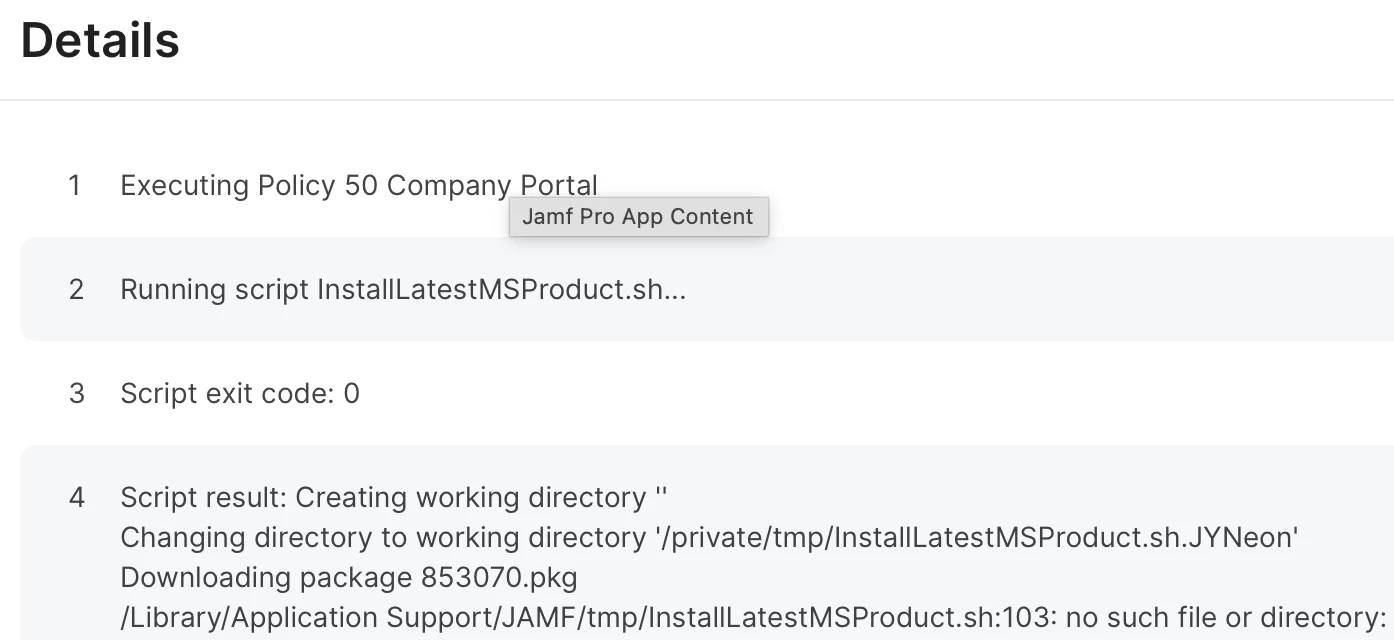
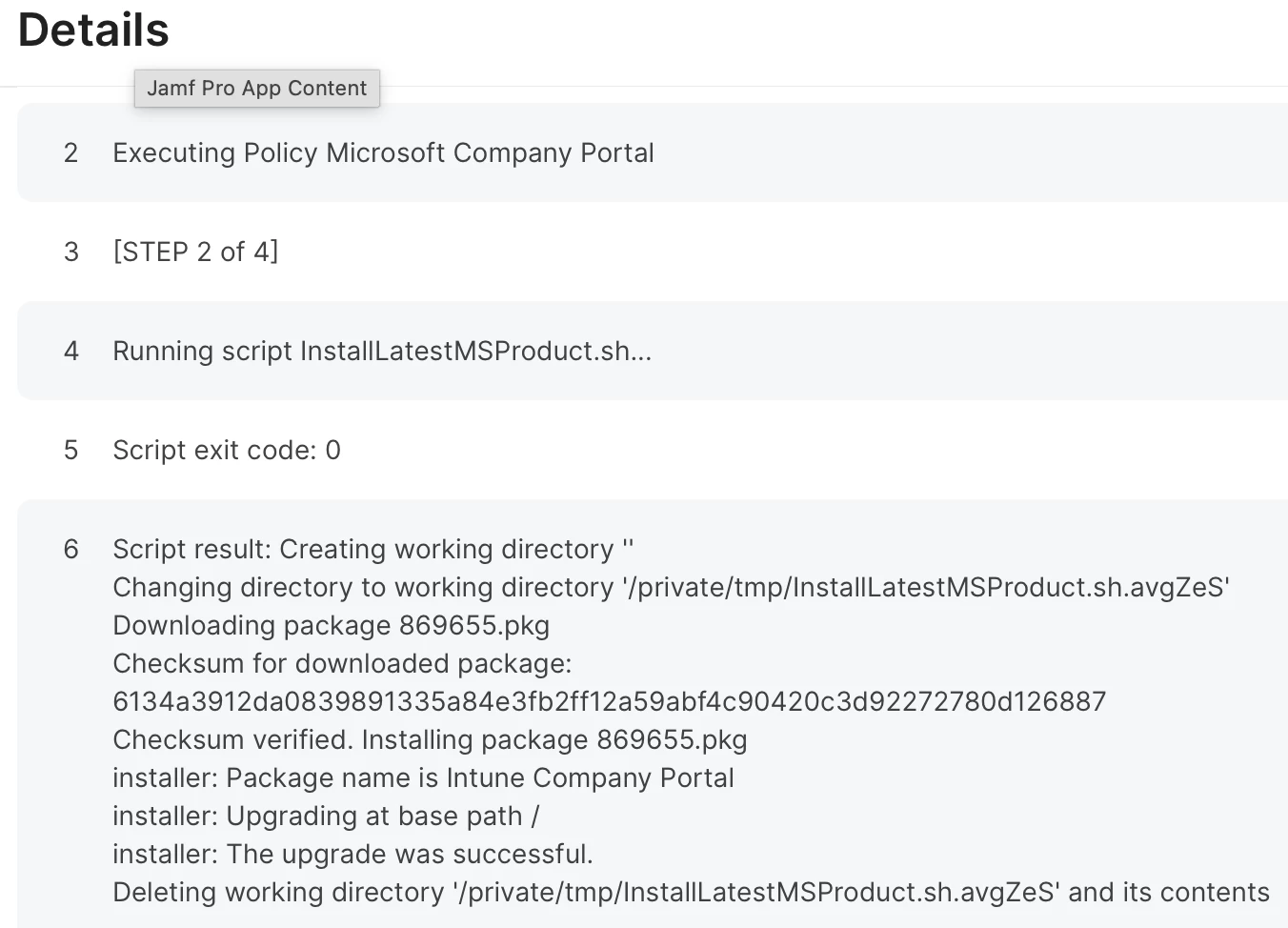
I get what you mean, but the script doesn’t fail to run, it just doesn’t complete the download. See below for failed policy run at enrollment vs similar policy (successfully) run via self service.


Forum|alt.badge.img+1
  • Author
  • New Contributor
  • January 5, 2026

Adding to what Chub’s is saying, definitely be careful using Enrollment Complete, but there’s nothing wrong with running a script, executed via an enrollment complete trigger, that then calls policies or what have you to manage the process so things don’t trip over each other. But it definitely needs to be managed.


Essentially, that’s what we’re still doing generally, with a modified version of DEP Notify. Though Setup-Your-Mac from Dan Snelson is a more up to date project that you could look into. The “macOS Onboarding” features right from Jamf might fit your needs too! My apologies if you’re familiar with all of these. 


We’re using Octory, but it really just monitors and displays what’s been installed.


Chubs
Forum|alt.badge.img+23
  • Jamf Heroes
  • January 5, 2026

It’s your installer directory.  Change it to something that actually exists like /tmp/ or something.


Forum|alt.badge.img+1
  • Author
  • New Contributor
  • January 6, 2026

It’s your installer directory.  Change it to something that actually exists like /tmp/ or something.


/private/tmp/ does exist, as you can see in the successful policy which uses same directory.


Chubs
Forum|alt.badge.img+23
  • Jamf Heroes
  • January 6, 2026

It’s your installer directory.  Change it to something that actually exists like /tmp/ or something.


/private/tmp/ does exist, as you can see in the successful policy which uses same directory.

Yes but look at your failed installer - it’s looking for this: “/Library/Application Support/JAMF/tmp” which does exist, but requires explicit permissions.  We’d have to know what the script is doing to see why it’s failing and where.


Forum|alt.badge.img+1
  • Author
  • New Contributor
  • January 6, 2026

It’s your installer directory.  Change it to something that actually exists like /tmp/ or something.


/private/tmp/ does exist, as you can see in the successful policy which uses same directory.

Yes but look at your failed installer - it’s looking for this: “/Library/Application Support/JAMF/tmp” which does exist, but requires explicit permissions.  We’d have to know what the script is doing to see why it’s failing and where.

I see, but the script has no mention of /Library/Application Support/JAMF/tmp, so not sure why that is listed in log. For clarity, this script is on git here.

https://gist.github.com/talkingmoose/b6637160b65b751824943ede022daa17


Chubs
Forum|alt.badge.img+23
  • Jamf Heroes
  • January 6, 2026

There have been a lot of changes to the MS product suite over the last year as well - which product is failing to install?  Any reason why you’re using a-la-carte and not the full product installer suite?

Something like this (kinda raw, but you get the idea):
 

#!/bin/bash

# Set Variables
o365URL="https://go.microsoft.com/fwlink/?linkid=2009112"
o365URL="$(curl -s -i -H "Accept: application/json" -H "Content-Type: application/json" "$o365URL" | grep "Location:" | awk '{print $2}' | tr -d '\r')"
o365="/tmp/o365.pkg"

# Download and install Office 365
caffeinate -disu -t 36000 &
/usr/bin/curl -L --output "$o365" -C - "$o365URL"
/usr/sbin/installer -dumplog -verbose -pkg "$o365" -target "/"
/bin/sleep 1
# Cleanup Temp Files & Mounts
/bin/rm -rf "$o365"
/bin/sleep 1
killall caffeinate
echo "Office 365 Installed Successfully"
exit 0


Forum|alt.badge.img+1
  • Author
  • New Contributor
  • January 6, 2026

The product is Company Portal. I’m not sure why historically my organization chose to go a-la-carte, but it’s what we’re stuck with. Verified we have current linkID for that product and tested by just using link in browser, which pulls down correct (latest) version.


Chubs
Forum|alt.badge.img+23
  • Jamf Heroes
  • January 6, 2026

So how about just using this in a policy via script?

#!/bin/bash

# Set Variables
CompanyPortal_InstallerFWlink="https://go.microsoft.com/fwlink/?linkid=862280"
CompanyPortal_InstallerURL="$(curl -s -i -H "Accept: application/json" -H "Content-Type: application/json" "$CompanyPortal_InstallerFWlink" | grep "Location:" | awk '{print $2}' | tr -d '\r')"
CompanyPortal_Installer="/tmp/CompanyPortal_Installer.pkg"

# Download and install Office 365
/usr/bin/curl --output "$CompanyPortal_Installer" "$CompanyPortal_InstallerURL"
/usr/sbin/installer -dumplog -verbose -pkg "$CompanyPortal_Installer" -target "/"
/bin/sleep 1
# Cleanup Temp Files & Mounts
/bin/rm -rf "$CompanyPortal_Installer"
/bin/sleep 2
echo "Company Portal Installed Successfully"
exit 0


mattjerome
Forum|alt.badge.img+9
  • Jamf Heroes
  • January 6, 2026

I would advise using something like installomator to get those apps versus what you’re doing. it’s a community backed tool with a proven track record.


Forum|alt.badge.img+1
  • Author
  • New Contributor
  • January 7, 2026

I would advise using something like installomator to get those apps versus what you’re doing. it’s a community backed tool with a proven track record.

Thanks for the suggestion, I’ll check it out.