

Does anyone have a working restore process for iPads that are managed by Jamf Pro? I'm running into some trouble (outlined below) and am wondering if there is a better way than what I'm doing now. Our Jamf host says the only solution is to set all apps to install automatically, but since faculty use different apps, I do not want to force apps on their devices that they won't use (and will take up storage space).
Thanks in advance!
Tim
----
Currently, we use device-based assignment of apps. I have a pre-stage enrollment group set up for faculty iPads that automatically adds the correct department (and thus the correct app assignments). I can restore a backup to a new faculty iPad using iCloud or a Mac Backup (iPadOS 15.1), which includes user data and the arrangement of the home screen.
The issue is that the apps don't actually install. They appear with the download/cloud icon next to the name. When you tap the app to download it, an alert appears:
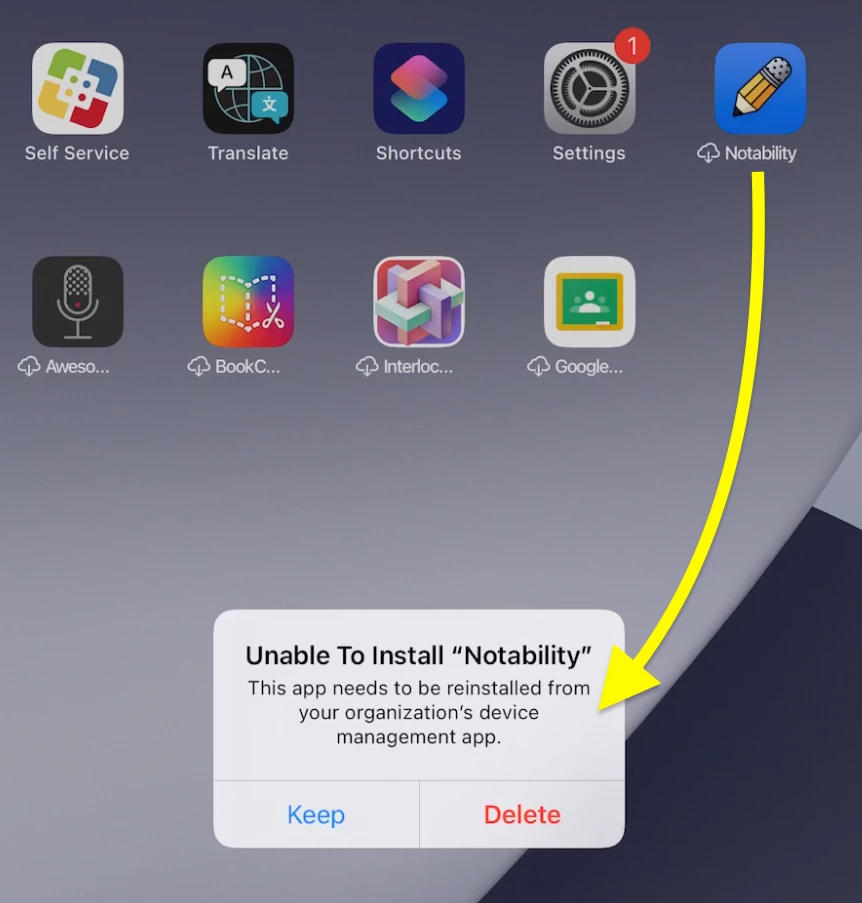
Tap "Keep" and then you can go into Self Service and reinstall it. After it has installed, the app contains the data from the restore process.
So the good thing is we don't lose data, but if this is the only way, faculty are going to have to go in and restore each app individually in order to finish setting up their iPad. I really need a better solution, especially for those faculty that have downloaded a bunch of apps through Self Service.
Is there a better way?