Question

iPad self service free app store application

  • November 28, 2017
  • 4 replies
  • 18 views

Forum|alt.badge.img+20

I am testing self service on an ipad. I have the microsoft remote desktop in self service and then when i try to install it, it eventually popup to login to the App Store.

is this supposed to happen?

the popup says 'App Installation. Sign in to iTunes to allow casper.test.test to manage and install apps. CANCEL. SIGN IN

4 replies

Forum|alt.badge.img+26
  • Esteemed Contributor
  • November 28, 2017

HI,
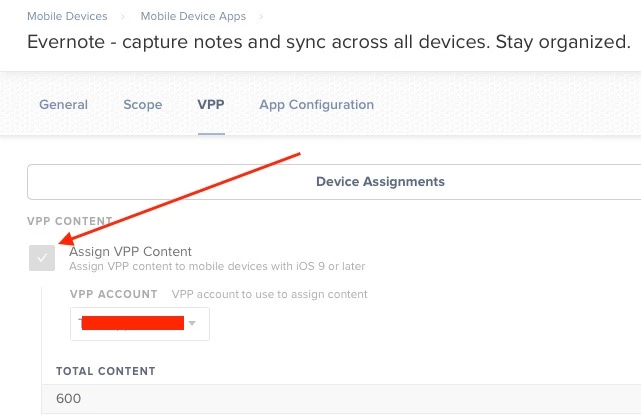
In order to use "Device Based Assignment" of apps which does not require the user to have an Apple ID, you need to check the box shown below:


Forum|alt.badge.img+7
  • Valued Contributor
  • November 29, 2017

you also need to first "buy" however many copies of the app from the VPP store. if its a free app so dont worry about getting more then you need giving you room to grow. just dont go crazy. every vpp license you have adds a line to your database. if you end up with a couple million un-needed licenses your jss might start misbehaving.


Forum|alt.badge.img+20
  • Author
  • Contributor
  • December 1, 2017

@Sandy I do not have this VPP option available, for the microsoft remote desktop policy. VPP Content
Content not available to assign to mobile devices

@jchurch are you saying that even though this is a FREE app i have to go through the buying process?


Forum|alt.badge.img+26
  • Esteemed Contributor
  • December 1, 2017


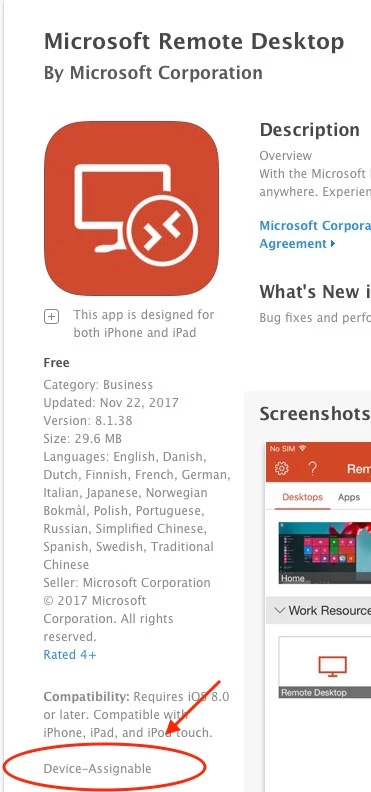
Yes, if you want to use Device Based app distribution (no Apple ID needed) with any MDM, including jamf Pro, you have to acquire app licenses from VPP, even for free apps.
When you look up the App in VPP it will tell you if it is "Device Assignable"